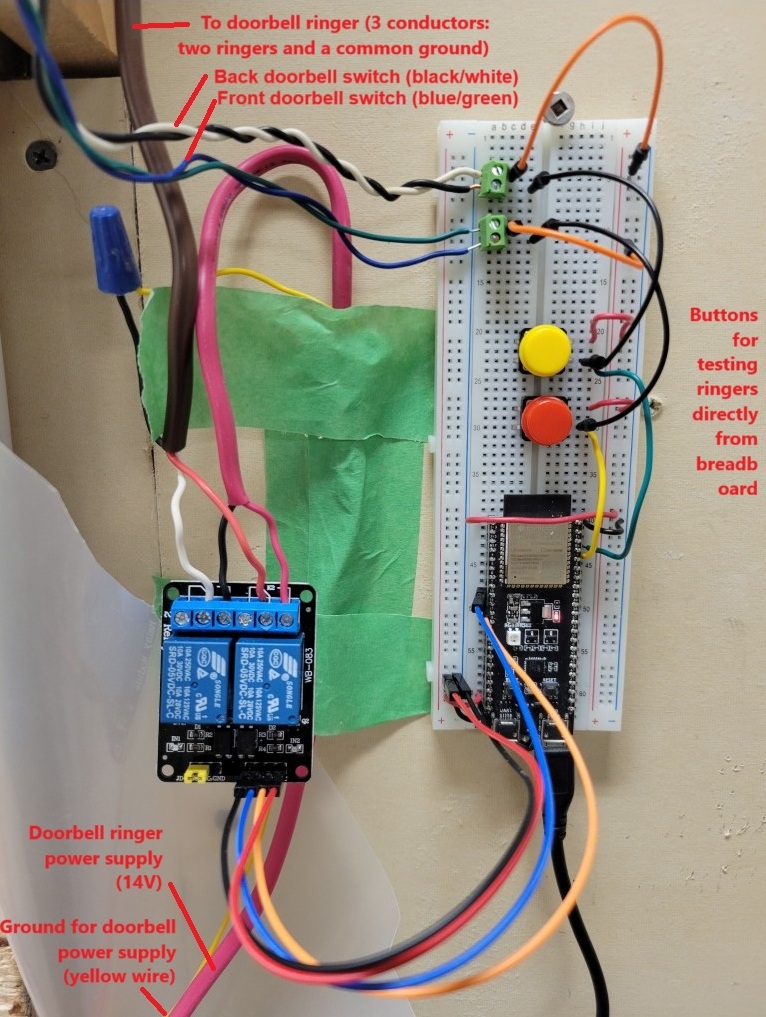
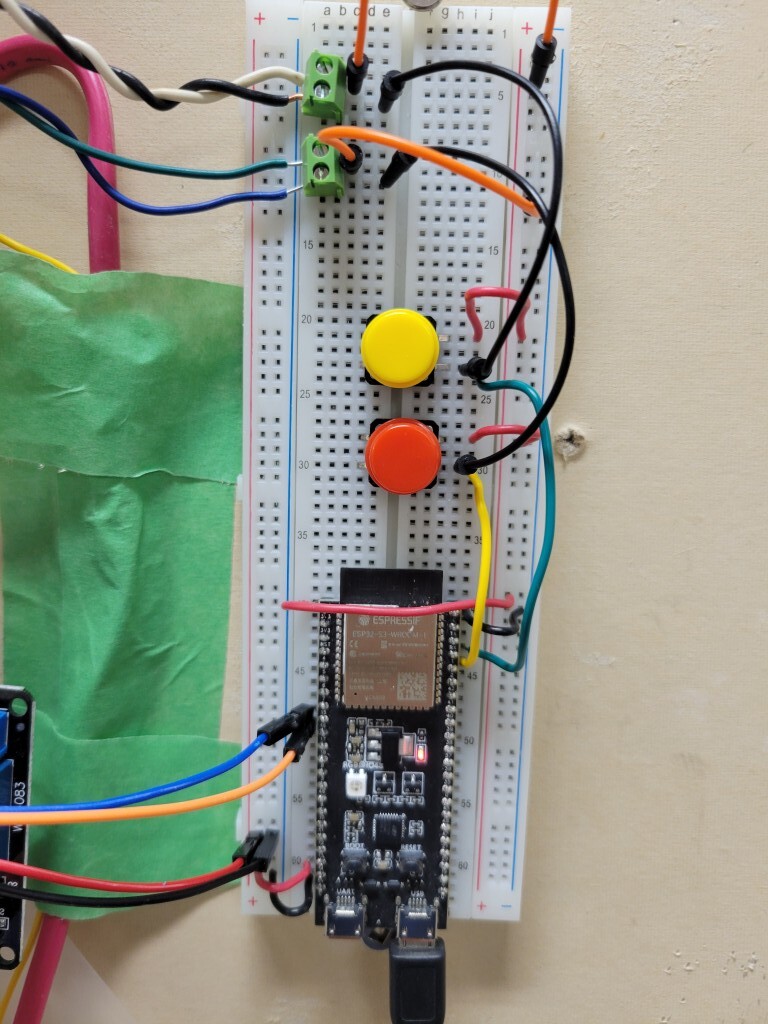
I am working on a project to bring my 1960's doorbell into the Internet of Things with an ESP32-S3-DevKitC-1 microcontroller and a two-channel 5V relay. I am having trouble with erratic behaviour from the relay.
The ESP32 microcontroller receives a "high" signal from the front or back door doorbell switch when pressed, then signals the first relay to fire, which closes the circuit and rings the doorbell ringer.
I also have the controller monitoring the status the garage door using a MQTT message server. When the garage door is "OPEN" the second relay fires, which closes the circuit on a second doorbell ringer that sounds a little different. The ringer keeps going until the garage door is closed.
It all works great but the problem I am having is the relay randomly fires erroneously and rings the doorbell. This happens even at 2 am (ESPECIALLY at 2 am... ).
).
From my monitoring log, it is always the back door ringer that fires erroneously. But this happens even if the back doorbell switch is disconnected, so it is not due to any wiring issues with the doorbell switch itself. It happens every couple of hours but as far as I can tell there is no pattern.
Things I have tried to fix this, but with no success:
- Different GPIO pin configurations
- A different microcontroller (the Seeeduino XIAO ESP32-S3)
- A different relay module
- Disconnecting the back door switch circuit
- Deactivating the wifi and MQTT messaging sections of the code
Can anyone help me determine the cause of this? I am at the end of my rope!
Here is my code:
// import libraries
#include <WiFi.h>             // provides wifi support for the esp32 board
#include <PubSubClient.h>     // enables MQTT messaging for the esp32 board
#include <Wire.h>             // allows communication with i2c devices
#include <secrets.h>          // contains protected information

WiFiClient xiao_barracuda;
PubSubClient client(xiao_barracuda);
long lastMsg = 0;
char msg[50];
int value = 0;

// define MQTT topics
const char* mqtt_topic_pub_1 = "sense/main-floor/doorbell";
const char* mqtt_topic_sub_1 = "sense/garage/bay-door";

// define input/output pin numbers
const int pin_relay_1 = 16;        // output pin to activate the relay to actuate first ringer
const int pin_relay_2 = 17;        // output pin to activate the relay to actuate second ringer
const int pin_front_door = 1;     // input pin for front doorbell switch
const int pin_back_door = 2;      // input pin for rear doorbell switch

void setup() {
  Serial.begin(115200);           // open a serial monitor connection at given baud rate

  setup_wifi();                   // calls a subroutine to connect to the wifi network

  client.setServer(mqtt_server, mqtt_port);  // connect to the MQTT server at the given port

  client.setCallback(callback);   // calls a subrountine to establish a "callback"  that will process messages recieved

  // setup input/output pins
  pinMode(LED_BUILTIN, OUTPUT);     // setup built-in LED light on microcontroller as an output pin
  digitalWrite(LED_BUILTIN, LOW);   // set built-in LED to off (i.e., low)

  pinMode(pin_relay_1, OUTPUT);     // setup for the pin connected to the relay switch to actuate first ringer
  digitalWrite(pin_relay_1, HIGH);    // set pin starting voltage to high or low depending on whether relay is a high or low voltage trigger

  pinMode(pin_relay_2, OUTPUT);     // setup for the pin connected to the relay switch to actuate second ringer
  digitalWrite(pin_relay_2, HIGH);    // set pin starting voltage to high or low depending on whether relay is a high or low voltage trigger

  pinMode(pin_front_door, INPUT_PULLDOWN); // setup for the pin connected to the front doorbell switch
  pinMode(pin_back_door, INPUT_PULLDOWN);  // setup for the pin connected to the back doorbell switch

}

void setup_wifi() {               // subroutine to setup wifi connection
  delay(10);


  // Connect to wifi and display connection status while connecting
  Serial.println();
  Serial.print("Connecting to ");
  Serial.println(ssid);

  WiFi.begin(ssid, password);     // connect to wifi using ssid and password provided

  while (WiFi.status() != WL_CONNECTED) {   // while in process of connecting, print a dot every 0.5 seconds
    delay(500);
    Serial.print(".");
  }

  // Display message when connected and give IP address
  Serial.println("");
  Serial.println("WiFi connected");
  Serial.println("IP address: ");
  Serial.println(WiFi.localIP());

}

void reconnect() {  // subrountine to connect to the MQTT broker and subscribe to topics

  while (!client.connected()) {       // loop until connected

    Serial.print("Attempting MQTT connection...");

    if (client.connect(mqtt_client)) {
      Serial.println("connected");
      client.subscribe(mqtt_topic_sub_1);
      Serial.print("Subscribed to: ");
      Serial.println(mqtt_topic_sub_1);
    }

    else {        // if not successful connecting, wait 5 seconds and then try again
      Serial.print("failed, rc = ");
      Serial.print(client.state());
      Serial.println(" try again in 5 seconds");
      delay(5000);
    }
  }
}

void callback(char* topic, byte* message, unsigned int length) {    // A "callback" function to monitor for messages. Accepts a topic, message, and length of message.

  // Display topic and message recieved
  Serial.print("Message arrived on topic: ");
  Serial.println(topic);
  Serial.print("Message: ");

  String messageTemp;             // define a temporary string variable to hold the message

  // Dump the characters of the message recieved into the temporary string variable
  for (int i = 0; i < length; i++) {
    Serial.print((char)message[i]);
    messageTemp += (char)message[i];
  }

  Serial.println();

  /* If a message is published to the subscribed topic, determine if it is asking to activate the relay.
  If so, activate relay; if not, do not take action. */
  if(String(topic) == mqtt_topic_sub_1) {
    if(messageTemp == "OPEN") {
      play_garage_door_tune();
    }
  }
}

void play_front_door_tune() {
    // Play front door tune (customize as needed)
    Serial.println("Front door tune");
    digitalWrite(pin_relay_1, LOW);
    delay(80); // Adjust delay as needed
    digitalWrite(pin_relay_1, HIGH);
    delay(240);
}

void play_back_door_tune() {
    // Play front door tune (customize as needed)
    Serial.println("Back door tune");
    digitalWrite(pin_relay_1, LOW);
    delay(240); // Adjust delay as needed
    digitalWrite(pin_relay_1, HIGH);
    delay(240);
}

void play_garage_door_tune() {
    // Play front door tune (customize as needed)
    Serial.println("Garage door tune");
    digitalWrite(pin_relay_2, LOW);
    delay(40); // Adjust delay as needed
    digitalWrite(pin_relay_2, HIGH);
    }

void loop() {

  if (!client.connected()) {      // if not connected to MQTT broker then call subroutine to connect
    digitalWrite(LED_BUILTIN, HIGH); // turn on built-in LED to indicate lack of connection to server
    reconnect();
  }

  digitalWrite(LED_BUILTIN, LOW);

  client.loop();

  int front_door_state = digitalRead(pin_front_door);        // dump front door state into variable
  int back_door_state = digitalRead(pin_back_door);           // dump back door state into variable

  if (front_door_state == HIGH) {
    client.publish(mqtt_topic_pub_1, "FRONT DOOR RING");
    Serial.println("Front doorbell pressed.");
    play_front_door_tune();
  }

  if (back_door_state == HIGH) {
    client.publish(mqtt_topic_pub_1, "BACK DOOR RING");
    Serial.println("Back doorbell pressed.");
    play_back_door_tune();
  }

}
Here are two pictures of the hardware and wiring: