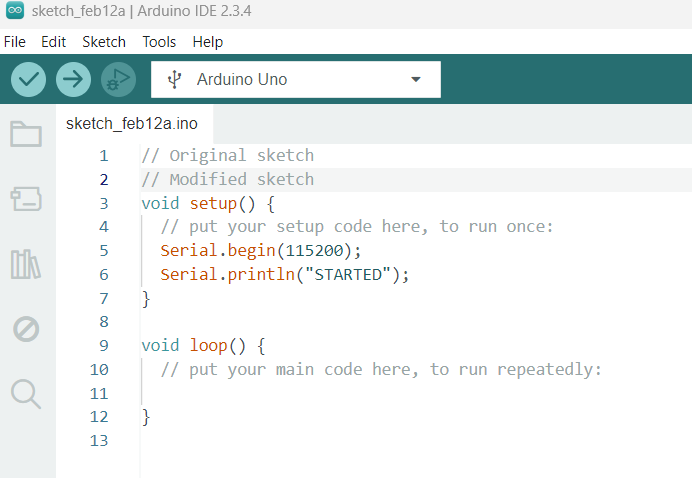
It is a bit annoying when you have installed Arduino IDE and then open old sketch and make edits and then you notice that IDE has autosaved over the old code.
Autosave should not be selected as default when fresh or updated version of software is installed. User should need to select autosave after installation manually. And also a selectable function to autosave that it could ask promt yes/no before autosaving?
Also in the settings there could be an option to select if u want to open last edited code at IDE startup or if you want to open new empty project.
Too much automation makes the software confusing to use.
It sounds like you need to wrap the invocation of the IDE in a script to do EXACTLY what you want. The other 4 million users are happy with it the way it is.
OK, I yield, strike the 4 million part.
BUT if not happy, write a script wrapper to do what you want.
I am another user who is not happy that the default is for AutoSave to be turned on. It is a surefire way to cause problems when you make a code change to test something only to have the revised sketch saved automatically
What exactly is the point of saving the sketch when it is uploaded ?
Agree. If you change something in your sketch without compiling (and/or uploading) and close the IDE, the program silently (and nastingly) saves the code without any warning.
It once happened to me, I pasted some code inside the wrong sketch, so I just closed the IDE without saving, so I have unexpectedly lost the original code!
Well, "almost", because thanks to a backup I made a few days before I was able to recover it and apply the few changes I made, but if the backup was pretty old or it was something I haven't a backup for, it could be very annoying.
Like any decent other editor on Earth, it should warn if you changed the code before closing, like "You have changed the code, do you want to save before closing?" (with OK and Cancel buttons).
Anyone serious about coding should be using version control. It can be just locally; don't have to upload it to a central repository, like GitHub.
You commit changes after every "now this work" milestone. This enables you to roll back if you screw up, which also frees you to make experimental changes. You can also maintain separate branches.
It's the same reason Google Docs and Sheets do auto-save, and have History. It is much more common for people to forget to save. So save automatically, but let people roll back. Otherwise, desired changes can be lost easily.
Some IDEs offer a Local History feature. Checking just now, VS Code got it not that long ago. I do not see it in the underlying Theia for Arduino IDE though.
As someone who prefers to control when my projects are saved, I do understand why you would suggest this change. However, this has always been the default setting of Arduino IDE (even with Arduino IDE 1.x), so changing the default for this important setting would be too disruptive.
I think that you will find that auto save is also the default of many modern IDEs and text editors, and that many users actually prefer this behavior, so this is not an unusual design.
For those of us who don't want auto save, it only takes a matter of seconds to change the preference and you only ever need to do that once, so I don't think it is too much of an imposition.
Auto save saves after every change you make to the sketch, so that would be incredibly annoying.
Arduino IDE already automatically prompts you to save whenever you perform some action that would result in the loss of unsaved changes (closing the sketch, exiting the application), so I think it already does what you are reasonably requesting.
The Arduino IDE developers are tracking this request here:
If you have a GitHub account, you can subscribe to that thread to get notifications of any new developments related to this subject:
It is not designed to do this, and from my extensive testing I don't believe that it does that.
It is true that during the beta phase of development there were some bugs with saving as you reported. Were you using one of the beta/release candidate versions of Arduino IDE when that happened? If you are experiencing this problem with the latest version, please provide instructions I can follow to reproduce it and I will be happy to investigate.
I use several different systems and I simply copy the original file (Filename.ino) to a new one Filename(YYMMDD).txt and it resides without problem with the sketch. You can add time tags if you want.
Now I close the IDE without doing anything else. And I can tell it won't send any warning about changed code.
open the IDE back: you'll get exactly the modified version, even if you haven't saved (no, this isn't the same picture, it's the new screen capture), instead of the saved one:
This is because you have the "Auto save" feature enabled in your preferences. When "Auto save" is enabled, Arduino IDE automatically saves the file after every change. So there is nothing to warn about in regards to closing the IDE. The changes were already saved to disk regardless of the fact you are closing the IDE.
As is expected, since the changes you made were automatically saved as you made them.
If you don't like this behavior, just turn off the "Auto save" feature:
Select File > Preferences... (or Arduino IDE > Settings... for macOS users) from the Arduino IDE menus.
The "Preferences" dialog will open.
Uncheck the box next to Auto save in the "Preferences" dialog.
Click the "OK" button.
The "Preferences" dialog will close.
Wow, that's weird, thanks! I have never activated that option, so I assume it was the default behaviour. Anyway, the auto-save feature should fire when compiling only, and not when just closing the program, and in this case a warning message could help avoiding unwanted code changes on the physical file preventing some loss.
As mentioned before, I had nearly lost the source code of a sketch because I pasted the entire code into the wrong instance and closed the program: if the IDE had warned me about unsaved code changes I could have restored the original one before exiting (or say "don't save" to that messagebox). I have backups, so I haven't lost anything, but IMHO asking the users to install and configure a local versioning like Git to avoid that is not a good idea.
Anyway, I now have unselected the sauto save options. Thanks.
It is true that Arduino IDE 1.x had that behavior. However, I think that was a bad approach and am glad we were able to use the sensible approach in Arduino IDE 2.x. Auto save is for people who want all their changes to be saved automatically without requiring any action.
This behavior is not specific to Arduino IDE. You would find that most modern editors and IDEs have the same behavior and default.
It is not necessary to do that. It is only necessary to perform the three simple steps I provided in my previous reply.
The auto save as default causes more problems than autosave as not default. Here is a functional solution...
Make auto save not as default
Make possibility to revert back up to the version when you open the .ino file, even after autosaves are made..
Also one thing...as everyone here says that they don't use AI for coding :)... The methods of coding has changed...Now people do very fast iterations according to AI suggested code line changes and they test if they compile and work well. That's why u many times open a code and replace test lines quickly and see if it works. But you definitely don't want IDE to save all test lines over the original code. The thing was different when every line was coded "by hand" and the iterations and changes were much slower. That's why the auto save as default should be removed as default. World changes and so should Arduino IDE....
I have been providing support to the Arduino community daily for over a decade, with a special focus on Arduino IDE and I simply don't see evidence to back that claim. Since it is the default, it is sure that a significant portion of the user base have it enabled. If automatic saving was causing problems for those many thousands of users, surely we would see lots of reports of it here on the forum. Yet I don't see lots of reports.
The average Arduino IDE user has always had this approach to coding. It is only that before they were cursorily copy/pasting snippets from Instructables, Stack Exchange, etc. and then checking to see if it happened to work as they hoped and now they are doing the same with snippets provided by an AI.