ROM-Reader for Super Nintendo / Super Famicom Game Cartridges

sanni:
Does it write anything to the SD cart? Might be just that the checksum is missing because it's a prototype.

I have checked the SD and it does write to the card, when I compare multiple attempts with a HEX editor there is numerous bytes that are different. I would say about 95% are always the same and then some differ.

Then you probably have to play around with the source code in GB.ino to make the Cart Reader compatible with this dev cartridge.

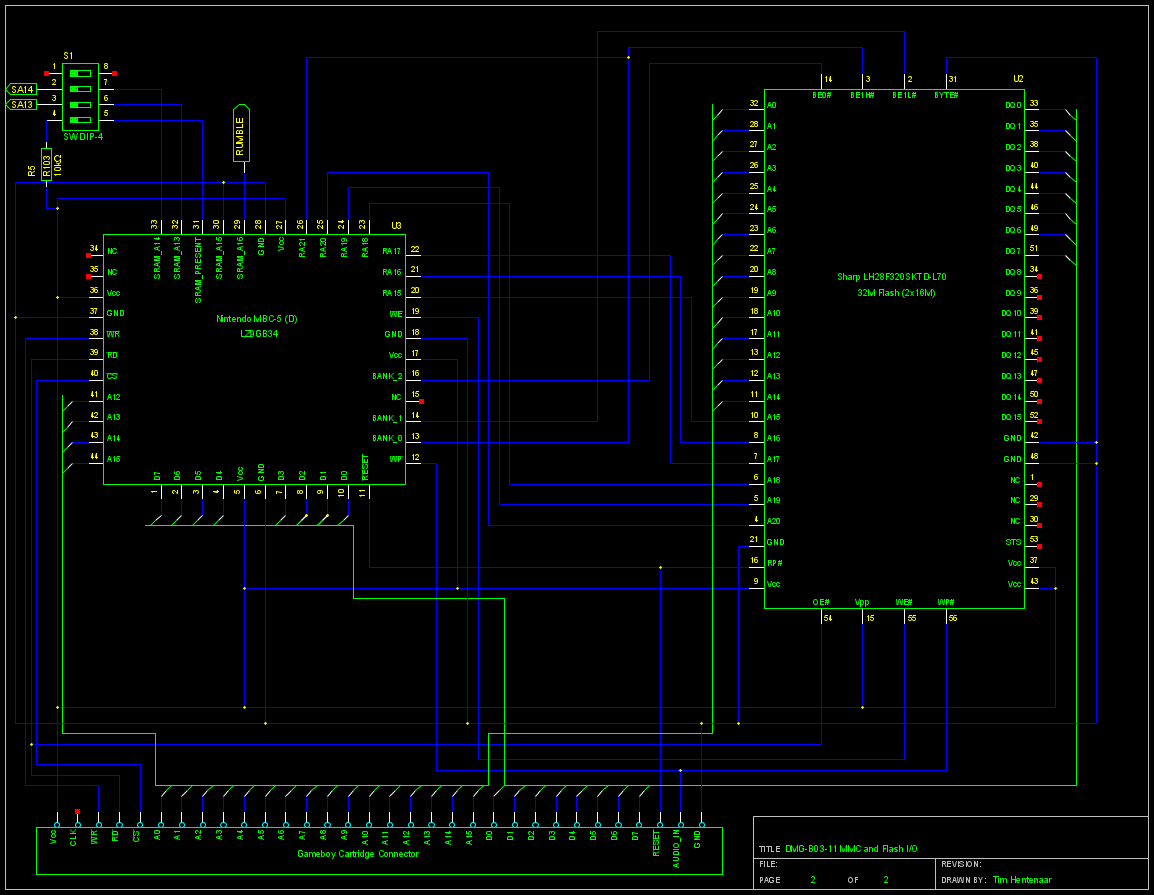
There is a schematic of the cart and also a link to the flash's datasheet here: Tim Hentenaar's Blog

First idea:
If this schematic is correct then the SRAM is connected directly to the cart edge without being controlled by the MBC5-D like you would suspect in a standard MBC5 cartridge.
So that is most likely your problem. The cart reader tries to read data from both the flash and the SRAM at the same time resulting in errors. You need to deactivate the SRAM by not pulling the CE/CS pin low during the read operation by changing the readByte_GB function in GB.ino like so:

byte readByte_GB(word myAddress) {
  PORTF = myAddress & 0xFF;
  PORTK = (myAddress >> 8) & 0xFF;

  __asm__("nop\n\t""nop\n\t""nop\n\t""nop\n\t");

  // Switch RD(PH6) to LOW
  PORTH &= ~(1 << 6);

  __asm__("nop\n\t""nop\n\t""nop\n\t""nop\n\t");

  // Read
  byte tempByte = PINC;

  // Switch and RD(PH6) to HIGH
  PORTH |= (1 << 6);

  __asm__("nop\n\t""nop\n\t""nop\n\t""nop\n\t");

  return tempByte;
}

Second idea: It could be because of the reset pin.

From the datasheet:

3.1 Read
Information can be read from any block, identifier codes, query structure, or status register independent of the VPP voltage. RP# must be at VIH.
The first task is to write the appropriate read mode command (Read Array, Read Identifier Codes, Query or Read Status Register) to the CUI. Upon initial device power-up or after exit from deep power-down mode, the device automatically resets to read array mode.

Five control pins dictate the data flow in and out of the component: BE# (BE0#, BE1L#, BE1H#), OE#, WE#, RP# and WP#. BE0#, BE1L#, BE1H# and OE# must be driven active to obtain data at the outputs. BE0#, BE1L#, BE1H# is the device selection control, and when active enables the selected memory device. OE# is the data output (DQ0-DQ15) control and when active drives the selected memory data onto the I/O bus. WE# and RP# must be at VIH.
Figure 18, 19 illustrates a read cycle.

In the current GB.ino code the reset pin, which in the dev cart is connected to RP#, is not actively driven so you need to change the setup_GB() function so that the reset pin is actively driven high like so:

/******************************************
   Setup
 *****************************************/
void setup_GB() {
  // Set Address Pins to Output
  //A0-A7
  DDRF = 0xFF;
  //A8-A15
  DDRK = 0xFF;

  // Set Control Pins to Output RST(PH0) CS(PH3) WR(PH5) RD(PH6)
  DDRH |= (1 << 0) | (1 << 3) | (1 << 5) | (1 << 6);
  // Output a high signal on all pins, pins are active low therefore everything is disabled now
  PORTH |= (1 << 0) | (1 << 3) | (1 << 5) | (1 << 6);

  // Set Data Pins (D0-D7) to Input
  DDRC = 0x00;
  // Disable Internal Pullups
  //PORTC = 0x00;

  delay(400);

  // Print start page
  getCartInfo_GB();
  showCartInfo_GB();
}

Third idea: The flash chip has two banks controlled by the MBC5-D, if you're lucky the MBC5-D switches the flash's banks automatically, but it could also require a special command to switch the banks. You probably would need to hook-up a logic analyzer to find out if that is the case.

Thank you very much for such a detailed reply.
I will give all that a try in the next hour and let you know how I get on. The cartridge I have looks the same as the website with the yellow housing.

Ill write back soon to let you know how I got on.

Thank you!

sanni:
First idea:
If this schematic is correct then the SRAM is connected directly to the cart edge without being controlled by the MBC5 like you would suspect in a standard MBC5 cartridge.
So that is most likely your problem. The cart reader tries to read data from both the flash and the SRAM at the same time resulting in errors. You need to deactivate the SRAM by not pulling the CE/CS pin low during the read operation by changing the readByte_GB function in GB.ino like so:

That was spot on! I was able to dump the game first time after implementing the code to deactivate the SRAM.
The checksum matches and the game runs fine on the emulator.

It had a rom of Ballistic on it, sadly it is actually identical to the Retail rom in every byte so its not a prototype but an actually retail rom.

Thank you very much for your help! I really love the work you have put into this, It has become my go to for any rom work.

I ordered the boards, and am in the process of ordering parts. Most of the parts are only available in bulk anyway, so I was wondering if I could find 9 people who want one and don't have one yet. If so, I can buy enough for 10 and then divide out and send them out at cost. I don't care about making a profit, but the inefficiency of 10 people buying parts, many of which are only available in bulk, and making 1 each and just... having 9 spare boards and 99 spare 100nf capacitors and 99 spare 1K resistors... it hurts me deep in my soul.

Anyway, the boards are blue, I also have the SD card conversion board, and the SNES to NES adapter. I won't be including the Mega, since it's easier for you to get your own, but I have a 3D printer so I will provide 3d printed parts to order. I won't even calculate the cost of the plastic because that's a pain. I only have red, blue, black, and white PLA, and clear PETG, although if enough of you want the same color I could probably be convinced to expand my palette.

Who's in?

EDIT: Oh, and I'll pre-program the pic, too

Might be interested. I'll PM you

I've known about the Sanni reader for a couple years. I just signed up for the forum because I want to get one of these. There isn't a very good search function on this site so just going to ask here:

Where are official or recommended places to get kits? I found a link to assemblergames but that site has been down for a year or so now...I see some people selling fully assembled ones but they are too expensive, and buying all the parts seems like too much hassle.

I may be interested in DieKatzchen's offer 2 posts up depending on what other sellers are offering.

I was thinking about the INL retro dumper because it is assembled and fairly cheap but it doesn't seem as well documented / developed.

Thanks

The recommended way is to just ask here in the forum. There is always someone that either just built a Cart Reader and has some parts left or is planning to build one in the future. Even if just 2 or 3 people get together and do a group buy it will drop the parts price significantly.

If you need one pre-assembled I could probably do it for a small fee. I won't do it for free because once you give one person something for free then everyone crawls out of the woodwork with their hand out, but we could work something out.

So at current prices, buying as much stuff as possible from the same place to minimize shipping, and factoring in money already spent, it will cost me ~$214 for ten worth. I'll spread it out over a few weeks to buffer the cost, make it $25 each to account for plastic, cardboard boxes so it makes it to you in one piece, and anything I forgot to take into account. You pay for shipping on top of that and you've got yourself a cart reader. As said before it comes with everything but the Mega, including the SD card board (but no SD slot) and if you want, I'll throw in the NES cart adapter (WITH slot). Heck, I'll even throw in some lengths of wire.

What would happen if you tried to rip a snes game with a dsp-1 enhancement chip like Super Mario Kart?
Would you get a error or maybe you would get a file with a messed up header?

thetechmaster:
What would happen if you tried to rip a snes game with a dsp-1 enhancement chip like Super Mario Kart?
Would you get a error or maybe you would get a file with a messed up header?

You would get a copy of the game.

I got a cart reader the other day.
Finally I have a backup of my mega cd saves and some famicom saves. Thanks everyone!
I have some suggestions and things to report.

  1. The first thing I did was try to read a Japanese Sega/Mega CD Backup RAM cart.
    At first, bramCheck read from address 0 was 0x0104 or 0x0704, with two different RAM carts.
    The checksum read from address 0xC7 was the same value as bramCheck, leading me to believe that the cause was not something simple like a dirty cartridge slot or contacts.
    So I made it so that bramSize is set when the lower byte is 0x04, or 0x06.
    After that I was able to dump the RAM cart just fine. After connecting B2 /MRES and B27 /VRES with a jumper wire, writes work fine as well.
    Now with the jumper wire soldered in place, I always get a bramCheck of 0x0004 with both carts.
    While investigating this, I noticed that the checksum was being printed oddly, for example 0x0704 would be printed as 74. So I added the function print_Msg_PaddedHexByte that adds a leading zero digit when necessary.

  2. Dragon Slayer: Eiyuu Densetsu (Megadrive) SRAM is weird.
    It apparently has only 8KB of SRAM, but my retrode outputs a save file of 16KB, with each byte duplicated.
    When reading from SRAM using the cart reader, the high byte of each 2-byte word read from SRAM was 0.
    You can also see this in Kega Fusion, where the first byte and every other odd numbered byte is 0xFF in the srm file.
    So I made a new saveType 5 that duplicates the lower byte of each 2-byte word read from SRAM when saving to a file, as the retrode does. When writing to SRAM, read two bytes at a time and skip the first byte of each pair. The first byte is either the same as the second, or garbage like 0 or 0xFF.
    Are there any other games like this?

  3. Madara (Famicom VRC6 mapper 26) CHR data was not being read correctly.
    Every other block of 4096 bytes would be all zeroes.
    I don't know exactly what is going on, but I was able to read it correctly by using only the 0xD00X registers.
    See commit 68292541d6966ebf422233bd55ce108acf42cda9 of GitHub - jiyunomegami/cartreader: A shield for the Arduino Mega that can back up video game cartridges.

  4. The global variable sramBanks is declared in GB.ino, but it appears you are using it unintentionally in writeSRAM of SNES.ino
    Fixed in commit 4e7e9ece32486814a69b7636c282ad559e6b92e8

  5. Due to the long compile/upload times to the arduino, I moved the options section of Cart_Reader.ino to a new file options.h
    Currently my options.h is basically this:
    #define startMenu smsMenu
    #define enable_MD
    #define enable_SMS
    Each module is wrapped inside a #ifdef enable_MODULENAME, so when debugging a certain module, the other modules are not compiled. Upload time goes from seemingly minutes to seemingly seconds.

  6. A year or two ago, I made a retrode game gear to megadrive adapter.
    You can see the pin mapping here: Retrode SMS/GG plug-in adapter pin-out | Consoling Myself
    The main difference is that while Raphnet's adapter uses MD pins D0-D7, the retrode adapter uses the other half, MD pins D8-D15.
    I was able to modify SMS.ino to use the retrode adapter. You just toggle "Retrode Mode" using the menu, and then you can use whichever adapter.
    I also added basic SRAM read/write support.
    When saving the SRAM to a file, it will always output the whole 32KB range, even if the SRAM is only 8KB.
    I tested SRAM reading/writing with Lunar Sanpo Suru Gakuen (8KB) and Shining Force Final Conflict (32KB)
    My adapter is GG only, and have not tested any actual SMS games, nor do I have a raphnet style adapter to test with.

You can see all of the changes in my fork on github at GitHub - jiyunomegami/cartreader: A shield for the Arduino Mega that can back up video game cartridges.
Please consider merging some or all of the changes, if they are correct and can be properly tested.

Thanks a lot. Merged it into the main repo. :slight_smile:

@DieKatzchen Please see PM. Would love to start building this soon

DieKatzchen:
I ordered the boards, and am in the process of ordering parts. Most of the parts are only available in bulk anyway, so I was wondering if I could find 9 people who want one and don't have one yet. If so, I can buy enough for 10 and then divide out and send them out at cost. I don't care about making a profit, but the inefficiency of 10 people buying parts, many of which are only available in bulk, and making 1 each and just... having 9 spare boards and 99 spare 100nf capacitors and 99 spare 1K resistors... it hurts me deep in my soul.

Anyway, the boards are blue, I also have the SD card conversion board, and the SNES to NES adapter. I won't be including the Mega, since it's easier for you to get your own, but I have a 3D printer so I will provide 3d printed parts to order. I won't even calculate the cost of the plastic because that's a pain. I only have red, blue, black, and white PLA, and clear PETG, although if enough of you want the same color I could probably be convinced to expand my palette.

Who's in?

EDIT: Oh, and I'll pre-program the pic, too

I am interested, been meaning to sort myself out with one for ages, you have just kicked me to do it. PM sent.

Sanni, I made another pull request.
The saveType 5 for Dragon Slayer: Eiyuu Densetsu was unnecessary.
Most if not all games are like that. The m68k CPU accesses the SRAM one 16-bit word at a time, and usually the SRAM is one 8-bit chip. The data lines of the SRAM chip are connected so that each byte is accessed using just one half of each 16-bit word.
The Retrode has a setting called segaSram16bit, that allows you to choose which format you want.
I added support for this setting.
In a file called md.txt in the root of the sd card, you set it like this:
[segaSram16bit] 1
Description of each setting:
0: Output each byte once. Not supported by most emulators.
1: Duplicate each byte. Usable by Kega Fusion.
2: Duplicate each byte. Pad with 0xFF so that the file size is 64KB.
The default is 0 for now. Note that with the Retrode 2 with current firmware (.25a here), the default is 1.

Hi sanni,

I'm trying to get started on building one of these cartridge readers for myself but it looks like LCSC is out of stock for the PIC12F629 chip (LCSC#:C8226) that's called for in the "Needed Parts" Wiki page. Can I use the PIC12F675 chip instead? The two chips share a datasheet:

Thanks for all the hard work!

PIC12F675 will not work with the snescic-lock-resync.hex

PIC12F629-I/SN is widely available. Mouser, Digikey, Farnell, Newark, etc.

skaman:
PIC12F675 will not work with the snescic-lock-resync.hex

PIC12F629-I/SN is widely available. Mouser, Digikey, Farnell, Newark, etc.

Hi skaman,

Thanks for the response, and I appreciate the detail. I was just trying to cut down on multiple orders. I'm looking forward to getting the parts in and I hope I can contribute to the project here in the future.

Thanks!