I have a plan to run a several function void through the control from MIT App Inventor so I have make a apps to choose which function to use and click a button to examine all.
The problem is when the arduino read the function it print the value obtain from Bluetooth into 1 function not several value. and the value is in string, that is it can't run the void function.
#include <SoftwareSerial.h>
#include <Adafruit_NeoPixel.h>

#define rxPin 8
#define txPin 7


Adafruit_NeoPixel strip = Adafruit_NeoPixel (12,3,NEO_RGB + NEO_KHZ800);


SoftwareSerial mySerial(rxPin, txPin); // RX, TX
char myChar ;

void setup() {
  Serial.begin(9600);
  Serial.println("Goodnight moon!");

  mySerial.begin(9600);
  mySerial.println("Hello, world?");
  pinMode(13, OUTPUT);
}

void loop(){
  while(mySerial.available()){
    myChar = mySerial.read();
    Serial.print(myChar);
  }

  while(Serial.available()){
   myChar = Serial.read();
   mySerial.print(myChar);
  }

}

void ani1(){
  for(int c=0;c<12;c++){
      strip.setPixelColor(c,strip.Color(255,0,0));
    Serial.print(c);
    strip.show();
    delay(100);
  }
}

void ani2(){
  for(int c=11;c>=0;c--){
      strip.setPixelColor(c,strip.Color(255,0,0));
      Serial.print(c);
    strip.show();
    delay(100);
  }
}
and here is my MIT Apps
Please the Guidance, thank you
Here is th result the void function is not running
Loop contains 2 identical small blocks. What is the idea?
You can make use of an array of function pointers. Your cellphone app sends a number that can be used as an index into that array. Below demostrates; valid characters to send are '1' and '2' for the example.
#include <SoftwareSerial.h>

#define rxPin 8
#define txPin 7

SoftwareSerial mySerial(rxPin, txPin); // RX, TX
char myChar ;

// function prototypes
void ani1();
void ani2();

// array of function pointers
void (*animations[])() =
{
  ani1,
  ani2
};

void setup() {
  Serial.begin(57600);
  Serial.println("Goodnight moon!");

  mySerial.begin(9600);
  mySerial.println("Hello, world?");
  pinMode(13, OUTPUT);
}

void loop()
{
  if (mySerial.available())
  {
    myChar = mySerial.read();
    myChar -= '1';
    Serial.print(myChar);
    if (myChar < sizeof(animations) / sizeof(animations[0]))
    {
      animations[myChar]();
    }
  }

  if (Serial.available())
  {
    myChar = Serial.read();
    myChar -= '1';
    Serial.print(myChar);
    if (myChar < sizeof(animations) / sizeof(animations[0]))
    {
      // run the selected animation
      animations[myChar]();
    }
  }
}

void ani1()
{
  Serial.println("animation 1");
}

void ani2() {
  Serial.println("animation 2");
}
#include <SoftwareSerial.h>
#include <Adafruit_NeoPixel.h>

#define rxPin 8
#define txPin 7


Adafruit_NeoPixel strip = Adafruit_NeoPixel (12,3,NEO_RGB + NEO_KHZ800);


SoftwareSerial mySerial(rxPin, txPin); // RX, TX
char myChar ;

void setup() {
  Serial.begin(9600);
  Serial.println("Goodnight moon!");

  mySerial.begin(9600);
  mySerial.println("Hello, world?");
  pinMode(13, OUTPUT);

}

void loop(){
  while(mySerial.available()){
    myChar = mySerial.read(); // when the serial is receive from bluetooth will called the void function
    Serial.print(myChar);
  }

  while(Serial.available()){
   myChar = Serial.read();
   mySerial.print(myChar);
  }

}

void ani1(){
  for(int c=0;c<12;c++){
      strip.setPixelColor(c,strip.Color(255,0,0));
    Serial.print(c);
    strip.show();
    delay(100);
  }
}

void ani2(){
  for(int c=11;c>=0;c--){
      strip.setPixelColor(c,strip.Color(255,0,0));
      Serial.print(c);
    strip.show();
    delay(100);
  }
}
My bad there is written on the Serial.read when receive value from bluetooth will run the void function
ahh using array, but there is also a problem with the Serial.read(); look like it read those value into 1 character that should be a seperated value
should be : 1st ( ani1()
owhh look like it work properly now based on your instruction is there a way to keep the value keep running? Put the function outside the serial. available?
Make that independent of the condition where you check if a character is available. So move it out of if (mySerial.available()).
#include <SoftwareSerial.h>
#include <Adafruit_NeoPixel.h>
#define rxPin 8
#define txPin 7
Adafruit_NeoPixel strip = Adafruit_NeoPixel (24,2,NEO_RGB + NEO_KHZ800);
SoftwareSerial mySerial(rxPin, txPin); // RX, TX
char myChar ;
// function prototypes
void ani1();
void ani2();
void ani3();
void ani4();
void ani5();
// array of function pointers
void (*animations[])() =
{
ani1,
ani2,
ani3,
ani4,
ani5
};
void setup() {
Serial.begin(9600);
Serial.println("Goodnight moon!");
mySerial.begin(9600);
mySerial.println("Hello, world?");
pinMode(13, OUTPUT);
}
void loop(){
if(mySerial.available()){
myChar = mySerial.read();
myChar -= '1';
Serial.print(myChar);
    if (myChar < sizeof(animations) / sizeof(animations[0]))
    {
      animations[myChar]();
    }
}
if(Serial.available()){
myChar = Serial.read();
myChar -= '1';
Serial.print(myChar);
if (myChar < sizeof(animations) / sizeof(animations[0]))
{
// run the selected animation
animations[myChar]();
}
}
}
void ani1(){
for(int c=0;c<24;c++){
strip.setPixelColor(c,strip.Color(255,255,255));
delay(100);
strip.show();
Serial.print(c);
}
}
void ani2(){
Serial.print("animation2");
}
void ani3(){
Serial.print("animation3");
}
void ani4(){
Serial.print("animation4");
}
void ani5(){
Serial.print("animation5");
}
[quote="sterretje, post:9, topic:869258, full:true"]
[quote="sterretje, post:4, topic:869258"]
```c++
if (myChar < sizeof(animations) / sizeof(animations[0]))
{
animations[myChar]();
}
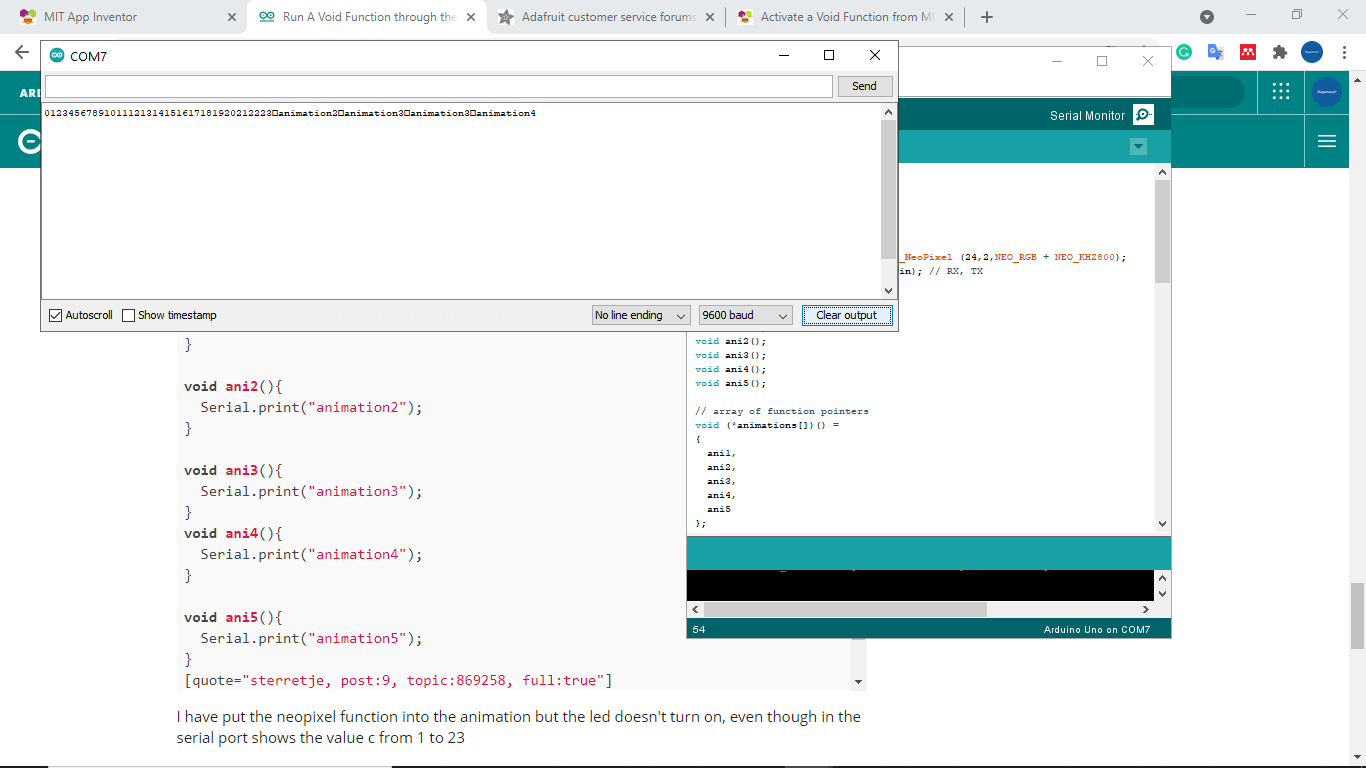
I have put the neopixel function into the animation but the led doesn't turn on, even though in the serial port shows the value c from 1 to 23
Does your function ani1() work when you call it in loop() without any additional code?
void loop()
{
  ani1();
}
without additional code it does printed the value, in serial monitor, but doesn't show on the led. When I try my another file that specifically only for led it does work
does it due to the rx and tx? because i also to change some by some but still not work
Are we talking about the ledstrip on pin 2 or the led on pin 13?
Led strip on pin 2 sir the led on pin 13 is the previous file
Adafruit_NeoPixel strip = Adafruit_NeoPixel (24,2,NEO_RGB + NEO_KHZ800);
danieltianussan:
Led strip on pin 2
OK, do the library examples behave as expected?
i'm not sure because the led show turn on but in the serial port show the function of animation value of (c from 1 to 23);
Please don't talk about the led when you're referring to the led strip. Your code is not trying to control a led, it's controlling a led strip.


 , 2nd (ani2()