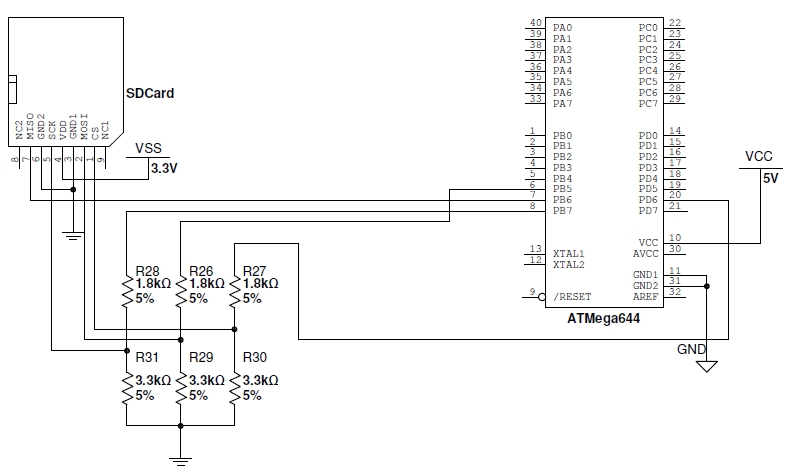
estoy trabajando en un proyecto dónde necesito crear archivos en una tarjeta SD y guardar algo de información. Comencé trabajando con un atmega 328 pero por falta de memoria migré a un atmega 644. No he tenido problema con ninguna librería (y estoy usando bastantes), excepto que ahora que deseo guardar archivos en la SD, me indica que no puede inicializarla.
He revisado los pines y las conexiones, pero sin idea de que puede ser.
Alguien ha tenido un problema similar? o sabe a que material recurrir para solucionarlo..
PD: estoy utilizando las librerías, firmware y material de sanguino para poder usar la IDE de Arduino, hasta ahora todo perfecto excepto por la SD.
Perdón, estoy utilizando el shield para la tarjeta SD que viene con el regulador de 3,3Volt, por lo tanto alimento con 5 volt al shield. He probado con 2 shields iguales para descartar que sea un problema en uno de ellos.
El módulo SD es un dispositivo SPI.
No veo que incialices el dispositivo SPI. Falta
#include <SPI.h>
Yo me baso en lo posteado y en lo posteado no esta.
Incluso inicializas Wire.begin o sea i2c y eso no se para que lo haces?
Luego no dices en que pin conectas SS o sea el pin con el que seleccionas la SD.
A menos que uses el valor por defecto entonces me cayo, pero como falta
#include <SPI.h>
#include <SD.h>
Todo lo que intentas es inválido incluso debería dar errores.
El ejemplo del IDE es simple y funciona bien si conectas todo apropiadamente
Mira este cardinfo.ino
/*
  SD card test

 This example shows how use the utility libraries on which the'
 SD library is based in order to get info about your SD card.
 Very useful for testing a card when you're not sure whether its working or not.

 The circuit:
  * SD card attached to SPI bus as follows:
 ** MOSI - pin 11 on Arduino Uno/Duemilanove/Diecimila
 ** MISO - pin 12 on Arduino Uno/Duemilanove/Diecimila
 ** CLK - pin 13 on Arduino Uno/Duemilanove/Diecimila
 ** CS - depends on your SD card shield or module.
 Pin 4 used here for consistency with other Arduino examples


 created  28 Mar 2011
 by Limor Fried
 modified 9 Apr 2012
 by Tom Igoe
 */
// include the SD library:
#include <SPI.h>
#include <SD.h>

// set up variables using the SD utility library functions:
Sd2Card card;
SdVolume volume;
SdFile root;

// change this to match your SD shield or module;
// Arduino Ethernet shield: pin 4
// Adafruit SD shields and modules: pin 10
// Sparkfun SD shield: pin 8
const int chipSelect = 4;

void setup() {
  // Open serial communications and wait for port to open:
  Serial.begin(9600);
  while (!Serial) {
    ; // wait for serial port to connect. Needed for native USB port only
  }


  Serial.print("\nInitializing SD card...");

  // we'll use the initialization code from the utility libraries
  // since we're just testing if the card is working!
  if (!card.init(SPI_HALF_SPEED, chipSelect)) {
    Serial.println("initialization failed. Things to check:");
    Serial.println("* is a card inserted?");
    Serial.println("* is your wiring correct?");
    Serial.println("* did you change the chipSelect pin to match your shield or module?");
    return;
  } else {
    Serial.println("Wiring is correct and a card is present.");
  }

  // print the type of card
  Serial.print("\nCard type: ");
  switch (card.type()) {
    case SD_CARD_TYPE_SD1:
      Serial.println("SD1");
      break;
    case SD_CARD_TYPE_SD2:
      Serial.println("SD2");
      break;
    case SD_CARD_TYPE_SDHC:
      Serial.println("SDHC");
      break;
    default:
      Serial.println("Unknown");
  }

  // Now we will try to open the 'volume'/'partition' - it should be FAT16 or FAT32
  if (!volume.init(card)) {
    Serial.println("Could not find FAT16/FAT32 partition.\nMake sure you've formatted the card");
    return;
  }


  // print the type and size of the first FAT-type volume
  uint32_t volumesize;
  Serial.print("\nVolume type is FAT");
  Serial.println(volume.fatType(), DEC);
  Serial.println();

  volumesize = volume.blocksPerCluster();    // clusters are collections of blocks
  volumesize *= volume.clusterCount();       // we'll have a lot of clusters
  volumesize *= 512;                            // SD card blocks are always 512 bytes
  Serial.print("Volume size (bytes): ");
  Serial.println(volumesize);
  Serial.print("Volume size (Kbytes): ");
  volumesize /= 1024;
  Serial.println(volumesize);
  Serial.print("Volume size (Mbytes): ");
  volumesize /= 1024;
  Serial.println(volumesize);


  Serial.println("\nFiles found on the card (name, date and size in bytes): ");
  root.openRoot(volume);

  // list all files in the card with date and size
  root.ls(LS_R | LS_DATE | LS_SIZE);
}


void loop(void) {

}
Las librerías están todas incluídas (mala mía de no subir la parte de definiciones), sólo que el programa tiene unas 600 lineas, por eso no lo subí completamente.
Uso comunicación I2C porque tengo 2 micros que trabajan esclavo-maestro para intercambiar datos.
Si, uso el valor por defecto "SS", corroborado que es el 4, cómo corresponde.
Probé el ejemplo de la librería pero no funciona, sin embargo con la placa de arduino uno funciona a la perfección. Algo para comentar es que el regulador del shield que estoy utilizando viene mal conectado, y tengo 4,2 volt en lugar de 3,3 Volt. Probaré si es eso.
De todas maneras revisaré los ejemplos para ver si he dejado pasar alguna declaración.