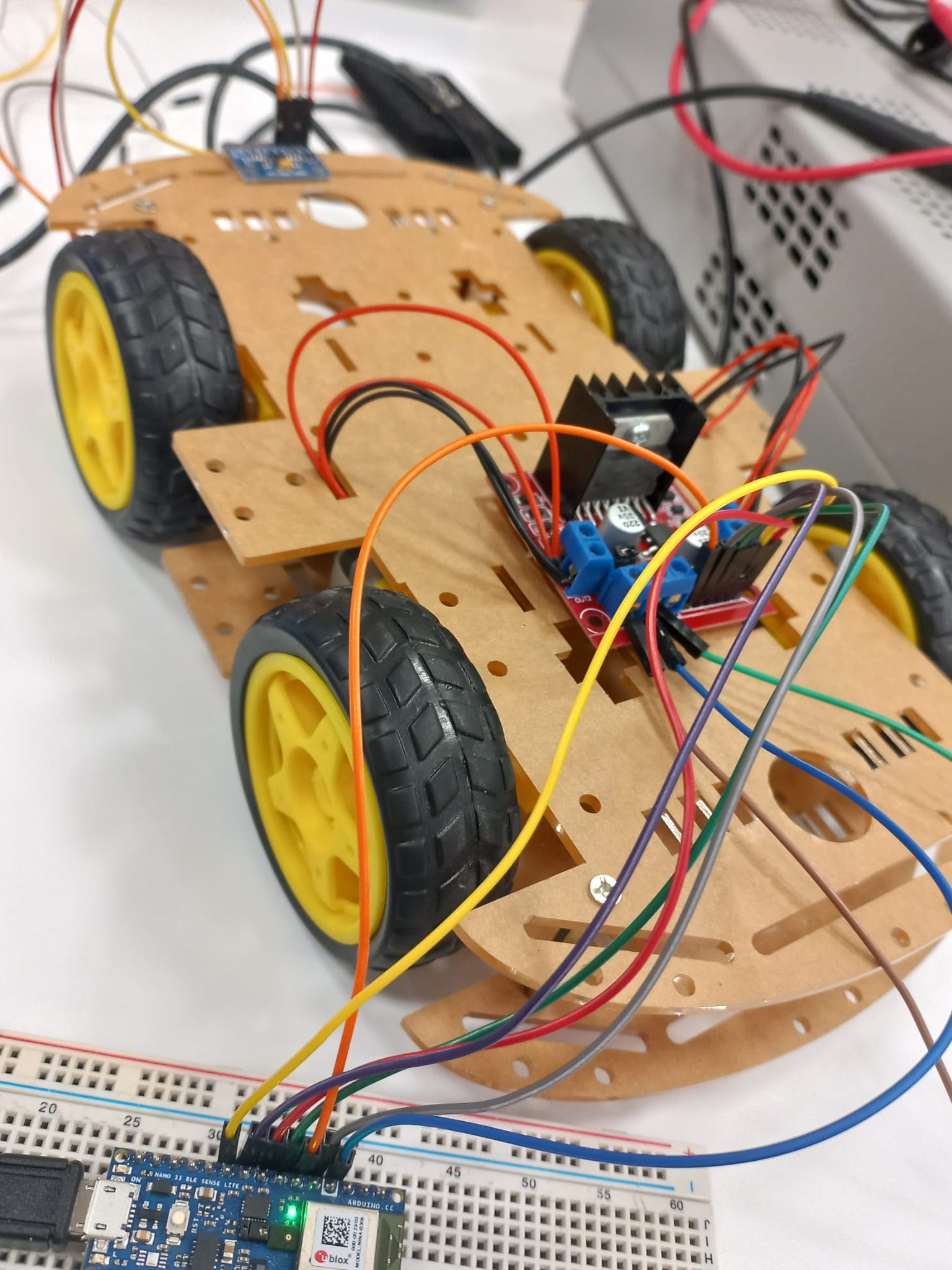
hello guys. i have two arduino nano 33 ble sense, one is peripheral and one is central and i used them for sensor communication via bluetooth and it was working until i added the motor task. my motor driver is L298N and i have four motors. i want central to give peripheral a command about how to run the motors. and my peripheral is connected to L298N by cables. but now i don't know if this part of my code is working or not because my central serial monitor is just blank and i don't even know if two nano 33 are connected via bluetooth. what can i do, can you please help me, thank you...
central code:
/*
  -----------------------------------------------------------------------------------------------
 | BLE_IMU_CENTRAL - Wireless IMU Communication with peripheral device
 |
 | Arduino Boards Tested: Nano 33 BLE Sense as a peripheral & Nano 33 BLE as central.
 | Code not tested for multiple peripherals
 |
 | This sketch works alongside the BLE_IMU_PERIPHERAL sketch to communicate with another Arduino BLE.
 | This sketch can also be used with a generic BLE central app, like LightBlue (iOS and Android) or
 | nRF Connect (Android), to interact with the services and characteristics created in this sketch.
 |
 | This example code is adapted from the ArduinoBLE library, available in the public domain.
 | Authors: Aaron Yurkewich & Pilar Zhang Qiu
 | Latest Update: 25/02/2021
  -----------------------------------------------------------------------------------------------
*/

#include <ArduinoBLE.h>

//PASTEBEGIN
#include <Arduino_LSM9DS1.h>
//PASTEFINISH

// ------------------------------------------ BLE UUIDs ------------------------------------------
#define BLE_UUID_PERIPHERAL               "19B10000-E8F2-537E-4F6C-D104768A1214"  //please change to a unique value that matches BLE_IMU_PERIPHERAL
#define BLE_UUID_CHARACT_LED              "19B10001-E8F2-537E-4F6C-E104768A1214"  //please change to a unique value that matches BLE_IMU_PERIPHERAL
#define BLE_UUID_CHARACT_GYROX             "29B10001-E8F2-537E-4F6C-a204768A1215"  //please change to a unique value that matches BLE_IMU_PERIPHERAL
#define BLE_UUID_CHARACT_GYROY             "39B10001-E8F2-537E-4F6C-a204768A1215"  //please change to a unique value that matches BLE_IMU_PERIPHERAL
#define BLE_UUID_CHARACT_GYROZ             "49B10001-E8F2-537E-4F6C-a204768A1215"  //please change to a unique value that matches BLE_IMU_PERIPHERAL

//PASTEBEGIN
#define BLE_UUID_CHARACT_ACCA             "59B10001-E8F2-537E-4F6C-a204768A1215" //please chnage to a unique value that matches BLE_IMU_CENTRAL
#define BLE_UUID_CHARACT_ACCB             "69B10001-E8F2-537E-4F6C-a204768A1215" //please chnage to a unique value that matches BLE_IMU_CENTRAL
#define BLE_UUID_CHARACT_ACCC             "79B10001-E8F2-537E-4F6C-a204768A1215" //please chnage to a unique value that matches BLE_IMU_CENTRAL

#define BLE_UUID_CHARACT_MAGK             "89B10001-E8F2-537E-4F6C-a204768A1215" //please chnage to a unique value that matches BLE_IMU_CENTRAL
#define BLE_UUID_CHARACT_MAGL             "99B10001-E8F2-537E-4F6C-a204768A1215" //please chnage to a unique value that matches BLE_IMU_CENTRAL
#define BLE_UUID_CHARACT_MAGM             "09B10001-E8F2-537E-4F6C-a204768A1215" //please chnage to a unique value that matches BLE_IMU_CENTRAL
//PASTEFINISH

//begin
BLEService motorService("19B10000-E8F2-537E-4F6C-E104768A1214");
BLEByteCharacteristic motorControlChar("19B10001-E8F2-537E-4F6C-D104768A1214", BLERead | BLEWrite);
//end

// ------------------------------------------ VOID SETUP ------------------------------------------
void setup() {
  Serial.begin(9600);
  while (!Serial);

  // configure the button pin as input
  pinMode(LED_BUILTIN, OUTPUT);

  // initialize the BLE hardware
  BLE.begin();

  Serial.println("BLE Central - Gyroscope control");

  // start scanning for peripherals
  BLE.scanForUuid(BLE_UUID_PERIPHERAL);//
}

// ------------------------------------------ VOID LOOP ------------------------------------------
void loop() {
  // check if a peripheral has been discovered
  BLEDevice peripheral = BLE.available();

  if (peripheral) {
    // discovered a peripheral, print out address, local name, and advertised service
    Serial.print("Found ");
    Serial.print(peripheral.address());
    Serial.print(" '");
    Serial.print(peripheral.localName());
    Serial.print("' ");
    Serial.print("' ");
    Serial.print(peripheral.advertisedServiceUuid());
    Serial.println();

    if (peripheral.localName() != "BLE_IMU") {
      return;
    }

    // stop scanning
    BLE.stopScan();

    LED_IMU(peripheral);
    // peripheral disconnected, start scanning again
    BLE.scanForUuid(BLE_UUID_PERIPHERAL);

  }

}

// ------------------------------------------ FUNCTIONS ------------------------------------------
void LED_IMU(BLEDevice peripheral) {
  // connect to the peripheral
  Serial.println("Connecting ...");

  if (peripheral.connect()) {
    Serial.println("Connected");
  } else {
    Serial.println("Failed to connect!");
    return;
  }

  // discover peripheral attributes
  Serial.println("Discovering attributes ...");
  if (peripheral.discoverAttributes()) {
    Serial.println("Attributes discovered");
  } else {
    Serial.println("Attribute discovery failed!");
    peripheral.disconnect();
    return;
  }

  // retrieve the LED characteristic
  BLECharacteristic ledCharacteristic = peripheral.characteristic(BLE_UUID_CHARACT_LED);
  BLECharacteristic gyroXCharacteristic = peripheral.characteristic(BLE_UUID_CHARACT_GYROX);
  BLECharacteristic gyroYCharacteristic = peripheral.characteristic(BLE_UUID_CHARACT_GYROY);
  BLECharacteristic gyroZCharacteristic = peripheral.characteristic(BLE_UUID_CHARACT_GYROZ);

  //PASTEBEGIN
  BLECharacteristic accACharacteristic = peripheral.characteristic(BLE_UUID_CHARACT_ACCA);
  BLECharacteristic accBCharacteristic = peripheral.characteristic(BLE_UUID_CHARACT_ACCB);
  BLECharacteristic accCCharacteristic = peripheral.characteristic(BLE_UUID_CHARACT_ACCC);

  BLECharacteristic magKCharacteristic = peripheral.characteristic(BLE_UUID_CHARACT_MAGK);
  BLECharacteristic magLCharacteristic = peripheral.characteristic(BLE_UUID_CHARACT_MAGL);
  BLECharacteristic magMCharacteristic = peripheral.characteristic(BLE_UUID_CHARACT_MAGM);
  //PASTEFINISH


  // check if an specific BLE characteristic exists
  if (!ledCharacteristic) {
    Serial.println("Peripheral does not have LED characteristic!");
    peripheral.disconnect();
    return;
  } else if (!ledCharacteristic.canWrite()) {
    Serial.println("Peripheral does not have a writable LED characteristic!");
    peripheral.disconnect();
    return;
  }


  int buttonState = 0;
  float x, y, z, a, b, c, k, l, m;

  while (peripheral.connected()) {

    //begin
      unsigned long start = millis();

        while (millis() - start < 2000){
          motorControlChar.writeValue(1);
          delay(100);
        }

        start = millis();

        while (millis() - start < 100){
          motorControlChar.writeValue(3);
          delay(100);
        }

        start = millis();

        while (millis() - start < 2000){
          motorControlChar.writeValue(1);
          delay(100);
        }

        start = millis();

        while (millis() - start < 100){
          motorControlChar.writeValue(4);
          delay(100);
        }

        start = millis();

        while (millis() - start < 2000){
          motorControlChar.writeValue(1);
          delay(100);
        }

        start = millis();

        while (millis() - start < 100){
          motorControlChar.writeValue(3);
          delay(100);
        }

        start = millis();

        while (millis() - start < 2000){
          motorControlChar.writeValue(2);
          delay(100);
        }

        start = millis();

        while (millis() - start < 100){
          motorControlChar.writeValue(3);
          delay(100);
        }

        start = millis();

        while (millis() - start < 2000){
          motorControlChar.writeValue(2);
          delay(100);
        }

        start = millis();

        while (millis() - start < 2000){
          motorControlChar.writeValue(4);
          delay(100);
        }
    //end

    // while the peripheral is connected
    // read the gyroscope values
    gyroXCharacteristic.readValue( &x, 4 );
    gyroYCharacteristic.readValue( &y, 4 );
    gyroZCharacteristic.readValue( &z, 4 );

    //PASTEBEGIN
    accACharacteristic.readValue( &a, 4 );
    accBCharacteristic.readValue( &b, 4 );
    accCCharacteristic.readValue( &c, 4 );

    magKCharacteristic.readValue( &k, 4 );
    magLCharacteristic.readValue( &l, 4 );
    magMCharacteristic.readValue( &m, 4 );
    //PASTEFINISH

    Serial.print(millis());
    Serial.print('\t');
    Serial.print(x);
    Serial.print('\t');
    Serial.print(y);
    Serial.print('\t');
    Serial.print(z);
    Serial.print('\t');
    //PASTEBEGIN
    Serial.print(a);
    Serial.print('\t');
    Serial.print(b);
    Serial.print('\t');
    Serial.print(c);
    Serial.print('\t');

    Serial.print(k);
    Serial.print('\t');
    Serial.print(l);
    Serial.print('\t');
    Serial.println(m);
    //PASTEFINISH

    // make the LED blink
    if (buttonState == 0)
    {buttonState = 1;}
    else if (buttonState == 1)
    {buttonState = 0;}

    digitalWrite(LED_BUILTIN, buttonState);
      if (buttonState == 0) {
        // write 0x01 to turn the LED on
        ledCharacteristic.writeValue((byte)0x01);
      } else {
        // write 0x00 to turn the LED off
        ledCharacteristic.writeValue((byte)0x00);
      }
  }
  Serial.println("Peripheral disconnected");
}
peripheral code:
/*
  -----------------------------------------------------------------------------------------------
 | BLE_IMU_PERIPHERAL - Wireless IMU Communication with central device
 |
 | Arduino Boards Tested: Nano 33 BLE Sense as a peripheral & Nano 33 BLE as central.
 | Code not tested for multiple peripherals

 | This sketch works alongside the BLE_IMU_CENTRAL sketch to communicate with an Arduino Nano 33 BLE.
 | This sketch can also be used with a generic BLE central app, like LightBlue (iOS and Android) or
 | nRF Connect (Android), to interact with the services and characteristics created in this sketch.

 | This example code is adapted from the ArduinoBLE library, available in the public domain.
 | Authors: Aaron Yurkewich & Pilar Zhang Qiu
 | Latest Update: 25/02/2021
  -----------------------------------------------------------------------------------------------
*/

#include <ArduinoBLE.h>
#include <Arduino_LSM9DS1.h>
//#include <Arduino_LSM6DS3.h> // Uncomment this if your peripheral is the Nano 33 IoT

// ------------------------------------------ BLE UUIDs ------------------------------------------
#define BLE_UUID_PERIPHERAL               "19B10000-E8F2-537E-4F6C-D104768A1214" //please chnage to a unique value that matches BLE_IMU_CENTRAL
#define BLE_UUID_CHARACT_LED              "19B10001-E8F2-537E-4F6C-E104768A1214" //please chnage to a unique value that matches BLE_IMU_CENTRAL
#define BLE_UUID_CHARACT_GYROX             "29B10001-E8F2-537E-4F6C-a204768A1215" //please chnage to a unique value that matches BLE_IMU_CENTRAL
#define BLE_UUID_CHARACT_GYROY             "39B10001-E8F2-537E-4F6C-a204768A1215" //please chnage to a unique value that matches BLE_IMU_CENTRAL
#define BLE_UUID_CHARACT_GYROZ             "49B10001-E8F2-537E-4F6C-a204768A1215" //please chnage to a unique value that matches BLE_IMU_CENTRAL

//PASTEBEGIN
#define BLE_UUID_CHARACT_ACCA             "59B10001-E8F2-537E-4F6C-a204768A1215" //please chnage to a unique value that matches BLE_IMU_CENTRAL
#define BLE_UUID_CHARACT_ACCB             "69B10001-E8F2-537E-4F6C-a204768A1215" //please chnage to a unique value that matches BLE_IMU_CENTRAL
#define BLE_UUID_CHARACT_ACCC             "79B10001-E8F2-537E-4F6C-a204768A1215" //please chnage to a unique value that matches BLE_IMU_CENTRAL

#define BLE_UUID_CHARACT_MAGK             "89B10001-E8F2-537E-4F6C-a204768A1215" //please chnage to a unique value that matches BLE_IMU_CENTRAL
#define BLE_UUID_CHARACT_MAGL             "99B10001-E8F2-537E-4F6C-a204768A1215" //please chnage to a unique value that matches BLE_IMU_CENTRAL
#define BLE_UUID_CHARACT_MAGM             "09B10001-E8F2-537E-4F6C-a204768A1215" //please chnage to a unique value that matches BLE_IMU_CENTRAL
//PASTEFINISH


BLEService LED_IMU_Service(BLE_UUID_PERIPHERAL); // BLE LED Service

//begin
BLEService motorService("19B10000-E8F2-537E-4F6C-E104768A1214");
BLEByteCharacteristic motorControlChar("19B10001-E8F2-537E-4F6C-D104768A1214", BLERead | BLEWrite);
//end

// BLE LED Switch Characteristic - custom 128-bit UUID, read and writable by central
BLEByteCharacteristic switchCharacteristic(BLE_UUID_CHARACT_LED, BLERead | BLEWrite);
BLEFloatCharacteristic gyroXCharacteristic(BLE_UUID_CHARACT_GYROX, BLERead | BLENotify | BLEWrite);
BLEFloatCharacteristic gyroYCharacteristic(BLE_UUID_CHARACT_GYROY, BLERead | BLENotify | BLEWrite);
BLEFloatCharacteristic gyroZCharacteristic(BLE_UUID_CHARACT_GYROZ, BLERead | BLENotify | BLEWrite);


//PASTEBEGIN
BLEFloatCharacteristic accACharacteristic(BLE_UUID_CHARACT_ACCA, BLERead | BLENotify | BLEWrite);
BLEFloatCharacteristic accBCharacteristic(BLE_UUID_CHARACT_ACCB, BLERead | BLENotify | BLEWrite);
BLEFloatCharacteristic accCCharacteristic(BLE_UUID_CHARACT_ACCC, BLERead | BLENotify | BLEWrite);

BLEFloatCharacteristic magKCharacteristic(BLE_UUID_CHARACT_MAGK, BLERead | BLENotify | BLEWrite);
BLEFloatCharacteristic magLCharacteristic(BLE_UUID_CHARACT_MAGL, BLERead | BLENotify | BLEWrite);
BLEFloatCharacteristic magMCharacteristic(BLE_UUID_CHARACT_MAGM, BLERead | BLENotify | BLEWrite);
//PASTEFINISH

//begin
int enA=3;
int enB=5;
int in1=2;
int in2=4;
int in3=6;
int in4=7;
//end

const int ledPin = LED_BUILTIN; // pin to use for the LED
float x, y, z, a, b, c, k, l, m;


// ------------------------------------------ VOID SETUP ------------------------------------------
void setup() {

  //PASTEBEGIN
  pinMode(enA, OUTPUT);
  pinMode(enB, OUTPUT);
  pinMode(in1, OUTPUT);
  pinMode(in2, OUTPUT);
  pinMode(in3, OUTPUT);
  pinMode(in4, OUTPUT);
  //PASTEFINISH

  Serial.begin(9600);
  //while (!Serial); //uncomment to view the IMU data in the peripheral serial monitor

  // begin IMU initialization
  if (!IMU.begin()) {
    Serial.println("Failed to initialize IMU!");
    while (1);
  }

  // set LED pin to output mode
  pinMode(ledPin, OUTPUT);

  // begin BLE initialization
  if (!BLE.begin()) {
    Serial.println("starting BLE failed!");
    while (1);
  }

  // set advertised local name and service UUID:
  BLE.setLocalName("BLE_IMU");
  BLE.setAdvertisedService(LED_IMU_Service);

  //begin
  BLE.setLocalName("MotorControlPeripheral");
  BLE.setAdvertisedService(motorService);
  motorService.addCharacteristic(motorControlChar);
  //end

  // add the characteristic to the service
  LED_IMU_Service.addCharacteristic(switchCharacteristic);
  LED_IMU_Service.addCharacteristic(gyroXCharacteristic);
  LED_IMU_Service.addCharacteristic(gyroYCharacteristic);
  LED_IMU_Service.addCharacteristic(gyroZCharacteristic);

  //PASTEBEGIN
  LED_IMU_Service.addCharacteristic(accACharacteristic);
  LED_IMU_Service.addCharacteristic(accBCharacteristic);
  LED_IMU_Service.addCharacteristic(accCCharacteristic);

  LED_IMU_Service.addCharacteristic(magKCharacteristic);
  LED_IMU_Service.addCharacteristic(magLCharacteristic);
  LED_IMU_Service.addCharacteristic(magMCharacteristic);
  //PASTEFINISH

  // add service
  BLE.addService(LED_IMU_Service);

  //begin
  BLE.addService(motorService);
  //end

  // set the initial value for the characeristic:
  switchCharacteristic.writeValue(0);

  //begin
  motorControlChar.writeValue(0);
  //end

  // start advertising
  BLE.advertise();

  Serial.println("BLE LED Peripheral");

  //PASTEBEGIN
  /*Serial.begin(9600);
  while (!Serial);
  Serial.println("Started");

  if (!IMU.begin()) {
    Serial.println("Failed to initialize IMU!");
    while (1);
  }

  Serial.print("Accelerometer sample rate = ");
  Serial.print(IMU.accelerationSampleRate());
  Serial.println(" Hz");
  Serial.println();
  Serial.println("Acceleration in g's");
  Serial.println("A\tB\tC");

  if (!IMU.begin()) {
    Serial.println("Failed to initialize IMU!");
    while (1);
  }
  Serial.print("Magnetic field sample rate = ");
  Serial.print(IMU.magneticFieldSampleRate());
  Serial.println(" Hz");
  Serial.println();
  Serial.println("Magnetic Field in uT");
  Serial.println("K\tL\tM");
  */
  //PASTEFINISH
}

// ------------------------------------------ VOID LOOP ------------------------------------------
void loop() {

  // listen for BLE peripherals to connect:
  BLEDevice central = BLE.central();

  // if a central is connected to peripheral:
  if (central) {
    Serial.print("Connected to central: ");
    // print the central's MAC address:
    Serial.println(central.address());

    // while the central is still connected to peripheral:
    while (central.connected()) {
      // if the remote device wrote to the characteristic,
      // use the value to control the LED:

      if (switchCharacteristic.written()) {
        if (switchCharacteristic.value()) {   // any value other than 0
          Serial.println("LED on");
          digitalWrite(ledPin, HIGH);         // will turn the LED on
        } else {                              // a 0 value
          Serial.println(F("LED off"));
          digitalWrite(ledPin, LOW);          // will turn the LED off
        }
      }

      if (IMU.gyroscopeAvailable()) {
        IMU.readGyroscope(x, y, z);

        gyroXCharacteristic.writeValue(x);
        gyroYCharacteristic.writeValue(y);
        gyroZCharacteristic.writeValue(z);


        Serial.print(millis());
        Serial.print('\t');
        Serial.print(x);
        Serial.print('\t');
        Serial.print(y);
        Serial.print('\t');
        Serial.print(z);
        Serial.print('\t');
      }


      //PASTEBEGIN
      if (IMU.accelerationAvailable()) {
        IMU.readAcceleration(a, b, c);

        accACharacteristic.writeValue(a);
        accBCharacteristic.writeValue(b);
        accCCharacteristic.writeValue(c);


        Serial.print(a);
        Serial.print('\t');
        Serial.print(b);
        Serial.print('\t');
        Serial.print(c);
        Serial.print('\t');
      }

      if (IMU.magneticFieldAvailable()) {
        IMU.readMagneticField(k, l, m);

        magKCharacteristic.writeValue(k);
        magLCharacteristic.writeValue(l);
        magMCharacteristic.writeValue(m);

        Serial.print(k);
        Serial.print('\t');
        Serial.print(l);
        Serial.print('\t');
        Serial.println(m);
      }
      //PASTEFINISH

      //begin
      if (motorControlChar.written()) {
        byte motorCommand = motorControlChar.value();

        // Motor kontrolü
        if (motorCommand == 1) {
          // İleri düz hareket
          analogWrite(enA, 120);
          digitalWrite(in1, HIGH);
          digitalWrite(in2, LOW);

          analogWrite(enB, 120);
          digitalWrite(in3, HIGH);
          digitalWrite(in4, LOW);
        } else if (motorCommand == 2) {
          // Geri düz hareket
          analogWrite(enA, 120);
          digitalWrite(in1, LOW);
          digitalWrite(in2, HIGH);

          analogWrite(enB, 120);
          digitalWrite(in3, LOW);
          digitalWrite(in4, HIGH);
        } else if (motorCommand == 3) {
          // İleri sağa hareket
          analogWrite(enA, 120);
          digitalWrite(in1, HIGH);
          digitalWrite(in2, LOW);

          analogWrite(enB, 120);
          digitalWrite(in3, LOW);
          digitalWrite(in4, HIGH);
        } else if (motorCommand == 4) {
          // İleri sola hareket
          analogWrite(enA, 120);
          digitalWrite(in1, LOW);
          digitalWrite(in2, HIGH);

          analogWrite(enB, 120);
          digitalWrite(in3, HIGH);
          digitalWrite(in4, LOW);
        } else if (motorCommand == 0) {
          // Dur
          analogWrite(enA, 0);
          analogWrite(enB, 0);
        }
      }
      //end

    }

      // when the central disconnects, print it out:
      Serial.print(F("Disconnected from central: "));
      Serial.println(central.address());
    }

  }
peripheral device which is connected to L298N by cables:
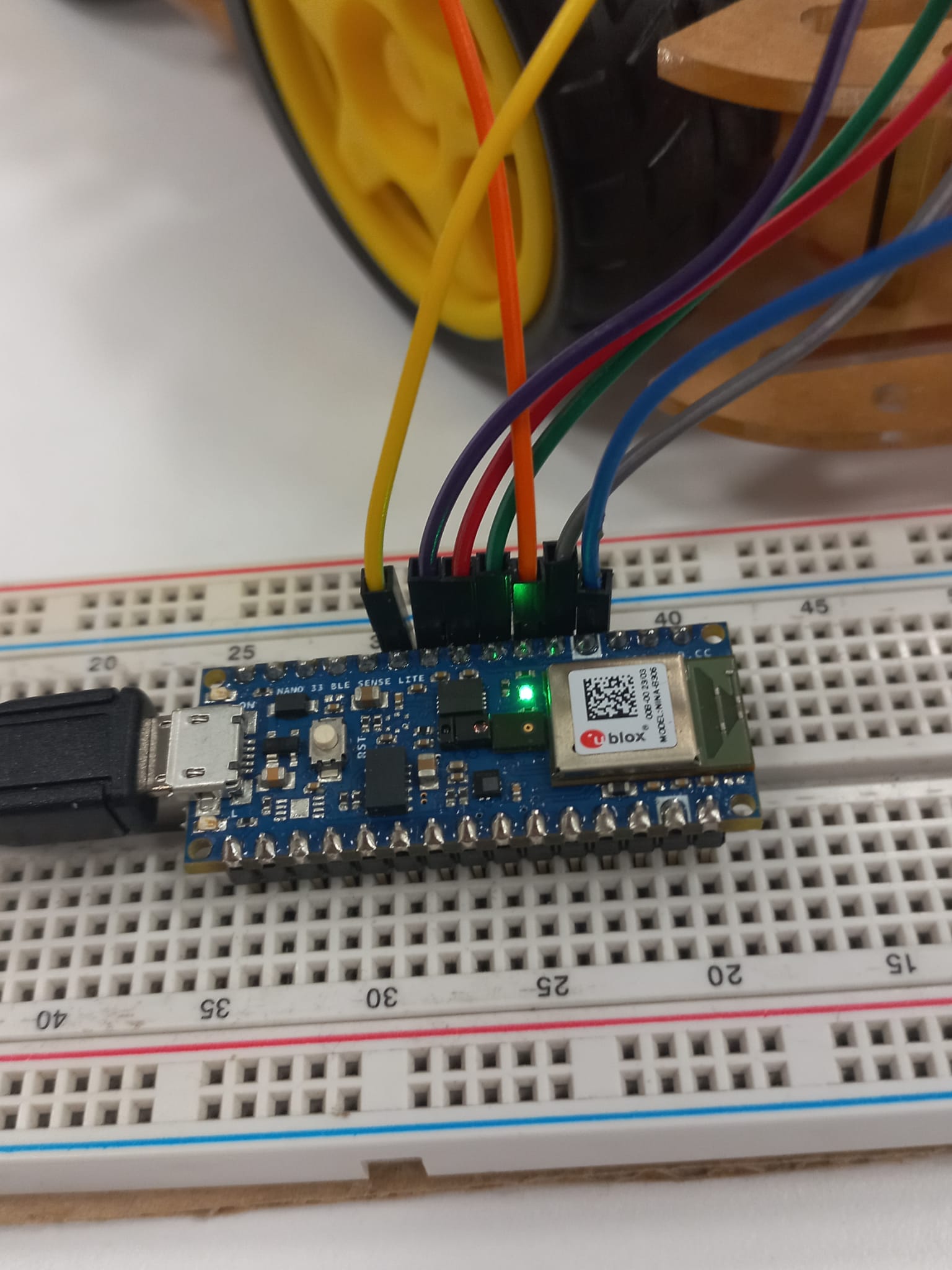
L298N:
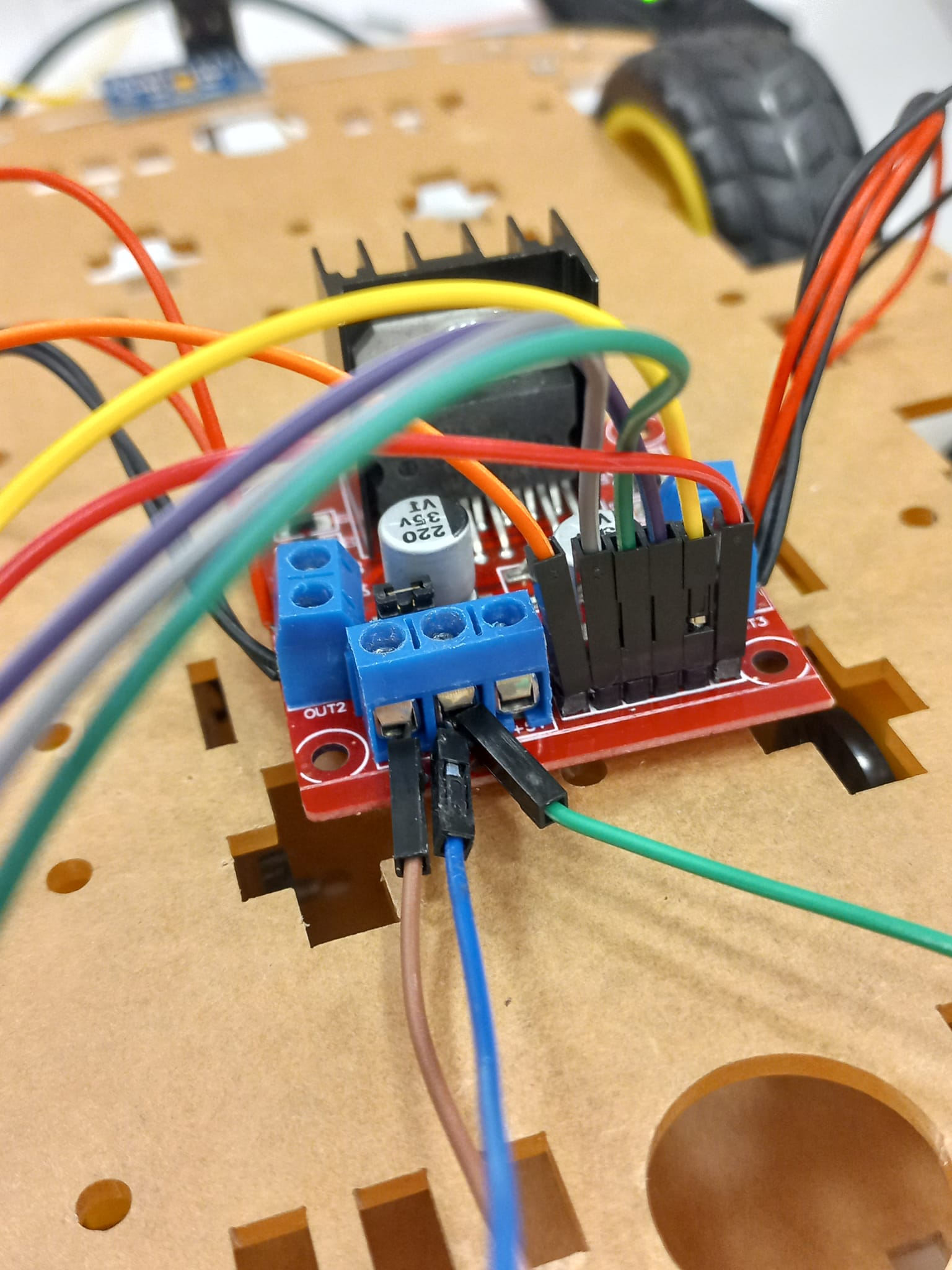
motors: