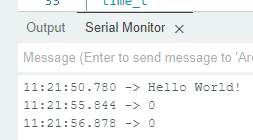
I was working on a project and found that suddenly things that I printed to the Serial Monitor were showing strange characters.
I created a new super-simple sketch, and it's still happening.
This is my code:
void setup() {
  // put your setup code here, to run once:
  Serial.begin(9600);
  Serial.println("Hello World!");
}

void loop() {
  // put your main code here, to run repeatedly:
}
I suspect it's something to do with the serial buffer, but I really don't know. I've unplugged the board from my PC and plugged it in again, doesn't seem to make a difference.
In fact, I'm seeing that when I upload a new sketch, the Serial Monitor continues to show me characters that were printed to the Serial Monitor from the previous sketch. See my screenshot below - 'Hello World!' is not mentioned anywhere in the sketch that is now running in my board.
Thanks @jremington , but this behaviour hasn't stopped. I even burned the bootloader, but it still prints out funny characters (funnily enough now it's before Hello World!. I connected another (generic) Uno, and it's working fine (see attached screenshot - first 5 attempts are with problematic board, last two are with another board) so it can't be the PC.