Servo radom movements (bluetooth HC-05) [SOLVED!]

Hi everyone,

I am trying to program a 3DOF robotic arm (using 3 servo motors). I would like to move the servos using an Android app (developed by Ionic 5, Angular and Capacitor), by means of bluetooth (HC-05).

I developed a 3tabs app, in whose there is an interface with 6 buttons (Up and Down moving the first servo for vertical movements; Left and Right moving the second servo for horizontal movements; Forward and Backward moving the third servo), an interface for simply text sending (digited by keyboard) and the last interface that allows you to create a personalised interface (you can choose the matrix for your customised keypad, the number of servo you want to control and, for each button you want to activate, you can choose label, icon, colour and positions for each servo). I'll attach a screenshot for each tab.

To communicate with Arduino (code attached), the App sends a JSON file in which are reported all the information that Arduino needs to move servos as requested (example of JSON received by Arduino, printed in the command control:

    deserializeJson() ok: 
{"action":"manual","id":1,"update":10}          // action = identified the corrisponding tab; id = servo you want to move; update = I defined an angula step of 10 degrees
    updateServoAngle: Servo #1 wants to move at 103
    updateServoAngle: Servo #1 middle movement at 0
    updateServoAngle: Servo #1 moved at 103
    Servo #1 moved at 103

).

I am having a problem with servo movements: also using a power supply, servos respond correctly (moving according to what received via Bluetooth) few times and then start to move randomly (for instance, instead of completing the 10-degrees movement, servo either just makes a small movement back- and forward or just starts rotating continuously never-ending).
Seen that, I tried just with only one servo, directly powered by Arduino, but the problem persists (the baud rate is 9600).

Can anyone help me with that?

Thank you.
Giammarco

Arduino Code:

#define ANGLE_STEP 10                                              // 10 degrees steps
    #define ANGLE_MIN 10                 
    #define ANGLE_MAX 170 
    
    #define BT_BEGIN String("[@")
    #define BT_END String("@]")
    #define JSON_SIZE 96
    
    #include <ArduinoJson.h>                                          // Json Library (installed with Tools --> Manage Libraries --> typed "json" --> install the "Arduinojson by Benoit Blanchon"
    #include <SoftwareSerial.h>                                       // Bluetooth library
    SoftwareSerial bluetooth(11, 10);                                 // BlueTooth RX ,TX
    
    #include <Servo.h>                                                // Servo library
    #define NO_OF_SERVOS 3                                            // See: https://forum.arduino.cc/index.php?topic=444373.0
    Servo servo01, servo02, servo03;                                  // Servos names
    Servo servos[NO_OF_SERVOS] = {servo01, servo02, servo03};    // Servo Array
    // Input here Servo pins
    int servos_pins[NO_OF_SERVOS] = {12, 13, 7};
    // DEFAULT angles of servos
    int servos_angles[NO_OF_SERVOS]  = {90, 90, 90};
    
    // https://www.arduino.cc/reference/en/libraries/servo/read/
    
    void setup(){
      // Bluetooth setup
      Serial.begin(9600);
      bluetooth.begin(9600);
      Serial.println("The bluetooth gates are open.\n Connect to HC-05 from any other bluetooth device with 1234 as pairing key!.\nReady ...\n");
      delay(1000);
      
      // Servo setup
      for(int i = 0; i < NO_OF_SERVOS; i++){
          // attach servo to pin
          servos[i].attach(servos_pins[i]);
          // move servo to default position
          delay(50);
          updateServoAngle(i, servos_angles[i]);   
          delay(50);
      }
    }
    
    void loop(){
      while(true){
        DynamicJsonDocument json = rxBt();
    
        String action = json["action"];
    
        if(String("position") == action){
          JsonArray servosAngles = json["angles"];
          size_t servosAnglesSize = servosAngles.size();
          
          for(int i=0; i<NO_OF_SERVOS && i<servosAnglesSize; i++){
            updateServoAngle(i, servosAngles[i]);
            delay(500); 
          }
          
        } else if(String("manual") == action){
          int servoId = json["id"];
          int servoUpdate = json["update"];
          int currentServoAngle = servos[servoId].read();
          int servoPosition = max(ANGLE_MIN, min(currentServoAngle + servoUpdate, ANGLE_MAX));
          updateServoAngle(servoId, servoPosition);
          Serial.println("Servo #" + String(servoId) + " moved at " + String(servoPosition));
          delay(500);
        } else if(String("get_keypads") == action){
          //code still in development
        }
      }
    }
    
    void updateServoAngle(int servoId, int newAngle){
      Serial.println("updateServoAngle: Servo #" + String(servoId) + " wants to move at " + String(newAngle));
      
      int servoEndAngle = max(ANGLE_MIN, min(newAngle, ANGLE_MAX)); // checks that the number is between 0 and 180
      int currentAngle = servos[servoId].read();
      
      while(currentAngle != servoEndAngle){
        int direction = servoEndAngle > currentAngle ? +1 : -1;
        currentAngle = (abs(servoEndAngle-currentAngle) >= ANGLE_STEP) ? currentAngle+ANGLE_STEP*direction : servoEndAngle;
        servos[servoId].write(currentAngle);
        //servos[servoId].writeMicroseconds(currentAngle);
        delay(200);
        Serial.println("updateServoAngle: Servo #" + String(servoId) + " middle movement at " + String(servos[servoId].read()));
      }
    
      Serial.println("updateServoAngle: Servo #" + String(servoId) + " moved at " + String(servoEndAngle));
    }
    
    // Read from the bluetooth
    DynamicJsonDocument rxBt(){
      DynamicJsonDocument doc(JSON_SIZE);
      String rxBt;
    
      while (true){
        delay(500);
    
        if (bluetooth.available()){
          rxBt = bluetooth.readString();
    
          const char* json = rxBt.c_str();
          DeserializationError error = deserializeJson(doc, json);
          if (error) {
            Serial.println("deserializeJson() failed: ");
            Serial.println(rxBt);
            Serial.println(error.c_str());
          } else {
            Serial.println("deserializeJson() ok: ");
            Serial.println(rxBt);
            return doc;
          }
        }
      }
      
    }

Using the 'String' class may be part of the issue but i have some questions.

void loop(){
      while(true){

what is the point of this ?

I am having a problem with servo movements: also using a power supply, servos respond correctly (moving according to what received via Bluetooth) few times and then start to move randomly (for instance, instead of completing the 10-degrees movement, servo either just makes a small movement back- and forward or just starts rotating continuously never-ending).

This may be due to memory fragmentation from using the String class, what is the Serial output when the Servo is not moving properly ?

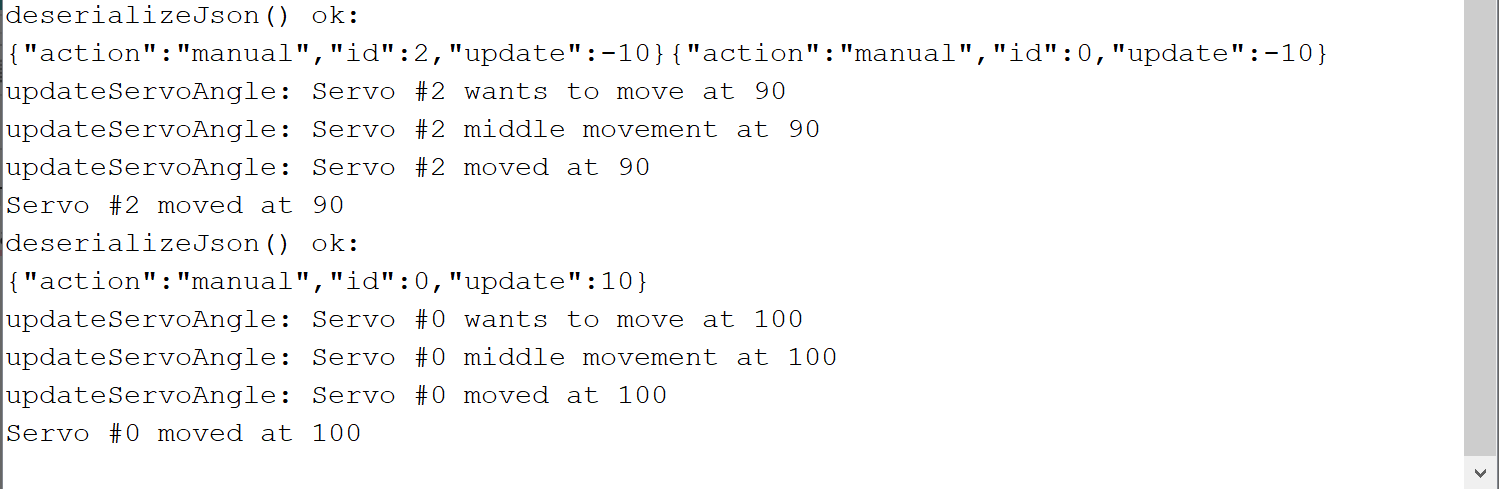
Hi, thank you for your time. That "while{true}" was effectively wrong (it remained from a previous version of my code).. So I cancelled it, but I have still the same problems.. When the servo does not work correctly, the serial command prints the correct data (I attached a screenshot of two JSON received correctly that made servo moving wrong)..
Thank you again for your help!

Thank you, well clearly the issue is in the actual sending of the pulse to the servo. The fading loop complete without a problem, and servos[servoId].write(currentAngle);there is nothing wrong with that, so it goes wrong beyond there.
Servo.h uses timers to send the pulse last specified repeatedly. There may be some conflict, i think it relies on interrupts in combination with hardware timers, Serial communication might interfere. You could create your own Servo pulse function, the 20ms cycle is flexible, and most servos will hold their position quite easily with pulses sent at 100ms interval. Of course to send the pulses you can simply turn the pin HIGH and then LOW again after the interval has passed, for multiple pins you should sort them first for length. You can use a timer1.h to call the function or just poll if time has passed repeatedly. It is more CPU consuming (you forfiet the use of hwTimers) but more reliable that way.

Ok, I'll try as you suggested. Thank you so much for your help!

Hi everyone,
I am still working on it and I had an idea.. Could be pins used to attach servos the problem?? or the library that I am using?? (My servos are attached to pins 7, 12, 13 and the library is Servo.h) .. Because searching on internet I found that there are many libraries to control multiple servos and also that pins have different timers and frequencies.. Thank you all in advance.
Giammarco

Random servo movements or jitter are usually due to an inadequate servo power supply. For light duty servos, the supply should be able to provide 1 Ampere per servo. 2-3 A for heavy duty servos.

Thank you for your reply. I am using an external power supply just for one microservo SG90, I think that's enough. I was thinking that my problems could be also related to the use of "String" (capital letter) instead of "string". Could be that? Because the same configuration was working with a previous version of Arduino code in which I have been using char.

Use of Strings usually leads to crashes or extreme program malfunction, but the behavior is unpredictable.

Breadboards can be a problem too. They are for low power logic circuitry, so the tracks can't carry motor/servo currents and tend to burn, leading to intermittent or poor connections.

I am using an external power supply just for one microservo SG90,

(using 3 servo motors).

Anyway they can draw up to 650mA, but i suggest you add 20% for comfort and provide 800mA per servo at least.

my problems could be also related to the use of "String" (capital letter) instead of "string". Could be that?

Not really in that way. (as already stated) If that would be the case, your messages over 'Serial' would be affected (or the program would just crash)

(My servos are attached to pins 7, 12, 13 and the library is Servo.h)

i don't think that changing the pins will resolve your issue, but it makes sense to try other libraries, or send the pulse manually. Servo.h is the library that is 'built-in' with the IDE, but that doesn't mean that it is the best or without issues. I think there is a conflict between swSerial & Servo.h
You could also try to manipulate the variables through the Serial monitor. Or even, since the BT module only sends data (i suspect) receive the data on hwSerial (while still putting out data to the Serial Monitor)

Thank you all for your support. Just to make some tests, I am using just one servo powered by an external power supply (It is enough, isn't it?).. The final project is going to control 3 servo motors. The strange fact is that with my previous code, in which I have been using char, there were no issues (with external power supply, powering even 3 servos ). I'll write here my previous code

#define KEY_TYPE_LETTERS 1
#define KEY_TYPE_NUMBERS 2 
#define ANGLE_STEP 10                 
#define ANGLE_MIN 0                 
#define ANGLE_MAX 180                 

#include <SoftwareSerial.h>                     
SoftwareSerial bluetooth(11, 10);               

#include <Servo.h>                              
Servo servo01, servo02, servo03;              
byte pos01 = 90;
byte pos02 =90;
byte pos03= 90; 
int servo01pos[20], servo02pos[20], servo03pos[20];    
char button;

void setup(){
  // Bluetooth setup
  Serial.begin(9600);
  bluetooth.begin(9600);
  Serial.println("The bluetooth gates are open.\n Connect to HC-05 from any other bluetooth device with 1234 as pairing key!.\nReady ...\n");
  delay(1000);
  
  // Servo setup
  servo01.attach(12);
  servo01.write(pos01);
  servo02.attach(13);
  servo02.write(pos02);
  servo03.attach(7);
  servo03.write(pos03);
}

void loop(){
  while(true){

    char bt = readBT(KEY_TYPE_LETTERS);

    switch (bt) {
      case ('G'):
        Serial.println("Pressed G");
        pressedG();
        break;
      case ('S'):
        Serial.println("Pressed S");
        pressedS();
        break;
      case ('U'):
        Serial.println("Pressed U");
        pressedU();
        break;
      case ('D'):
        Serial.println("Pressed D");
        pressedD();
        break;
      case ('R'):
        Serial.println("Pressed R");
        pressedR();
        break;
      case ('L'):
        Serial.println("Pressed L");
        pressedL();
        break;
      case ('F'):
        Serial.println("Pressed F");
        pressedF();
        break;
      case ('B'):
        Serial.println("Pressed B");
        pressedB();
        break;
      case ('X'):
        Serial.println("Pressed X");
        Serial.println("EXIT");
        return;
    }
  }
}

// Read the new value from bluetooth
char readBT(int keyType){

  String btStr;
  char bt;

  while (true){
    delay(500);

    if (bluetooth.available()){
      btStr = bluetooth.readString();
      bt = btStr.charAt(btStr.length() - 1);
      Serial.println("readBT: Data#1 = ");
      Serial.println(bt);
      Serial.println("\n");
      
      switch (keyType){
        case KEY_TYPE_NUMBERS:
          if(checkCharNumbers(bt)){
            Serial.println("readBT: Data#2 = ");
            Serial.println(bt);
            Serial.println("\n");
            return bt;
          }
          break;

        case KEY_TYPE_LETTERS:
          if(checkCharLetters(bt)){
            Serial.println("readBT: Data#2 = ");
            Serial.println(bt);
            Serial.println("\n");
            return bt;
          }
          break;

        default:
          return '\0';
      }
    }
  }
  
}

bool checkCharLetters(char bt){
  return bt == 'U' || bt == 'D' || bt == 'L' || bt == 'R' || bt == 'F' || bt == 'B' || bt == 'S' || bt == 'X' || bt == 'G';
}

bool checkCharNumbers(char bt){
  return bt == '0' || bt == '1' || bt == '2';
}

void pressedG(){
  //Serial.println("Pressed G");
  // bluetooth.println("3");
  bluetooth.write("#5");
}

void pressedS(){
  Serial.println("Enter the button you desire to set...");
  char number = readBT(KEY_TYPE_NUMBERS);

  Serial.println("SAVING POSITIONS ...");

  if (number == '0') {
    servo01pos[0] = pos01;
  } else if (number == '1') {
    servo01pos[1] = pos01;
  } else if (number == '2') {
    servo01pos[2] = pos01;
  }
  servo01.write(pos01);

  Serial.println("Button:\n");
  Serial.println(button + "\n");
  Serial.println("pos01:\n");
  Serial.println(pos01 + "\n");
  Serial.println("servo01pos[0,1,2]\n");
  Serial.println(servo01pos[0]);
  Serial.println(servo01pos[1]);
  Serial.println(servo01pos[2]);

}

void pressedU(){
  pos01 = min(pos01 + ANGLE_STEP, ANGLE_MAX);
  servo01.write(pos01);
  Serial.println("New Pos after U:");
  Serial.println(pos01);
  delay(500);
}

void pressedD(){
  pos01 = max(pos01 - ANGLE_STEP, ANGLE_MIN);
  servo01.write(pos01);
  Serial.println("New Pos after D:");
  Serial.println(pos01);
  delay(500);
}

void pressedR(){
  pos03 = min(pos03 + ANGLE_STEP, ANGLE_MAX);     
  servo03.write(pos03);
  Serial.println("New Pos after R:");
  Serial.println(pos03);
  delay(500);
}

void pressedL(){
  pos03 = max(pos03 - ANGLE_STEP, ANGLE_MIN);
  servo03.write(pos03);
  Serial.println("New Pos after L:");
  Serial.println(pos03);
  delay(500);
}

void pressedF(){
  pos02 = min(pos02 + ANGLE_STEP, ANGLE_MAX);     
  servo02.write(pos02);
  Serial.println("New Pos after F:");
  Serial.println(pos02);
  delay(500);
}

void pressedB(){
  pos02 = max(pos02 - ANGLE_STEP, ANGLE_MIN);
  servo02.write(pos02);
  Serial.println("New Pos after B:");
  Serial.println(pos02);
  delay(500);
}

In such a code, I used to send a char (for instance, "U" = UP, "D" = DOWN, "F" = FORWARD, "S" = SAVE and so on) and everything worked perfectly... I really don't understand why passing from the first code to the second one, it makes all those problems...
Thank you again for your help!
Giammarco

everything worked perfectly...

Now you tell us.
How about starting from the working code, you start modifying it to respond to your App correctly.

in which I have been using char

and String, less, but you still use the String class.

servo01.attach(12);
  servo01.write(pos01);
  servo02.attach(13);
  servo02.write(pos02);
  servo03.attach(7);
  servo03.write(pos03);

you know it would be better to use arrays.

giammarcop:
everything worked perfectly... I really don't understand why passing from the first code to the second one, it makes all those problems...

Surely the main difference between the two is not just char vs String it is that you have included a whole new library ArduinoJson and so are using a lot more memory.

Steve

Hi everyone, I started modifying, step by step, the old code toward the new one.. After many trials, the problem was still there also with char arrays.. So I thought the problem could have been the Bluetooth.. With a code in which I control servos without Bluetooth but just by Serial Command, it worked fine! So, searching online I found these:
Does Software serial still conflict with the Servo library? - Programming Questions - Arduino Forum ,
Problem with servo PWM and bluetooth module - Project Guidance - Arduino Forum .
It is the Servo.h library the problem!! It interferes with the SoftwareSerial.h! So in such links, guys suggest to use PWMServo.h (the old version) instead of Servo.h. In that way, I solved my problems!

Thank you all for your help!
Giammarco

It is the Servo.h library the problem!! It interferes with the SoftwareSerial.h

I am pretty sure i said so twice, i wasn't 100% sure admittedly.

This topic was automatically closed 120 days after the last reply. New replies are no longer allowed.