I'm 7 hours in on trying to get a SIM7600 module working and I'm struggling. First, this is my first ever post on this forum so please forgive me if I've posted out of place.
Long story short, I'm just trying to setup SMS on this SIM7600 and once that tests good, I will have an Arduino read an analog input value and then send that value in an SMS.
Anyone have experience setting these SIM7600G up? I know there is information I'm likely lacking as of this first post. I'm running a Lilygo ESP32/SIM7600G combo evaluation board, but right now I'm only using AT commands directly to the SIM module.
I'm currently using a prepaid 1NCE sim card, and everything seems to check out there when I'm running through the AT commands and looking at everything in the 1NCE dashboard. Can't seem to figure out how to set the APN though... This seems like a requirement to get things going.
Again, any help with getting this setup would be very helpful!
What I normally do is search for a library in the IDE Library Manager. I then click the 3 dots ... menu beside the library name and select examples. Find an example close to what you want and start editing the code.
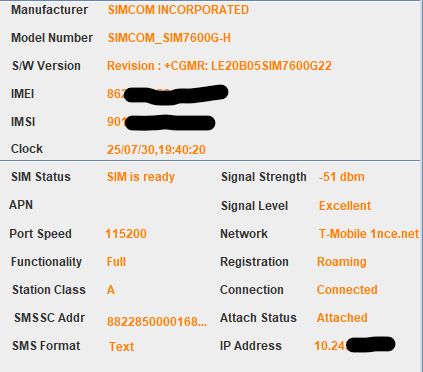
Thanks for the quick reply! I went through most all the basic setup commands in the 500+ page AT Command Manual for this unit. I tried the AT+CGDCONT=1,"IP","iot.1nce.net"over and over and it would just say "error" or "command error" which seemed odd as we know that is a valid command. I'm wondering if I have a bad unit because ALL the literature I have went through points to that command being the one I need to use to set the IP and APN. When I use "AT Command Tester For SIMCOM", I run the quick snapshot function and EVERYTHING appears to be fine except my APN is just blank.
I believe one time, the APN field read "IMS", but I could have saw that elsewhere...
If I try to send an SMS, the AT Command works. I then type my payload "test" and hit enter, it gives a line feed where I then type ctrl+z (Putty gives me a ^Z) and I hit enter and it immediately throws an error (+CMS ERROR: Unknown error). This is where things went down hill. There's not alot of help online in regards to this error or the "500" error that also means the error is unknown. Image below is what I see. I've tried Putty and AT Command Tester and both give me the same error.
I've blocked my cell number out for obvious reasons, but I'm using the standard "phone number" convention and the command seems to be working fine. I thought it was Putty at first, that's when I switched to AT Command Tester and it gave me the same issues.
Again, I'm guessing it's because the APN wont take. I'm wondering if folks think this is a hardware issue or a user error? Or maybe it's a carrier issue? This is my first time working with these cellular modems, so I'm really grasping at straws here.
I have several example libraries that I will use to get the Arduino talking to the SIM7600, so I should be covered there. I just haven't gotten to that point yet because the AT Commands wont even take when communicating directly with the modem. Once those bugs are worked out, I can have the Arduino handling all the communication with the modem.
Ok, but don't forget the guy who created the library has likely spent hundreds, if not thousands, of hours perfecting it. If it were me, I would try the library first.
Agree with @sonofcy - if you want to verify that your module is OK then you can try one of the libraries. You can also study the library to see which commands are sent.
The +CREG: 0,5 indicates that you're roaming. I wonder if your IOT SIM is getting network permission to send an SMS. Have you tried putting a SIM in that is directly supported by an available network?
How do you have AT+CPMS Preferred message storage set? I generally use "ME","ME","ME", FWIW.
Have you tried giving the destination number as "+44xxxyyyzzz" with the full country code?
I didn’t realize this when ordering. I think Hologram allows for messaging directly from device to device. I ordered one to give it a try, so we will see if this by chance can get me a step further in this journey. I will report back here with my findings once I get it next week!