So i have an arduino nano, and i can't upload sketches to it - here's the output message:
Sketch uses 576 bytes (1%) of program storage space. Maximum is 30720 bytes.
Global variables use 9 bytes (0%) of dynamic memory, leaving 2039 bytes for local variables. Maximum is 2048 bytes.
avrdude: stk500_recv(): programmer is not responding
avrdude: stk500_getsync() attempt 1 of 10: not in sync: resp=0xe4
avrdude: stk500_recv(): programmer is not responding
avrdude: stk500_getsync() attempt 2 of 10: not in sync: resp=0xe4
avrdude: stk500_recv(): programmer is not responding
avrdude: stk500_getsync() attempt 3 of 10: not in sync: resp=0xe4
avrdude: stk500_recv(): programmer is not responding
avrdude: stk500_getsync() attempt 4 of 10: not in sync: resp=0xe4
avrdude: stk500_recv(): programmer is not responding
avrdude: stk500_getsync() attempt 5 of 10: not in sync: resp=0xe4
avrdude: stk500_recv(): programmer is not responding
avrdude: stk500_getsync() attempt 6 of 10: not in sync: resp=0xe4
avrdude: stk500_recv(): programmer is not responding
avrdude: stk500_getsync() attempt 7 of 10: not in sync: resp=0xe4
avrdude: stk500_recv(): programmer is not responding
avrdude: stk500_getsync() attempt 8 of 10: not in sync: resp=0xe4
avrdude: stk500_recv(): programmer is not responding
avrdude: stk500_getsync() attempt 9 of 10: not in sync: resp=0xe4
avrdude: stk500_recv(): programmer is not responding
avrdude: stk500_getsync() attempt 10 of 10: not in sync: resp=0xe4
Failed uploading: uploading error: exit status 1
I've tried using another cable & installing the CH34x driver, and it still doesn't work.
When i tried uploading to one of my unos it works just fine. Are there any fixes to this?
Hi @epicdue1386. You described the Arduino board you are uploading to as "Nano". Something that can be confusing is there are multiple boards with "Nano" in their name. We need to be certain of exactly which one you have. The reason is that the problem might be caused by the IDE not being correctly configured for your specific board.
Please tell us which of the following boards you are attempting to upload to:
If you aren't sure which one you have, you can provide a picture of the board or a link to the place you bought it from and we'll see if we can identify it.
Hi there, mine is a classic nano
I'm going to ask you to provide the full verbose output from an upload attempt.
 This procedure is not intended to solve the problem. The purpose is to gather more information.
Please do this:
- Select File > Preferences... (or Arduino IDE > Settings... for macOS users) from the Arduino IDE menus.
The "Preferences" dialog will open.
- Uncheck the box next to Show verbose output during:
☑ compile in the "Preferences" dialog.
- Check the box next to Show verbose output during: ☐ upload.
- Click the "OK" button.
The "Preferences" dialog will close.
- Attempt an upload, as you did before.
- Wait for the upload to fail.
- You will see an "Upload error: ..." notification at the bottom right corner of the Arduino IDE window. Click the "COPY ERROR MESSAGES" button on that notification.
- Open a forum reply here by clicking the "Reply" button.
- Click the
<CODE/> icon on the post composer toolbar.
This will add the forum's code block markup (```) to your reply to make sure the error messages are correctly formatted.

- Press the Ctrl+V keyboard shortcut (Command+V for macOS users).
This will paste the error output from the upload into the code block.
- Move the cursor outside of the code block markup before you add any additional text to your reply.
- Click the "Reply" button to post the output.
Here's the final output
Sketch uses 576 bytes (1%) of program storage space. Maximum is 30720 bytes.
Global variables use 9 bytes (0%) of dynamic memory, leaving 2039 bytes for local variables. Maximum is 2048 bytes.
"C:\Users\(hidden for privacy)\AppData\Local\Arduino15\packages\arduino\tools\avrdude\6.3.0-arduino17/bin/avrdude" "-CC:\Users\(hidden for privacy)\AppData\Local\Arduino15\packages\arduino\tools\avrdude\6.3.0-arduino17/etc/avrdude.conf" -v -V -patmega328p -carduino "-PCOM10" -b115200 -D "-Uflash:w:C:\Users\(hidden for privacy)\AppData\Local\Temp\arduino\sketches\7AFA2D0B5A80033B7C65DBA74F72F64D/sketch_sep15a.ino.hex:i"

avrdude: Version 6.3-20190619
         Copyright (c) 2000-2005 Brian Dean, http://www.bdmicro.com/
         Copyright (c) 2007-2014 Joerg Wunsch

         System wide configuration file is "C:\Users\(hidden for privacy)\AppData\Local\Arduino15\packages\arduino\tools\avrdude\6.3.0-arduino17/etc/avrdude.conf"

         Using Port                    : COM10
         Using Programmer              : arduino
         Overriding Baud Rate          : 115200
avrdude: stk500_recv(): programmer is not responding
avrdude: stk500_getsync() attempt 1 of 10: not in sync: resp=0xb5
avrdude: stk500_recv(): programmer is not responding
avrdude: stk500_getsync() attempt 2 of 10: not in sync: resp=0xb5
avrdude: stk500_recv(): programmer is not responding
avrdude: stk500_getsync() attempt 3 of 10: not in sync: resp=0xb5
avrdude: stk500_recv(): programmer is not responding
avrdude: stk500_getsync() attempt 4 of 10: not in sync: resp=0xb5
avrdude: stk500_recv(): programmer is not responding
avrdude: stk500_getsync() attempt 5 of 10: not in sync: resp=0xb5
avrdude: stk500_recv(): programmer is not responding
avrdude: stk500_getsync() attempt 6 of 10: not in sync: resp=0xb5
avrdude: stk500_recv(): programmer is not responding
avrdude: stk500_getsync() attempt 7 of 10: not in sync: resp=0xb5
avrdude: stk500_recv(): programmer is not responding
avrdude: stk500_getsync() attempt 8 of 10: not in sync: resp=0xb5
avrdude: stk500_recv(): programmer is not responding
avrdude: stk500_getsync() attempt 9 of 10: not in sync: resp=0xb5
avrdude: stk500_recv(): programmer is not responding
avrdude: stk500_getsync() attempt 10 of 10: not in sync: resp=0xb5

avrdude done.  Thank you.

Failed uploading: uploading error: exit status 1
Please try this experiment and then report back with the results:
This procedure is not intended to solve the problem. The purpose is to gather more information.
- Connect the Arduino board to your computer with a USB cable.
- Press and release the button on the Arduino board that is marked "RESET".
Now please reply here on the forum thread with the answer to the following question:
- Did you see the "L" LED blink multiple times quickly immediately after you released the "RESET" button?
It blinked once after i pressed the button
After that it just turns on and off every +/- 1 second
A program called a "bootloader" is stored in a special area of memory in the Nano board's microcontroller. The classic Nano (as well as its 3rd party derivatives) have been manufactured with two different types of bootloader installed.
You must configure the Tools > Processor menu in Arduino IDE according to which bootloader is installed on your Nano. Having the incorrect configuration selected in this menu is one of the potential causes of uploads failing with the "avrdude: stk500_recv(): programmer is not responding" error.
The single blink on reset tells us that your Nano board has the "old" bootloader installed.
I can see from the verbose upload output that you have Arduino IDE incorrectly configured for use with the Nano boards that have the modern bootloader.
Select Tools > Processor > ATmega328P (Old Bootloader) from the Arduino IDE menus and then try uploading again.
Hopefully this time the upload will finish successfully.
It's still showing an error, but it's a bit different now
Sketch uses 576 bytes (1%) of program storage space. Maximum is 30720 bytes.
Global variables use 9 bytes (0%) of dynamic memory, leaving 2039 bytes for local variables. Maximum is 2048 bytes.
"C:\Users\(hidden for privacy)\AppData\Local\Arduino15\packages\arduino\tools\avrdude\6.3.0-arduino17/bin/avrdude" "-CC:\Users\(hidden for privacy)\AppData\Local\Arduino15\packages\arduino\tools\avrdude\6.3.0-arduino17/etc/avrdude.conf" -v -V -patmega328p -carduino "-PCOM10" -b57600 -D "-Uflash:w:C:\Users\(hidden for privacy)\AppData\Local\Temp\arduino\sketches\7AFA2D0B5A80033B7C65DBA74F72F64D/sketch_sep15a.ino.hex:i"

avrdude: Version 6.3-20190619
         Copyright (c) 2000-2005 Brian Dean, http://www.bdmicro.com/
         Copyright (c) 2007-2014 Joerg Wunsch

         System wide configuration file is "C:\Users\(hidden for privacy)\AppData\Local\Arduino15\packages\arduino\tools\avrdude\6.3.0-arduino17/etc/avrdude.conf"

         Using Port                    : COM10
         Using Programmer              : arduino
         Overriding Baud Rate          : 57600
         AVR Part                      : ATmega328P
         Chip Erase delay              : 9000 us
         PAGEL                         : PD7
         BS2                           : PC2
         RESET disposition             : dedicated
         RETRY pulse                   : SCK
         serial program mode           : yes
         parallel program mode         : yes
         Timeout                       : 200
         StabDelay                     : 100
         CmdexeDelay                   : 25
         SyncLoops                     : 32
         ByteDelay                     : 0
         PollIndex                     : 3
         PollValue                     : 0x53
         Memory Detail                 :

                                  Block Poll               Page                       Polled
           Memory Type Mode Delay Size  Indx Paged  Size   Size #Pages MinW  MaxW   ReadBack
           ----------- ---- ----- ----- ---- ------ ------ ---- ------ ----- ----- ---------
           eeprom        65    20     4    0 no       1024    4      0  3600  3600 0xff 0xff
           flash         65     6   128    0 yes     32768  128    256  4500  4500 0xff 0xff
           lfuse          0     0     0    0 no          1    0      0  4500  4500 0x00 0x00
           hfuse          0     0     0    0 no          1    0      0  4500  4500 0x00 0x00
           efuse          0     0     0    0 no          1    0      0  4500  4500 0x00 0x00
           lock           0     0     0    0 no          1    0      0  4500  4500 0x00 0x00
           calibration    0     0     0    0 no          1    0      0     0     0 0x00 0x00
           signature      0     0     0    0 no          3    0      0     0     0 0x00 0x00

         Programmer Type : Arduino
         Description     : Arduino
         Hardware Version: 2
         Firmware Version: 1.16
         Vtarget         : 0.0 V
         Varef           : 0.0 V
         Oscillator      : Off
         SCK period      : 0.1 us

avrdude: stk500_recv(): programmer is not responding
avrdude: initialization failed, rc=-1
         Double check connections and try again, or use -F to override
         this check.

avrdude: stk500_recv(): programmer is not responding

avrdude done.  Thank you.

Failed uploading: uploading error: exit status 1
Could it possibly be a hardware issue?
May we assume that this is a new Nano and that you're new to the Arduino world?
Please identify the chip on the top of the board. It should be an Atmel 328P. There are Nanos around that have a Atmel 328PB or a Logic Green LGT8F328P; there are also Nanos around with the Atmel 168 chip.
If you can't read it you can use a camera and take a photo; make sure that you have decent light (flash is not necessary a good thing) and try to identify the chip.
I don't remember exactly when, but i think it was bought after 2020
Also yes, i'm still a beginner
Anyways, the chip on my nano says Atmel Mega328P
Update: Did a loopback test, i entered the message "The quick brown fox jumps over the lazy dog." and for some reason it returned whatever this is?
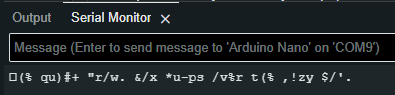
What is the chip on the bottom of your Nano? CH340?
For the CH340, the loopback test is non-conclusive.
You should verify it. One way to do so
- Open device manager.
- Expand the Ports section.
- Double click the COM port of interest (COM10 in your case)
- Click the Details tab.
- Select Hardware Ids in the Property dropdown.
These are the VID and PID for a CH340.
Now getting into an area that I have less knowledge of. Windows might think that your board is something else.
- While the Properties are open, click the Driver tab.
- Click the Driver Details button.
- Please post a screenshot if it differs significantly.
Okay, seems like i only have one of the driver files from your screenshot above


Could you try giving me a download link to the driver that you used?


