Since 10 days, I try to upload my code on my ESP8266 by my Arduino Uno.
I can use the serial monitor to write the commands but I can't download directly the code.
My try to change some settings but not works. When I plug my Arduino on my computer, it's written "Arduino Uno" and no "ESP8266". Moreover I have this error:
esptool v0.4.9 - (c) 2014 Ch. Klippel ck@atelier-klippel.de
setting board to ck
Une erreur est survenue lors du transfert du croquis
setting baudrate from 115200 to 9600
setting port from /dev/tty.usbserial to /dev/cu.usbmodem1411
setting address from 0x00000000 to 0x00000000
espcomm_upload_file
espcomm_upload_mem
opening port /dev/cu.usbmodem1411 at 9600
tcgetattr
tcsetattr
serial open
opening bootloader
resetting board
trying to connect
espcomm_send_command: sending command header
espcomm_send_command: sending command payload
trying to connect
espcomm_send_command: sending command header
espcomm_send_command: sending command payload
trying to connect
espcomm_send_command: sending command header
espcomm_send_command: sending command payload
resetting board
trying to connect
espcomm_send_command: sending command header
espcomm_send_command: sending command payload
trying to connect
espcomm_send_command: sending command header
espcomm_send_command: sending command payload
trying to connect
espcomm_send_command: sending command header
espcomm_send_command: sending command payload
resetting board
trying to connect
espcomm_send_command: sending command header
espcomm_send_command: sending command payload
trying to connect
espcomm_send_command: sending command header
espcomm_send_command: sending command payload
trying to connect
espcomm_send_command: sending command header
espcomm_send_command: sending command payload
warning: espcomm_sync failed
error: espcomm_open failed
error: espcomm_upload_mem failed
I have looked your "Begginer's Guide", I think that I can't find a solution on it. My problem is that my ESP is not recognised by my computer. Like I said, all works, I can use the serial monitor to put all my commands ("AT",...) but I can't upload the code in my card... It's really funny !
ulyssefender:
My problem is that my ESP is not recognised by my computer. Like I said, all works, I can use the serial monitor to put all my commands ("AT",...) but I can't upload the code in my card... It's really funny !
What do you mean it's not recognized? It doesn't need to be "recognized", just select the right port, put the ESP in programming mode (chapter 6), and hit upload.
If Tools > Port displays something like "COM3 (Arduino UNO)", then that's because you're using an Uno as USB-to-Serial converter. That has to do with the VID/PID in the ATmega16U2. Don't worry about it.
Ok, So for me "recognized" means that my Arduino can't upload the code on the WiFi module.
I tried to change the type or card, bauds,...
I don't understand why I can use the serial monitor to send all the commands that I want, but I can't upload a code by my Arduino card. Always the same error message :
esptool v0.4.9 - (c) 2014 Ch. Klippel <ck@atelier-klippel.de>
	setting board to ck
	setting baudrate from 115200 to 115200
	setting port from /dev/tty.usbserial to /dev/cu.usbmodem1411
	setting address from 0x00000000 to 0x00000000
	espcomm_upload_file
	espcomm_upload_mem
opening port /dev/cu.usbmodem1411 at 115200
	tcgetattr
	tcsetattr
	serial open
opening bootloader
resetting board
trying to connect
	espcomm_send_command: sending command header
	espcomm_send_command: sending command payload
trying to connect
	espcomm_send_command: sending command header
	espcomm_send_command: sending command payload
trying to connect
	espcomm_send_command: sending command header
	espcomm_send_command: sending command payload
resetting board
trying to connect
	espcomm_send_command: sending command header
	espcomm_send_command: sending command payload
trying to connect
	espcomm_send_command: sending command header
	espcomm_send_command: sending command payload
trying to connect
Une erreur est survenue lors du transfert du croquis
	espcomm_send_command: sending command header
	espcomm_send_command: sending command payload
resetting board
trying to connect
	espcomm_send_command: sending command header
	espcomm_send_command: sending command payload
trying to connect
	espcomm_send_command: sending command header
	espcomm_send_command: sending command payload
trying to connect
	espcomm_send_command: sending command header
	espcomm_send_command: sending command payload
warning: espcomm_sync failed
error: espcomm_open failed
error: espcomm_upload_mem failed
PieterP:
Did you put the ESP in programming mode as described in chapter 6?
I'm having same sort of problem but I have a Node MCU and I understood I don't need to fix any wires or push any buttons. I think I have tried every button combination, and I get the blue flash with Reset.
IDE recognises the board OK and has all the messages in the green band at the bottom but I cannot upload. I get the following after compiling OK. The verbose output shows just more of the same.
Archiving built core (caching) in: C:\Users\User\AppData\Local\Temp\arduino_cache_339497\core\core_esp8266_esp8266_nodemcu_CpuFrequency_80,UploadSpeed_115200,FlashSize_4M3M_0de89bcd161ff77f2054cf1685794f62.a
Sketch uses 224113 bytes (21%) of program storage space. Maximum is 1044464 bytes.
Global variables use 31696 bytes (38%) of dynamic memory, leaving 50224 bytes for local variables. Maximum is 81920 bytes.
warning: espcomm_sync failed
error: espcomm_open failed
error: espcomm_upload_mem failed
error: espcomm_upload_mem failed
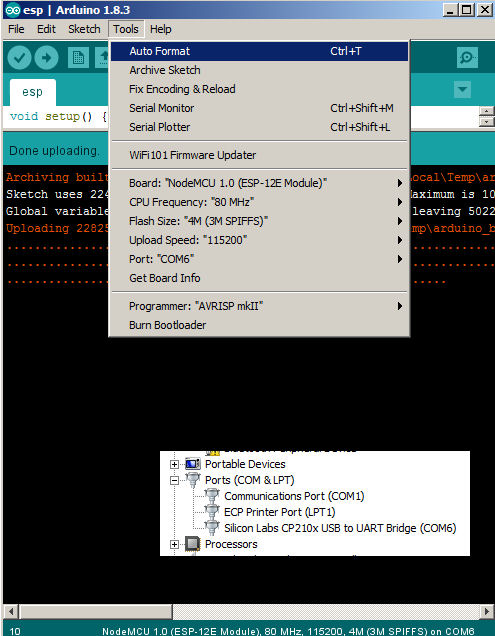
No, I can't see the setting but I have had some sort of result. I checked the COM ports in the device manager and saw this mysterious Silicon Labs thing. I changed to COM6 in the IDE, and I have now succeeded in uploading.
OK, I have got it working, but your comment is still of interest. This is a NodeMCU, running off the USB cable. I have just used a hello to serial monitor. The output starts with a row of junk, but is otherwise consistent and does what it is supposed to do.
I have just tried your initial WiFi programme and got a connection. (After realising the SSID is case- sensitive). I then tried a ping. This worked but I only saw a three or four lines and I lost the window. This is consistent. At least I am now getting something together. I hope this is useful for other Node MCU jockeys....