Sometimes the 'hints' (not sure what they are called) does not show see pic 1 and sometimes they do. Is that somehow connected to pic 2? If not, what is pic 2, and why don't hints always work?
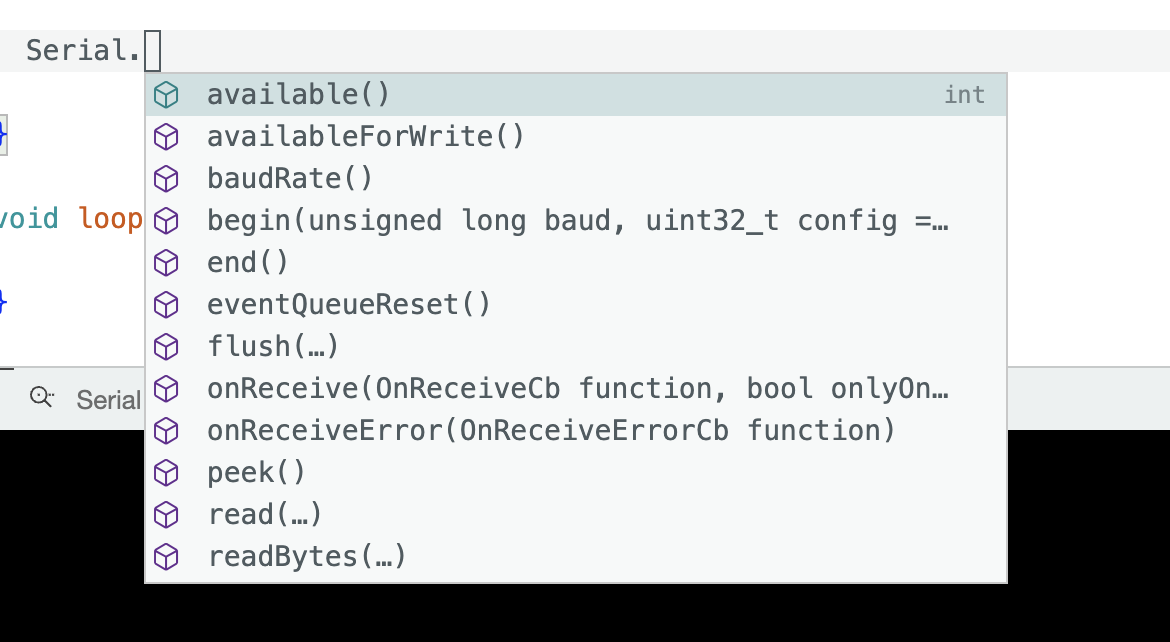

Sometimes the 'hints' (not sure what they are called) does not show see pic 1 and sometimes they do. Is that somehow connected to pic 2? If not, what is pic 2, and why don't hints always work?
In the first picture you are showing that you have written Serial.
and so these "hints" or auto completes have something to contribute. It is all the options you can have with a Serial. beginning.
Without any beginning it has nothing to contribute.
The term used for this feature is "Suggest". It is also sometimes referred to as "Suggestion".
Yes. The "IntelliSense" features like Suggest rely on a complete understanding of the sketch program, core, and toolchain. This requires processing all the code files, after every change to the sketch. The "indexing" you see on the Arduino IDE status bar is an indicator of the progress of that processing.
Perhaps because the processing hasn't finished?
Perhaps because you have selected a board that doesn't have "IntelliSense" support?
Do you have the "Editor Quick Suggestions" preference enabled? When you have that enabled, the Suggest interface only appears if there are suggestions available. So it is not expected to appear in other cases. But if you are instead manually triggering Suggest (either via the keyboard shortcut or the "Trigger Suggest" command) then you should at least see and empty Suggest interface appear with the text "No suggestions."
The "IntelliSense" features only work for objects from a library after one of these events occurs following the time of the addition of the #include directive for a library's header file in a sketch:
So it is expected that you won't see suggestions for objects from libraries during the time before one of those events have occurred.
Yes, I know that, I was asking why sometimes they don't appear.
Did not know some boards did not have IntelliSense support. Yes I have Editor Quick Suggestions enabled. Did not know about the keyboard shortcut either, thanks.
I personally prefer to use the keyboard shortcut to get Suggest on demand rather than having it pop up automatically as is done when you have the "Editor Quick Suggestions" preference enabled. The reason is that it is often more efficient for me to just type the code instead of using the Suggest interface and I find it distracting to have things popping up while I'm writing code. But in cases where I don't remember the exact name of an object the feature is very useful.
I always did not like it popping up, now that I know the keyboard shortcut I am turning off the preferences.
This topic was automatically closed 180 days after the last reply. New replies are no longer allowed.