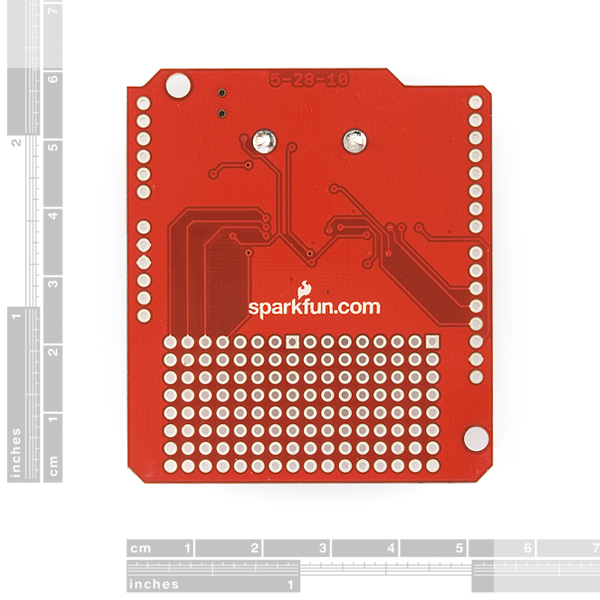
Sparkfun USB Host Shield working with oleg USB Host Shield 2.0

Sudar:
Can you post a picture?

Also was there any model number of something written anywhere in the package on in the PCB?

Also did you try adding an external power source?

Thanks for replying.

I attached the picture.
On the back it says 5-28-10.

I soldered the headers myself. It's my first time soldering so I don't know if the connections are good or if I burnt some lines printed on the PCB.

I did not try adding an external power source. How do I do that?

QFAN:
On the back it says 5-28-10.

It is the updated one. You can find the product page at SparkFun USB-C Host Shield - DEV-21247 - SparkFun Electronics and this is the image https://dlnmh9ip6v2uc.cloudfront.net/images/products/9/9/4/7/09947-03b.jpg

QFAN:
I soldered the headers myself. It's my first time soldering so I don't know if the connections are good or if I burnt some lines printed on the PCB.

Well checkout for any dry solder. I had a dry solder when I first tried a host shield.

QFAN:
I did not try adding an external power source. How do I do that?

Power up Arduino using an external power supply.

Sudar:

QFAN:
On the back it says 5-28-10.

It is the updated one. You can find the product page at SparkFun USB-C Host Shield - DEV-21247 - SparkFun Electronics and this is the image https://dlnmh9ip6v2uc.cloudfront.net/images/products/9/9/4/7/09947-03b.jpg

QFAN:
I soldered the headers myself. It's my first time soldering so I don't know if the connections are good or if I burnt some lines printed on the PCB.

Well checkout for any dry solder. I had a dry solder when I first tried a host shield.

QFAN:
I did not try adding an external power source. How do I do that?

Power up Arduino using an external power supply.

Checked with multimeter, pins seem to have good connections to corresponding test points shown on design file USBHostShield-v13.brd.

I also added external battery pack (5*AA) so I get 5.8V at Vin with rechargeable and 7V with alkaline.

The test still fails with the same error Value written: 01 read: 00.

Sudar:
It is the updated one. You can find the product page at SparkFun USB-C Host Shield - DEV-21247 - SparkFun Electronics and this is the image https://dlnmh9ip6v2uc.cloudfront.net/images/products/9/9/4/7/09947-

Thanks, I hv updated on the first page on the new product revision from Sparkfun so that others will find it easily...

QFAN:
The test still fails with the same error Value written: 01 read: 00.

Is this the loopback test? If yes then you can skip it.

Also the library is not officially compatible with the Sparkfun shield.

Sudar:

QFAN:
The test still fails with the same error Value written: 01 read: 00.

Is this the loopback test? If yes then you can skip it.

Also the library is not officially compatible with the Sparkfun shield.

Yes, but since the library cannot Init successfully, skipping the test doesn't help.

Still, I can't tell if it's the problem of wrong library or I have a defective card. Probably I should start reading the manual of the actual chip used and try to start from there.

=(
EDIT: previously got a bug in my test code. Now the new code and result...

_
I checked the max3421e.pdf and MAX3421E Programming Guide (AN3785.pdf).

WIth the Usb component from the usblib2, I did the following test:

  Serial.begin( 115200 );
  Serial.println("Start");

  uint8_t tmpbyte = Usb.regRd( rREVISION );
  print_hex(tmpbyte, 8);
  
  Serial.println("rUSBIRQ");

  tmpbyte = Usb.regRd(rMODE);
  Serial.print("Mode:");
  print_hex(tmpbyte,8); Serial.println();
  tmpbyte = tmpbyte | bmHOST;
  Serial.print("Setting Mode To:");
  print_hex(tmpbyte,8); Serial.println();
  Usb.regWr( rMODE, tmpbyte );
  
  Serial.print("Mode is now:");
  tmpbyte = Usb.regRd(rMODE);
  print_hex(tmpbyte,8);
  Serial.println();
  
  Usb.regWr( rUSBIEN, bmOSCOKIE );
  Usb.regWr( rUSBIRQ, bmOSCOKIE );
  
    uint16_t i = 0;
  Usb.regWr( rUSBCTL, 0x20 );
  Usb.regWr( rUSBCTL, 0x00 );
  
  tmpbyte = Usb.regRd(rMODE);
  Serial.print("Mode:");
  print_hex(tmpbyte,8); Serial.println();
  tmpbyte = tmpbyte | bmHOST;
  Serial.print("Setting Mode To:");
  print_hex(tmpbyte,8); Serial.println();
  Usb.regWr( rMODE, tmpbyte );
  
  
  Serial.print("Mode is now:");
  tmpbyte = Usb.regRd(rMODE);
  print_hex(tmpbyte,8);
  Serial.println();
  
  Serial.println("haha:[");
  tmpbyte = Usb.regRd( rREVISION );
  print_hex(tmpbyte, 8);
  Serial.println("]");


  while( ++i<10 ) 
  {
    tmpbyte = Usb.regRd( rUSBIRQ );
    print_hex(tmpbyte, 8);
    Serial.println();
  }
  
  
  Serial.println("END");

The result:

Start
13rUSBIRQ
Mode:00
Setting Mode To:01
Mode is now:00
Mode:00
Setting Mode To:01
Mode is now:00
haha:[
13]
00
00
00
00
00
00
00
00
00
END

What I found:

  • I cannot write to register (for example, MODE).

I have a 7.7V external power connected, which measures 6.8V at the Vin pin. Do I need higher external power voltage?

I hav'nt read all the thread posts but have you put the link mentioned previously on the board ?

I also now solved my connection problems by wiring the RST - D7 connection, it was literally the missing link for me

This is needed to run Olegs code on that board

Hey,

I have a couple of things I had ask to about the integration of my USB Barcode Scanner to the Arduino Mega 2560.

This is what I have done so far:

  1. Placed my Sparkfun USB Hostshield onto my Mega
  2. Jumpered RST to D7
  3. Changed the following in Usb.h

// typedef MAX3421e<P10, P9> MAX3421E; // Official Arduinos (UNO, Duemilanove, Mega, 2560 <<--- Modified line
typedef MAX3421e<P53, P9> MAX3421E; // Official Arduinos (UNO, Duemilanove, Mega, 2560

However, I still end up with the following result when I run it:

Circuits At Home 2011
USB Host Shield Quality Control Routine
Reading REVISION register... Die revision invalid. Value returned: 00
Unrecoverable error - test halted!!
0x55 pattern is transmitted via SPI
Press RESET to restart test

I really do not what else needs to be done.

Any help will be appreciated

Just a little UP !

Hi everyone !

I got the same problem as many. I got the revised USB Host Shield by Sparkfun and got errors on the board test. I tried the jumper D7 to reset trick and it didnt worked with and without external power. I dont know what to do next. Thanks.

hi guys,

I know this is a long time but I have the same issue and spent weeks trying to resolve it as I need it for my project. I am trying to get the hub_demo example to work as I want to connect a USB hub to my shield but it's not working.
I have jumpered D7 to RST and also used a seperate power supply for the Arduino and hub but still no result. I need help urgently, please.

Clement

Hi everyone. I try to deal with HID devices and library USB_Host_Library 2. I connect a keyboard with a touchpad and run the example USBHIDBootKbdAndMouse. The keyboard works, the touchpad doesn't. What could be the problem?