Stair Lights with PIR at either end

Hello!

I'm creating stair lights with the goal of having the lights triggered whether someone is going up or down the stairs, so I need 2 PIR to be able to trigger the LED strip lights. I've been able to get things working with one PIR, but the 2nd won't trigger the lights.

#include <FastLED.h>
#define NUM_LEDS 191
#define DATA_PIN 2
#define COLOR_ORDER GRB
#define CHIPSET WS2812B
#define BRIGHTNESS 60
#define VOLTS 5
#define MAX_AMPS 500
#define MOTION_SENSOR_1_PIN 12  // Arduino pin connected to the OUTPUT pin of motion sensor
#define MOTION_SENSOR_2_PIN 11

int motion_state = LOW;       // current  state of motion sensor's pin
int motion_state_2 = LOW; 
int prev_motion_state = LOW;  // previous state of motion sensor's pin

CRGB leds[NUM_LEDS];


void setup() {
  
FastLED.addLeds<CHIPSET,DATA_PIN,COLOR_ORDER>(leds,NUM_LEDS);
FastLED.setMaxPowerInVoltsAndMilliamps(VOLTS,MAX_AMPS);
FastLED.setBrightness(BRIGHTNESS);
pinMode(MOTION_SENSOR_1_PIN, INPUT);  // set arduino pin to input mode
pinMode(MOTION_SENSOR_2_PIN, INPUT);
}

void loop() {
  prev_motion_state = motion_state;               // store old state
  motion_state = digitalRead(MOTION_SENSOR_1_PIN);  // read new state
  motion_state_2 = digitalRead(MOTION_SENSOR_2_PIN);
  
  if (prev_motion_state == LOW && motion_state == HIGH) {  // pin state change: LOW -> HIGH
    Serial.println("Motion detected!");
    // turn on the led strip
    
    for (int i=0; i<NUM_LEDS; i++) {
    leds[i] = CRGB::White;
    FastLED.show();
    delay(10);
    
  }

  } else if (prev_motion_state == HIGH && motion_state == LOW) {  // pin state change: HIGH -> LOW
    Serial.println("Motion stopped!");
    FastLED.clear();
    FastLED.show();
  }

if (prev_motion_state == LOW && motion_state_2 == HIGH) {  // pin state change: LOW -> HIGH
    Serial.println("Motion detected!");
    // turn on the led strip
    
    for (int i=NUM_LEDS; i<0; i--) {
    leds[i] = CRGB::White;
    FastLED.show();
    delay(10);
    
  }

  } else if (prev_motion_state == HIGH && motion_state == LOW) {  // pin state change: HIGH -> LOW
    Serial.println("Motion stopped!");
    FastLED.clear();
    FastLED.show();
  }

}

Any help would be greatly appreciated!

I think you want to also keep track of the previous motion state of the second sensor in addition to the first.

Also

  if (prev_motion_state == LOW && motion_state_2 == HIGH) {  // pin state change: LOW -> HIGH
    Serial.println("Motion detected!");
    // turn on the led strip

    for (int i = NUM_LEDS; i < 0; i--) {
      leds[i] = CRGB::White;
      FastLED.show();
      delay(10);

    }

  } else if (prev_motion_state == HIGH && motion_state == LOW) {  // pin state change: HIGH -> LOW
    Serial.println("Motion stopped!");
    FastLED.clear();
    FastLED.show();
  }

shouldn't the else if clause here be motion_state_2?

How do you differentiate between two people one going up the other going down or the person that changes there mind and returns to there starting point. I would consider using two sensors on each end to determine what direction the person is going.

Your title is misleading.

Stair Lights with a PIR at each end

is unambiguous.

So is your title, really, except it is wrong. Unless you mean you have four PIR modules.

a7

The direction doesn't matter since the delay for the lights to turn off will be long enough for someone to get down the stairs, so in most cases if the sensor at the bottom of the strip is tripped, the person is going up the stairs, and vice versa.

Thank you for the correction.

I made those updates, but I'm still not getting any activity from the 2nd sensor.

input pullups perhaps...??
Is there any delay on pir relay reclosure or does it flicker on and off like a demented fluro..??

Good question. Is it a bare sensor or a module. I think most of the modules have a jumper that changes the triggering behavior, as well as two pots that change the delay before retriggering and PIR sensitivity

It’s a module. Both Distance pot is set to minimum and delay pot set to almost minimum, so those shouldn’t be a factor. Jumper is set to repeatable. The first PIR works without an issue.

.....except that it could be.

............ and the pullups...??

prev_motion_state doesn't store data for the second sensor, I'd suggest a prev_motion_state2.

the PIR sensors output a high pulse when it senses movement, so we'd need to pull the pin down, not up.
an external 10k resistor should do fine for OP, but might not be required.

I'm in transit, but I suggest to @hymiepie that she run the IDE Auto Format tool on the sketch.

It's hard to see if the gross structure is correct, and since

we have no idea what you are talking about. You changed things, but how do we know you did it correctly? You can't just say "I did this and that", it's fraught and also means we all have to do it right ourselves.

New sketch, new post with the code and exactly how it does not work, still.

It looks like some misplaced { braces } in the original code. Altering the intended flow.

a7

Another real good habit is to be more verbose.

Instead of two places where you can print

		Serial.println("Motion detected!");

go an extra step and write

		Serial.println("Motion detected at sensor one (top)!");

and similar with all printing.

Here

  motion_state = digitalRead(MOTION_SENSOR_1_PIN);  // read new state
  motion_state_2 = digitalRead(MOTION_SENSOR_2_PIN);

Immediately print out the sensor readings. You may get a surprise.

a7

1 Like

Some things to try. Change the pin definitions ie swap them. If that moves the problem it is software. If not change them back and validate it is the same. If so then switch inputs electrically. If that moves the problem it is the sensor.

You have a slight difference in the "PIR2" routine. I copied PIR1 and pasted it over PIR2, then gave PIR1 its own "previous" and PIR2 its own "previous" and #2 worked just as good as #1.

Files for Wokwi.com

sketch.ino
#include <FastLED.h>
#define NUM_LEDS 191
#define DATA_PIN 2
#define COLOR_ORDER GRB
#define CHIPSET WS2812B
#define BRIGHTNESS 60
#define VOLTS 5
#define MAX_AMPS 500
#define MOTION_SENSOR_1_PIN 12  // Arduino pin connected to the OUTPUT pin of motion sensor
#define MOTION_SENSOR_2_PIN 11
int motion_state_1 = LOW;       // current  state of motion sensor's pin
int motion_state_2 = LOW;
int prev_motion_state_1 = LOW;  // previous state of motion sensor's pin
int prev_motion_state_2 = LOW;  // previous state of motion sensor's pin
CRGB leds[NUM_LEDS];

void setup() {
  Serial.begin(115200);
  FastLED.addLeds<CHIPSET, DATA_PIN, COLOR_ORDER>(leds, NUM_LEDS);
  FastLED.setMaxPowerInVoltsAndMilliamps(VOLTS, MAX_AMPS);
  FastLED.setBrightness(BRIGHTNESS);
  pinMode(MOTION_SENSOR_1_PIN, INPUT);  // set arduino pin to input mode
  pinMode(MOTION_SENSOR_2_PIN, INPUT);
}

void loop() {
  prev_motion_state_1 = motion_state_1;               // store old state
  prev_motion_state_2 = motion_state_2;               // store old state
  motion_state_1 = digitalRead(MOTION_SENSOR_1_PIN);  // read new state
  motion_state_2 = digitalRead(MOTION_SENSOR_2_PIN);

  if (prev_motion_state_1 == LOW && motion_state_1 == HIGH) {  // pin state change: LOW -> HIGH
    Serial.println("Motion (1) detected!");
    // turn on the led strip
    for (int i = 0; i < NUM_LEDS; i++) {
      leds[i] = CRGB::White;
      FastLED.show();
      delay(10);
    }
  } else if (prev_motion_state_1 == HIGH && motion_state_1 == LOW) {  // pin state change: HIGH -> LOW
    Serial.println("Motion (1) stopped!");
    FastLED.clear();
    FastLED.show();
  }

  if (prev_motion_state_2 == LOW && motion_state_2 == HIGH) {  // pin state change: LOW -> HIGH
    Serial.println("Motion (2) detected!");
    // turn on the led strip
    for (int i = 0; i < NUM_LEDS; i++) {
      leds[i] = CRGB::White;
      FastLED.show();
      delay(10);
    }
  } else if (prev_motion_state_2 == HIGH && motion_state_2 == LOW) {  // pin state change: HIGH -> LOW
    Serial.println("Motion (2) stopped!");
    FastLED.clear();
    FastLED.show();
  }
}
diagram.json
{
  "version": 1,
  "author": "Anonymous maker",
  "editor": "wokwi",
  "parts": [
    { "type": "wokwi-arduino-nano", "id": "nano", "top": -52.8, "left": 66.7, "attrs": {} },
    {
      "type": "wokwi-neopixel-matrix",
      "id": "ring1",
      "top": -294,
      "left": -61.56,
      "attrs": { "pixleate": "1", "rows": "10", "cols": "19" }
    },
    {
      "type": "wokwi-pir-motion-sensor",
      "id": "pir1",
      "top": -64.92,
      "left": -33.9,
      "rotate": 270,
      "attrs": {}
    },
    {
      "type": "wokwi-pir-motion-sensor",
      "id": "pir2",
      "top": -65.48,
      "left": 250.1,
      "rotate": 90,
      "attrs": {}
    }
  ],
  "connections": [
    [ "ring1:VCC", "nano:5V.2", "red", [ "v0" ] ],
    [ "ring1:GND", "nano:GND.3", "black", [ "v0" ] ],
    [ "ring1:DIN", "nano:2", "green", [ "v0" ] ],
    [ "pir1:OUT", "nano:12", "green", [ "v2.42", "h49.72" ] ],
    [ "pir1:GND", "nano:GND.3", "black", [ "h0" ] ],
    [ "pir1:VCC", "nano:5V.2", "red", [ "h0" ] ],
    [ "pir2:VCC", "nano:5V.2", "red", [ "h-9.6", "v19.2" ] ],
    [ "pir2:GND", "nano:GND.3", "black", [ "h-19.2", "v-19.46" ] ],
    [ "pir2:OUT", "nano:11", "green", [ "h0" ] ]
  ],
  "dependencies": {}
}
libraries.txt
# Wokwi Library List
# See https://docs.wokwi.com/guides/libraries

# Automatically added based on includes:
FastLED

1 Like

I've updated the code using all suggestions above, including auto format.

#include <FastLED.h>
#define NUM_LEDS 191
#define DATA_PIN 2
#define COLOR_ORDER GRB
#define CHIPSET WS2812B
#define BRIGHTNESS 60
#define VOLTS 5
#define MAX_AMPS 500
#define MOTION_SENSOR_1_PIN 12  // Arduino pin connected to the OUTPUT pin of motion sensor
#define MOTION_SENSOR_2_PIN 11

int motion_state_1 = LOW;       // current  state of motion sensor's pin
int motion_state_2 = LOW;
int prev_motion_state_1 = LOW;  // previous state of motion sensor's pin
int prev_motion_state_2 = LOW;

CRGB leds[NUM_LEDS];


void setup() {

  FastLED.addLeds<CHIPSET, DATA_PIN, COLOR_ORDER>(leds, NUM_LEDS);
  FastLED.setMaxPowerInVoltsAndMilliamps(VOLTS, MAX_AMPS);
  FastLED.setBrightness(BRIGHTNESS);
  pinMode(MOTION_SENSOR_1_PIN, INPUT);  // set arduino pin to input mode
  pinMode(MOTION_SENSOR_2_PIN, INPUT);
}

void loop() {
  prev_motion_state_1 = motion_state_1;
  prev_motion_state_2 = motion_state_2; // store old state
  motion_state_1 = digitalRead(MOTION_SENSOR_1_PIN);  // read new state
  motion_state_2 = digitalRead(MOTION_SENSOR_2_PIN);

  if (prev_motion_state_1 == LOW && motion_state_1 == HIGH) {  // pin state change: LOW -> HIGH
    Serial.println("Motion detected at sensor one (top)!");
    // turn on the led strip

    for (int i = 0; i < NUM_LEDS; i++) {
      leds[i] = CRGB::White;
      FastLED.show();
      delay(10);

    }

  } else if (prev_motion_state_1 == HIGH && motion_state_1 == LOW) {  // pin state change: HIGH -> LOW
    Serial.println("Motion stopped!");
    FastLED.clear();
    FastLED.show();
  }

  if (prev_motion_state_2 == LOW && motion_state_2 == HIGH) {  // pin state change: LOW -> HIGH
    Serial.println("Motion detected at sensor two (bottom)!");
    // turn on the led strip

    for (int i = NUM_LEDS; i < 0; i--) {
      leds[i] = CRGB::White;
      FastLED.show();
      delay(10);

    }

  } else if (prev_motion_state_2 == HIGH && motion_state_2 == LOW) {  // pin state change: HIGH -> LOW
    Serial.println("Motion stopped!");
    FastLED.clear();
    FastLED.show();
  }

}


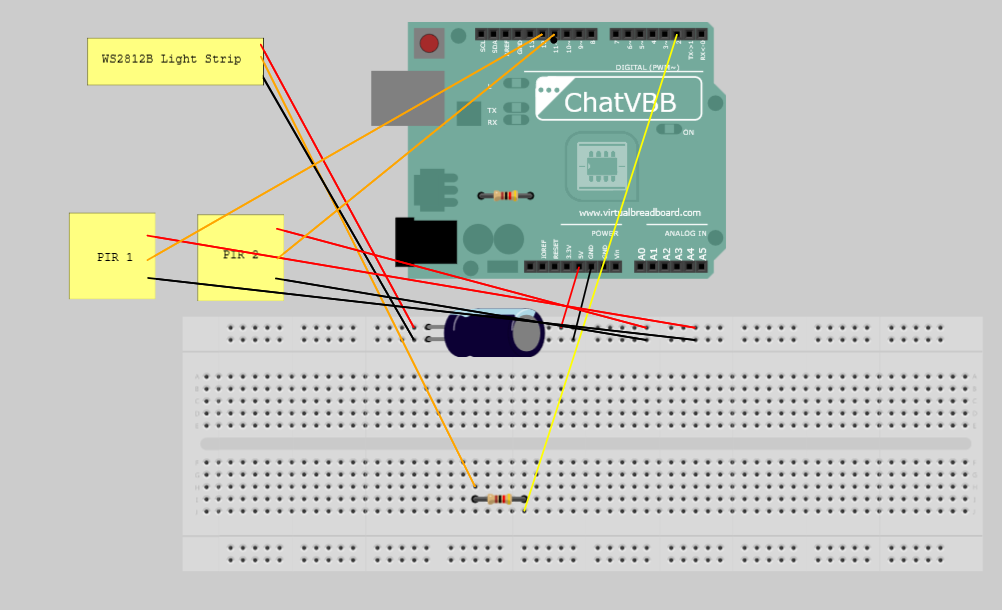
I'm also including a current hardware layout:

For some reason, i'm not getting anything in the serial monitor though.

You must have Serial.begin(your baud rate); to initialize serial communications.

Did you understand my previous post about "copy/paste #1" and renumber the second one, and everything works?

I thought you meant to copy/paste the first "if" statement over the 2nd and renumber. I copied your code and put it in and both are now being detected in the serial monitor. However, i wanted the 2nd PIR to cause the lights to run (decrement), and when I update the code to do that, the PIR is detected but the lights don't appear.

#include <FastLED.h>
#define NUM_LEDS 191
#define DATA_PIN 2
#define COLOR_ORDER GRB
#define CHIPSET WS2812B
#define BRIGHTNESS 60
#define VOLTS 5
#define MAX_AMPS 500
#define MOTION_SENSOR_1_PIN 12  // Arduino pin connected to the OUTPUT pin of motion sensor
#define MOTION_SENSOR_2_PIN 11
int motion_state_1 = LOW;       // current  state of motion sensor's pin
int motion_state_2 = LOW;
int prev_motion_state_1 = LOW;  // previous state of motion sensor's pin
int prev_motion_state_2 = LOW;  // previous state of motion sensor's pin
CRGB leds[NUM_LEDS];

void setup() {
  Serial.begin(115200);
  FastLED.addLeds<CHIPSET, DATA_PIN, COLOR_ORDER>(leds, NUM_LEDS);
  FastLED.setMaxPowerInVoltsAndMilliamps(VOLTS, MAX_AMPS);
  FastLED.setBrightness(BRIGHTNESS);
  pinMode(MOTION_SENSOR_1_PIN, INPUT);  // set arduino pin to input mode
  pinMode(MOTION_SENSOR_2_PIN, INPUT);
}

void loop() {
  prev_motion_state_1 = motion_state_1;               // store old state
  prev_motion_state_2 = motion_state_2;               // store old state
  motion_state_1 = digitalRead(MOTION_SENSOR_1_PIN);  // read new state
  motion_state_2 = digitalRead(MOTION_SENSOR_2_PIN);

  if (prev_motion_state_1 == LOW && motion_state_1 == HIGH) {  // pin state change: LOW -> HIGH
    Serial.println("Motion (1) detected!");
    // turn on the led strip
    for (int i = 0; i < NUM_LEDS; i++) {
      leds[i] = CRGB::White;
      FastLED.show();
      delay(10);
    }
  } else if (prev_motion_state_1 == HIGH && motion_state_1 == LOW) {  // pin state change: HIGH -> LOW
    Serial.println("Motion (1) stopped!");
    FastLED.clear();
    FastLED.show();
  }

  if (prev_motion_state_2 == LOW && motion_state_2 == HIGH) {  // pin state change: LOW -> HIGH
    Serial.println("Motion (2) detected!");
    // turn on the led strip
    for (int i = NUM_LEDS; i < 0; i--) {
      leds[i] = CRGB::White;
      FastLED.show();
      delay(10);
    }
  } else if (prev_motion_state_2 == HIGH && motion_state_2 == LOW) {  // pin state change: HIGH -> LOW
    Serial.println("Motion (2) stopped!");
    FastLED.clear();
    FastLED.show();
  }
}

I was able to correct the < to > in the decrement line, and now it's working.

Thank you everyone for your help!

1 Like