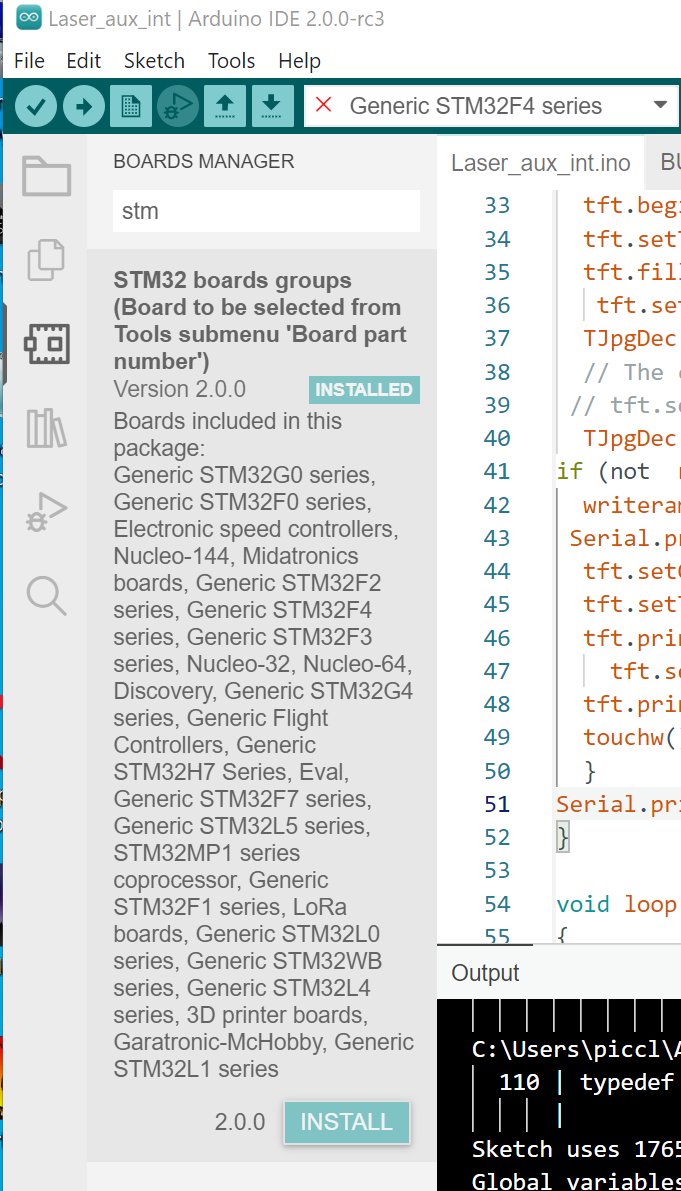
Generic F401CC board can is not be selected for compile. The Tools - boards menu shows the correct list of boards, and they can be selected. But when compiling only the board at the top of the list is used resulting in :
I have tried and removed the adding the stm url to the boards manager to no effect.
This makes the IDE unuseable for me.
Best Regards
picclock
I have managed to resolve this issue, but its a bit strange, possibly a boards library problem.
Clicking install on the STM board definitions resolved the issue.
So to sum up the bug is that the board option and selection in the tools menu is displayed even when the library is not installed.
Further investigation shows that when the Preferences url is set (https://raw.githubusercontent.com/stm32duino/BoardManagerFiles/main/package_stmicroelectronics_index.json ) this disables the the inbuilt board selection whilst leaving it to be selectable.
As you can see it installed (not), and yet offers to install below.
Hope this helps some other bewildered user.
Best Regards
picclock
Hi @picclock . Thanks so much for your report!
It took me a while to track down the cause of this confusing bug, but I finally got it. I have reported it to Arduino's developers here:
opened 03:04AM - 05 Jan 22 UTC
closed 01:05PM - 02 Aug 22 UTC
conclusion: resolved
topic: code
type: imperfection
topic: gRPC
## Describe the bug
The Arduino boards platform system offers a [custom board… options](https://arduino.github.io/arduino-cli/dev/platform-specification/#custom-board-options) capability. The platform properties associated with a given option are defined only when that option is selected (e.g., `arduino:avr:nano:cpu=atmega328old` or **Tools > Processor > ATmega328P (Old Bootloader)**).
Because the properties defined in [`boards.txt`](https://arduino.github.io/arduino-cli/dev/platform-specification/#boardstxt) override those in [`platform.txt`](https://arduino.github.io/arduino-cli/dev/platform-specification/#platformtxt), default property definitions are often made in `platform.txt`. This allows non-default property definitions to be made only for those board configurations that need it. A prominent example of this practice is the `build.extra_flags` property (e.g., [here](https://github.com/arduino/ArduinoCore-avr/blob/1.8.4/platform.txt#L39-L40)).
:bug: If a property was defined in a custom board option of a board previously compiled for, that board option associated definition persists into subsequent compilations with another board option selection that does not define the property.
## To Reproduce
### Set up
1. Download this [`boards.local.txt`](https://arduino.github.io/arduino-cli/dev/platform-specification/#boardslocaltxt) file: [boards.local.txt](https://github.com/arduino/arduino-cli/files/7811762/boards.local.txt)
This file defines a `some_menu` custom board option for the `arduino:avr:uno` board.
<details>
<summary>Click to see file contents</summary>
```
menu.some_menu=Some Custom Menu
uno.menu.some_menu.bad=Bad Option
uno.menu.some_menu.bad.build.extra_flags=-bad-build-extraflags
uno.menu.some_menu.bad.compiler.cpp.extra_flags=-bad-compiler-cpp-extraflags
uno.menu.some_menu.good=Good Option
uno.menu.some_menu.good.compiler.cpp.extra_flags=-DGOOD_COMPILER_CPP_EXTRA_FLAGS
```
</details>
1. Put the `boards.local.txt` file in the `arduino:avr` boards platform installation folder (e.g., `~/.arduino15/packages/arduino/hardware/avr/1.8.4/`)
### Demo for Arduino IDE 2.x
1. Quit the IDE if it is running.
1. Delete the configuration folder:
- Windows:
```
C:\Users\<user name>\AppData\Roaming\arduino-ide\
```
- Linux:
```
~/.config/arduino-ide/
```
- macOS:
```
~/Library/Application Support/arduino-ide/
```
This is necessary due to a bug in the Arduino IDE that causes it to not recognize new board options (variant of `https://github.com/arduino/arduino-ide/issues/591`)
1. Start the Arduino IDE.
1. Select **File > Preferences...** from the Arduino IDE menus.
1. Check the box next to "**Show verbose output during ☐ compile**".
(This is done only so you can see the flags added to the compilation commands by the custom board option properties.)
1. Click the <kbd>OK</kbd> button.
1. Select **Tools > Board > Arduino AVR Boards > Arduino Uno** from the Arduino IDE menus.
1. Select **Tools > Some Custom Menu > Good Option** from the Arduino IDE menus.
1. Select **Sketch > Verify/Compile** from the Arduino IDE menus.
1. Wait for compilation to finish.
:bug: Compilation fails unexpectedly:
```
avr-g++: error: unrecognized command line option '-bad-build-extraflags'
```
Note that the flag that caused the compilation failure is only defined via the `build.extra_flags` property of the **Tools > Some Custom Menu > Bad Option** custom board option. The expected behavior would be that [the default empty property definition from `platform.txt`](https://github.com/arduino/ArduinoCore-avr/blob/1.8.4/platform.txt#L40) be used instead.
---
Note that the compilation commands do contain the expected `-DGOOD_COMPILER_CPP_EXTRA_FLAGS` flag which was defined via the `compiler.cpp.extra_flags` property of the **Tools > Some Custom Menu > Good Option** custom board option, which proves that option was used:
```
Detecting libraries used...
"C:\\Users\\per\\AppData\\Local\\Arduino15\\packages\\arduino\\tools\\avr-gcc\\7.3.0-atmel3.6.1-arduino7/bin/avr-g++" -c -g -Os -w -std=gnu++11 -fpermissive -fno-exceptions -ffunction-sections -fdata-sections -fno-threadsafe-statics -Wno-error=narrowing -flto -w -x c++ -E -CC -mmcu=atmega328p -DF_CPU=16000000L -DARDUINO=10607 -DARDUINO_AVR_UNO -DARDUINO_ARCH_AVR -DGOOD_COMPILER_CPP_EXTRA_FLAGS -bad-build-extraflags "-IC:\\Users\\per\\AppData\\Local\\Arduino15\\packages\\arduino\\hardware\\avr\\1.8.4\\cores\\arduino" "-IC:\\Users\\per\\AppData\\Local\\Arduino15\\packages\\arduino\\hardware\\avr\\1.8.4\\variants\\standard" "C:\\Users\\per\\AppData\\Local\\Temp\\arduino-sketch-762B53F80F856C25998A7E9799EC2C98\\sketch\\sketch_jan4a.ino.cpp" -o nul
```
---
This behavior is extra confusing since the erroneous property definition could only have been produced by a compilation for the **Tools > Some Custom Menu > Bad Option** custom board option, but no compilation was initiated for that option in this demo. The explanation is that the Arduino IDE automatically compiled for that option as soon as you selected the Arduino Uno board in order to generate the language server data.
### Demo for Arduino CLI
1. Use the gRPC interface to [Create](https://arduino.github.io/arduino-cli/dev/rpc/commands/#createrequest) and [Init](https://arduino.github.io/arduino-cli/dev/rpc/commands/#initrequest) an "Arduino Core" instance.
1. Use that instance to compile any valid sketch (e.g., `arduino-cli sketch new`) for `arduino:avr:uno:some_menu=bad`
:slightly_smiling_face: The compilation fails as expected due to the invalid compiler flags specified by this board option configuration:
```
avr-g++: error: unrecognized command line option '-bad-compiler-cpp-extraflags'
avr-g++: error: unrecognized command line option '-bad-build-extraflags'
```
1. Use that instance to compile any valid sketch for `arduino:avr:uno:some_menu=good`
:bug: Compilation fails unexpectedly:
```
avr-g++: error: unrecognized command line option '-bad-build-extraflags'
```
## Expected behavior
Property definitions from previous compilations should not be persistent.
## Desktop
- OS: Windows 10
- Version: git-snapshot Commit: 60c1c98e Date: 2022-01-05T01:37:22Z
## Additional context
Originally reported at https://forum.arduino.cc/t/stm32f-board-will-not-select/941102
Although I demonstrated the issue via a minimal contrived platform configuration, the report was from a user of [the `STMicroelectronics:stm32` ("STM32Duino") boards platform](https://github.com/stm32duino/Arduino_Core_STM32), which provides a real world occurrence of this bug. You can reproduce it using that platform via the following instructions:
<details>
<summary>Click to see instructions</summary>
1. Start the Arduino IDE.
1. Select **File > Preferences** from the Arduino IDE menus.
1. Add the following URL:
```
https://github.com/stm32duino/BoardManagerFiles/raw/main/package_stmicroelectronics_index.json
```
1. Click the <kbd>OK</kbd> button.
1. Select **File > Quit** from the Arduino IDE menus.
(this is necessary due to the unrelated bug `https://github.com/arduino/arduino-ide/issues/637`)
1. Start the Arduino IDE.
1. Select **File > New** from the Arduino IDE menus.
1. Use Boards Manager to install the "**STM32 MCU based boards**" platform.
1. Select **Tools > Board > STM32 MCU based boards > Generic STM32F4 series**" from the Arduino IDE menus.
1. Select **Tools > Board part number > Generic F401CCYx**" from the Arduino IDE menus.
(This particular board configuration is selected arbitrarily for the demo. Other board configurations in this platform are also affected by the bug.)
1. Select **Sketch > Verify/Compile** from the Arduino IDE menus.
:bug: Compilation fails unexpectedly:
```
<command-line>: fatal error: variant_BLACK_F407VX.h: No such file or directory
```
This error is caused by a property definition from another option of the "Board part number" menu than the "Generic F401CCYx" option that was selected:
https://github.com/stm32duino/Arduino_Core_STM32/blob/2.2.0/boards.txt#L2117
The "Generic F401CCYx" option that was selected does not define the property:
https://github.com/stm32duino/Arduino_Core_STM32/blob/2.2.0/boards.txt#L2270-L2276
so the default definition should have been used:
https://github.com/stm32duino/Arduino_Core_STM32/blob/2.2.0/platform.txt#L56
</details>
---
Another sighting of this bug here:
https://forum.arduino.cc/t/problems-with-megatinycore-in-ide-2/959081
system
July 4, 2022, 3:07am
4
This topic was automatically closed 180 days after the last reply. New replies are no longer allowed.