Thanks. As I said, the button code seems to be working as it should now.. Just need to make sure this code doesn't cause delays (and therefore stepping) on receiving the MIDI Control Change from the Expression Pedal. I will do that in a while.
I do like the way this code flows, when using it in different functions. I have another project that was greatly simplified when I changed its switching code to this one. It saved loads of Kb on a processor that was basically full
But if you want to know what this code is for, and what the buttons do, here is a little video I made a couple days ago.
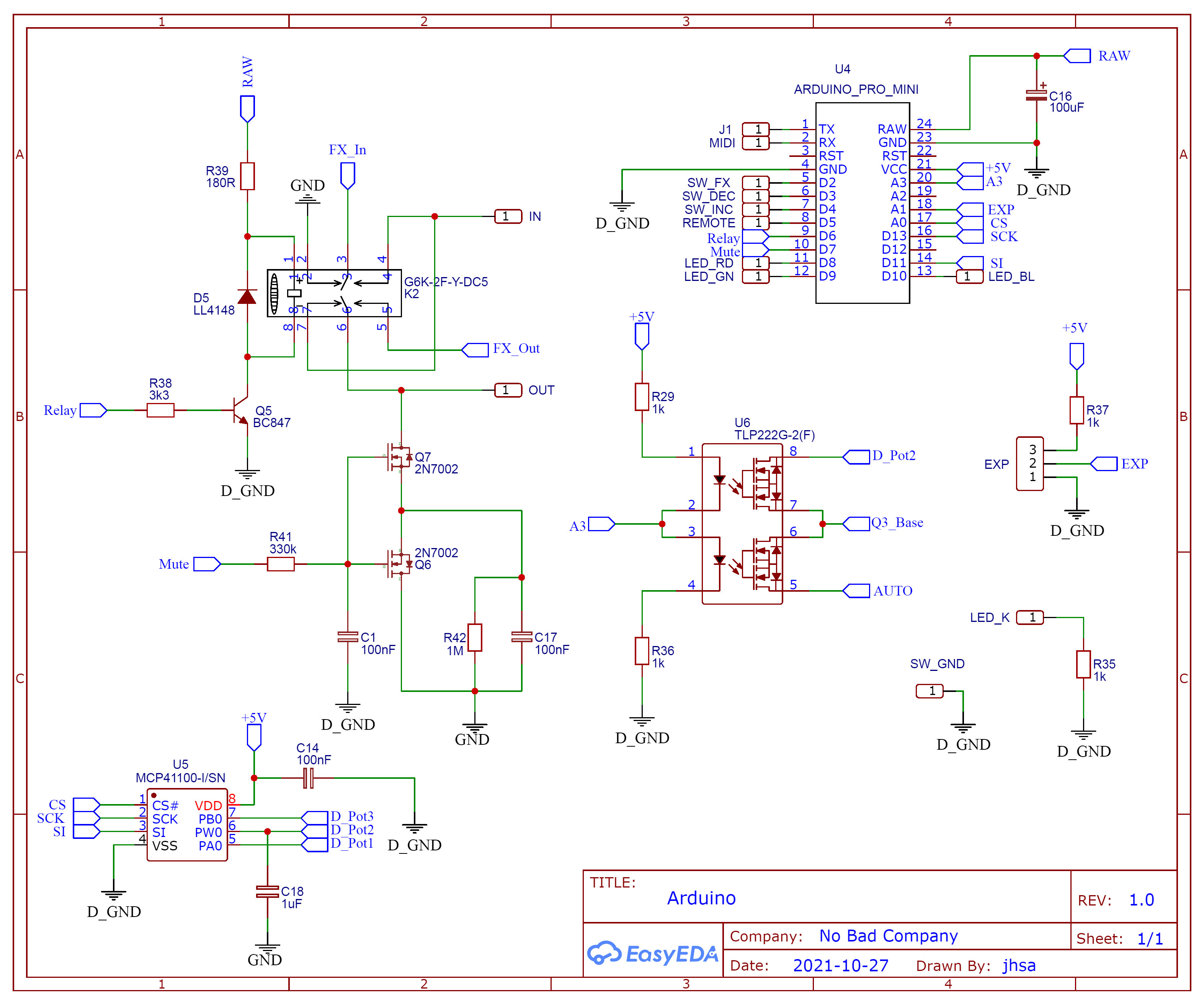
And if you want to try it, here is the schematic of the digital part of my project. The rest is just audio, not relevant for this problem.
The LED is RGB with common Cathode. You can replace the relay with an LED, and the dual optocoupler (Which works as a solid state relay, you could replace with 2 LEDs. There are 3 Buttons and one remote input, which is treated just like a button by the code. the effect will be ON whenever this remote input is LOW and OFF whenever is HIGH.
Confirmed working, thank you all for your ideas, thanks to you I found what part of the code was causing the problem. Now debouncing is working and it is not blocking the other code. at least I can't notice it.
I placed your last code into a testing sketch here
The new version does work, but it relies on a call to delay() for its functioning.
You may not notice it, but that's blocking. The version without delay() had problems, but worked better if the main loop didn't run quite so fast - a delay() to simulate running code demonstrates this.
The blocking may never be a problem. If you were trying to run a smooth animation or otherwise depend on real time frame rates like keeping a quadcopter from falling out of the sky, a 10 ms hit on inputs for debouncing would be a non-starter.
TBH I did not look further at your code. Nothing personal, I just didn't have to to test it. Also I can't be depended on for short, long and extra long pressing - my mind is wonderfully disconnected from the passage of real time, so normally I just use button down to do stuff.
Thanks. Yeah, it can be blocking only if the code is doing something else while a button is pressed. In this case it doesn't. So, it is fine.
But I still would like to understand why millis() didn't want to work. Obviously I was doing something wrong. This millis() thingy is still a bit of black magic to me..
Yeah, I know.. The problem is that I still don't fully understand it. I don't really know why it isn't working on that code. Is it because it is inside a for loop?
It's far easier to see how millis() works, in a sketch that uses it rationally, than in one that uses it rather mysteriously. So if your goal is to understand it, pay no more attention to this code because it is not very clean. If you want to use it for a one off project that is mostly finished, I can see your rationale, but this is not a good demonstration or learning sketch at all.
To learn something, say, riding a horse, would you better watch someone self taught, who has not learned the techniques of 5000 years of equine arts, or someone that has been trained and knows the straightforward, time proven ways to ride? A proven winner at the track?
Sometimes, I read some code, I can understand it eventually, but after the struggle, I feel that I've unlearned more than I've learned. I have to take a cold shower.
I understand what you mean, but put it this way. never seen a piece of code that does what this do, with many options, that is as easy to integrate on my projects as this one. And I have searched a lot, believe me. Some implementations I found were far too complicated, and others didn't even work well. This was the only code I found that did exactly what I wanted, the way I wanted.
Now that I know where the problem is, I might study millis a bit more and will probably make it work. But for this project this debounce with the delay is good enough.
I like that I just use an if statement or a switch case with the detection type (short, long, release,etc) I need to do anywhere in the code. It might not be the most correct way of coding, but I like it until something better that fits my needs come along, or until I learn enough so I can write something better and as uncomplicated
Until there, I can only thank you guys for putting me on the right track.
Nothing wrong. As I said above, I just like the way this code fits in my projects. And my original question was was about fixing this code I posted, which I kinda did to an extent. I don't want to change other projects, some with more than 15 thousand lines of code, when I can just fix this one. When I fix this, I can just easily update the other code, by probably just make changes to one single function. Otherwise i would have to re-write the complete code. Makes sense?
Except that you'll be massaging the code forever, every time you use it. Whereas, a library doesn't change much usually, you can pick and choose the functions that you need from it, for each new program, without any rewriting at all.
You'll be due for a major overhaul, as soon as your debounce delay crashes something that depends on a short minimum loop completion time. Because to paraphrase, you "kind of fixed it to an extent"...
I comment mainly not to you, but to others that might encounter this thread.
I do understand, and I do appreciate it. I do want to fix that millis() code which (I repeat) was my original question, and I am sure it can be done. Once I get that fixed, the code will be 100% non blocking as far as I know. And even with delay, it is only blocking when you press a button, which in my case is ok.. I'll fix it, I don't give up that easily. Yeah, I am stubborn too
I would respectfully suggest that this might not be a good attitude from an engineering point of view. Software engineering isn't supposed to be some kind of battle between you and a dodgy algorithm; it isn't like climbing a mountain just because it's there; it isn't about overcoming impossible odds to prove how smart you are.
Software engineering is about making cogent, rational, logical choices about the best way to deliver the required functionality. "Best" means things like quick to develop, reliable, maintainable, modifiable, reusable, responsive, and whatever else is important for the particular application, customer or end-user.
Don't let your ego steer you away from the true path, just because you like climbing over obstacles.
Just in case it is helpful for you, here's an example using the button code I wrote/use. You're welcome to use it too if you wanted.
Of course, if you remove the comments, remove the setButtonFunction (and DoThis() ) ... unless you need them, remove the blinking LED code, and choose one of the button read styles, then it will be a lot shorter. It just looks like a lot because of showing the extras and the various options.
Debouncing is built-in, and it's non-blocking, using millis();
reliable - With the Delay, yes in the way I am using it. when it is working with millis also, definitely. can't see why.. It is reliable on my other prfojects with STM32, even without debouncing. It DOES NOT FAIL.
maintainable - yes.
modifiable - definitely, I already added some different detections like the extra long and released
reusable - Yes, I use it everywhere, at least on my STM32 projects.
responsive - not sure what this means or if it applies to this situation.
whatever else is important for the particular application, customer or end-user. - Exactly, whatever it works, and as long as it works. The client is not going to dig your code to see what you have done, right?
But anyway, have just asked a simple question, and no one answered it.
My question was if it is possible to make this code work, and that is all I wanted to know. I have checked dozens of other pieces of code, and most I didn't like them. I do like the way I can use this one and how easy it is to use it.
I am not selling my work, I build stuff for myself. I don't care about products or whatever. I just wanted some help to make this code work with millis().
So people, please DO NOT use this code if you want to be an engineer. Apparently is is wrong because it does not follow the standards of coding, so it might be wrong. Even if thinking outside the box is the main reason we get advanced on new technology.
As no one was able to answer my original (and very simple) question and really help me with my problem, I think I will close this topic, and try to ask my question somewhere else, or even better, dig deeper into millis() and fully understand it.
I apologize for wasting your time, and thank you all once again.
Yes, if you read the comments it explains it all. It's a different 'read' call, that's not as optimal (less responsive) but it gives you access to the double and triple.
Cool, I believe it can be used inside a for loop with a switch case, or with an if statement, just like the code I posted. But on my projects I need also to detect on press (just pressed), on release, extra long, etc. The switch I do has to be detected on press, not on release, unless I use the short press option. This makes for fast switching of my guitar effects. Also, sometimes I need the code to do something as soon as the button is released.
That's the thing, it is easy to find some code that do one detection, and other code that do other type of detection. But it is difficult to find code that does all I need. And the code I use does it all.. I just have that little problem with millis, but it is because of the bad understanding I have of it. But I am stubborn and when i want to make something to work the way I want, I will, with or without help..
Your code is very interesting, even if I don't understand half of it. at least the .h file. Thanks