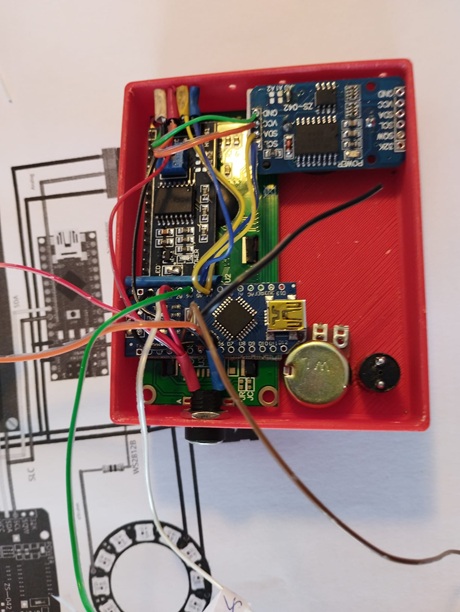
Hello,
I am trying to make a HALL effect Tachometer with an Arduino NANO for my SIEG X2 milling machine, BUT all the models tested are no longer functional over 500 rpm,
I would like to control the speed from 200 to 5000 rpm
On this Arduino I also drive a circle of 25 LEDs (WS2812B) and an RTC (DS3231), All of which only takes up 27% of the NANO's capacity.
is the Arduino ideal and which one?
Will RASPBERRY do better?
Here is the code '' #include <Adafruit_NeoPixel.h> #include <Wire.h> #include <LCDI2C_Multilingual.h> //#include <LiquidCrystal_I2C.h> #include "RTClib.h"
LCDI2C_Symbols lcd(0x27, 16, 2);
RTC_DS3231 ds3231;
#ifdef __AVR__
#include <avr/power.h> // Required for 16 MHz Adafruit Trinket
#endif
//*********** Interupt1
volatile byte change;
unsigned int rpm;
unsigned long timeold;
//************ LCD
const int numRows = 2;
const int numCols = 16;
#define PIN_WS2812B 4 // Arduino pin that connects to WS2812B
#define NUM_PIXELS 24 // The number of LEDs (pixels) on WS2812B 24 ou + 35 = 59
#define POTENTIOMETER_PIN A6
#define DELAY_INTERVAL 250 // 250ms pause between each pixel
// Constante(s)
char joursDeLaSemaine[7][12] = {"Dimanche", "Lundi", "Mardi", "Mercredi", "Jeudi", "Vendredi", "Samedi"}; //Jeudi
struct pot {
byte level = 0;
};
pot pot;
Adafruit_NeoPixel WS2812B(NUM_PIXELS, PIN_WS2812B, NEO_GRB + NEO_KHZ800);
void setup() {
lcd.init();
lcd.backlight();
lcd.clear();
WS2812B.begin(); // INITIALIZE WS2812B strip object (REQUIRED)
pinMode(POTENTIOMETER_PIN, INPUT);
Serial.begin(9600);
//*********** Interupt1
attachInterrupt(0, magnet_detect, RISING);
change = 0;
rpm = 0;
timeold = 0;
// Initialisation du module DS3231
if (!ds3231.begin()) {
Serial.println("[ERREUR] (problème de câblage ?)");
Serial.flush();
while (1);
}
}
// =================================================================================
// Fonction : formateValeurSurDeuxChiffresMinimum
// (permet d'avoir une homogénéïté, au niveau de l'affichage, sur le moniteur série)
// =================================================================================
String formateValeurSurDeuxChiffresMinimum(int nombre)
{
if (nombre < 10)
return "0" + String(nombre);
else
return String(nombre);
}
void loop() {
//*********** Interupt1
{
if (change >= 20) {
                  rpm = 30*1000/(millis() - timeold)*change;
                  timeold = millis();
                  change = 0;
          }
}
//Serial.println("ICI");
//******************** Cercle de Led
WS2812B.clear(); // set all pixel colors to 'off'. It only takes effect if pixels.show() is called
pot.level = readPotentiometerLevelMapped(POTENTIOMETER_PIN); // potar
Serial.println(pot.level); // me donne le niveau de lumière
Serial.println(",");
for (int pixel = 0; pixel < NUM_PIXELS; pixel++) { // for each pixel
WS2812B.setPixelColor(pixel, WS2812B.Color(pot.level,pot.level,pot.level)); // potentiometer.level it only takes effect if pixels.show() is called
}
WS2812B.show(); // send the updated pixel colors to the WS2812B hardware
delayMicroseconds(100);
lcd.setCursor(0, 0);
lcd.print("Rotation = ");
lcd.print(rpm);
lcd.print("");
lcd.println(" ");
// Lecture de la date/heure actuelle, de notre horloge temps réel DS 3231
DateTime dateHeureDuDS3231 = ds3231.now();
lcd.setCursor(0, 1);
lcd.print(joursDeLaSemaine[dateHeureDuDS3231.dayOfTheWeek()]);
lcd.print(" ");
//serial.println(formateValeurSurDeuxChiffresMinimum(dateHeureDuDS3231.hour()));
lcd.print(formateValeurSurDeuxChiffresMinimum(dateHeureDuDS3231.hour()));
lcd.print(":");
lcd.print(formateValeurSurDeuxChiffresMinimum(dateHeureDuDS3231.minute()));
lcd.println();
//lcd.println(" ");
// Attente de 2 secondes, avant relecture de l'heure (histoire de vérifier que l'horloge RTC "avance bien" !)
delay(100);
}
byte readPotentiometerLevelMapped(int pin)
{
return map(analogRead(pin), 0, 1023, 0, 253);
}
//*********** Interupt1
void magnet_detect()
// This function is called whenever a magnet/interrupt is detected.
{
change++;
//Serial.println(" detect");
}
<code/>


With the neopixel library turning off interrupts for the time it takes to perform WS2812B.show();
which is 24(leds) * 24(bits) / 800(KHz) = 0.72ms , you may anyhow run into some issues when measuring higher speeds.
also your
volatile byte change;
may just roll over given all the other tasks that are being executed between the measuring moments.
Keep in mind that on an 8-bit MCU for using a 16-bit value from an interrupt routine, you will need to disable interrupts, copy the 16-bit value and re-enable interrupts.
So my bet is on the variable rolling over, within the time between measurements, which happens every 255 ticks, and there is a 100ms delay in your loop, so i am fairly sure that is the cause.
At higher revs, the show() will cause the missing of some ticks if there are more than 1000 ticks per second, but this may be acceptable. And you should correct the syntax. (which will also make it clear which pin you are actually using.)
Oh missed that question. I would use an ESP i guess, for being able to send the ledstrip signal without turning off interrupts using Makuna Neopixelbus, and having the additional advantage off a 32-bit architecture, which simplifies transfer of data between the ISR and the main sketch.
In that case you 9should attempt at getting it to work using the Nano first i guess.
The main concern would be the loss of some ticks. 5000 RPM = 5000 / 60 ticks per second so the ticks are still more than 10ms apart and maybe it is worry over nothing.
change this
volatile byte change;
to
volatile uint16_t change;
Hmm i was just going to modify this section to use that variable, but i am not impressed with the math and method.
First of all is there 1 tick per revolution ?
anyway the way to do it would be
noInterrupts();
uint16_t readChange = change;
if (change >= 20) {
   change = 0;
   interrupts();
  (--- etc  --)  // using readChange as the variable in the math
  }
else {
  interrupts();
}
More or less i guess.
When doing multiplications and division on an integer variable, make sure the variable type is big enough to hold all multiplications, perform those first, and then do the division(s) for greater accuracy.
eg. 12 * 7 / 10 = 8, whereas 12 / 10 * 7 = 7
Rather than counting pulses you could measure the time between pulses. Depending on how long your code takes to execute you may need to use blocking code in order to read the higher RPMs
Hello Deva_Rishi
I compare the result of my code with a "DIGITAL TACHIMETER DT-2234C+"
I have to use 2 tiks, I glued two magnets on the axis of the SIEG X2 as close as possible to the Hall sensor,
uint16_t instead byte already works much better,
I have to learn to use interruptions, this is the first time I use this way, it is very very interesting and efficient (I have to go back to school !).
The milling machine is far from me, I can't stretch a wire to modify the code, so I use a RASPBERRY PI4 on which I put the ARDUINO IDE and libraries, then I connect the RASPBERRY with wifi from my workstation, change the code, it works very well and it's fun.
What should I do with:
noInterrupts();
uint16_t readChange = change;
if (change >= 20) {
change = 0;
interrupts();
(--- etc --) // using readChange as the variable in the math
}
else {
interrupts();
}
Well the main thing to keep in mind that on an 8-bit machine, it takes more than 1 instruction to read from a 16-bit variable. If the interrupt is triggered in the mean time, that can cause the lsB to roll over possibly corrupting the total value. So the method is to disable interrupts, copy the 16-bit value into another one, reset the counter, and re-enable interrupts and use the copied value for processing. The test for a minimum of 20 clicks complicates matters a little in your case, but i guess you could also perform that test on the copied value in some way.
rpm = 30*1000/(millis() - timeold)*change;
This is still not a very accurate method.
first of all i would take the millis() only once
Enabling/Disabling interrupts won't solve the problem.
The problem is with the Adafruit_NepPixel library. It disables interrupts, so millis() may be wrong and you will miss hall sensor pulses, especially at high RPM.
I did the math on it, it only disables them for show(), which at 24 leds takes about 720us (24 * 24 / 800) and the break is done with interrupts enabled, At 5000 rpm, that is 10000 ticks per minute, 167 ticks per second, that is a tick every 6ms, i think it's fine, or as you would put it, see reply #8
On an AVR they are all bit-banged method, which requires the disabling of interrupts for the duration of show(). Keep in mind though that it is just the callback execution that is halted. The interrupt is registered and the callback is executed the moment the interrupts are re-enabled, so i don't see a problem there at all
Any processor that will allow the signal to be sent fully in the background will do, so also an ESP8266 may do the trick, The 32-bit thing is an added bonus, which does not require the copying of the multi byte variable with interrupts disabled.
Anyway i think you should manage with what you have as long as you correctly implement the reading of the counter.