TimeLib.h or NTPClient.h

What library should be used to get time and date on regular intervals for controlling purposes?

Paul Stoffregen developed the TimeLib.h library which seems to call for NTPpackets over UDP which need to be parsed while NTPClient.h simply calls for an update of timeClient.update()

NTPClient.h unless I am mistaken can only get time and day of the week.
While TimeLib.h gets complete time and date (dd/mm/yyyy)?

What makes you think that?

Excerpted frpm NTPClient.h:

    int getDay() const;
    int getHours() const;
    int getMinutes() const;
    int getSeconds() const;
...
    /**
     * @return time formatted like `hh:mm:ss`
     */
    String getFormattedTime() const;

    /**
     * @return time in seconds since Jan. 1, 1970
     */
    unsigned long getEpochTime() const;

with getEpochTime() you can use all the usual time functions from time.h (or TimeLib.h).

that depends on the micrcontroller you are using.
For example for the ESP32 or ESP8266 you should use the time.h which comes with the platform package (core).

1 Like

The Time library folder I have contains Time.cpp and TimeLib.h: is that the one you are refering to?

Edit: yes, for ESP32 and ESP8266

no.
ESP32 and ESP8266 have their own time.h (small t) implementation. You don't need a 3rd party library for NTP on these microcontrollers as it is already part of the platform package (part of the ESP core).

here I have a short summary

and

1 Like

With Serial.println(timeClient.getEpochTime()); I get the number of seconds from 1970. But how do I convert this to day, month and year in a byte each?

Edit: @sterretje Modified with backticks :slight_smile:

@noiasca Great! But where does the time.h library reside?

in the respective ESP package!

@noiasca Not in ...\AppData\Local\Arduino15\packages\esp8266\hardware\esp8266\3.1.2\libraries

Where should I search?

time.h is not a typical "Arduino library". time.h is a part of the esp core.
For the ESP8266 there is an IDE example. you will find it in

Examples/ESP8266/NTP-TZ-DST

but imho my stripped down versions are simpler to read.

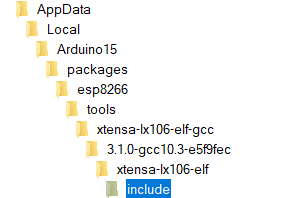
p.s.: the time.h file is in my installation here:

but imho there is "nothing" to see there for someone like me. I just use the default API of time.h and the members of the structure tm.

Opening and closing code tags should be on their own line :wink:

There is another way to use code tags

  1. For a block of code three back ticks on their own line followed by the code followed by another 3 back ticks.
    ```
    code
    ```
  2. For a single statement inline use a single back tick followed by the statement followed by a another single back tick.
    `statement`
1 Like

The time.h example in NTP for the ESP8266 including day light saving time (DST) without 3rd party library is a lot simpler and just as efficient than in Examples/ESP8266/NTP-TZ-DST.

But it is not clear to me how he sets the timezone:
#define MY_TZ "CET-1CEST,M3.5.0/02,M10.5.0/03"

he = me :wink:

you find the link to the timezones in the links section:

now search your best fitting option and use it.

Ohhh, what an honour :+1:!

But what does the text in, for example, CET-1CEST,M3.5.0,M10.5.0/3 mean?

Edit: I found the answer in your page

Is there no limit on the frequency NTP servers may be polled? To prevent flooding etc..?

the ESPs have (some kind of) RTC.
The NTP polling interval is handled in the background.
When you just try to get current time, you get the time from the RTC.
Meaning, a time(&now); // read the current time does not cause a NTP call - it reads the current time from its internal RTC.

The interval of the NTP calls is fixed, but you can change it. The example sketch (from the ZIP) also includes how to change it, but frankly, I seldom change the default.

Furthermore, there is an example how to define a callback when the NTP call is initated.

1 Like

The servers will throttle you if you start banging them too hard. But, as pointed out, you don't need to:

I don't use ESP8286 much, but on ESP32, the RTC is more than adequate to go an hour or more between NTP updates.

That's a POSIX time zone specification that is used to set the TZ Environment Variable.

The ESP8286 core includes a TZ.h file with lots of predefined time zones. Just do:

#include <TZ.h>

Interestingly, ESP32 doesn't have this. So I just copy the file into my ESP32 environment. Said file is attached herein.
TZ.h (22.2 KB)