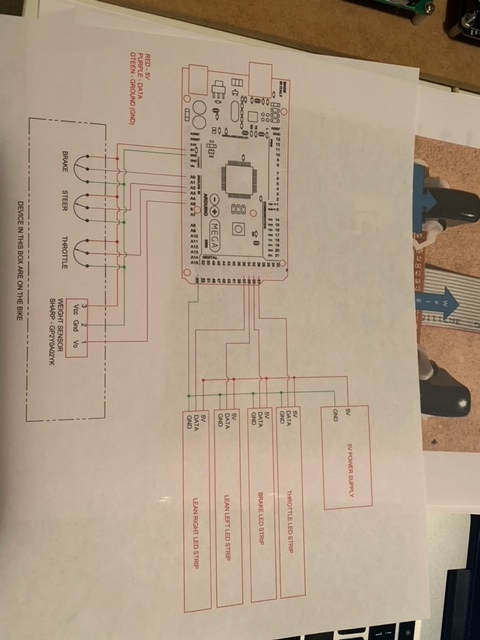
I am 1 million percent brand new - JUST literally downloaded and installed the IDE. I bought a project that the person did a mod with and build it on an Arduino -and was told in order to configure it I would have to - Install Librarys - and was instructed to go to tool> manage libraries -
He provided me with a list of 7 libraries and the first three I tried I struck out with and thus thought maybe I am not doing it right.
any thoughts, help or input on these libraries where I find them how i load them and any other insights would be so helpful. (as a brief search suggested the first library is already embded and not seperate... shrug who knew????
13|#Include <wire.h> //Library for I2C communication
14|#Include <LiquidCrystal_I2C.h> //Libary for LCD
15|#Include <SPI.h> // Communication to Shield board
16|#Include <SD.h> // SD Card
17|#Include <SharpIR.h> // Sharp Sensor
18|#Include <Adafruit_MCP4728.h> // 12 Bit - Digital to Analog (DAC)
19|#Include <Adafruit_NeoPixel.h> // Led Library
I am not going to suggest that i know what any of this is I am absolutely brand new but trying to figure it out his code is written and i just need to make edits to certain values
I will show you how I get myself confused, then how I get what I need...
How I get confused... I should be able to find libraries through the IDE, by clicking TOOLS >> MANAGE LIBRARIES (or CTRL-SHFT-L)... this will bring up a panel on the left side of the IDE with a "Filter your search..." box... inside that box, type the filename of the library you want... starting with LiquidCrystal_I2C.h (because wire.h is already known by the IDE as twi or onewire or two wire or wire - another point of confusion that we will ignore for a moment). As you type LiquidCrystal... you will see the filter box change, bubbling-up the libraries that have the key words you are typing... and with the full library name LiquidCrystal_I2C.h, you see... almost 20 files... when you want only ONE! Why? (the answer is; a lot of people know the "right" file by working with the file, or the author's name, or by hanging around this forum and reading it repeatedly... NOT because it's is the first or only library file... that rarely happens)
SOoooo.... here is how I solve my confusion:
I copy the filename LiquidCrystal_I2C.h and paste it into a web search along with Arduino. My first hit is from ArduinoLibraries.com, the second is GitHub, and the third is from Reference.Arduino.CC... that is the link I will take. In that link I find the Official Arduino author (Frank Barbander), so now I can go back to my IDE and type "Frank" (along with LiquidCrystal_i2c.h) and the top library is the one for me.
From here... with the library you want in the IDE Library Manager, click INSTALL... and your LiquidCrustal_I2C library is installed.
Okay... that was a long Step 2. How are things going at your end?
First off a BIG thank you to @xfpd, and @cattledog - for taking the time to help me better understand and not just saying go to a search engine.
So from what I can gather so far-
13|#Include <wire.h> //Library for I2C communication
14|#Include <LiquidCrystal_I2C.h> //Libary for LCD - Suggested to be there by default
15|#Include <SPI.h> // Communication to Shield board -
16|#Include <SD.h> // SD Card - Suggested to be there by default <Cattledog
17|#Include <SharpIR.h> // Sharp Sensor - I searched and was able to add this one
18|#Include <Adafruit_MCP4728.h> // 12 Bit - Digital to Analog (DAC) - searched and found
19|#Include <Adafruit_NeoPixel.h> // Led Library- searched and found
So I think I am in good shape there:
Next question can you get the source code of an Arduino - after its been compiled? The guy I got this from is pulling the old - "I figured it out for myself now you have to figure it all out on your own" - to me I have a wooden board with a few circuits and a Arduino on it so lots of questions to try and reverse engineer it. (orginal agreement was I will give you everything you need to get you up and running - that quickly reverted once he got my cash)
He made it so it can interface with a PS4 controller and then connect to a older arcade machine -It takes analog outputs from and arcade machine and sends it sends it to ps 4 controller... (that is then in turn connected to a PS4) thus being able to play modern games with the old arcade controls... (the whole reason i bought it and spent a months salary on it)
Some more GENERAL Questions:
There is a SD card reader Board on TOP of the main Arduino: (he did send me a BASIC schematic of 6 wires I need to attach to the Arduino - the header pins from sd card board are in the pin slots he identified ) - can I just solder wires to the pin headers coming out of arduino even though sd board is in them too???? I'll post pics.... maybe someone will have some ideas visually from what's going on...
P.s i'm happy to shoot a little money offer to anyone that wants to give me some thoughts inputs and pointers as a coaching session.....
This works, you will need to substitute your port (-P) and output file (-) this writes to stdout.
If you still have trouble suppress the reset on your Arduino by placing a ~150 ohm resistor between 5v and reset or a 1uf cap between reset and ground.
No. The LiquidCrystal library for the parallel wired lcd displays is part of the bundle, not the library for the displays with the i2c backpack.
The best library for the i2c displays is Bill Perry's hd44780.h. It is available through the library manager and is plug and play for detecting the i2c address and the specific configuration of the hd44780 driver chip as it is wired to the display. If you are going to use an i2c character lcd it is very strongly recommended you use this library. There is a comprehensive diagnostic sketch if you have issues, and the author is usually available on this board if something major comes up.
The library is designed to cover several different types of displays so there is a class of display which needs to be set up along with the # include.
#include <Wire.h>
#include <hd44780.h>
#include <hd44780ioClass/hd44780_I2Cexp.h> // include i/o class header

hd44780_I2Cexp lcd; // declare lcd object: auto locate & config display for hd44780 chip

void setup()
{
  // initialize LCD with number of columns and rows:
  lcd.begin(16, 2);

  // Print a message to the LCD
  lcd.print("Hello, World!");
}

void loop()
{
  lcd.setCursor(0, 1);
  lcd.print(millis() / 1000);
  delay(1000);
}