Thank you so much for your response! It really helped me a lot!  The whole code is at the bottom of my post.
That's a little bigger question. Do you want this process to be blocking, meaning that it slowly moves all the way to the new position and completes that before going back to check anything else, or do you want it to be non-blocking where it is interleaved into the rest of the code and all the other things the code needs to do are still happening?
I want it only to move smoother, without delaying the whole process. So 2nd option where it is non-blocking servo movement that is like from the Arduino example for sweep-servo (I mean just the effect that servo is moving very smooth from start to destination angle).
for (pos = 0; pos <= 180; pos += 1) { // goes from 0 degrees to 180 degrees
     // in steps of 1 degree
     myservo.write(pos);              // tell servo to go to position in variable 'pos'
     delay(15);
The last issue I have is the turning-off LED when the code is checking for the number of followers. Its just turning off for 500ms when its waiting for response and turning back on with the new intensity- matching the new number of followers. Is there any way to fix it? Picture of the serial monitor with data below. Also it does switch off completely when it exceeds the range <0,255>. I tried 'if' command in different organisations but with no results.
if(response.followedByCount != 0){
  InstagramUserStats response = instaStats.getUserStats(userName);
  int ledintensity = map(response.followedByCount, MinFollowers, MaxFollowers, 255, 0);
  if(ledintensity < 255){
   ledcWrite(ledChannel, ledintensity);
   Serial.print("Led Intensity: ");
   Serial.println(255-ledintensity);
   }
I am so sorry for asking so many questions. I highly appreciate any help!
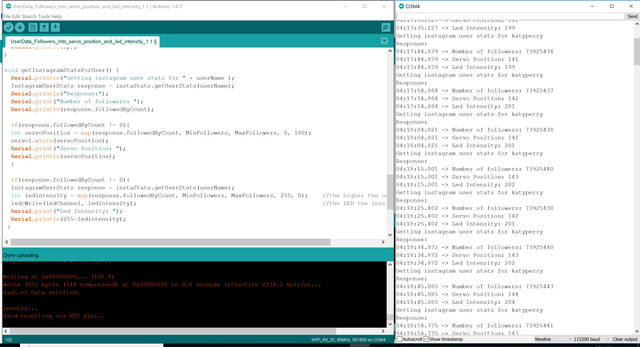
/*******************************************************************
 *  An example of usisng the InstagramStats library to get
 *  info on a given user
 *
 *  Written by Brian Lough
 *  https://www.youtube.com/channel/UCezJOfu7OtqGzd5xrP3q6WA
 *******************************************************************/
 // ----------------------------
 // Standard Libraries - Already Installed if you have ESP32 set up
 // ----------------------------

#include "InstagramStats.h"
#include "Arduino.h"
#include <Servo.h>

Servo servo1;

#include <WiFi.h>
#include <WiFiClientSecure.h>

//Instagram Followers range for mapping
#define MinFollowers 73925042
#define MaxFollowers 73925042+500
//Servo
static const int servoPin = 5;
static const int potentiometerPin = 14;

// int value;
int followedByCount;

//int LED value and setup
int freq = 5000;
int ledChannel = 0;
int resolution = 8;
#define LedPin 25


// ----------------------------
// Additional Libraries - each one of these will need to be installed.
// ----------------------------

#include "JsonStreamingParser.h"
// Used to parse the Json code within the library
// Available on the library manager (Search for "Json Streamer Parser")
// https://github.com/squix78/json-streaming-parser

//------- Replace the following! ------
char ssid[] = "VM6722315";       // your network SSID (name)  iPhone Maciek
char password[] = "w6vpPnqFrwvv";  // your network key  o9h2gott

WiFiClientSecure client;
InstagramStats instaStats(client);

unsigned long delayBetweenChecks = 10000; //mean time between api requests
unsigned long whenDueToCheck = 0;

//Inputs
String userName = "katyperry"; // from their instagram url https://www.instagram.com/brian_lough/


void setup() {

  Serial.begin(115200);
  servo1.attach(servoPin);

  ledcSetup(ledChannel, freq, resolution);
  ledcAttachPin(LedPin, ledChannel);

  // Attempt to connect to Wifi network:
  Serial.print("Connecting Wifi: ");
  Serial.println(ssid);

  WiFi.mode(WIFI_STA);
  WiFi.begin(ssid, password);
  while (WiFi.status() != WL_CONNECTED) {
    Serial.print(".");
    delay(500);
  }
  Serial.println("");
  Serial.println("WiFi connected");
  Serial.println("IP address: ");
  IPAddress ip = WiFi.localIP();
  Serial.println(ip);
}

void getInstagramStatsForUser() {
  Serial.println("Getting instagram user stats for " + userName );
  InstagramUserStats response = instaStats.getUserStats(userName);
  Serial.println("Response:");
  Serial.print("Number of followers: ");
  Serial.println(response.followedByCount);

  if(response.followedByCount != 0){
  int servoPosition = map(response.followedByCount, MinFollowers, MaxFollowers, 0, 180);
  servo1.write(servoPosition);
  Serial.print("Servo Position: ");
  Serial.println(servoPosition);
  }

  if(response.followedByCount != 0){
  InstagramUserStats response = instaStats.getUserStats(userName);
  int ledintensity = map(response.followedByCount, MinFollowers, MaxFollowers, 255, 0);    //the higher the output number for
  ledcWrite(ledChannel, ledintensity);                                                     //the LED the less bright it lights
  Serial.print("Led Intensity: ");
  Serial.println(255-ledintensity);
 }

  /*if(response.followedByCount != 0){
  InstagramUserStats response = instaStats.getUserStats(userName);
  int ledintensity = map(response.followedByCount, MinFollowers, MaxFollowers, 0, 255);
  digitalWrite(LED01, ledintensity);
  delay(FADESPEED01);
  }*/
}

void loop() {
    unsigned long timeNow = millis();
  if ((timeNow > whenDueToCheck))  {
    getInstagramStatsForUser();
    whenDueToCheck = timeNow + delayBetweenChecks;
  }
}