Trouble with mapping number of instagram followers into servo position

Hi there!

I am having trouble with this little line error that is stoping me from mapping the number of followers of a given Instagram account into the servo position (working on ESP32 board).

I would highly appreciate any help from you as I cannot get through for the past 3 days.

Best!

Code:/******************************************************************* * An exa - Pastebin.com

/*******************************************************************
 *  An example of usisng the InstagramStats library to get
 *  info on a given user
 *
 *  Written by Brian Lough
 *  https://www.youtube.com/channel/UCezJOfu7OtqGzd5xrP3q6WA
 *******************************************************************/

#include "InstagramStats.h"
#include "Arduino.h"
#include <Servo.h>

Servo servo1;

 // ----------------------------
 // Standard Libraries - Already Installed if you have ESP32 set up
 // ----------------------------

#include <WiFi.h>
#include <WiFiClientSecure.h>

//LED setup
#define GREENPIN 38
#define FADESPEED 5

//Servo
static const int servoPin = 5;
static const int potentiometerPin = 14;

int value;
int followedByCount;

// ----------------------------
// Additional Libraries - each one of these will need to be installed.
// ----------------------------

#include "JsonStreamingParser.h"
// Used to parse the Json code within the library
// Available on the library manager (Search for "Json Streamer Parser")
// https://github.com/squix78/json-streaming-parser

//------- Replace the following! ------
char ssid[] = "iPhone Maciek";       // your network SSID (name)
char password[] = "o9h2gott";  // your network key

WiFiClientSecure client;
InstagramStats instaStats(client);

unsigned long delayBetweenChecks = 20000; //mean time between api requests
unsigned long whenDueToCheck = 0;

//Inputs
String userName = "najadeostos"; // from their instagram url https://www.instagram.com/brian_lough/


void setup() {

  Serial.begin(115200);
  servo1.attach(servoPin);

  // Attempt to connect to Wifi network:
  Serial.print("Connecting Wifi: ");
  Serial.println(ssid);

  WiFi.mode(WIFI_STA);
  WiFi.begin(ssid, password);
  while (WiFi.status() != WL_CONNECTED) {
    Serial.print(".");
    delay(500);
  }
  Serial.println("");
  Serial.println("WiFi connected");
  Serial.println("IP address: ");
  IPAddress ip = WiFi.localIP();
  Serial.println(ip);
}

void getInstagramStatsForUser() {
  Serial.println("Getting instagram user stats for " + userName );
  InstagramUserStats response = instaStats.getUserStats(userName);
  Serial.println("Response:");
  Serial.print("Number of followers: ");
  Serial.println(response.followedByCount);
}

void loop() {
    unsigned long timeNow = millis();
  if ((timeNow > whenDueToCheck))  {
    getInstagramStatsForUser();
    whenDueToCheck = timeNow + delayBetweenChecks;
  }
    int value = response.followedByCount;
    int servoPosition = map(value, 166, 170, 0, 180);
    servo1.write(servoPosition);
    Serial.println(servoPosition);
    delay(20);
}
 /* int value = (response.followedByCount);
  follows = map(value, 166, 170, 0, 255);
  analogWrite(GREENPIN, follows);
  delay(FADESPEED); */
Arduino: 1.8.7 (Windows 10), Board: "WIFI_Kit_32, 80MHz, 921600"

C:\Users\tomak\Documents\Arduino\UserData_led_intensity_from_follows\UserData_led_intensity_from_follows.ino: In function 'void loop()':

UserData_led_intensity_from_follows:92:17: error: 'response' was not declared in this scope

     int value = response.followedByCount;

                 ^

exit status 1
'response' was not declared in this scope

This report would have more information with
"Show verbose output during compilation"
option enabled in File -> Preferences.

Delta_G:
In this function you create a variable called response:

void getInstagramStatsForUser() {

Serial.println("Getting instagram user stats for " + userName );
InstagramUserStats response = instaStats.getUserStats(userName);
Serial.println("Response:");
Serial.print("Number of followers: ");
Serial.println(response.followedByCount);
}


But since it is created inside that function, it only exists inside that function. 

You need to create a variable like that in your loop. You can still call it response. 

But you need this line:


InstagramUserStats response = instaStats.getUserStats(userName);


before you can use:


int value = response.followedByCount;

Thank You so much! It works! :smiley:

I have one more question regarding mapping the output numbers and limiting the range of the numbers that are being mapped.
The thing is that if json parser is late to get the respond from the web on the number of follows it gives '0' as a response. This 0 is being mapped to -4096 degrees for servo and it makes servo come back to the lowest position everytime the parser is late. I need it to take 0 out of the range of mapping and tried to do it with 'for' command but didn't managed.
Does anyone have an idea on how can I do it?

*Also- I would like my servo to reach it new position in a very slow movement. (Like in sweep mode where
for for(int posDegrees = 0; posDegrees <= 180; posDegrees++) Is moving servo every 1 degree every 20ms.
How can I implement both of these aspects into my project?
I am so sorry for asking such questions but Iam new to coding and couldn't find an answer since today morning.

Thank you!

/*******************************************************************
 *  An example of usisng the InstagramStats library to get
 *  info on a given user
 *
 *  Written by Brian Lough
 *  https://www.youtube.com/channel/UCezJOfu7OtqGzd5xrP3q6WA
 *******************************************************************/

#include "InstagramStats.h"
#include "Arduino.h"
#include <Servo.h>

Servo servo1;

 // ----------------------------
 // Standard Libraries - Already Installed if you have ESP32 set up
 // ----------------------------

#include <WiFi.h>
#include <WiFiClientSecure.h>

//LED setup
#define GREENPIN 38
#define FADESPEED 5

//Instagram Followers range for mapping
#define MinFollowers 49
#define MaxFollowers 52

//Servo
static const int servoPin = 5;
static const int potentiometerPin = 14;

// int value;
int followedByCount;

// ----------------------------
// Additional Libraries - each one of these will need to be installed.
// ----------------------------

#include "JsonStreamingParser.h"
// Used to parse the Json code within the library
// Available on the library manager (Search for "Json Streamer Parser")
// https://github.com/squix78/json-streaming-parser

//------- Replace the following! ------
char ssid[] = "iPhone Maciek";       // your network SSID (name)
char password[] = "o9h2gott";  // your network key

WiFiClientSecure client;
InstagramStats instaStats(client);

unsigned long delayBetweenChecks = 20000; //mean time between api requests
unsigned long whenDueToCheck = 0;

//Inputs
String userName = "newformalism"; // from their instagram url https://www.instagram.com/brian_lough/


void setup() {

  Serial.begin(115200);
  servo1.attach(servoPin);

  // Attempt to connect to Wifi network:
  Serial.print("Connecting Wifi: ");
  Serial.println(ssid);

  WiFi.mode(WIFI_STA);
  WiFi.begin(ssid, password);
  while (WiFi.status() != WL_CONNECTED) {
    Serial.print(".");
    delay(500);
  }
  Serial.println("");
  Serial.println("WiFi connected");
  Serial.println("IP address: ");
  IPAddress ip = WiFi.localIP();
  Serial.println(ip);
}

void getInstagramStatsForUser() {
  Serial.println("Getting instagram user stats for " + userName );
  InstagramUserStats response = instaStats.getUserStats(userName);
  Serial.println("Response:");
  Serial.print("Number of followers: ");
  Serial.println(response.followedByCount);

  //for(int response.followedByCount > 0; servoPosition < response.followedByCount; servoPosition++); {
  //InstagramUserStats response = instaStats.getUserStats(userName);
  //int value = response.followedByCount;
  for (response.followedByCount > 0 ; servoPosition <= 180; servoPosition += 1)
  int servoPosition = map(response.followedByCount, MinFollowers, MaxFollowers, 0, 180);
  servo1.write(servoPosition);
  Serial.print("Servo Position: ");
  Serial.println(servoPosition);
}


void loop() {
    unsigned long timeNow = millis();
  if ((timeNow > whenDueToCheck))  {
    getInstagramStatsForUser();
    whenDueToCheck = timeNow + delayBetweenChecks;
  }
    
}
 /* int value = (response.followedByCount);
  follows = map(value, 166, 170, 0, 255);
  analogWrite(GREENPIN, follows);
  delay(FADESPEED); */

Thank you so much for your response! It really helped me a lot! :slight_smile: The whole code is at the bottom of my post.
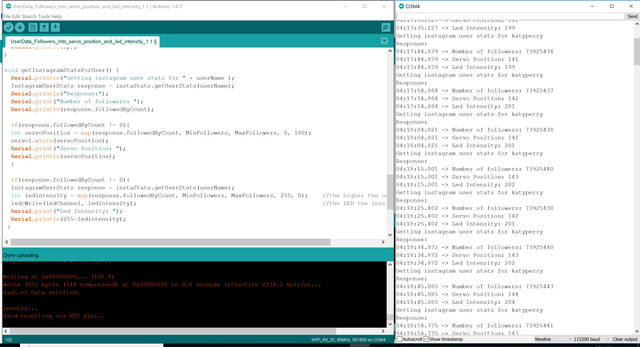
That's a little bigger question. Do you want this process to be blocking, meaning that it slowly moves all the way to the new position and completes that before going back to check anything else, or do you want it to be non-blocking where it is interleaved into the rest of the code and all the other things the code needs to do are still happening?

I want it only to move smoother, without delaying the whole process. So 2nd option where it is non-blocking servo movement that is like from the Arduino example for sweep-servo (I mean just the effect that servo is moving very smooth from start to destination angle).

for (pos = 0; pos <= 180; pos += 1) { // goes from 0 degrees to 180 degrees
     // in steps of 1 degree
     myservo.write(pos);              // tell servo to go to position in variable 'pos'
     delay(15);

The last issue I have is the turning-off LED when the code is checking for the number of followers. Its just turning off for 500ms when its waiting for response and turning back on with the new intensity- matching the new number of followers. Is there any way to fix it? Picture of the serial monitor with data below. Also it does switch off completely when it exceeds the range <0,255>. I tried 'if' command in different organisations but with no results.

if(response.followedByCount != 0){
  InstagramUserStats response = instaStats.getUserStats(userName);
  int ledintensity = map(response.followedByCount, MinFollowers, MaxFollowers, 255, 0);  
  if(ledintensity < 255){
   ledcWrite(ledChannel, ledintensity);       
   Serial.print("Led Intensity: ");
   Serial.println(255-ledintensity);
   }

I am so sorry for asking so many questions. I highly appreciate any help!

/*******************************************************************
 *  An example of usisng the InstagramStats library to get
 *  info on a given user
 *
 *  Written by Brian Lough
 *  https://www.youtube.com/channel/UCezJOfu7OtqGzd5xrP3q6WA
 *******************************************************************/
 // ----------------------------
 // Standard Libraries - Already Installed if you have ESP32 set up
 // ----------------------------

#include "InstagramStats.h"
#include "Arduino.h"
#include <Servo.h>

Servo servo1;

#include <WiFi.h>
#include <WiFiClientSecure.h>

//Instagram Followers range for mapping
#define MinFollowers 73925042
#define MaxFollowers 73925042+500
//Servo
static const int servoPin = 5;
static const int potentiometerPin = 14;

// int value;
int followedByCount;

//int LED value and setup
int freq = 5000;
int ledChannel = 0;
int resolution = 8;
#define LedPin 25


// ----------------------------
// Additional Libraries - each one of these will need to be installed.
// ----------------------------

#include "JsonStreamingParser.h"
// Used to parse the Json code within the library
// Available on the library manager (Search for "Json Streamer Parser")
// https://github.com/squix78/json-streaming-parser

//------- Replace the following! ------
char ssid[] = "VM6722315";       // your network SSID (name)  iPhone Maciek
char password[] = "w6vpPnqFrwvv";  // your network key  o9h2gott

WiFiClientSecure client;
InstagramStats instaStats(client);

unsigned long delayBetweenChecks = 10000; //mean time between api requests
unsigned long whenDueToCheck = 0;

//Inputs
String userName = "katyperry"; // from their instagram url https://www.instagram.com/brian_lough/


void setup() {

  Serial.begin(115200);
  servo1.attach(servoPin);
  
  ledcSetup(ledChannel, freq, resolution);
  ledcAttachPin(LedPin, ledChannel);

  // Attempt to connect to Wifi network:
  Serial.print("Connecting Wifi: ");
  Serial.println(ssid);

  WiFi.mode(WIFI_STA);
  WiFi.begin(ssid, password);
  while (WiFi.status() != WL_CONNECTED) {
    Serial.print(".");
    delay(500);
  }
  Serial.println("");
  Serial.println("WiFi connected");
  Serial.println("IP address: ");
  IPAddress ip = WiFi.localIP();
  Serial.println(ip);
}

void getInstagramStatsForUser() {
  Serial.println("Getting instagram user stats for " + userName );
  InstagramUserStats response = instaStats.getUserStats(userName);
  Serial.println("Response:");
  Serial.print("Number of followers: ");
  Serial.println(response.followedByCount);

  if(response.followedByCount != 0){
  int servoPosition = map(response.followedByCount, MinFollowers, MaxFollowers, 0, 180);
  servo1.write(servoPosition);
  Serial.print("Servo Position: ");
  Serial.println(servoPosition);
  }

  if(response.followedByCount != 0){
  InstagramUserStats response = instaStats.getUserStats(userName);
  int ledintensity = map(response.followedByCount, MinFollowers, MaxFollowers, 255, 0);    //the higher the output number for 
  ledcWrite(ledChannel, ledintensity);                                                     //the LED the less bright it lights
  Serial.print("Led Intensity: ");
  Serial.println(255-ledintensity);
 }
  
  /*if(response.followedByCount != 0){
  InstagramUserStats response = instaStats.getUserStats(userName);
  int ledintensity = map(response.followedByCount, MinFollowers, MaxFollowers, 0, 255);
  digitalWrite(LED01, ledintensity);
  delay(FADESPEED01);
  }*/
}
 
void loop() {
    unsigned long timeNow = millis();
  if ((timeNow > whenDueToCheck))  {
    getInstagramStatsForUser();
    whenDueToCheck = timeNow + delayBetweenChecks;
  }
}

MaciejT:
*Also- I would like my servo to reach it new position in a very slow movement. (Like in sweep mode where
for for(int posDegrees = 0; posDegrees <= 180; posDegrees++) Is moving servo every 1 degree every 20ms.

Look at using VarSpeedServo.h instead of Servo.h. That has a speed parameter to the write() command...and it is non-blocking.

Steve