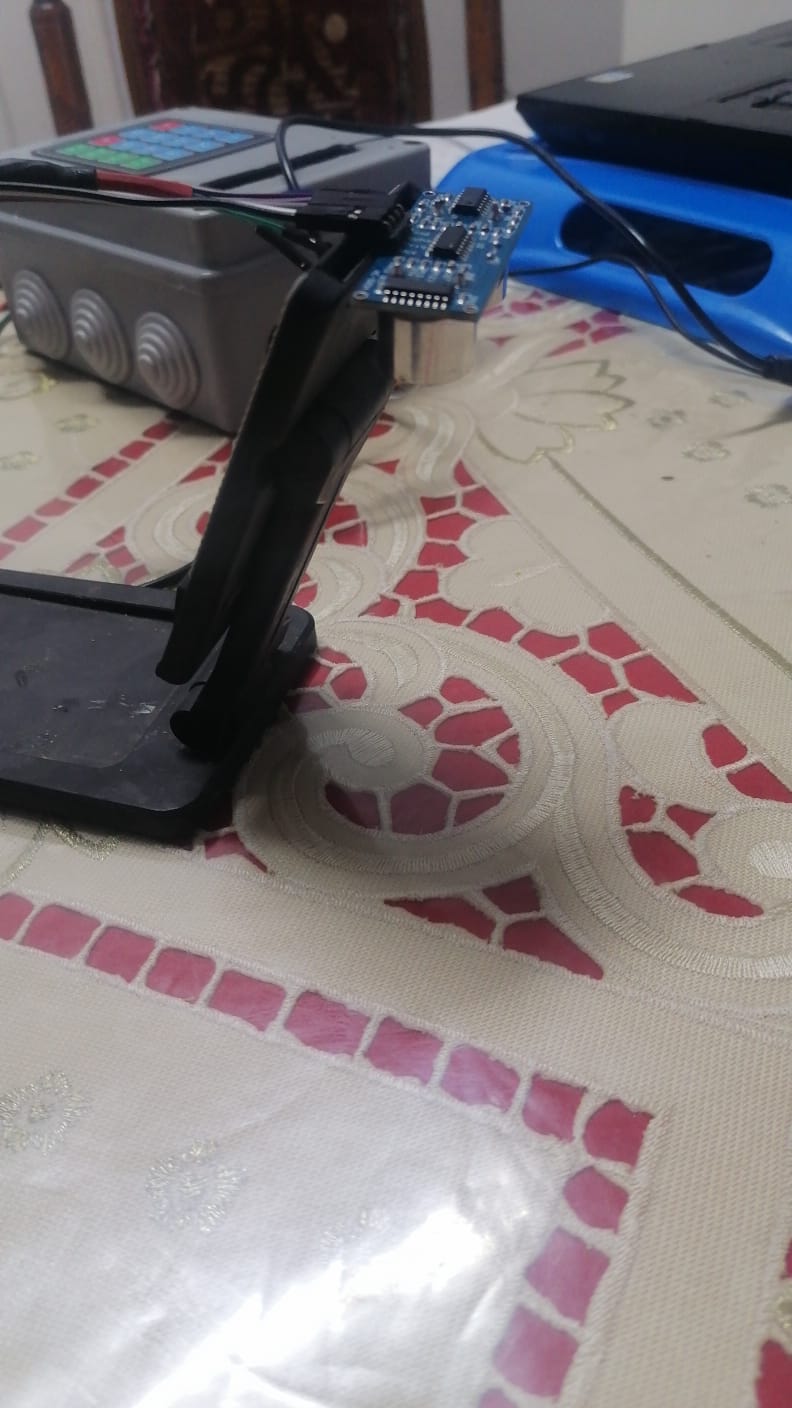
Ultrasonic module reading fluctuations

Hi Every one ,
I have a project with Arduino nano to measure a person height and weight
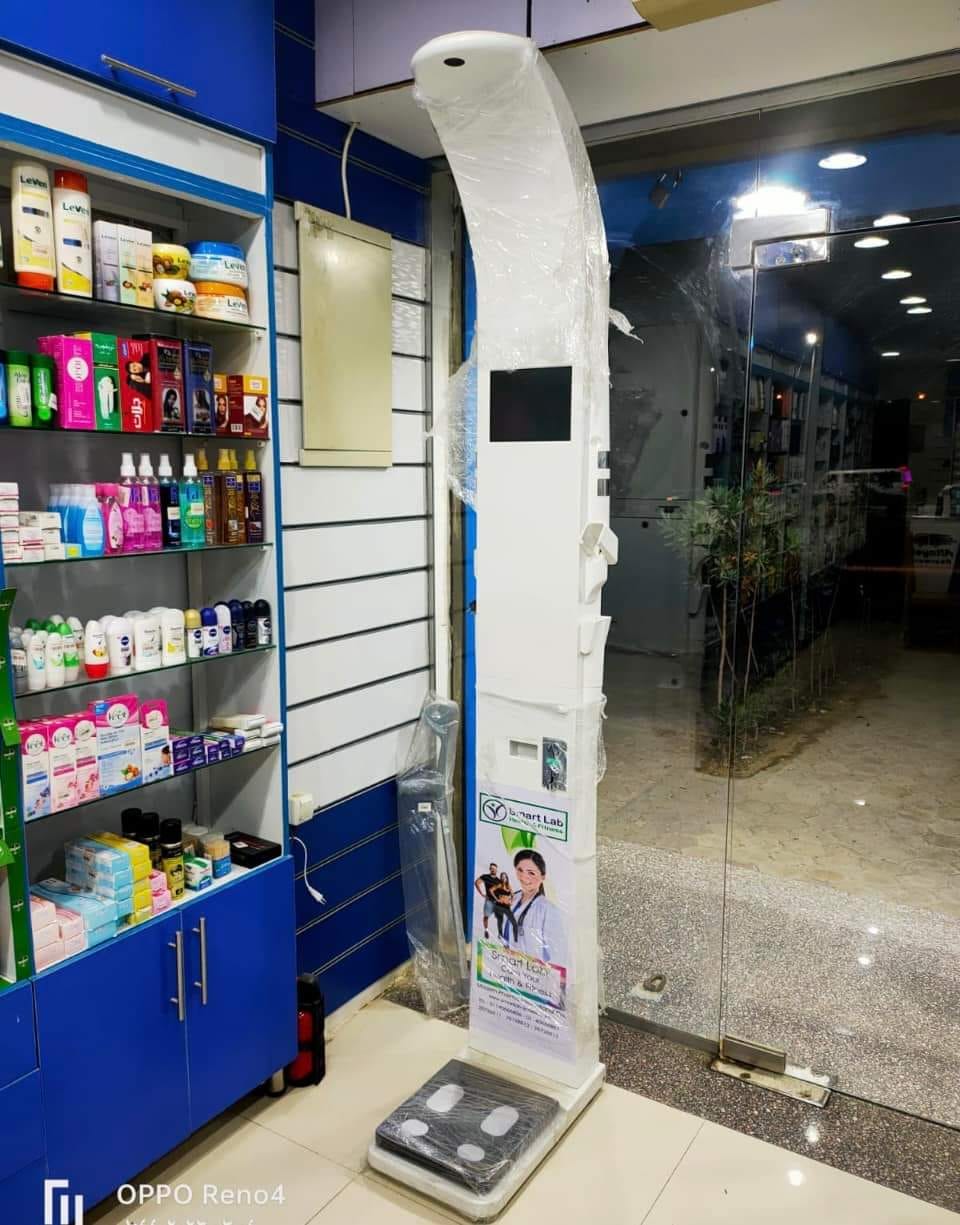
the final shape would be some thing like that

In my project the ultrasonic module is at 2 meter distance from the nano board, where it placed above the person head.
I have followed the tutorial in this project and used almost identical code

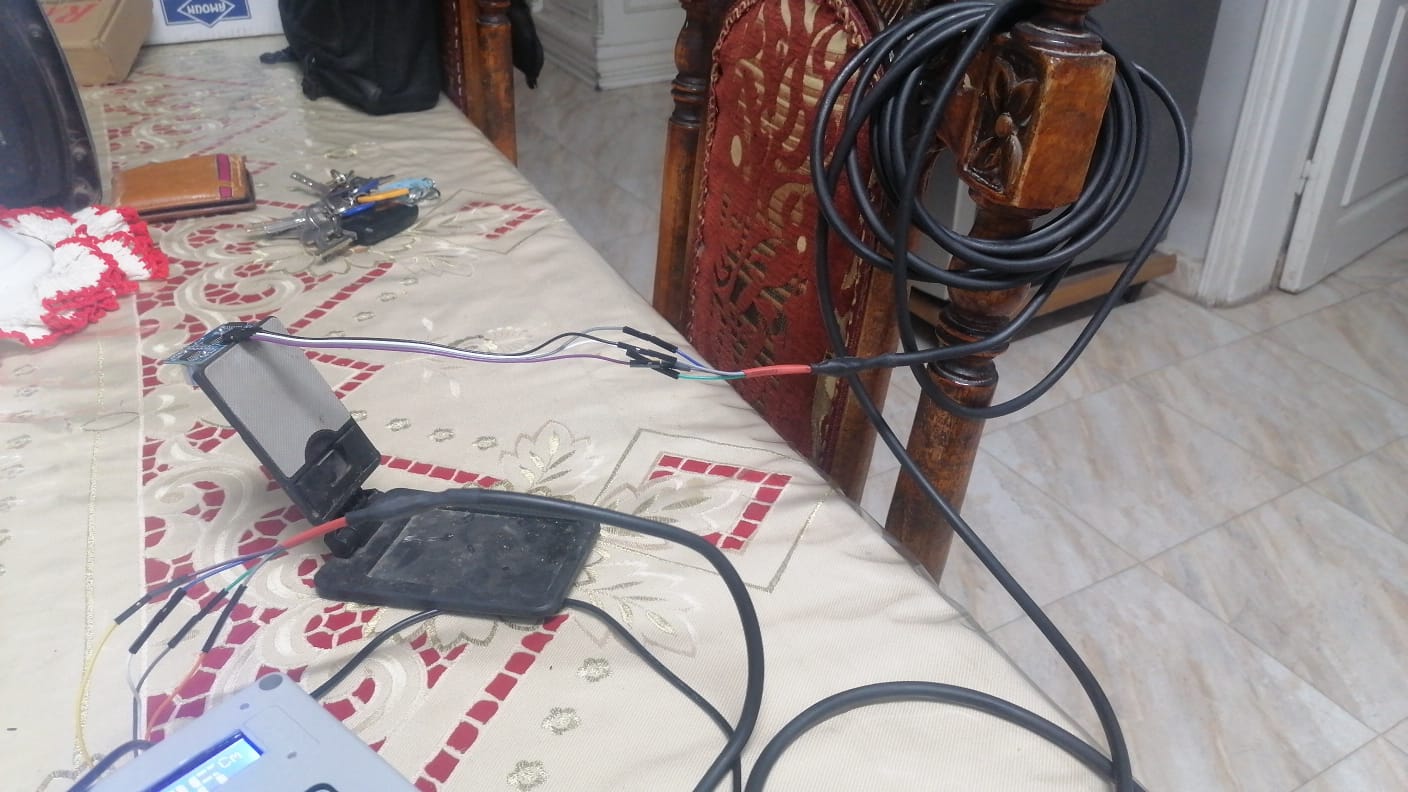
I have tested the ultrasonic module twice , in the first time I used the normal jumper wire to connect the nano to the ultrasonic module.
and when observed the reading I found a variation in the reading although the ultrasonic module location was fixed as you can see here


here are the readings


short cable


CLEARSHEET
CLEARDATA
HX711 scale demo
AHeight: 9.40
CELL,SET,B10, 9.40
Height: 9.52
CELL,SET,B10, 9.52
Height: 9.52
CELL,SET,B10, 9.52
Height: 9.52
CELL,SET,B10, 9.52
Height: 9.52
CELL,SET,B10, 9.52
Height: 9.52
CELL,SET,B10, 9.52
Height: 9.50
CELL,SET,B10, 9.50
Height: 9.42
CELL,SET,B10, 9.42
Height: 9.40
CELL,SET,B10, 9.40
Height: 9.42
CELL,SET,B10, 9.42
Height: 9.40
CELL,SET,B10, 9.40
Height: 9.42
CELL,SET,B10, 9.42
Height: 9.42
CELL,SET,B10, 9.42
Height: 9.52
CELL,SET,B10, 9.52
Height: 9.52
CELL,SET,B10, 9.52
Height: 9.52
CELL,SET,B10, 9.52
Height: 9.52
CELL,SET,B10, 9.52
Height: 9.52
CELL,SET,B10, 9.52
Height: 9.52
CELL,SET,B10, 9.52
Height: 9.52
CELL,SET,B10, 9.52
Height: 9.52
CELL,SET,B10, 9.52
Height: 9.52
CELL,SET,B10, 9.52
Height: 9.52
CELL,SET,B10, 9.52
Height: 9.52
CELL,SET,B10, 9.52
Height: 9.42
CELL,SET,B10, 9.42
Height: 9.42
CELL,SET,B10, 9.42
Height: 9.42
CELL,SET,B10, 9.42
Height: 9.40
CELL,SET,B10, 9.40
Height: 9.42
CELL,SET,B10, 9.42
Height: 9.42
CELL,SET,B10, 9.42
Height: 9.40
CELL,SET,B10, 9.40
Height: 9.52
CELL,SET,B10, 9.52
Height: 9.52
CELL,SET,B10, 9.52
Height: 9.52
CELL,SET,B10, 9.52
Height: 9.52
CELL,SET,B10, 9.52
Height: 9.52
CELL,SET,B10, 9.52
Height: 9.50
CELL,SET,B10, 9.50
Height: 9.52
CELL,SET,B10, 9.52
Height: 9.89
CELL,SET,B10, 9.89
Height: 9.42
CELL,SET,B10, 9.42
Height: 9.42
CELL,SET,B10, 9.42
Height: 9.40
CELL,SET,B10, 9.40
Height: 9.42
CELL,SET,B10, 9.42
Height: 9.42
CELL,SET,B10, 9.42
Height: 9.42
CELL,SET,B10, 9.42
Height: 9.42
CELL,SET,B10, 9.42
Height: 9.49
CELL,SET,B10, 9.49
Height: 9.52
CELL,SET,B10, 9.52
Height: 9.52
CELL,SET,B10, 9.52
Height: 9.52
CELL,SET,B10, 9.52
Height: 9.52
CELL,SET,B10, 9.52
Height: 9.52
CELL,SET,B10, 9.52
Height: 9.52
CELL,SET,B10, 9.52
Height: 9.42
CELL,SET,B10, 9.42
Height: 9.42
CELL,SET,B10, 9.42
Height: 9.40
CELL,SET,B10, 9.40
Height: 9.42
CELL,SET,B10, 9.42
Height: 9.42
CELL,SET,B10, 9.42
Height: 9.42
CELL,SET,B10, 9.42
Height: 9.45
CELL,SET,B10, 9.45
Height: 9.52
CELL,SET,B10, 9.52
Height: 9.52
CELL,SET,B10, 9.52
Height: 9.52
CELL,SET,B10, 9.52
Height: 9.52
CELL,SET,B10, 9.52
Height: 9.52
CELL,SET,B10, 9.52
Height: 9.52
CELL,SET,B10, 9.52
Height: 9.52
CELL,SET,B10, 9.52
Height: 9.42
CELL,SET,B10, 9.4

and the fluctuations also existed when I used a 4 meter cable between the the ultrasonic module and the Nano board
as you can see here


long cable


CLEARSHEET
CLEARDATA
HX711 scale demo
AHeight: 9.55
CELL,SET,B10, 9.55
Height: 9.76
CELL,SET,B10, 9.76
Height: 9.78
CELL,SET,B10, 9.78
Height: 9.76
CELL,SET,B10, 9.76
Height: 9.76
CELL,SET,B10, 9.76
Height: 9.78
CELL,SET,B10, 9.78
Height: 9.67
CELL,SET,B10, 9.67
Height: 9.66
CELL,SET,B10, 9.66
Height: 9.66
CELL,SET,B10, 9.66
Height: 9.66
CELL,SET,B10, 9.66
Height: 9.67
CELL,SET,B10, 9.67
Height: 9.66
CELL,SET,B10, 9.66
Height: 9.66
CELL,SET,B10, 9.66
Height: 9.66
CELL,SET,B10, 9.66
Height: 9.67
CELL,SET,B10, 9.67
Height: 9.57
CELL,SET,B10, 9.57
Height: 9.67
CELL,SET,B10, 9.67
Height: 9.66
CELL,SET,B10, 9.66
Height: 9.66
CELL,SET,B10, 9.66
Height: 9.66
CELL,SET,B10, 9.66
Height: 9.66
CELL,SET,B10, 9.66
Height: 9.66
CELL,SET,B10, 9.66
Height: 9.66
CELL,SET,B10, 9.66
Height: 9.57
CELL,SET,B10, 9.57
Height: 9.76
CELL,SET,B10, 9.76
Height: 9.76
CELL,SET,B10, 9.76
Height: 9.76
CELL,SET,B10, 9.76
Height: 9.78
CELL,SET,B10, 9.78
Height: 9.76
CELL,SET,B10, 9.76
Height: 9.78
CELL,SET,B10, 9.78
Height: 9.76
CELL,SET,B10, 9.76
Height: 9.76
CELL,SET,B10, 9.76
Height: 9.76
CELL,SET,B10, 9.76
Height: 9.76
CELL,SET,B10, 9.76
Height: 9.76
CELL,SET,B10, 9.76
Height: 9.78
CELL,SET,B10, 9.78
Height: 9.66
CELL,SET,B10, 9.66
Height: 9.66
CELL,SET,B10, 9.66
Height: 9.66
CELL,SET,B10, 9.66
Height: 9.67
CELL,SET,B10, 9.67
Height: 9.67

and here is the code I used

void HeightX() {
  switch (GetKey("A")) {
    case 'A':
      BufReset();
      lcd_1.clear();
      lcd_1.setCursor(3, 0);
      lcd_1.print("Thank You");
      delay(1000); 
      lcd_1.clear();
      State = S_Idle;
      return;
  }
  digitalWrite(trigPin, LOW);
  delayMicroseconds(2);
  digitalWrite(trigPin, HIGH);
  delayMicroseconds(10);
  digitalWrite(trigPin, LOW);
  duration_us = pulseIn(echoPin, HIGH);
  distance_cm = 0.017 * duration_us;
  tone(BUZZER_PIN, 750, 150);  // make a beep sound
  lcd_1.clear();
  lcd_1.setCursor(0, 0);
  lcd_1.print("Ht:           Cm");
  printValueF(4, distance_cm); 
  Serial.print("Height: ");
  Serial.println(distance_cm);
  Serial.print("CELL,SET,B10, ");
  Serial.print(distance_cm);
  Serial.println();
  tone(BUZZER_PIN, 1000, 350);  // make a beep sound
  delay(200);    

so what are causing those fluctuations in readings and what is the best way to avoid them

Are you measuring to the curved surface of the hair? Wear a flat hat and try again.

Change this to also be 2 microseconds and see if this helps. Most Arduino processors count microseconds 4 at a time, as I understand. Your sensor triggers on the rising of the trigger pulse so the time before the return to zero is irrelevant.

Study how your sensor operates. If it sends out more than a single sound pulse, you may get a return on ANY of the pulses.

The solution may be to do many readings and average them. Remember you are relying on hair, skin, fat and finally bone to produce the reflection.

Test only with a solid sound reflecting material on the person's head.

@Paul_KD7HB
I changed the delay to 2 Microseconds then to 5 microseconds but suddenly all readings are converted to 0

@Delta_G
Sure I'm measuring a real person , I made the setup to measure my self
here are the readings

ELL,SET,B10, 138.99
Height: 132.38
CELL,SET,B10, 132.38
Height: 138.65
CELL,SET,B10, 138.65
Height: 139.08
CELL,SET,B10, 139.08
Height: 130.90
CELL,SET,B10, 130.90
Height: 131.05
CELL,SET,B10, 131.05
Height: -835.53
CELL,SET,B10, -835.53
Height: 139.13
CELL,SET,B10, 139.13
Height: 139.08
CELL,SET,B10, 139.08
Height: -835.48
CELL,SET,B10, -835.48
Height: 134.76
CELL,SET,B10, 134.76
Height: 137.16
CELL,SET,B10, 137.16
Height: 136.83
CELL,SET,B10, 136.83
Height: 134.11
CELL,SET,B10, 134.11
Height: 140.29
CELL,SET,B10, 140.29
Height: 139.30
CELL,SET,B10, 139.30
Height: 138.38
CELL,SET,B10, 138.38
Height: 139.59
CELL,SET,B10, 139.59
Height: -26.50
CELL,SET,B10, -26.50
Height: -835.48
CELL,SET,B10, -835.48
Height: 143.62
CELL,SET,B10, 143.62
Height: 142.80
CELL,SET,B10, 142.80
Height: 141.65
CELL,SET,B10, 141.65
Height: 142.96
CELL,SET,B10, 142.96
Height: 141.49
CELL,SET,B10, 141.49
Height: 140.03
CELL,SET,B10, 140.03
Height: 140.20
CELL,SET,B10, 140.20
Height: 140.01
CELL,SET,B10, 140.01
Height: 142.67
CELL,SET,B10, 142.67
Height: 142.94
CELL,SET,B10, 142.94
Height: 143.89
CELL,SET,B10, 143.89
Height: 143.19
CELL,SET,B10, 143.19
Height: 143.87
CELL,SET,B10, 143.87
Height: 144.28
CELL,SET,B10, 144.28
Height: 143.45
CELL,SET,B10, 143.45
Height: 142.84
CELL,SET,B10, 142.84
Height: 144.13
CELL,SET,B10, 144.13
Height: 144.13
CELL,SET,B10, 144.13
Height: 143.52
CELL,SET,B10, 143.52
Height: 144.40
CELL,SET,B10, 144.40
Height: 143.96
CELL,SET,B10, 143.96
Height: 143.53
CELL,SET,B10, 143.53
Height: 143.53
CELL,SET,B10, 143.53
Height: 143.72
CELL,SET,B10, 143.72
Height: 143.70
CELL,SET,B10, 143.70
Height: 144.15
CELL,SET,B10, 144.15
Height: 144.13
CELL,SET,B10, 144.13
Height: 144.23
CELL,SET,B10, 144.23
Height: 144.40
CELL,SET,B10, 144.40
Height: -835.57
CELL,SET,B10, -835.57
Height: -835.74
CELL,SET,B10, -835.74
Height: -1.65
CELL,SET,B10, -1.65
Height: -0.41
CELL,SET,B10, -0.41
Height: -1.12
CELL,SET,B10, -1.12
Height: -1.10
CELL,SET,B10, -1.10
Height: -0.68
CELL,SET,B10, -0.68
Height: -0.36
CELL,SET,B10, -0.36
Height: -0.70
CELL,SET,B10, -0.70
Height: 0.15
CELL,SET,B10, 0.15
Height: -1.46
CELL,SET,B10, -1.46
Height: -1.05
CELL,SET,B10, -1.05
A

and here is the code

void HeightX() {
  switch (GetKey("A")) {
    case 'A':
      BufReset();
      lcd_1.clear();
      lcd_1.setCursor(3, 0);
      lcd_1.print("Thank You");
      delay(1000); 
      lcd_1.clear();
      State = S_Idle;
      return;
  }
  digitalWrite(trigPin, LOW);
  delayMicroseconds(2);
  digitalWrite(trigPin, HIGH);
  delayMicroseconds(10);
  digitalWrite(trigPin, LOW);
  duration_us = pulseIn(echoPin, HIGH);
  distance_cm = 0.017 * duration_us;
  distance_cm_X = 180 - (distance_cm + 22);
  tone(BUZZER_PIN, 750, 150);  // make a beep sound
  lcd_1.clear();
  lcd_1.setCursor(0, 0);
  lcd_1.print("Ht:           Cm");
  printValueF(4, distance_cm_X); 
  Serial.print("Height: ");
  Serial.println(distance_cm_X);
  Serial.print("CELL,SET,B10, ");
  Serial.print(distance_cm_X);
  Serial.println();
  tone(BUZZER_PIN, 1000, 350);  // make a beep sound
  delay(200);    
}

I measured my self and as you can see from the reading it's not accurate as my height is 172 and the average reading is 140 , so some correction is needed, especially there are reading that are completely wrong like 800

@drmina2023 - When posting code, please include the full program.

30cm... the distance from the top of your head to your shoulders is 30cm.

Try commenting-out the "buzzer" lines.

You have never disclosed the error range for the ultrasonic module you are using. Does your test readings fit the error range?

@Paul_KD7HB
the vendor of this module never sold me the datasheet
I changed the hi delay to 30 millisecond and I made just one reading every 1 sec as you can see here and this stabilized the readings a bit.

digitalWrite(trigPin, LOW);

it gave better and more stable readings .

  digitalWrite(trigPin, LOW);
  delayMicroseconds(2);
  digitalWrite(trigPin, HIGH);
  delayMicroseconds(30);
  digitalWrite(trigPin, LOW);
  duration_us = pulseIn(echoPin, HIGH);
  distance_cm = 0.017 * duration_us;
  distance_cm_X = 180 - (distance_cm + 22);
  tone(BUZZER_PIN, 750, 150);  // make a beep sound
  lcd_1.clear();
  lcd_1.setCursor(0, 0);
  lcd_1.print("Ht:           Cm");
  printValueF(4, distance_cm); 
  Serial.print("Height: ");
  Serial.println(distance_cm);
  Serial.print("CELL,SET,B10, ");
  Serial.print(distance_cm);
  Serial.println();
  tone(BUZZER_PIN, 1000, 350);  // make a beep sound
  delay(1000);   

here are the readings

CLEARSHEET
CLEARDATA
HX711 scale demo
AHeight: 177.36
CELL,SET,B10, 177.36
Height: 179.55
CELL,SET,B10, 179.55
Height: 179.47
CELL,SET,B10, 179.47
Height: 145.67
CELL,SET,B10, 145.67
Height: 180.74
CELL,SET,B10, 180.74
Height: 96.76
CELL,SET,B10, 96.76
Height: 179.11
CELL,SET,B10, 179.11
Height: 180.83
CELL,SET,B10, 180.83
Height: 115.72
CELL,SET,B10, 115.72
Height: 94.86
CELL,SET,B10, 94.86
Height: 179.52
CELL,SET,B10, 179.52
Height: 179.86
CELL,SET,B10, 179.86
Height: 180.66
CELL,SET,B10, 180.66
Height: 181.42
CELL,SET,B10, 181.42
Height: 111.98
CELL,SET,B10, 111.98
Height: 181.27
CELL,SET,B10, 181.27
Height: 180.76
CELL,SET,B10, 180.76
Height: 179.64
CELL,SET,B10, 179.64
Height: 180.76
CELL,SET,B10, 180.76
Height: 181.08
CELL,SET,B10, 181.08
Height: 179.55
CELL,SET,B10, 179.55

again there are many off-shoot values so more work is needed.
then I removed the following line from the function and placed it only in the set-up

AHeight: 176.95
CELL,SET,B10, 176.95
Height: 179.45
CELL,SET,B10, 179.45
Height: 179.47
CELL,SET,B10, 179.47
Height: 83.32
CELL,SET,B10, 83.32
Height: 179.35
CELL,SET,B10, 179.35
Height: 179.78
CELL,SET,B10, 179.78
Height: 181.41
CELL,SET,B10, 181.41
Height: 179.71
CELL,SET,B10, 179.71
Height: 179.44
CELL,SET,B10, 179.44
Height: 179.69
CELL,SET,B10, 179.69
Height: 176.44
CELL,SET,B10, 176.44
Height: 179.35
CELL,SET,B10, 179.35
Height: 179.35
CELL,SET,B10, 179.35
Height: 179.44
CELL,SET,B10, 179.44
Height: 180.74
CELL,SET,B10, 180.74
Height: 179.89
CELL,SET,B10, 179.89
Height: 178.94
CELL,SET,B10, 178.94
Height: 175.15
CELL,SET,B10, 175.15
Height: 181.00
CELL,SET,B10, 181.00
Height: 180.22
CELL,SET,B10, 180.22
Height: 179.37
CELL,SET,B10, 179.37
Height: 179.79
CELL,SET,B10, 179.79
Height: 179.03
CELL,SET,B10, 179.03
Height: 179.79
CELL,SET,B10, 179.79
Height: 175.20
CELL,SET,B10, 175.20
Height: 179.83
CELL,SET,B10, 179.83
Height: 179.81
CELL,SET,B10, 179.81
Height: 179.89
CELL,SET,B10, 179.89
Height: 179.38
CELL,SET,B10, 179.38
Height: 181.00
CELL,SET,B10, 181.00
Height: 179.28
CELL,SET,B10, 179.28
Height: 173.64
CELL,SET,B10, 173.64
Height: 179.47
CELL,SET,B10, 179.47
Height: 179.98
CELL,SET,B10, 179.98
Height: 182.05
CELL,SET,B10, 182.05
Height: 179.42
CELL,SET,B10, 179.42
Height: 179.38
CELL,SET,B10, 179.38
Height: 180.22
CELL,SET,B10, 180.22
Height: 172.19
CELL,SET,B10, 172.19
Height: 179.13
CELL,SET,B10, 179.13
Height: 179.89
CELL,SET,B10, 179.89
Height: 179.49
CELL,SET,B10, 179.49
Height: 146.29
CELL,SET,B10, 146.29
Height: 179.57
CELL,SET,B10, 179.57
Height: 179.89
CELL,SET,B10, 179.89
Height: 181.19
CELL,SET,B10, 181.19
Height: 179.38
CELL,SET,B10, 179.38
Height: 179.83
CELL,SET,B10, 179.83
Height: 180.63
CELL,SET,B10, 180.63
Height: 149.86
CELL,SET,B10, 149.86
Height: 179.71
CELL,SET,B10, 179.71
Height: 179.37
CELL,SET,B10, 179.37
Height: 179.79
CELL,SET,B10, 179.79
Height: 180.66
CELL,SET,B10, 180.66
Height: 179.89
CELL,SET,B10, 179.89
Height: 179.89
CELL,SET,B10, 179.89
Height: 108.31
CELL,SET,B10, 108.31
Height: 179.69
CELL,SET,B10, 179.69
Height: 181.41
CELL,SET,B10, 181.41
Height: 179.47
CELL,SET,B10, 179.47

then I increased the delay to 100 secs
and here are the readings

CLEARSHEET
CLEARDATA
HX711 scale demo
AHeight: 177.72
CELL,SET,B10, 177.72
Height: 179.44
CELL,SET,B10, 179.44
Height: 181.14
CELL,SET,B10, 181.14
Height: 179.08
CELL,SET,B10, 179.08
Height: 82.76
CELL,SET,B10, 82.76
Height: 180.61
CELL,SET,B10, 180.61
Height: 181.49
CELL,SET,B10, 181.49
Height: 180.71
CELL,SET,B10, 180.71
Height: 179.35
CELL,SET,B10, 179.35
Height: 181.05
CELL,SET,B10, 181.05
Height: 180.27
CELL,SET,B10, 180.27
Height: 164.95
CELL,SET,B10, 164.95
Height: 128.27
CELL,SET,B10, 128.27
Height: 82.91
CELL,SET,B10, 82.91
Height: 144.18
CELL,SET,B10, 144.18
Height: 179.66
CELL,SET,B10, 179.66
Height: 179.33
CELL,SET,B10, 179.33
Height: 180.59
CELL,SET,B10, 180.59
Height: 179.27
CELL,SET,B10, 179.27
Height: 180.73
CELL,SET,B10, 180.73
Height: 94.38
CELL,SET,B10, 94.38
Height: 179.52
CELL,SET,B10, 179.52
Height: 179.10
CELL,SET,B10, 179.10
Height: 179.52
CELL,SET,B10, 179.52
Height: 180.71
CELL,SET,B10, 180.71
Height: 181.03
CELL,SET,B10, 181.03
Height: 180.69
CELL,SET,B10, 180.69
Height: 164.51
CELL,SET,B10, 164.51
Height: 179.10
CELL,SET,B10, 179.10
Height: 181.49
CELL,SET,B10, 181.49
Height: 179.52
CELL,SET,B10, 179.52
Height: 179.96
CELL,SET,B10, 179.96
Height: 181.97
CELL,SET,B10, 181.97
Height: 182.67
CELL,SET,B10, 182.67
Height: 180.44
CELL,SET,B10, 180.44
Height: 180.37
CELL,SET,B10, 180.37
Height: 180.63
CELL,SET,B10, 180.63
Height: 179.86
CELL,SET,B10, 179.86
Height: 124.17
CELL,SET,B10, 124.17
Height: 180.73
CELL,SET,B10, 180.73
Height: 179.52
CELL,SET,B10, 179.52

So any suggestions for better results ?

No suggestions because nothing to base them on. Fortunately, you are only making a single device for your personal use.

The three groups of data, graphed.

  • Randomness would show above 180, and not just decrease below 180.
  • Group #2 shows a rhythm/pulse/pattern every 15 samples.
  • Group #3 shows a pattern every 20 samples
  • All Groups show the same value (80+) at 10 samples

Data group #1:
image

Data group #2:
image

Data group #3:
image

I really appreciate your response and time,
so, what those patterns indicate?

The patterns indicate either your code or hardware or power doing something for some reason (sorry, I couldn't be more vague, could I?). When this "something" occurs, the measurement is effected.

Here is a utility program that graphs the measurements real-time. Note the pins used might not be the same as your configuration.

#define trigPin 12
#define echoPin 13

long duration;
int distance;

void setup() {
  Serial.begin(115200);
  pinMode(trigPin, OUTPUT);
  pinMode(echoPin, INPUT);
}

void loop() {
  // create trigger pulse
  digitalWrite(trigPin, LOW);         // turn off pulses
  delayMicroseconds(2);               // pause before transmitting
  digitalWrite(trigPin, HIGH);        // transmit pulses...
  delayMicroseconds(10);              // ...for 10 microseconds
  digitalWrite(trigPin, LOW);         // turn off pulses
  duration = pulseIn(echoPin, HIGH);  // time the echo
  for (int i = 0; i < duration / 130; i++) { // create graph of echo
    Serial.print("*");
  }
  for (int i = 0; i < 80 - (duration / 130); i++ ) { // fill the cube to 100
    Serial.print(" ");
  }
  Serial.println("|");
  delay(200);
}

@xfpd
an extremely clever technique for real time graphs
I removed the buzzer after every reading which I think make things better
as you can see here

CLEARSHEET
CLEARDATA
HX711 scale demo
ACELL,SET,B10, 7.20
CELL,SET,B10, 4.80
CELL,SET,B10, 2.63
CELL,SET,B10, 10.20
CELL,SET,B10, 3.93
CELL,SET,B10, 2.90
CELL,SET,B10, 4.31
CELL,SET,B10, 2.61
CELL,SET,B10, 3.84
CELL,SET,B10, 3.82
CELL,SET,B10, 5.16
CELL,SET,B10, 5.28
CELL,SET,B10, 5.37
CELL,SET,B10, 4.78
CELL,SET,B10, 95.54
CELL,SET,B10, 5.39
CELL,SET,B10, 3.84
CELL,SET,B10, 3.37
CELL,SET,B10, 2.97
CELL,SET,B10, 4.39
CELL,SET,B10, 4.41
CELL,SET,B10, 4.41
CELL,SET,B10, 4.31
CELL,SET,B10, 5.28
CELL,SET,B10, 4.90
CELL,SET,B10, 3.46
CELL,SET,B10, 3.82
CELL,SET,B10, 5.18
CELL,SET,B10, 3.82
CELL,SET,B10, 2.61

I think I would add a code to exclude the off-shoot values then averaging like 10 close values , how about this Idea?

That "15th" sample...
12

This is certainly one source of error. Assuming, the OP is using an HC-SR04 type module, it sends 8 pulses out. I did some experiments a while ago with this sensor, (GitHub - GaryDyr/HC-SR04_motion_detection) and found that indeed it usually picks up the return signal most of the time spread over the second or third reflected pulse, but the material, texture and shape of the target all play a role in when a pulse is detected. The measured pulses are on 4 us intervals.

The specifications generally given for the sensor, and the results I found, suggest resolution is 0.1 to 0.5 cm, depending on the distance of the sensor from the target. In my case, this was with flat targets placed normal to the sensor beam axis.

The output will be very sensitive to the head position, because it is more or less a rounded and likely a moving target, and a lot of the beam energy will therefore not return to the receiver transducer, especially if the sensor is fairly far away from the head. In addition, hair will likely also cause more dispersion of the beam, further impacting the sound energy returned. Bald is better, but only in this case.

One possible untested solution to improve the results might be to take a bunch of readings, sort the values, and average some number of the lowest raw distance readings, then subtract that average from the sensor to base height.

I made a little modification to the code which is strangely resulted in very stable readings, which is a real measurement for a real person .


ACELL,SET,B10, 170.84
CELL,SET,B10, 168.89
CELL,SET,B10, 168.52
CELL,SET,B10, 170.14
CELL,SET,B10, 169.76
CELL,SET,B10, 169.46
CELL,SET,B10, 169.95
CELL,SET,B10, 171.20
CELL,SET,B10, 169.38
CELL,SET,B10, 170.31
CELL,SET,B10, 169.67
CELL,SET,B10, 170.35
CELL,SET,B10, 168.99
CELL,SET,B10, 169.46
CELL,SET,B10, 170.16
CELL,SET,B10, 168.72
CELL,SET,B10, 171.93
CELL,SET,B10, 170.12
CELL,SET,B10, 169.01
CELL,SET,B10, 170.03

here is the code

switch (GetKey("A")) {
    case 'A':
      BufReset();
      lcd_1.clear();
      lcd_1.setCursor(3, 0);
      lcd_1.print("Thank You");
      delay(1000); 
      lcd_1.clear();
      State = S_Idle;
      return;
  }
  //digitalWrite(trigPin, LOW);
    for (int i = 0; i < 20; i++) {
      delayMicroseconds(2);
      digitalWrite(trigPin, HIGH);
      delayMicroseconds(10);
      digitalWrite(trigPin, LOW);
      duration_us = pulseIn(echoPin, HIGH);
      distance_cm = 1.111 * (0.017 * duration_us);
      distance_cm_X = abs(200 - distance_cm);
      lcd_1.clear();
      lcd_1.setCursor(0, 0);
      lcd_1.print("Ht:           Cm");
      printValueF(4, distance_cm_X); 
      //Serial.print("Height: ");
      //Serial.println(distance_cm_X);
      Serial.print("CELL,SET,B10, ");
      Serial.print(distance_cm_X);
      Serial.println();
      //tone(BUZZER_PIN, 1000, 350);  // make a beep sound
       delay(2000); 
      

    }
  tone(BUZZER_PIN, 1000, 350);  // make a beep sound
  lcd_1.clear();
  State = S_Idle;
  return;    
}

for few days now after trying the usual code for the ultrasonic module
some drifting values still exists as you can see here without measuring any body

CLEARSHEET
CLEARDATA
HX711 scale demo
ACELL,SET,B10, 114.81
CELL,SET,B10, 197.95
CELL,SET,B10, 165.94
CELL,SET,B10, 198.90
CELL,SET,B10, 198.03
CELL,SET,B10, 198.12
CELL,SET,B10, 200.32
CELL,SET,B10, 198.90
CELL,SET,B10, 151.04
CELL,SET,B10, 197.56
CELL,SET,B10, 197.95
CELL,SET,B10, 181.18
CELL,SET,B10, 197.56
CELL,SET,B10, 115.25
CELL,SET,B10, 200.20
CELL,SET,B10, 197.84
CELL,SET,B10, 197.80
CELL,SET,B10, 200.13
CELL,SET,B10, 180.86
CELL,SET,B10, 78.82
CELL,SET,B10, 121.33
CELL,SET,B10, 198.05
CELL,SET,B10, 197.56
CELL,SET,B10, 200.11
CELL,SET,B10, 140.05
CELL,SET,B10, 199.37
CELL,SET,B10, 200.32
CELL,SET,B10, 197.65
CELL,SET,B10, 198.97
CELL,SET,B10, 199.07


CLEARSHEET
CLEARDATA
HX711 scale demo
ACELL,SET,B10, 196.07
CELL,SET,B10, 198.43
CELL,SET,B10, 200.32
CELL,SET,B10, 198.60
CELL,SET,B10, 199.47
CELL,SET,B10, 200.88
CELL,SET,B10, 197.75
CELL,SET,B10, 198.11
CELL,SET,B10, 90.56
CELL,SET,B10, 198.90
CELL,SET,B10, 198.39
CELL,SET,B10, 198.41
CELL,SET,B10, 199.33
CELL,SET,B10, 198.43
CELL,SET,B10, 199.35
CELL,SET,B10, 198.05
CELL,SET,B10, 200.75
CELL,SET,B10, 196.33
CELL,SET,B10, 200.39
CELL,SET,B10, 153.51
CELL,SET,B10, 197.95
CELL,SET,B10, 197.94
CELL,SET,B10, 198.14
CELL,SET,B10, 200.22
CELL,SET,B10, 200.35
CELL,SET,B10, 197.84
CELL,SET,B10, 122.41
CELL,SET,B10, 197.94
CELL,SET,B10, 200.90
CELL,SET,B10, 198.97

and here after measuring a real person


CLEARSHEET
CLEARDATA
HX711 scale demo
ACELL,SET,B10, 196.56
CELL,SET,B10, 198.52
CELL,SET,B10, 215.37
CELL,SET,B10, 219.96
CELL,SET,B10, 217.67
CELL,SET,B10, 30.97
CELL,SET,B10, 31.71
CELL,SET,B10, 30.86
CELL,SET,B10, 33.24
CELL,SET,B10, 30.60
CELL,SET,B10, 31.71
CELL,SET,B10, 31.62
CELL,SET,B10, 32.20
CELL,SET,B10, 217.75
CELL,SET,B10, 217.69
CELL,SET,B10, 217.48
CELL,SET,B10, 32.79
CELL,SET,B10, 31.73
CELL,SET,B10, 32.56
CELL,SET,B10, 31.33
CELL,SET,B10, 32.67
CELL,SET,B10, 31.94
CELL,SET,B10, 32.39
CELL,SET,B10, 217.39
CELL,SET,B10, 32.01
CELL,SET,B10, 216.82
CELL,SET,B10, 33.17
CELL,SET,B10, 32.09
CELL,SET,B10, 218.24
CELL,SET,B10, 31.26


CLEARSHEET
CLEARDATA
HX711 scale demo
ACELL,SET,B10, 196.54
CELL,SET,B10, 200.77
CELL,SET,B10, 198.52
CELL,SET,B10, 200.66
CELL,SET,B10, 198.12
CELL,SET,B10, 198.86
CELL,SET,B10, 31.16
CELL,SET,B10, 218.14
CELL,SET,B10, 32.13
CELL,SET,B10, 30.60
CELL,SET,B10, 30.96
CELL,SET,B10, 30.96
CELL,SET,B10, 30.60
CELL,SET,B10, 30.96
CELL,SET,B10, 30.11
CELL,SET,B10, 32.01
CELL,SET,B10, 31.52
CELL,SET,B10, 31.45
CELL,SET,B10, 30.69
CELL,SET,B10, 32.39
CELL,SET,B10, 31.52
CELL,SET,B10, 31.14
CELL,SET,B10, 32.20
CELL,SET,B10, 31.14
CELL,SET,B10, 31.24
CELL,SET,B10, 31.71
CELL,SET,B10, 32.69
CELL,SET,B10, 32.20
CELL,SET,B10, 31.24
CELL,SET,B10, 31.35


CELL,SET,B10, 30.48
CELL,SET,B10, 31.18
CELL,SET,B10, 30.60
CELL,SET,B10, 29.63
CELL,SET,B10, 31.18
CELL,SET,B10, 31.16
CELL,SET,B10, 31.05
CELL,SET,B10, 30.67
CELL,SET,B10, 31.26
CELL,SET,B10, 31.14
CELL,SET,B10, 31.14
CELL,SET,B10, 31.73
CELL,SET,B10, 31.18
CELL,SET,B10, 31.33
CELL,SET,B10, 30.01
CELL,SET,B10, 30.12
CELL,SET,B10, 30.86
CELL,SET,B10, 30.39
CELL,SET,B10, 30.12
CELL,SET,B10, 30.88
CELL,SET,B10, 31.33
CELL,SET,B10, 30.97
CELL,SET,B10, 30.48
CELL,SET,B10, 32.30
CELL,SET,B10, 31.45
CELL,SET,B10, 31.07
CELL,SET,B10, 31.45

and here is the usual code

switch (GetKey("A")) {
    case 'A':
      BufReset();
      lcd_1.clear();
      lcd_1.setCursor(3, 0);
      lcd_1.print("Thank You");
      delay(1000); 
      lcd_1.clear();
      State = S_Idle;
      return;
  }
  //digitalWrite(trigPin, LOW);
    for (int i = 0; i < 20; i++) {
      delayMicroseconds(2);
      digitalWrite(trigPin, HIGH);
      delayMicroseconds(10);
      digitalWrite(trigPin, LOW);
      duration_us = pulseIn(echoPin, HIGH);
      distance_cm = 1.111 * (0.017 * duration_us);
      distance_cm_X = abs(200 - distance_cm);
      lcd_1.clear();
      lcd_1.setCursor(0, 0);
      lcd_1.print("Ht:           Cm");
      printValueF(4, distance_cm_X); 
      //Serial.print("Height: ");
      //Serial.println(distance_cm_X);
      Serial.print("CELL,SET,B10, ");
      Serial.print(distance_cm_X);
      Serial.println();
      //tone(BUZZER_PIN, 1000, 350);  // make a beep sound
       delay(2000); 
      

    }
  tone(BUZZER_PIN, 1000, 350);  // make a beep sound
  lcd_1.clear();
  State = S_Idle;
  return;    
}

and as you can see, the presence of offshoot values will make take average much more prone to error,
and after a lot of searching , I found specific code to remove noise from the readings
the first one is using the KALMAN filter , as you can see the code here

void usonic_transmit() {
  digitalWrite(trigPin, HIGH);
  delayMicroseconds(10);
  digitalWrite(trigPin, LOW);
  delayMicroseconds(2);
}

double kalman(double U){
  static const double R = 40;
  static const double H = 1.00;
  static double Q = 10;
  static double P = 0;
  static double U_hat = 0;
  static double K = 0;
  K = P*H/(H*P*H+R);
  U_hat += + K*(U-H*U_hat);
  P = (1-K*H)*P+Q;
  return U_hat;
}


void HeightX() {
    switch (GetKey("A")) {
    case 'A':
      BufReset();
      lcd_1.clear();
      lcd_1.setCursor(3, 0);
      lcd_1.print("Thank You");
      delay(1000); 
      lcd_1.clear();
      State = S_Idle;
      return;
  }
  for (int i = 0; i < 30; i++) {
        usonic_transmit();
        durations = pulseIn(echoPin, HIGH);
        distances = 1.106 * ((durations*.034)/2);
        kaldist = kalman(distances);
        lcd_1.clear();
        lcd_1.setCursor(0, 0);
        lcd_1.print("Ht:           Cm");
        printValueF(4, kaldist);
        Serial.println(distances);  // "Distance (in cm): %f", 
        Serial.println( kaldist);  // "Corrected distance (in cm): %f",
        Serial.print("CELL,SET,B10, ");
        Serial.print(kaldist);
        Serial.println();
        delay(1000);
        }
  tone(BUZZER_PIN, 1000, 350);  // make a beep sound
  lcd_1.clear();
  State = S_Idle;
  return; 

  }

here the readings before measurement

CLEARSHEET
CLEARDATA
HX711 scale demo
A197.16
0
CELL,SET,B10, 0.00
198.32
39.66
CELL,SET,B10, 39.66
199.53
89.28
CELL,SET,B10, 89.28
198.3
128.43
CELL,SET,B10, 128.43
199.53
155.34
CELL,SET,B10, 155.34
198.32
171.93
CELL,SET,B10, 171.93
180.93
175.43
CELL,SET,B10, 175.43
143.14
162.84
CELL,SET,B10, 162.84
198.59
176.79
CELL,SET,B10, 176.79
198.76
185.36
CELL,SET,B10, 185.36
198.1
190.33
CELL,SET,B10, 190.33
209.25
197.72
CELL,SET,B10, 197.72
200.22
198.7
CELL,SET,B10, 198.70
118.41
167.36
CELL,SET,B10, 167.36
198.42
179.48
CELL,SET,B10, 179.48
111.57
152.97
CELL,SET,B10, 152.97
199.62
171.18
CELL,SET,B10, 171.18
197.93
181.62
CELL,SET,B10, 181.62
198.66
188.28
CELL,SET,B10, 188.28
198.32
192.2
CELL,SET,B10, 192.20
198.19
194.54
CELL,SET,B10, 194.54
198.77
196.19
CELL,SET,B10, 196.19
201.01
198.07
CELL,SET,B10, 198.07
199.15
198.49
CELL,SET,B10, 198.49
198.66
198.56
CELL,SET,B10, 198.56
198.59
198.57
CELL,SET,B10, 198.57
197.7
198.23
CELL,SET,B10, 198.23
200.18
198.99
CELL,SET,B10, 198.99
203.17
200.63
CELL,SET,B10, 200.63
197.83
199.54
CELL,SET,B10, 199.54

CLEARSHEET
CLEARDATA
HX711 scale demo
A197.38
0
CELL,SET,B10, 0.00
210.49
42.1
CELL,SET,B10, 42.10
197.76
90.41
CELL,SET,B10, 90.41
141.64
108.8
CELL,SET,B10, 108.80
94.57
103.42
CELL,SET,B10, 103.42
197.48
139.72
CELL,SET,B10, 139.72
199.15
162.82
CELL,SET,B10, 162.82
199.28
177.03
CELL,SET,B10, 177.03
197.67
185.08
CELL,SET,B10, 185.08
200.03
190.92
CELL,SET,B10, 190.92
198.61
193.92
CELL,SET,B10, 193.92
200.13
196.34
CELL,SET,B10, 196.34
120.46
166.72
CELL,SET,B10, 166.72
198.23
179.02
CELL,SET,B10, 179.02
198.68
186.7
CELL,SET,B10, 186.70
197.83
191.04
CELL,SET,B10, 191.04
198.61
194
CELL,SET,B10, 194.00
198.23
195.65
CELL,SET,B10, 195.65
200.18
197.42
CELL,SET,B10, 197.42
197.76
197.55
CELL,SET,B10, 197.55
199.45
198.29
CELL,SET,B10, 198.29
201.82
199.67
CELL,SET,B10, 199.67
198.61
199.25
CELL,SET,B10, 199.25
198.49
198.96
CELL,SET,B10, 198.96
197.67
198.45
CELL,SET,B10, 198.45
197.83
198.21
CELL,SET,B10, 198.21
200.96
199.28
CELL,SET,B10, 199.28
198.12
198.83
CELL,SET,B10, 198.83
198.7
198.78
CELL,SET,B10, 198.78
197.38
198.23
CELL,SET,B10, 198.23

and after measuring

CLEARSHEET
CLEARDATA
HX711 scale demo
A195.47
0
CELL,SET,B10, 0.00
198.79
39.76
CELL,SET,B10, 39.76
86.36
54.22
CELL,SET,B10, 54.22
34.88
47.27
CELL,SET,B10, 47.27
35.63
42.87
CELL,SET,B10, 42.87
95.53
63.19
CELL,SET,B10, 63.19
35.18
52.3
CELL,SET,B10, 52.30
1079.4
452.64
CELL,SET,B10, 452.64
34.31
289.43
CELL,SET,B10, 289.43
1088.82
601.43
CELL,SET,B10, 601.43
35.25
380.42
CELL,SET,B10, 380.42
218.35
317.15
CELL,SET,B10, 317.15
220.06
279.25
CELL,SET,B10, 279.25
810.48
486.63
CELL,SET,B10, 486.63
87.3
330.74
CELL,SET,B10, 330.74
95.44
238.88
CELL,SET,B10, 238.88
33.28
158.62
CELL,SET,B10, 158.62
33.37
109.72
CELL,SET,B10, 109.72
34.33
80.29
CELL,SET,B10, 80.29
34.22
62.31
CELL,SET,B10, 62.31
34.22
51.34
CELL,SET,B10, 51.34
34.31
44.69
CELL,SET,B10, 44.69
34.43
40.69
CELL,SET,B10, 40.69
34.76
38.37
CELL,SET,B10, 38.37
33.94
36.64
CELL,SET,B10, 36.64
33
35.22
CELL,SET,B10, 35.22
34.43
34.91
CELL,SET,B10, 34.91
34.31
34.68
CELL,SET,B10, 34.68
32.98
34.01
CELL,SET,B10, 34.01
35.25
34.5
CELL,SET,B10, 34.50

CLEARSHEET
CLEARDATA
HX711 scale demo
A29.27
0
CELL,SET,B10, 0.00
29.39
5.88
CELL,SET,B10, 5.88
29.5
13.21
CELL,SET,B10, 13.21
30.23
19.32
CELL,SET,B10, 19.32
30.82
23.67
CELL,SET,B10, 23.67
28.15
25.4
CELL,SET,B10, 25.40
29.59
27.03
CELL,SET,B10, 27.03
30.05
28.21
CELL,SET,B10, 28.21
28.94
28.49
CELL,SET,B10, 28.49
29.76
28.99
CELL,SET,B10, 28.99
29.78
29.3
CELL,SET,B10, 29.30
29.86
29.52
CELL,SET,B10, 29.52
28.65
29.18
CELL,SET,B10, 29.18
27.68
28.59
CELL,SET,B10, 28.59
29.69
29.02
CELL,SET,B10, 29.02
28.05
28.64
CELL,SET,B10, 28.64
29.69
29.05
CELL,SET,B10, 29.05
29.58
29.26
CELL,SET,B10, 29.26
29.69
29.42
CELL,SET,B10, 29.42
30.52
29.85
CELL,SET,B10, 29.85
30.16
29.97
CELL,SET,B10, 29.97
29.67
29.85
CELL,SET,B10, 29.85
28.75
29.42
CELL,SET,B10, 29.42
28.62
29.11
CELL,SET,B10, 29.11
28.75
28.97
CELL,SET,B10, 28.97
29.29
29.09
CELL,SET,B10, 29.09
31.78
30.14
CELL,SET,B10, 30.14
29.29
29.81
CELL,SET,B10, 29.81
30.61
30.12
CELL,SET,B10, 30.12
29.69
29.95

you can notice that the last 10 reading are very smooth,
the second one is much more smoother
here the code

long SonarSensor(int trigPin, int echoPin) {
  
  //digitalWrite(trigPin, LOW);
  //delayMicroseconds(2);
  digitalWrite(trigPin, HIGH);
  delayMicroseconds(10);
  digitalWrite(trigPin, LOW);
  durations = pulseIn(echoPin, HIGH);
  unfiltereds = (durations / 2) / speed_of_sound; //Stores preliminary reading to compare
  if(durations <= 8) durations = ((inRange + 1) * speed_of_sound * 2); 
  //Rejects very low readings, kicks readout to outside detection range
  if(lastDurations == 0) lastDurations = durations;
  //Compensation parameters for intial start-up
  if(durations > (5 * maxDuration)) durations = lastDurations;
  //Rejects any reading defined to be out of sensor capacity (>1000)
  //Sets the fault reading to the last known "successful" reading
  if(durations > maxDuration) durations = maxDuration;  
  //Caps Reading output at defined maximum distance (~200)
  if((durations - lastDurations) < ((-1) * (NoiseReject / 100) * lastDurations)){
    distances = (lastDurations / 2) / speed_of_sound; //Noise filter for low range drops
  }
  distances = 1.099 * ((durations / 2) / speed_of_sound);
  lastDurations = durations; //Stores "successful" reading for filter compensation
  return distances;
}


void HeightX() {
    switch (GetKey("A")) {
    case 'A':
      BufReset();
      lcd_1.clear();
      lcd_1.setCursor(3, 0);
      lcd_1.print("Thank You");
      delay(1000); 
      lcd_1.clear();
      State = S_Idle;
      return;
  }
  for (int i = 0; i < 30; i++) {
        //usonic_transmit();
        //durations = pulseIn(echoPin, HIGH);
        //distances = 1.106 * ((durations*.034)/2);
        //kaldist = kalman(distances);
        SonarSensor( trigPin,  echoPin);
        lcd_1.clear();
        lcd_1.setCursor(0, 0);
        lcd_1.print("Ht:           Cm");
        printValueF(4, distances);
        Serial.println(distances);  // "Distance (in cm): %f", 
        //Serial.println( kaldist);  // "Corrected distance (in cm): %f",
        Serial.print("CELL,SET,B10, ");
        Serial.print(distances);
        Serial.println();
        delay(1000);
        }
  tone(BUZZER_PIN, 1000, 350);  // make a beep sound
  lcd_1.clear();
  State = S_Idle;
  return; 

  }

and here are the reading before measuring

CLEARSHEET
CLEARDATA
HX711 scale demo
A142
CELL,SET,B10, 142
197
CELL,SET,B10, 197
198
CELL,SET,B10, 198
197
CELL,SET,B10, 197
198
CELL,SET,B10, 198
198
CELL,SET,B10, 198
197
CELL,SET,B10, 197
200
CELL,SET,B10, 200
197
CELL,SET,B10, 197
198
CELL,SET,B10, 198
198
CELL,SET,B10, 198
201
CELL,SET,B10, 201
197
CELL,SET,B10, 197
198
CELL,SET,B10, 198
198
CELL,SET,B10, 198
178
CELL,SET,B10, 178
197
CELL,SET,B10, 197
198
CELL,SET,B10, 198
197
CELL,SET,B10, 197
197
CELL,SET,B10, 197
198
CELL,SET,B10, 198
200
CELL,SET,B10, 200
198
CELL,SET,B10, 198
197
CELL,SET,B10, 197
200
CELL,SET,B10, 200
200
CELL,SET,B10, 200
200
CELL,SET,B10, 200
198
CELL,SET,B10, 198
197
CELL,SET,B10, 197
198
CELL,SET,B10, 198

and after measuring a real person

CLEARSHEET
CLEARDATA
HX711 scale demo
A196
CELL,SET,B10, 196
200
CELL,SET,B10, 200
198
CELL,SET,B10, 198
198
CELL,SET,B10, 198
28
CELL,SET,B10, 28
30
CELL,SET,B10, 30
29
CELL,SET,B10, 29
30
CELL,SET,B10, 30
29
CELL,SET,B10, 29
30
CELL,SET,B10, 30
29
CELL,SET,B10, 29
31
CELL,SET,B10, 31
30
CELL,SET,B10, 30
31
CELL,SET,B10, 31
30
CELL,SET,B10, 30
30
CELL,SET,B10, 30
30
CELL,SET,B10, 30
30
CELL,SET,B10, 30
30
CELL,SET,B10, 30
30
CELL,SET,B10, 30
30
CELL,SET,B10, 30
29
CELL,SET,B10, 29
30
CELL,SET,B10, 30
31
CELL,SET,B10, 31
29
CELL,SET,B10, 29
31
CELL,SET,B10, 31
31
CELL,SET,B10, 31
32
CELL,SET,B10, 32
30
CELL,SET,B10, 30
31
CELL,SET,B10, 31

as you can see the second one gives much smoother readings
my question now is , which code would give more reliable averages based on the analysis of the code and results of both techniques?
And with no data sheet for your device, if you try a second unit, your experience will be much different.

here are the datasheet provided by the supplier of this module here in Egypt

and here is the main page at the supplier

Are you measuring within the 200cm range they specify? I am not surprised to see they do not give an error percent range for their module. So any variation is possible for that device.