Unable to receive texts from HTTPS website

Greetings,
I have an text sending issue that I hope someone will be able to help me with. Here are the details:
My microcontrollers are - Adafruit Feather MO WIFI
Computer - iMac OSX v12.6
Arduino IDE v2.0.1

Background
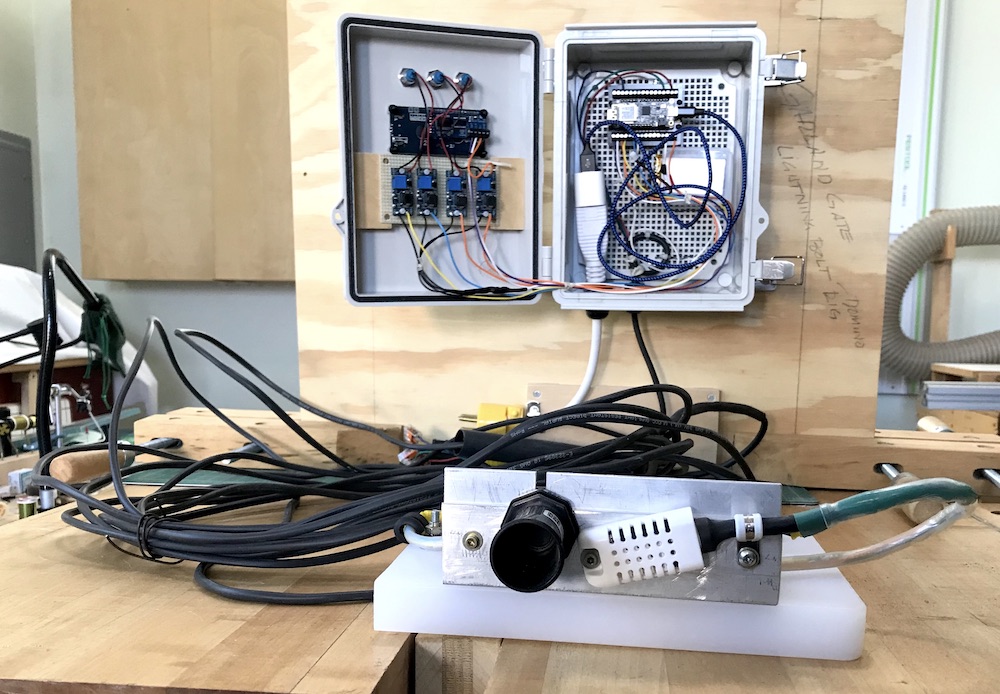
I have developed a water level sensor for my water association. This microcontroller is embedded in an enclosure which is why I refer to it as the 'Embedded Board'. Receiving texts from this board is the heart of this project because it sends low water level alerts to member's so they can act on the problem causing the low water level.

The 'Test Board', is just that, a Feather MO WIFI used for test purposes.

Sketches
The pertinent function that triggers text sending is nearly identical in both sketches. This will be shown later.

Test Board
I can receive texts from either HTTP or HTTPS websites using the sketch on this test board.

Problem
The 'Embedded Board' will send texts from an HTTP website, but will not send texts from an HTTPS. The pertinent text sending functions are as follows:

Test Board text sending function:

{ 
          //if (client.connect(server, 80)) {   // use for HTTP ports

          if (client.connectSSL(server, 443)) {   // use for HTTPS ports 

            client.println("POST /includes/text_to_be_sent.php HTTP/1.1");
            
            client.println("Host: www.https-site.org");
            //client.println("Host: www.http-site.com"); 
            
            client.println("Content-Type: application/x-www-form-urlencoded");
            client.print("Content-Length: ");
            client.println(postData.length());
            client.println();
            client.print(postData);
            Serial.println("Message sent!"); 
          }
          if (client.connected()) {
            client.stop();
          }
          delay(60000); 
      }

Embedded Board text sending function:

void send_text(float interval, float tank_level){

    String current_tank_level = String (tank_level,2);

    postData = postVariable + current_tank_level; 
      
    unsigned long tank_level_currentMillis = millis(); 
      
    if (tank_level_currentMillis - tank_level_previousMillis >= interval) 
      { 
        tank_level_previousMillis = tank_level_currentMillis;
      
        //if (client.connect(server, 80))         // HTTP port  ...
        if (client.connectSSL(server, 443))    // HTTP port ...
            {
              client.println("POST /includes/text_to_be_sent.php HTTP/1.1");

              client.println("Host: www.https-site.org"); 
              //client.println( "Host: www.http-site.com" );

              client.println( "Content-Type: application/x-www-form-urlencoded" );
              client.print("Content-Length: ");
              client.println(postData.length());
              client.println();
              client.print(postData);

              Serial.println("Email Sent");
              Serial.println(postData);
            }
            if (client.connected()) {
                client.stop();
             }
      }
  }

The Embedded Board text sending function receives a time delay (interval) and the current water level (tank_level). This function is only triggered if the water level falls below 8 feet.

QUESTION
Using a nearly identical text sending sketch function as the Test Board - why is the Embedded Board able to send texts from an HTTP website but not from an HTTPS website?

I hope I have made my problem as clear as possible. If not please let me know.

Thank you for any help you can provide.

in order to use client.connectSSL(), you need to load the SSL certificate used by the server into the Arduino WiFi module. Have you done this (if it's not already known)?

Thank you for your post.

The test board sketch function that I posted does not make use of that functionality and will trigger texts from an HTTPS website. I am not disputing your comments in any way and will take a look at the link you kindly provided.

A month or so back it was suggested to me to do as you have noted. At that time I was using an ESP32 board and did load the HTTPS's certificate - several times - and that failed to work, so I reverted back to my Feather board.

I first came across 'client.connectSSL(server, 443)' in this Arduino tutorial.

Thanks again for your help.

is the https web site the same?

Am not quite certain what you mean.

The 'http-site.com' is one of my personal websites that I use for testing purposes.

The 'https-site.org' is the water associations website. The domain names are not correctly, obviously.

I tried following this Feather PDF but ran into a problem that it did not recognize the Feather MO WIFI board I was using so could not upload the HTTPS domain name. I will get back to it tomorrow.

Thanks for sticking with me on this.

I meant to ask: are both boards accessing the same https web site with the similar code? (And do they have the same firmware/certificates installed?)

Also just to make sure we are aligned - when you say

Do you actually mean send an HTTPS GET or POST request to the externally hosted website and get a response you could deal with ?

Sorry for the confusion.

"are both boards accessing the same https web site with the similar code?"
Yes. I am only using one of my HTTP websites to test with and the HTTPS website is the water associations website.

"And do they have the same firmware/certificates installed?"
I am not certain of that. Because I was able to trigger texts from the HTTPS website (using the test Feather board) I made the assumption that the certificates built into the WINC1500 of the Feather MO WIFI boards was working without having to upload the FirmwareUpdater sketch.

As to my comment - "so could not upload the HTTPS domain name", I was referring the the results of the FirmwareUpdater that I uploaded to the embedded Feather MO WIFI board yesterday.

I will upload that sketch to the embedded Feather again in a few minutes and see if I can install the HTTPS certificate.

I sincerely appreciate your help. I will check back in later with my results.

Am not able to upload SSL certificates to either board. Have reached out to Adafruit - the Feather MO WIFI - is their board and hope to hear back from them soon. I hope.

Will get back when this is resolved. It never ends.

Firmware is up to date as seen next.

So this is not an issue.

This is what I see when I try to upload an SSL Certificate:

As seen I cannot select anything after entering the site URL.

I don't have that board so can't say... helpfully you'll hear back from Adafruit

did you follow Updating SSL Certificates | Adafruit Feather M0 WiFi with ATWINC1500 | Adafruit Learning System ?

Well I was finally able to upload the SSL certificate but I had to revert back the the older IDE v1.8.19 to do so. Bottom line - no change with regards to text sending.

The embedded board will send texts if I use my HTTP site, but not if I use the HTTPS site.

And, yes, I was following the Adafruit PDF. It makes use of the older IDE version, but it is still helpful.

I will get back on this Monday. Still feel like I'm chasing my tail.

Again, I appreciate your help. Have a good weekend.

Over the past few days I have tried many things but nothing has changed my ability to receive texts from the HTTPS website using the enclosure microcontroller sketch.

The Feather MO WIFI board is towards the top of the enclosure.

Out of curiosity I replaced the enclosure Feather microcontroller with the breadboard test Feather board. I did this because the test Feather board is able to receive texts from the HTTPS website while the enclosure Feather board is not. I was thinking that perhaps the firmware was not identical even though I have verified this repeatedly.

Results were the same: I am still not able to receive texts from the enclosure Feather (formerly the test board). I uploaded my test sketch to the formerly enclosure Feather board and it was able to receive texts from the HTTPS website. This, I think, proves without any doubt that both microcontrollers have identical firmware.

Bottom Line
The test sketch will send texts from either HTTP or HTTPS websites.
The enclosure sketch will send texts if sent from my HTTP website, but never from the HTTPS website.

While the two text sending functions are not identical - the text sketch function is minimal and the embedded function is a bit more elaborate - the fact that they are able to send texts demonstrates that they are viable text sending functions. If the enclosed sketch did not send any texts that would be one thing, but that is not the case at all. It will send texts but only from HTTP sites.

These are seemingly contradictory results from the sketch text sending function. I am overlooking something, but what that may be I am not certain.

Thanks.

It looks like this is a code block for establishing a secure SSL connection between your embedded board and the server in order to send an HTTP POST request to send text messages with the text_t endpoint.

If you're having trouble sending texts, there are a few things to consider:

  1. Ensure that your Adafruit Feather MO WIFI is properly connected to the internet and that it has access to the domain of your server.
  2. Double-check that you have configured the SSL parameters correctly in your code. Be sure to use the correct port number (443) for HTTPS.
  3. Verify that the text_t endpoint on your server is configured properly and able to handle incoming requests from your embedded board.
  4. Check if there are any firewalls or network filters that are blocking traffic from the embedded board.

Additionally, I would suggest reviewing any error messages that you're receiving during runtime for more insight into what's going wrong.

I hope these tips help you resolve your issue and get those texts sent successfully!

Thanks for the latest comments.

I will respond in-depth in a few days as to how I finally overcame all of the 'obstacles' to receiving texts from a secure website. My free time is extremely limited at the moment.

Thanks again.

Greetings, pabeldfd!

Soooooo much has happened - maker-wise - since I began this thread back in November of 2022. Nearly nine(9) months have passed. As the saying goes, 'Time does indeed fly'.

I have solved all of these HTTPS issues, but at a cost: I had to change microcontrollers. I replaced the Adafruit Feather MO WIFI with an Adafruit HUZZAH32 ESP32 Feather microcontroller.

My Reason For Changing Microcontrollers
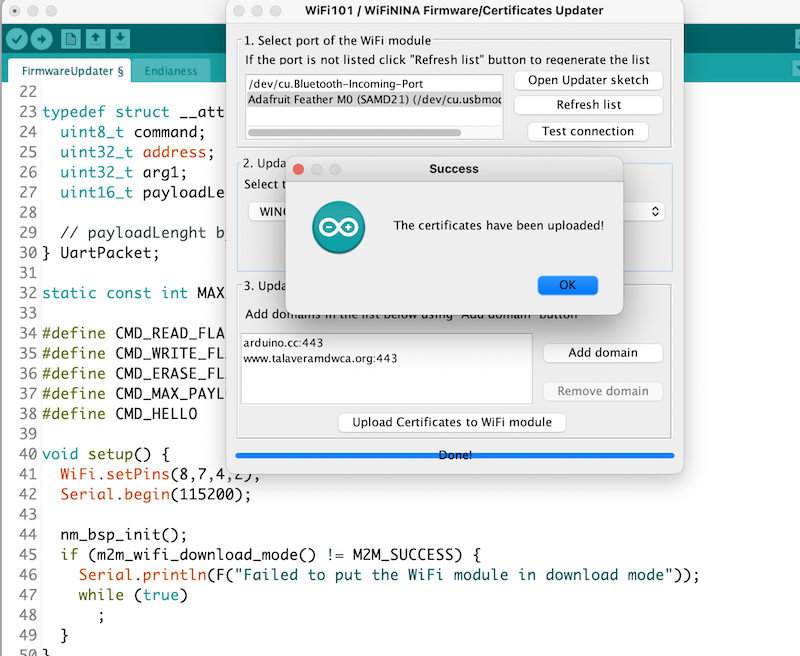
Enabling the Feather MO WIFI to connect to HTTPS servers, you must flash the HTTPS domain name onto the the board as seen next:

The Talavera domain certificate has been uploaded. This is all well and good but if you verify this at a later time you will see the following:

The domain name has vanished. I have read that if you upload the same domain name twice it will be deleted. But if you see it, then you don't, this becomes a guessing game. Because of this drama I moved on to the HUZZAH32. I have sought help on the Adafruit forum about this issue but have yet to hear from them.

Adafruit HUZZAH32 ESP32 Feather Microcontroller
As most maker's know, ESP32 boards require CA certs embedded in the sketch to connect to HTTPS servers. Once I recoded everything to match this board I was good to go. My HTTPS issues are a thing of the past.

Thanks!

Thank you for your comments and suggestions.

I just posted the 'solution' to my HTTPS connection issue.

Thank you!

Hello,
It seems you've delved deep into troubleshooting your Adafruit Feather MO WIFI's HTTPS communication issue. If you haven't already, consider checking the SSL/TLS version compatibility between your board and the server, as well as ensuring that any required certificates are correctly installed on your device. Sometimes, the devil is in the details with HTTPS configurations. Keep us posted on your progress, and good luck!

Hello Bobbie,

Thanks for your supportive comments.

(Note. Your email had several helpful posts (attached) about my HTTPS connectivity issue that has since been solved. Do not understand why those posts are not contained within this thread.)

I solved my problem by switching to an ESP32 board whose sketch I could embed the websites SSL Certificate into. This is different from using the Firmware/Updater to upload the Certificate onto the Feather MO WIFI board. The latter, is IMO, sketchy at best. Adafruit never responded to my queries in this regard. This Feather is a great microcontroller but not for HTTPS use. I may not have prepped it correctly, but all of my efforts were in vain.

To be clear the board I am using is Adafruit's ESP32 HUZZAH Feather. I prefer these particular boards due to their simple LiPo battery connector. The HUZZAH has worked flawlessly. I could not be happier with its performance thus far.

The sensor was (finally) installed in one of the water tanks on 1NOV23. It does have some texting glitches that I am trying to solve. Having it installed is providing 'real' feedback as opposed to testing it on my workbench.

I plan to document this entire process on one of my websites so others can learn from my mistakes and solutions.

Thanks again for your insightful comments,
Phillip

Mod edit:
This is from AI and thus not checked by any human for accuracy, use at your own risk.

Greetings,

Thank you for providing detailed information about your issue. After reviewing the sketches and the problem you've outlined, it appears that the primary difference lies in the communication protocol used for the text sending function between the 'Test Board' and the 'Embedded Board.' The 'Test Board' uses HTTPS successfully, while the 'Embedded Board' encounters difficulties.

Here are a few potential reasons for the discrepancy:

SSL Certificate Issues:
Ensure that the Embedded Board has the necessary SSL certificates to establish a secure connection with the HTTPS server. Confirm that the certificates are correctly configured and up to date.

Network Configuration:
Verify that the Embedded Board has proper network connectivity and is able to establish an HTTPS connection. Check for any firewall or network configuration issues that might be hindering secure communication.

Debugging Output:
To diagnose the issue further, consider adding more debugging output statements to both sketches. This can help you identify where the communication process is breaking down on the Embedded Board.

Library Compatibility:
Confirm that the libraries used for HTTPS communication on the Embedded Board are compatible with its hardware and software configuration. Check for any library updates or community discussions related to HTTPS communication issues on your specific microcontroller.

Given the similarity of the sketches, it's worth exploring these aspects to pinpoint the root cause. Feel free to share any additional details or debug output, and the community here can assist you in resolving the issue.

On a related note, I recently encountered a similar SSL-related issue with another client and was able to successfully resolve it by addressing the SSL certificate configuration. It might be beneficial to review the SSL setup on your Embedded Board.

Best regards,