I am trying to connect a Uno Rev4 Wifi to an Ignition Scada system via modbus. Unfortunately, the ArduinoModbus and RS485 libraries do not seem to work with the new R4 board (multiple errors). I have searched for other libraries, but haven't had any luck. Anyone know of a library that will work, or what to do to get the libraries to work?
1 Like
In most cases like this, it always helps if you provide some additional information, like what sketch are you trying to run.
But as a quick test I installed the two libraries and tried building the example sketch
ModbusRTUClientKitchenSink
And it failed to compile:
Compiling library "ArduinoRS485"
"C:\\Users\\kurte\\AppData\\Local\\Arduino15\\packages\\arduino\\tools\\arm-none-eabi-gcc\\7-2017q4/bin/arm-none-eabi-g++" -c -Wall -Wextra -Os -g3 -fno-use-cxa-atexit -fno-rtti -fno-exceptions -MMD -nostdlib -DF_CPU=48000000 -DARDUINO_UNOR4_MINIMA -MMD -std=gnu++17 -mcpu=cortex-m4 -mfloat-abi=hard -mfpu=fpv4-sp-d16 -fsigned-char -ffunction-sections -fdata-sections -fmessage-length=0 -fno-builtin -DARDUINO=10607 "-DPROJECT_NAME=\"C:\\Users\\kurte\\AppData\\Local\\Temp\\arduino\\sketches\\27EF963AEFB70B4306C32067C0B7CCD6/ModbusRTUClientKitchenSink.ino\"" -DARDUINO_MINIMA -DARDUINO_ARCH_RENESAS_UNO -DARDUINO_ARCH_RENESAS -DARDUINO_FSP -D_XOPEN_SOURCE -mthumb "@C:\\Users\\kurte\\AppData\\Local\\Arduino15\\packages\\arduino\\hardware\\renesas_uno\\1.0.2\\variants\\MINIMA/defines.txt" -DCFG_TUSB_MCU=OPT_MCU_RAXXX "-IC:\\Users\\kurte\\AppData\\Local\\Arduino15\\packages\\arduino\\hardware\\renesas_uno\\1.0.2/cores/arduino/tinyusb" "-IC:\\Users\\kurte\\AppData\\Local\\Arduino15\\packages\\arduino\\hardware\\renesas_uno\\1.0.2\\cores\\arduino/api/deprecated" "-IC:\\Users\\kurte\\AppData\\Local\\Arduino15\\packages\\arduino\\hardware\\renesas_uno\\1.0.2\\cores\\arduino/api/deprecated-avr-comp" "-IC:\\Users\\kurte\\AppData\\Local\\Arduino15\\packages\\arduino\\hardware\\renesas_uno\\1.0.2\\cores\\arduino" "-IC:\\Users\\kurte\\AppData\\Local\\Arduino15\\packages\\arduino\\hardware\\renesas_uno\\1.0.2\\variants\\MINIMA" "-Ic:\\Users\\kurte\\Documents\\Arduino\\libraries\\ArduinoRS485\\src" "-Ic:\\Users\\kurte\\Documents\\Arduino\\libraries\\ArduinoModbus\\src" "-iprefixC:\\Users\\kurte\\AppData\\Local\\Arduino15\\packages\\arduino\\hardware\\renesas_uno\\1.0.2" "@C:\\Users\\kurte\\AppData\\Local\\Arduino15\\packages\\arduino\\hardware\\renesas_uno\\1.0.2\\variants\\MINIMA/includes.txt" "c:\\Users\\kurte\\Documents\\Arduino\\libraries\\ArduinoRS485\\src\\RS485.cpp" -o "C:\\Users\\kurte\\AppData\\Local\\Temp\\arduino\\sketches\\27EF963AEFB70B4306C32067C0B7CCD6\\libraries\\ArduinoRS485\\RS485.cpp.o"
c:\Users\kurte\Documents\Arduino\libraries\ArduinoRS485\src\RS485.cpp:209:18: error: 'SERIAL_PORT_HARDWARE' was not declared in this scope
 RS485Class RS485(SERIAL_PORT_HARDWARE, RS485_DEFAULT_TX_PIN, RS485_DEFAULT_DE_PIN, RS485_DEFAULT_RE_PIN);
                  ^~~~~~~~~~~~~~~~~~~~
c:\Users\kurte\Documents\Arduino\libraries\ArduinoRS485\src\RS485.cpp:209:18: note: suggested alternative: 'SERIAL_PARITY_MARK'
 RS485Class RS485(SERIAL_PORT_HARDWARE, RS485_DEFAULT_TX_PIN, RS485_DEFAULT_DE_PIN, RS485_DEFAULT_RE_PIN);
                  ^~~~~~~~~~~~~~~~~~~~
                  SERIAL_PARITY_MARK
In file included from c:\Users\kurte\Documents\Arduino\libraries\ArduinoRS485\src\RS485.cpp:20:0:
c:\Users\kurte\Documents\Arduino\libraries\ArduinoRS485\src\RS485.h:44:30: error: 'A6' was not declared in this scope
 #define RS485_DEFAULT_DE_PIN A6
                              ^
c:\Users\kurte\Documents\Arduino\libraries\ArduinoRS485\src\RS485.cpp:209:62: note: in expansion of macro 'RS485_DEFAULT_DE_PIN'
 RS485Class RS485(SERIAL_PORT_HARDWARE, RS485_DEFAULT_TX_PIN, RS485_DEFAULT_DE_PIN, RS485_DEFAULT_RE_PIN);
                                                              ^~~~~~~~~~~~~~~~~~~~
c:\Users\kurte\Documents\Arduino\libraries\ArduinoRS485\src\RS485.h:44:30: note: suggested alternative: 'A5'
 #define RS485_DEFAULT_DE_PIN A6
                              ^
c:\Users\kurte\Documents\Arduino\libraries\ArduinoRS485\src\RS485.cpp:209:62: note: in expansion of macro 'RS485_DEFAULT_DE_PIN'
 RS485Class RS485(SERIAL_PORT_HARDWARE, RS485_DEFAULT_TX_PIN, RS485_DEFAULT_DE_PIN, RS485_DEFAULT_RE_PIN);
                                                              ^~~~~~~~~~~~~~~~~~~~

Using library ArduinoRS485 at version 1.0.5 in folder: C:\Users\kurte\Documents\Arduino\libraries\ArduinoRS485
Using library ArduinoModbus at version 1.0.8 in folder: C:\Users\kurte\Documents\Arduino\libraries\ArduinoModbus
exit status 1
Looks like the Arduino Library has not been updated yet to work with the new board.
Someone should probably create an Issue up on the github project:
arduino-libraries/ArduinoRS485 (github.com).
I have not used this library before, so I don't know enough to fully make work.
Could probably guess that you would need to edit the header file to have it have a new section for these two new boards, and specify which pins to use and the like.
Was hoping that maybe you could simply specify your own object, but the library creates a default one for you, which is generating these errors.
Does not look, like it should be very hard to update the library.
Good luck
Hello,
I'm also trying to use Arduino Uno R4 Wifi as a modbus master as to read data from a heatpump. (e.g. setpoint)
For this, I connected an RS485 grove to the UART pins (Rx,TX) (through Grove Base shield for Arduino V2).
I use Serial1 for the communication (see Arduino UNO R4 WiFi Cheat Sheet | Arduino Documentation - USB serial and UART.
I use the modbusmaster.h library, and the code compiles, but no result in reading anything...
Since I don't have much knowledge on the issue, would appreciate any advice on setup/code. Could this be working or is there something wrong/missing.
See my code below.
Thanks.
#include <ModbusMaster.h>
// Create a ModbusMaster object
ModbusMaster node;
// Declare variables
int8_t result;
uint16_t Setpoint_from_mb;
//----------------------------------------------------
void setup() {
Serial.begin(9600); // Initialize serial and wait for port to open:
delay(1500); // This delay gives the chance to wait for a Serial Monitor without blocking if none is found
//
Serial1.begin(9600); // setting of UART port
node.begin(1, Serial1); // communicate with Modbus slave ID 1 over Serial port 1)
}
//----------------------------------------------------------
void loop() {
result = node.readHoldingRegisters(1, 1); // read holding register 1; length 1
// Check if the read was successful
if (result == node.ku8MBSuccess) {
// Get the value of the register
Setpoint_from_mb = node.getResponseBuffer(0);
Serial.print("SetPoint : ");
Serial.print(Setpoint_from_mb);
} else {
// Failed to read the register
Serial.println("Error reading Modbus register");
}
// Delay before reading again
delay(500);
}
After swapping A B wires on the grove, above code works perfect...
Do you have a solution for this problem yet?
Hi @velde,
Can you show us how you make the final wiring between sensor / grove base / arduino R4? im using a MAX485 that works on arduino mega, but with arduino R4 doesn't.
For everyone how has been on this situation (RS485 MAX485 connection to Arduino R4 Wifi with connection issues). Yo need to know:
-
If you are using USB C for serial monitor (Serial) with PIN 0 and PIN 1 ("Serial1"), it doesn't work, is necessary unplug USB C.
-
Finally, i use SoftwareSerial on PIN 0 (RX) and PIN 1 (TX) (yes, the same of SERIAL1), and it works.
I was struggling with modbus communication as well. I tried to connect the Uno r4 Wifi to a BAC002 thermostat. I finally got it to work. I got these pitfalls:
- As said earlier; you can't use usb-c and serial communication using pin D0 and D1
- For SoftwareSerial any pin can be used for TX, but only the following pins can be used for RX: D0, D1, D2, D3, D8, D14, D15, A1, A2, A3, A4, A5
So finally i connected DI of the RS485 to TTL converter to D2, R0 to D3 and DE/RE both to D4
can you please give details of your project. i am trying to connect a sensor by modbus RTU to uno r4.
I have created a iot that reads the bac002 thermostat and drives a servo motor to position a valve in the kitchen heating. Also it sends valve position, room temperature and temperature setpoint to my Home Assistant server via MQTT

So what do you want to know?
Do you have a schematic for this. What pins are you using for serial connection?
There is a bug in the HardwareSerial library on the Uno R4, as detailed in this thread: ArduinoModbus gives CRC16 errors with Uno Wifi R4 - #12 by bobcousins
The flush() function doesn't work. The RS485 library relies on HardwareSerial, and the ArduinoModbus library depends on RS485.
So your choices are:
- Modify RS485 to use a SoftwareSerial instead of a HardwareSerial.
- Use a different Modbus library that doesn't use RS485 and can use a SoftwareSerial. I've used ModbusMaster, I found that I had to insert code to control the flow control pins (DE and RE) on the RS485 device to get it to work.
- Use a different board. The R2 Uno Wifi works well.
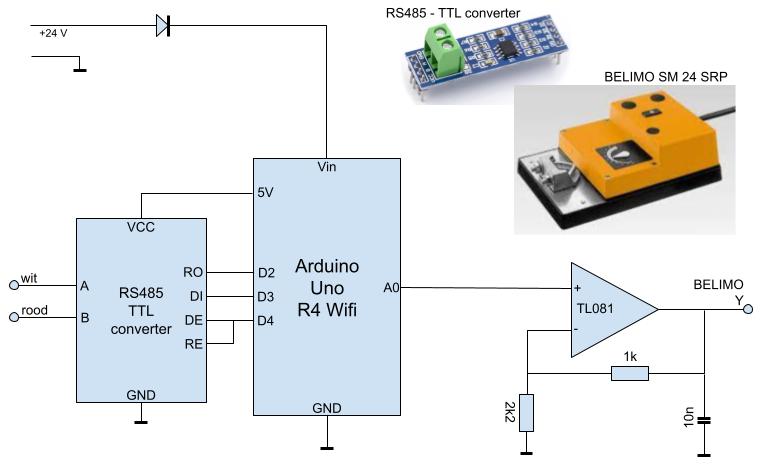
This is the circuit i use to drive a Belimo servo motor.
I use the SoftwareSerial library on pin 2 and 3. For modbus I use ModbusMaster by Doc Walter, but sometimes there is an communication error and the communication stops completely.
Thank you for this update.
Thank you for this info. greatly appreciated.
I think there is a bug in the ModbusMaster library. I'm not sure it is caused by Uno R4, or it is a general bug in de library. Or even it is as designed.
When there is a communication error between client and master (Uno), then the amount of bytes in the SoftwareSerial increases to max 1024. The functions in the library can't handle this situation, when the communication has been restored. For example the function readHoldingRegisters stil returns 0xE0.
To handle this situation one have to clear the input buffer of SoftwareSerial. So my code for this part:
  result = modbus.readHoldingRegisters(0, REGCNT); //Read
  if (result == modbus.ku8MBSuccess)
  {
    // read your registers
  }
  else
  {
    Serial.print("Connection error: ");
    Serial.println(result, HEX);
    int amount = modbusSerial.available();
    for (int i=0; i<amount; i++)
    {
      modbusSerial.read();
    }
  }
PS Don't use the modbusSerial.flush function. This only affects the transmit buffers.