I have an Arduino Nano clone and have been happily compiling and uploading sketches using 1.6.7 for quite a while. As I kept getting messages to upgrade I decided to do that and upgraded to 1.8.16. After this my sketches compile well but uploading fails. I then visited the website and installed 2.2.1 but the uploads still fail.
I should point out that with the IDE active and the USB cable unplugged the box below the menu bar says Arduino Nano with a feint font and when I plug my board in the font changes to bold. I deduce that some communication is possible.
Here is a screen shot of the verbose upload diagnostics:

...sorry, I should have added that if anyone has any advice I'd be very grateful.
Mike.
close any other program, may be reopen IDE, maybe restart PC.
Thank you kolaha for your prompt reply.
I tried that and the result was exactly the same.
is serial monitor open?
I should also say that I checked the device manager:

I notice that the service running was: CH341SER_A64
whereas the port's name is USB-SERIAL CH340 (COM3)
I searched for CH341SER_A64 using the process explorer and it couldn't find anything.
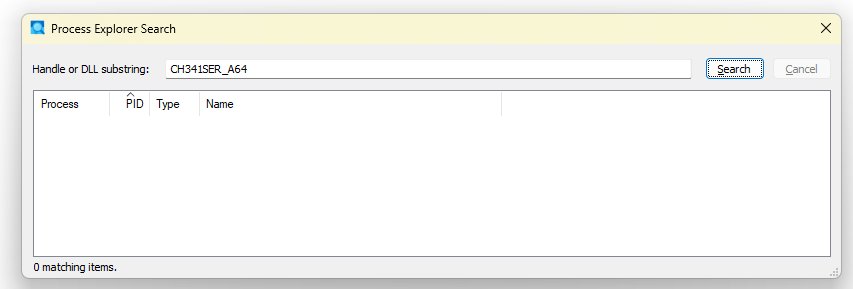
No it's not.
does COM3 disappear when you disconnect Nano ?
Yes, it does.
good, does arduino blink three times when you connect it to USB?
did you tried this option?

1 Like
No, this is the sequence:
- The LED nearest to the Ax pins flashes
- The LED 2nd nearest the Ax pins comes on
- The LED 3rd nearest the Ax pins comes on (about 1 to 1.5 seconds later)
This produced this:
Sketch uses 4760 bytes (15%) of program storage space. Maximum is 30720 bytes.
Global variables use 96 bytes (4%) of dynamic memory, leaving 1952 bytes for local variables. Maximum is 2048 bytes.
"C:\Users\Mike\AppData\Local\Arduino15\packages\arduino\tools\avrdude\6.3.0-arduino17/bin/avrdude" "-CC:\Users\Mike\AppData\Local\Arduino15\packages\arduino\tools\avrdude\6.3.0-arduino17/etc/avrdude.conf" -v -V -patmega328p -carduino "-PCOM3" -b57600 -D "-Uflash:w:C:\Users\Mike\AppData\Local\Temp\arduino\sketches\BF78B4E05470F27E9279F54D51A997DE/Towel_rail.ino.hex:i"
avrdude: Version 6.3-20190619
Copyright (c) 2000-2005 Brian Dean, http://www.bdmicro.com/
Copyright (c) 2007-2014 Joerg Wunsch
     System wide configuration file is "C:\Users\Mike\AppData\Local\Arduino15\packages\arduino\tools\avrdude\6.3.0-arduino17/etc/avrdude.conf"

     Using Port                    : COM3
     Using Programmer              : arduino
     Overriding Baud Rate          : 57600
     AVR Part                      : ATmega328P
     Chip Erase delay              : 9000 us
     PAGEL                         : PD7
     BS2                           : PC2
     RESET disposition             : dedicated
     RETRY pulse                   : SCK
     serial program mode           : yes
     parallel program mode         : yes
     Timeout                       : 200
     StabDelay                     : 100
     CmdexeDelay                   : 25
     SyncLoops                     : 32
     ByteDelay                     : 0
     PollIndex                     : 3
     PollValue                     : 0x53
     Memory Detail                 :

                              Block Poll               Page                       Polled
       Memory Type Mode Delay Size  Indx Paged  Size   Size #Pages MinW  MaxW   ReadBack
       ----------- ---- ----- ----- ---- ------ ------ ---- ------ ----- ----- ---------
       eeprom        65    20     4    0 no       1024    4      0  3600  3600 0xff 0xff
       flash         65     6   128    0 yes     32768  128    256  4500  4500 0xff 0xff
       lfuse          0     0     0    0 no          1    0      0  4500  4500 0x00 0x00
       hfuse          0     0     0    0 no          1    0      0  4500  4500 0x00 0x00
       efuse          0     0     0    0 no          1    0      0  4500  4500 0x00 0x00
       lock           0     0     0    0 no          1    0      0  4500  4500 0x00 0x00
       calibration    0     0     0    0 no          1    0      0     0     0 0x00 0x00
       signature      0     0     0    0 no          3    0      0     0     0 0x00 0x00

     Programmer Type : Arduino
     Description     : Arduino
     Hardware Version: 2
     Firmware Version: 1.16
     Vtarget         : 0.0 V
     Varef           : 0.0 V
     Oscillator      : Off
     SCK period      : 0.1 us
avrdude: AVR device initialized and ready to accept instructions
Reading | ################################################## | 100% 0.00s
avrdude: Device signature = 0x1e950f (probably m328p)
avrdude: reading input file "C:\Users\Mike\AppData\Local\Temp\arduino\sketches\BF78B4E05470F27E9279F54D51A997DE/Towel_rail.ino.hex"
avrdude: writing flash (4760 bytes):
Writing | ################################################## | 100% 1.38s
avrdude: 4760 bytes of flash written
avrdude done. Thank you.
...and it worked !!!
Many thanks kolaha.
Mike
1 Like
You've made me very happy. 
This topic was automatically closed 180 days after the last reply. New replies are no longer allowed.