I’m building a weather station that transmits sensor data via LoRaWAN to a gateway, which then forwards the data to the Arduino Cloud.
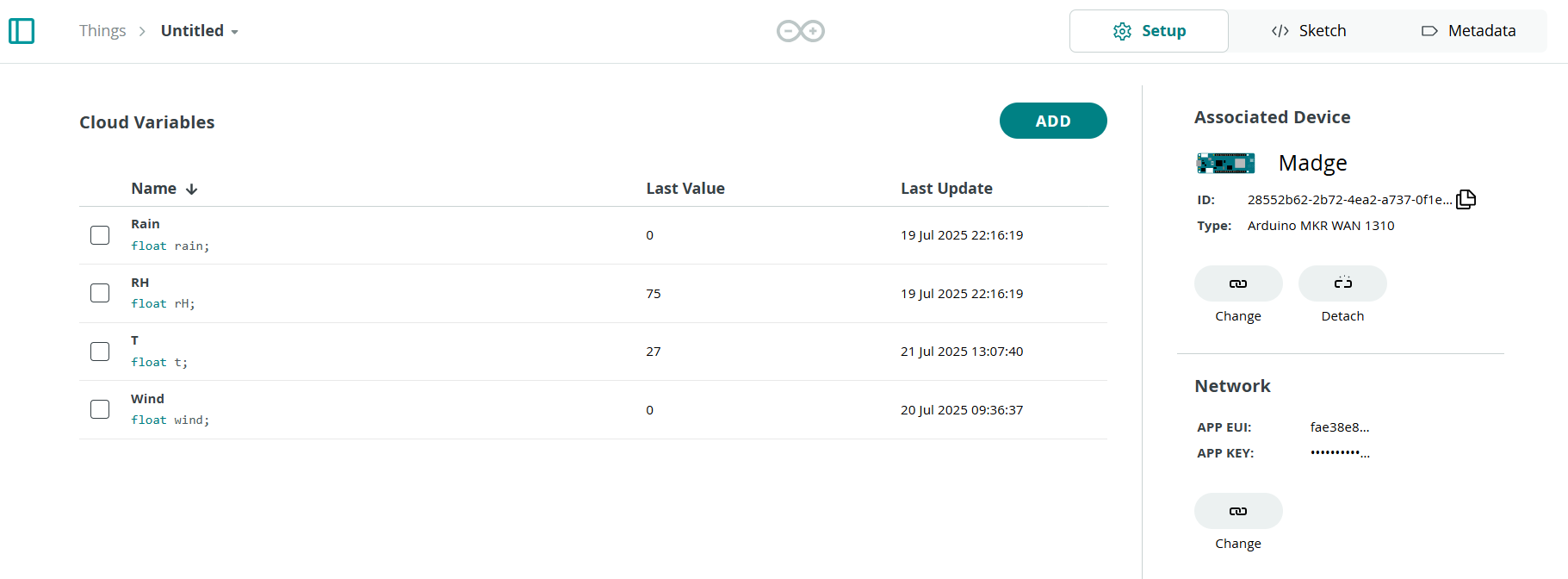
The system uses a MKR WAN 1310 connected to an Edge Control board to collect sensor readings and send them via LoRaWAN. I’ve configured four variables under a single Thing in Arduino Cloud. Initially, after recreating the Thing and its variables, everything works fine—data updates as expected on the dashboard. However, after a few hours, only one or none of the variables continue updating. The "last update" timestamps also stop advancing, as shown in the attached image.
Despite this, the serial monitor indicates that the MKR is sending data successfully, and the gateway logs confirm both uplink and downlink messages are being transmitted.
However, the serial monitor occasionally also shows a “LoRa chip busy” message, even after confirming that the message was sent correctly.
Below, I’ve included my sketch and thingProperties.h file for reference.
#include "thingProperties.h"
#include <Wire.h>

// must match Edge’s struct
typedef struct { char message[64]; } SensorValues_t;
volatile SensorValues_t i2cBuf;
volatile bool newPacket = false;

// I²C ISR: grab the incoming blob
void receiveEvent(int n) {
  if (n == sizeof(i2cBuf)) {
    Wire.readBytes((char*)&i2cBuf, sizeof(i2cBuf));
    newPacket = true;
  } else {
    while (Wire.available()) Wire.read();
  }
}

void setup() {
  Serial.begin(115200);
  delay(1500);

  initProperties();
  ArduinoCloud.begin(ArduinoIoTPreferredConnection, false);
  setDebugMessageLevel(2);
  ArduinoCloud.printDebugInfo();

  Wire.begin(0x05);            // MKR = I²C slave @0x05
  Wire.onReceive(receiveEvent);

  Serial.println(F("MKR WAN 1310 ready"));
}

void loop() {
  if (newPacket) {
    SensorValues_t local;
    noInterrupts();
    memcpy(&local, (void*)&i2cBuf, sizeof(local));
    newPacket = false;
    interrupts();

    // parse 6 CSV fields into an array
    float v[6] = {0};
    int idx = 0;
    for (char* tok = strtok(local.message, ","); tok && idx < 6;
         tok = strtok(NULL, ","), idx++) {
      v[idx] = atof(tok);
    }

    if (idx == 6) {
      // map to your 5 Cloud floats
      t     = v[0];
      rH  = v[1];
      //p  = v[2];
      wind = v[3];
      rain      = v[5];    // skip windDir at v[4]

      Serial.print(F("Parsed → "));
      Serial.print(t);     Serial.print(F("°C, "));
      Serial.print(rH);  Serial.print(F("%, "));
      //Serial.print(p);  Serial.print(F("hPa, "));
      Serial.print(wind); Serial.print(F("m/s, "));
      Serial.print(rain);      Serial.println(F("mm"));
    } else {
      Serial.println(F("CSV parse error"));
    }
  }

  ArduinoCloud.update();  // push any changes up to the Cloud
}
// Code generated by Arduino IoT Cloud, DO NOT EDIT.

#include <ArduinoIoTCloud.h>
#include <Arduino_ConnectionHandler.h>


const char THING_ID[] = "7a38638c-cd27-4a92-a96f-a60bf93cfd95";

const char APPEUI[]   = SECRET_APP_EUI;
const char APPKEY[]   = SECRET_APP_KEY;


float rain;
float rH;
float t;
float wind;

void initProperties(){
  ArduinoCloud.setThingId(THING_ID);
  ArduinoCloud.addProperty(rain, 3, READ, 600 * SECONDS, NULL);
  ArduinoCloud.addProperty(rH, 2, READ, 600 * SECONDS, NULL);
  ArduinoCloud.addProperty(t, 1, READ, 600 * SECONDS, NULL);
  ArduinoCloud.addProperty(wind, 4, READ, 600 * SECONDS, NULL);

}

LoRaConnectionHandler ArduinoIoTPreferredConnection(APPEUI, APPKEY, _lora_band::US915, "00000000000000000000FF00");