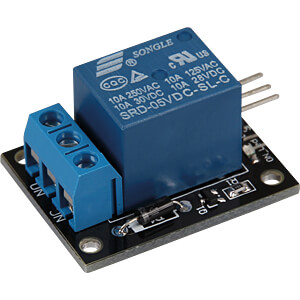
sure, see void fDoMoistureDetector1( void * parameter ).
#include <ESP32Time.h>
#include <WiFi.h>
#include <PubSubClient.h>
#include "certs.h" // include the connection info for WiFi and MQTT
#include "sdkconfig.h" // used for log printing
#include "esp_system.h"
#include "freertos/FreeRTOS.h" //freeRTOS items to be used
#include "freertos/task.h"
#include <driver/adc.h>
#include <SimpleKalmanFilter.h>
////
WiFiClient      wifiClient; // do the WiFi instantiation thing
PubSubClient    MQTTclient( mqtt_server, mqtt_port, wifiClient ); //do the MQTT instantiation thing
ESP32Time       rtc;
////
#define evtWaterCactus      ( 1 << 0 ) // declare an event
#define evtADCreading0      ( 1 << 3 )
EventGroupHandle_t eg; // variable for the event group handle
////
SemaphoreHandle_t sema_MQTT_KeepAlive;
SemaphoreHandle_t sema_mqttOK;
SemaphoreHandle_t sema_WaterCactus;
////
QueueHandle_t xQ_RemainingMoistureMQTT;
QueueHandle_t xQ_RM;
QueueHandle_t xQ_Message;
////
esp_timer_handle_t oneshot_timer; //veriable to store the hardware timer handle
////
const int payloadSize = 150;
struct stu_message
{
  char payload [payloadSize] = {'\0'};
  String topic ;
} x_message;////
int    mqttOK = 0;
bool   TimeSet = false;
//bool   manualPumpOn = false;
////
void IRAM_ATTR oneshot_timer_callback( void* arg )
{
  BaseType_t xHigherPriorityTaskWoken;
  xEventGroupSetBitsFromISR( eg, evtWaterCactus, &xHigherPriorityTaskWoken );
} //void IRAM_ATTR oneshot_timer_callback( void* arg )
////
// interrupt service routine for WiFi events put into IRAM
void IRAM_ATTR WiFiEvent(WiFiEvent_t event)
{
  switch (event) {
    case SYSTEM_EVENT_STA_CONNECTED:
      break;
    case SYSTEM_EVENT_STA_DISCONNECTED:
      log_i("Disconnected from WiFi access point");
      break;
    case SYSTEM_EVENT_AP_STADISCONNECTED:
      log_i("WiFi client disconnected");
      break;
    default: break;
  }
} // void IRAM_ATTR WiFiEvent(WiFiEvent_t event)
////
void IRAM_ATTR mqttCallback(char* topic, byte * payload, unsigned int length)
{
  // clear locations
  memset( x_message.payload, '\0', payloadSize ); // clear payload char buffer
  x_message.topic = ""; //clear topic string buffer
  x_message.topic = topic; //store new topic
  memcpy( x_message.payload, payload, length );
  xQueueOverwrite( xQ_Message, (void *) &x_message );// send data to queue
} // void mqttCallback(char* topic, byte* payload, unsigned int length)
////
void setup()
{
  x_message.topic.reserve( payloadSize );
  //
  xQ_Message = xQueueCreate( 1, sizeof(stu_message) );
  xQ_RemainingMoistureMQTT = xQueueCreate( 1, sizeof(float) ); // sends a queue copy
  xQ_RM = xQueueCreate( 1, sizeof(float) );
  //
  eg = xEventGroupCreate(); // get an event group handle
  //
  sema_mqttOK =  xSemaphoreCreateBinary();
  sema_WaterCactus = xSemaphoreCreateBinary();
  xSemaphoreGive( sema_mqttOK );
  xSemaphoreGive( sema_WaterCactus );
  //
  gpio_config_t io_cfg = {}; // initialize the gpio configuration structure
  io_cfg.mode = GPIO_MODE_INPUT; // set gpio mode. GPIO_NUM_0 input from water level sensor
  io_cfg.pull_down_en = GPIO_PULLDOWN_ENABLE; // enable pull down
  io_cfg.pin_bit_mask = ( (1ULL << GPIO_NUM_0) | (1ULL << GPIO_NUM_18) ); //bit mask of the pins to set, assign gpio number to be configured
  gpio_config(&io_cfg); // configure the gpio based upon the parameters as set in the configuration structure
  //
  io_cfg = {}; //set configuration structure back to default values
  io_cfg.mode = GPIO_MODE_OUTPUT;
  io_cfg.pin_bit_mask = ( (1ULL << GPIO_NUM_4) | (1ULL << GPIO_NUM_5) | (1ULL << GPIO_NUM_19)  ); //bit mask of the pins to set, assign gpio number to be configured
  gpio_config(&io_cfg);
  gpio_set_level( GPIO_NUM_4, LOW); // deenergize relay module
  gpio_set_level( GPIO_NUM_5, LOW); // deenergize valve
  gpio_set_level( GPIO_NUM_19, LOW); // deenergize valve
  // set up A:D channels  https://dl.espressif.com/doc/esp-idf/latest/api-reference/peripherals/adc.html
  adc1_config_width(ADC_WIDTH_12Bit);
  adc1_config_channel_atten(ADC1_CHANNEL_3, ADC_ATTEN_DB_11);// using GPIO 39
  //
  // https://docs.espressif.com/projects/esp-idf/en/latest/esp32/api-reference/system/esp_timer.html?highlight=hardware%20timer High Resoultion Timer API
  esp_timer_create_args_t oneshot_timer_args = {}; // initialize High Resoulition Timer (HRT) configuration structure
  oneshot_timer_args.callback = &oneshot_timer_callback; // configure for callback, name of callback function
  esp_timer_create( &oneshot_timer_args, &oneshot_timer ); // assign configuration to the HRT, receive timer handle
  //
  xTaskCreatePinnedToCore( MQTTkeepalive, "MQTTkeepalive", 10000, NULL, 6, NULL, 1 );
  xTaskCreatePinnedToCore( fparseMQTT, "fparseMQTT", 10000, NULL, 5, NULL, 1 ); // assign all to core 1, WiFi in use.
  xTaskCreatePinnedToCore( fPublish, "fPublish", 9000, NULL, 3, NULL, 1 );
  xTaskCreatePinnedToCore( fReadAD, "fReadAD", 9000, NULL, 3, NULL, 1 );
  xTaskCreatePinnedToCore( fDoMoistureDetector, "fDoMoistureDetector", 70000, NULL, 4, NULL, 1 );
  xTaskCreatePinnedToCore( fmqttWatchDog, "fmqttWatchDog", 3000, NULL, 2, NULL, 1 );
} //void setup()
////
// check gpiopin for cactus is present
// water cactus upon detection
// wait 30 days to water the cactus again
// to water
// let fDoMoistureDetector know of motor use.
// open valve
// run motor for 10 times each time for 10 seconds 5 minutes apart
// after sequence is done release fDoMoistureDetector
// start counting 30 days
void fWaterCactus( void * parameter )
{
  uint32_t microSecondsInADay = 86400000000;
  uint32_t DayCount           = 29;
  uint64_t pastTime           = esp_timer_get_time();
  uint32_t WaterTimeCount     = 0;
  //GPIO_NUM_18 is cactus detect pin.
  for (;;)
  {
    if ( gpio_get_level( GPIO_NUM_18 ) )
    {
      if ( (esp_timer_get_time() - pastTime) >= microSecondsInADay )
      {
        DayCount++;
      }
      if (DayCount == 30 )
      {
        xSemaphoreTake( sema_WaterCactus, portMAX_DELAY );// stops the other task from running the pump.
        //water cactus
        while ( WaterTimeCount < 10 )
        {
          gpio_set_level( GPIO_NUM_19, HIGH); // energize/open valve
          WaterPump0_on();
          // one minute of uS = 60000000
          esp_timer_start_once( oneshot_timer, 60000000 );
          xEventGroupWaitBits (eg, evtWaterCactus, pdTRUE, pdTRUE, portMAX_DELAY ); // event will be triggered by the timer expiring, wait here for the 280uS
          WaterPump0_off();
          gpio_set_level( GPIO_NUM_19, LOW); // deenergize/close valve
          esp_timer_start_once( oneshot_timer, 60000000 );
          xEventGroupWaitBits (eg, evtWaterCactus, pdTRUE, pdTRUE, portMAX_DELAY ); // event will be triggered by the timer expiring, wait here for the 280uS
          WaterTimeCount++;
        }
        xSemaphoreGive( sema_WaterCactus );
        WaterTimeCount = 0;
        DayCount = 0; // reset day couunt
      }
    } else {
      DayCount = 0;
      pastTime  = esp_timer_get_time();
    }
  } // for(;;)
  vTaskDelete( NULL );
}
////
void fReadAD( void * parameter )
{
  float    ADbits = 4096.0f;
  float    uPvolts = 3.3f;
  float    adcValue_b = 0.0f; //plant in yellow pot
  uint64_t TimePastKalman  = esp_timer_get_time(); // used by the Kalman filter UpdateProcessNoise, time since last kalman calculation
  float    WetValue = 1.07f; // value found by putting sensor in water
  float    DryValue = 2.732f; // value of probe when held in air
  float    Range = DryValue - WetValue;
  float    RemainingMoisture = 100.0f;
  SimpleKalmanFilter KF_ADC_b( 1.0f, 1.0f, .01f );
  for (;;)
  {
    xEventGroupWaitBits (eg, evtADCreading0, pdTRUE, pdTRUE, portMAX_DELAY ); //
    adcValue_b = float( adc1_get_raw(ADC1_CHANNEL_3) ); //take a raw ADC reading
    adcValue_b = ( adcValue_b * uPvolts ) / ADbits; //calculate voltage
    KF_ADC_b.setProcessNoise( (esp_timer_get_time() - TimePastKalman) / 1000000.0f ); //get time, in microsecods, since last readings
    adcValue_b = KF_ADC_b.updateEstimate( adcValue_b ); // apply simple Kalman filter
    TimePastKalman = esp_timer_get_time(); // time of update complete
    RemainingMoisture = 100.0f * (1 - ((adcValue_b - WetValue) / (DryValue - WetValue))); //remaining moisture =  1-(xTarget - xMin) / (xMax - xMin) as a percentage of the sensor wet dry volatges
    xQueueOverwrite( xQ_RM, (void *) &RemainingMoisture );
    //log_i( "adcValue_b = %f remaining moisture %f%", adcValue_b, RemainingMoisture );
  }
  vTaskDelete( NULL );
}
////
void fPublish( void * parameter )
{
  float  RemainingMoisture = 100.0f;
  for (;;)
  {
    if ( xQueueReceive(xQ_RemainingMoistureMQTT, &RemainingMoisture, portMAX_DELAY) == pdTRUE )
    {
      xSemaphoreTake( sema_MQTT_KeepAlive, portMAX_DELAY ); // whiles MQTTlient.loop() is running no other mqtt operations should be in process
      MQTTclient.publish( topicRemainingMoisture_0, String(RemainingMoisture).c_str() );
      xSemaphoreGive( sema_MQTT_KeepAlive );
    }
  } // for (;;)
  vTaskDelete( NULL );
} //void fPublish( void * parameter )
////
void WaterPump0_off()
{
  gpio_set_level( GPIO_NUM_4, LOW); //denergize relay module
}
////
void WaterPump0_on()
{
  gpio_set_level( GPIO_NUM_4, HIGH); //energize relay module
}
////
void fmqttWatchDog( void * paramater )
{
  int UpdateImeTrigger = 86400; //seconds in a day
  int UpdateTimeInterval = 85000; // get another reading when = UpdateTimeTrigger
  int maxNonMQTTresponse = 12;
  TickType_t xLastWakeTime = xTaskGetTickCount();
  const TickType_t xFrequency = 5000; //delay for mS
  for (;;)
  {
    xLastWakeTime = xTaskGetTickCount();
    vTaskDelayUntil( &xLastWakeTime, xFrequency );
    xSemaphoreTake( sema_mqttOK, portMAX_DELAY ); // update mqttOK
    mqttOK++;
    xSemaphoreGive( sema_mqttOK );
    if ( mqttOK >= maxNonMQTTresponse )
    {
      ESP.restart();
    }
    UpdateTimeInterval++; // trigger new time get
    if ( UpdateTimeInterval >= UpdateImeTrigger )
    {
      TimeSet = false; // sets doneTime to false to get an updated time after a days count of seconds
      UpdateTimeInterval = 0;
    }
  }
  vTaskDelete( NULL );
} //void fmqttWatchDog( void * paramater )
////

void fDoMoistureDetector1( void * parameter )
{
  //wait for a mqtt connection
  while ( !MQTTclient.connected() )
  {
    vTaskDelay( 250 );
  }
  int      TimeToPublish = 5000000; //5000000uS
  int      TimeForADreading = 100 * 1000; // 100mS
  uint64_t TimePastPublish = esp_timer_get_time(); // used by publish
  uint64_t TimeADreading   = esp_timer_get_time();
  TickType_t xLastWakeTime = xTaskGetTickCount();
  const TickType_t xFrequency = 10; //delay for 10mS
  float    RemainingMoisture = 100.0f; //prevents pump turn on during start up
  bool     pumpOn = false;
  uint64_t PumpOnTime = esp_timer_get_time();
  int      PumpRunTime = 11000000;
  uint64_t PumpOffWait = esp_timer_get_time();
  uint64_t PumpOffWaitFor = 60000000; //one minute
  float    lowMoisture = 23.0f;
  float    highMoisture = 40.0f;
  for (;;)
  {
    xSemaphoreTake( sema_WaterCactus, portMAX_DELAY );
    //read AD values every 100mS.
    if ( (esp_timer_get_time() - TimeADreading) >= TimeForADreading )
    {
      xEventGroupSetBits( eg, evtADCreading0 );
      TimeADreading = esp_timer_get_time();
    }
    xQueueReceive(xQ_RM, &RemainingMoisture, 0 ); //receive queue stuff no waiting
    //read gpio 0 is water level good. Yes: OK to run pump : no pump off.   remaining moisture good, denergize water pump otherwise energize water pump.
    if ( RemainingMoisture >= highMoisture )
    {
      WaterPump0_off();
    }
    if ( !pumpOn )
    {
      log_i( "not pump on ");
      if ( gpio_get_level( GPIO_NUM_0 ) )
      {
        if ( RemainingMoisture <= lowMoisture )
        {
          //has one minute passed since last pump energize, if so then allow motor to run
          if ( (esp_timer_get_time() - PumpOffWait) >= PumpOffWaitFor )
          {
            gpio_set_level( GPIO_NUM_5, HIGH); //open valve
            WaterPump0_on();
            log_i( "pump on " );
            pumpOn = !pumpOn;
            PumpOnTime = esp_timer_get_time();
          }
        }
        //xSemaphoreGive( sema_RemainingMoisture );
      } else {
        log_i( "water level bad " );
        WaterPump0_off();
        gpio_set_level( GPIO_NUM_5, LOW); //denergize/close valve
        PumpOffWait = esp_timer_get_time();
      }
    } else {
      /*
         pump goes on runs for X seconds then turn off, then wait PumpOffWaitTime before being allowed to energize again
      */
      if ( (esp_timer_get_time() - PumpOnTime) >= PumpRunTime )
      {
        log_i( "pump off " );
        WaterPump0_off(); // after 5 seconds turn pump off
        gpio_set_level( GPIO_NUM_5, LOW); //denergize/close valve
        pumpOn = !pumpOn;
        PumpOffWait = esp_timer_get_time();
      }
    }
    // publish to MQTT every 5000000uS
    if ( (esp_timer_get_time() - TimePastPublish) >= TimeToPublish )
    {
      xQueueOverwrite( xQ_RemainingMoistureMQTT, (void *) &RemainingMoisture );// data for mqtt publish
      TimePastPublish = esp_timer_get_time(); // get next publish time
    }
    xSemaphoreGive( sema_WaterCactus );
    xLastWakeTime = xTaskGetTickCount();
    vTaskDelayUntil( &xLastWakeTime, xFrequency );
  }
  vTaskDelete( NULL );
}// end fDoMoistureDetector1()
////
void fDoMoistureDetector( void * parameter )
{
  //wait for a mqtt connection
  while ( !MQTTclient.connected() )
  {
    vTaskDelay( 250 );
  }
  int      TimeToPublish = 5000000; //5000000uS
  int      TimeForADreading = 100 * 1000; // 100mS
  uint64_t TimePastPublish = esp_timer_get_time(); // used by publish
  uint64_t TimeADreading   = esp_timer_get_time();
  TickType_t xLastWakeTime = xTaskGetTickCount();
  const TickType_t xFrequency = 10; //delay for 10mS
  float    RemainingMoisture = 100.0f; //prevents pump turn on during start up
  bool     pumpOn = false;
  uint64_t PumpOnTime = esp_timer_get_time();
  int      PumpRunTime = 11000000;
  uint64_t PumpOffWait = esp_timer_get_time();
  uint64_t PumpOffWaitFor = 60000000; //one minute
  float    lowMoisture = 23.0f;
  float    highMoisture = 40.0f;
  for (;;)
  {
    xSemaphoreTake( sema_MQTT_KeepAlive, portMAX_DELAY );
    //read AD values every 100mS.
    if ( (esp_timer_get_time() - TimeADreading) >= TimeForADreading )
    {
      xEventGroupSetBits( eg, evtADCreading0 );
      TimeADreading = esp_timer_get_time();
    }
    xQueueReceive(xQ_RM, &RemainingMoisture, 0 ); //receive queue stuff no waiting
    //read gpio 0 is water level good. Yes: OK to run pump : no pump off.   remaining moisture good, denergize water pump otherwise energize water pump.
    if ( RemainingMoisture >= highMoisture )
    {
      WaterPump0_off();
    }
    if ( !pumpOn )
    {
      log_i( "not pump on ");
      if ( gpio_get_level( GPIO_NUM_0 ) )
      {
        if ( RemainingMoisture <= lowMoisture )
        {
          //has one minute passed since last pump energize, if so then allow motor to run
          if ( (esp_timer_get_time() - PumpOffWait) >= PumpOffWaitFor )
          {
            WaterPump0_on();
            log_i( "pump on " );
            pumpOn = !pumpOn;
            PumpOnTime = esp_timer_get_time();
          }
        }
        //xSemaphoreGive( sema_RemainingMoisture );
      } else {
        log_i( "water level bad " );
        WaterPump0_off();
        PumpOffWait = esp_timer_get_time();
      }
    } else {
      /*
         pump goes on runs for X seconds then turn off, then wait PumpOffWaitTime before being allowed to energize again
      */
      if ( (esp_timer_get_time() - PumpOnTime) >= PumpRunTime )
      {
        log_i( "pump off " );
        WaterPump0_off(); // after 5 seconds turn pump off
        pumpOn = !pumpOn;
        PumpOffWait = esp_timer_get_time();
      }
    }
    // publish to MQTT every 5000000uS
    if ( (esp_timer_get_time() - TimePastPublish) >= TimeToPublish )
    {
      xQueueOverwrite( xQ_RemainingMoistureMQTT, (void *) &RemainingMoisture );// data for mqtt publish
      TimePastPublish = esp_timer_get_time(); // get next publish time
    }
    xLastWakeTime = xTaskGetTickCount();
    vTaskDelayUntil( &xLastWakeTime, xFrequency );
  }
  vTaskDelete( NULL );
}// end fDoMoistureDetector()
////
void MQTTkeepalive( void *pvParameters )
{
  sema_MQTT_KeepAlive   = xSemaphoreCreateBinary();
  xSemaphoreGive( sema_MQTT_KeepAlive ); // found keep alive can mess with a publish, stop keep alive during publish
  MQTTclient.setKeepAlive( 90 ); // setting keep alive to 90 seconds makes for a very reliable connection, must be set before the 1st connection is made.
  TickType_t xLastWakeTime = xTaskGetTickCount();
  const TickType_t xFrequency = 250; // 250mS
  for (;;)
  {
    //check for a is-connected and if the WiFi 'thinks' its connected, found checking on both is more realible than just a single check
    if ( (wifiClient.connected()) && (WiFi.status() == WL_CONNECTED) )
    {
      xSemaphoreTake( sema_MQTT_KeepAlive, portMAX_DELAY ); // whiles MQTTlient.loop() is running no other mqtt operations should be in process
      MQTTclient.loop();
      xSemaphoreGive( sema_MQTT_KeepAlive );
    }
    else {
      log_i( "MQTT keep alive found MQTT status %s WiFi status %s", String(wifiClient.connected()), String(WiFi.status()) );
      if ( !(wifiClient.connected()) || !(WiFi.status() == WL_CONNECTED) )
      {
        connectToWiFi();
      }
      connectToMQTT();
    }
    xLastWakeTime = xTaskGetTickCount();
    vTaskDelayUntil( &xLastWakeTime, xFrequency );
  }
  vTaskDelete ( NULL );
}
////
void connectToMQTT()
{
  // create client ID from mac address
  byte mac[5];
  int count = 0;
  WiFi.macAddress(mac); // get mac address
  String clientID = String(mac[0]) + String(mac[4]);
  log_i( "connect to mqtt as client %s", clientID );
  while ( !MQTTclient.connected() )
  {
    MQTTclient.disconnect();
    MQTTclient.connect( clientID.c_str(), mqtt_username, mqtt_password );
    vTaskDelay( 250 );
    count++;
    if ( count == 5 )
    {
      ESP.restart();
    }
  }
  MQTTclient.setCallback( mqttCallback );
  MQTTclient.subscribe( topicOK );
}
////
void connectToWiFi()
{
  int TryCount = 0;
  while ( WiFi.status() != WL_CONNECTED )
  {
    TryCount++;
    WiFi.disconnect();
    WiFi.begin( SSID, PASSWORD );
    vTaskDelay( 4000 );
    if ( TryCount == 10 )
    {
      ESP.restart();
    }
  }
  WiFi.onEvent( WiFiEvent );
} // void connectToWiFi()
//////
void fparseMQTT( void *pvParameters )
{
  struct stu_message px_message;
  for (;;)
  {
    if ( xQueueReceive(xQ_Message, &px_message, portMAX_DELAY) == pdTRUE )
    {
      if ( px_message.topic == topicOK )
      {
        xSemaphoreTake( sema_mqttOK, portMAX_DELAY );
        mqttOK = 0; // clear mqtt ok count
        xSemaphoreGive( sema_mqttOK );
      }
      if ( !TimeSet )
      {
        String temp = "";
        temp = px_message.payload[0];
        temp += px_message.payload[1];
        temp += px_message.payload[2];
        temp += px_message.payload[3];
        int year =  temp.toInt();
        temp = "";
        temp = px_message.payload[5];
        temp += px_message.payload[6];
        int month =  temp.toInt();
        temp = "";
        temp = px_message.payload[8];
        temp += px_message.payload[9];
        int day =  temp.toInt();
        temp = "";
        temp = px_message.payload[11];
        temp += px_message.payload[12];
        int hour =  temp.toInt();
        temp = "";
        temp = px_message.payload[14];
        temp += px_message.payload[15];
        int min =  temp.toInt();
        rtc.setTime( 0, min, hour, day, month, year );
        log_i( "%s  ", rtc.getTime() );
        TimeSet = true;
      }
      // manual pump control
      //      if ( str_eTopic == topicPumpState )
      //      {
      //        if ( String(strPayload) == "off" )
      //        {
      //          WaterPump0_off();
      //          manualPumpOn = false;
      //        }
      //        if ( String(strPayload) == "on" )
      //        {
      //          WaterPump0_on();
      //          manualPumpOn = true;
      //        }
      //      }
    }
  } //for(;;)
  vTaskDelete ( NULL );
} // void fparseMQTT( void *pvParameters )
////
void loop() {}