I have background in Basic, Fortran, Assembly, machine language, and C++ from 40 years ago.
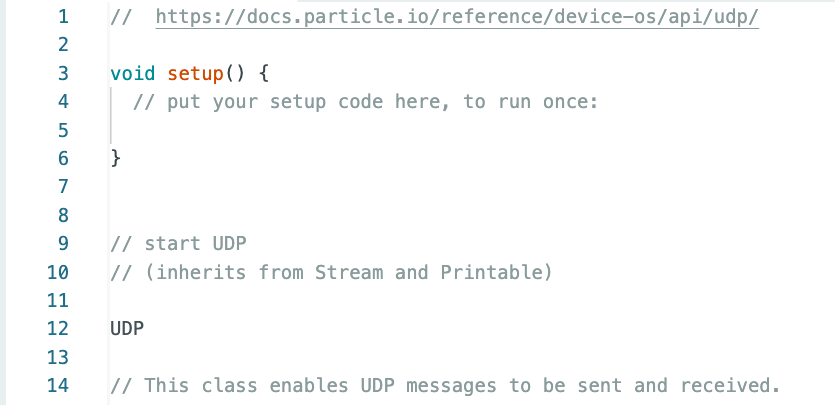
The following code segment comes from: EthernetUDPInterface.ino
UDP
// This class enables UDP messages to be sent and received.
// EXAMPLE USAGE
SerialLogHandler logHandler;
// UDP Port used for two way communication
unsigned int localPort = 8888;
// An UDP instance to let us send and receive packets over UDP
// end start the UDP
// start UDP
UDP Udp;
UDP, SerialLogHandler logHandler;, and UDP Udp; are all displayed in black type. I don't understand what any of them do. In other languages, UDP could be a marker, indicating where the code could jump to. When you have words separated by a space (SerialLogHandler logHandler; and UDP Udp;), I don't have a clue what that means. Why isn't UDP followed by a semi-colon?
Think of them (UDP, SerialLogHandler) as types, and the last UDP Udp; makes a thing called Udp of type UDP. The first UDP looks odd, like a bare int would look.
With all that background you understand how important it is to be able to read the code that needs to be debugged. Start by following the forum guidelines and post the code using code tag. What black type are you referring, everything you posted is black on a white screen.
@gilshultz Unfortunately, he'll need to post an image of the IDE, in order to see text colours, and we often disparage those who post code that way. In this case, it's necessary.
Line 12 is extremely suspect without seeing what's above it, and since it's a .ino file, you could get better help by simply copy-for-forum and paste into a message. We can copy it to our IDE then, and see what it is you're really seeing.
that uses exactly the same comments and lines you posted. However it looks like aiming at different products than Arduino boards called "particle hardware" or "particle devices". The inclusion of libraries seems to be handled differently in the particle IDE than in the Arduino IDE.
Could you probably post the link to the website where you found the ino file?
I'm sure that @UKHeliBob did that. The first request for screenshot was made so we could see what you meant regarding the colours. After that you could just have posted the code.
You did post your code in the opening post; it however is a snippet so most of us can't relate to it; you did refer to EthernetUDPInterface.ino and we possibly might not have that file on our system. Therefore we like to see complete code.
Thanks for trying to use code tags; it did not quite work out. I've fixed it for you.
Code tags are three backticks on a line (```) and they must be on their own line. ``` your code ```
I guess the reason might be the way how the particle reference lists the code. I'm not familiar with the particle IDE but on a first glance it looks that it provides a function where the user chooses the required lib and the appropriate #include line is automatically inserted.
Are you using the particle IDE or the Arduino IDE? If it's the Arduino IDE you have to install the required libraries and include them yourself in the sketch.
Could you please also post which hardware you use? The IDE you use must be able to support this hardware also.
@awneil Actually, it does appear in that image - as a title several lines above the subtitle "// EXAMPLE USAGE". That makes me think that someone has done a cut-and-paste of the text of the entire screen, then mis-edited to remove some extraneous content but left "UDP" dangling on it's own at the top.
Clearly, out-of-context, and will not compile, but hey, it's there.