Personally, I like the idea of having an easy to use, modular GUI core lib
Great, hopefully there is a niche for that, here is the current architecture. Please let me know if you have questions or suggestions, I appreciate your help making it better.
A View is the base class that keeps properties related to positioning and sizing. It provides the basics of receiving events, measure/layout/draw and a reference to parent panel. BControl is a BView that can receive focus. BPanel is a view that can contain other views. BFocusManager dispatches input events, maintains/moves focus, provides a timer tick (for animations) and iterates over the tree in a loop (when needed) to find dirty virews that need layout and/or redraw.

Drawing can be done immediatey by requesting BGraphics object or can be deferred to the next pass of the GUI loop by marking the View dirty. The layout system supports margins for views and additionally paddings for panels. When the draw() method is called on the view it is passed a BGraphics objects that is already setup to the screen coordinates of the view, so the view can draw as if starting from origin (0,0)..

It would be nice if any such library were structured in a way that off-loading the functionality to something like a smarter display (Think Nextion, or even a separate Arduino-class board. I have a SiSpeed Longan Nano (RISC-V chip with a 160x80 OLED (~$5) that I figured might be useful as a display even if it proved problematic from a general purpose PoV.)
That's an interesting use case, currently I'm using Arduino.h but only because it includes some standard CPP headers, so I can change that and then it could potentially be used with SiSpeed Longan Nano as long as there is a graphics library that can be wrapped with BGraphics objects. So in that sense the library is basic C++, it abstracts actual drawing to other libraries, and you can run multiple instances of it drawing on separate displays. But if you wanted it be some kind of GUI server that responds to remote commands you would need to implement it yourself but the library can be used in this way as long as there's a C++ compiler.. There's some features like drawing bitmaps from PROGMEM i don't know if it's a standard thing on any microcontroller or if it's arduino specific...
Got the bitmap from the code you shared, had to convert the mask to 1bit

Here's the code to create a bitmap button
class BBitmapButton: public BButton {
public:
  uint16_t* bitmap;
  uint8_t* mask;
  BBitmapButton();
  virtual void draw(BGraphics& g);
};

BBitmapButton::BBitmapButton() : bitmap(0), mask(0) {
}

void BBitmapButton::draw(BGraphics& g) {
  BView::draw(g); // draw bounding rect for debug if turned on
  if (bitmap) {
    if (_isDown) { // make it smaller by drawing border
      auto parentBackground = parent()->background;
      g.drawRect(0, 0, g.width, g.height, parentBackground);
      g.drawRect(1, 1, g.width - 2, g.height - 2, parentBackground);
    }
    else { // draw full state
        g.drawBitmap(0, 0, bitmap, mask, g.width, g.height);
        drawContent(g); // draw text, inherited from BButton
    }
  }
}
Yo, this is so cool. Good job!
Do you have a GitHub repo for this lib? I'd like to keep track of it once in an initial release state.
Thanks for your interest, it's a work in progress, but this is the repo for the library - Focuspocus, I need another month probably before the initial release
Some fresh visuals of widgtes. Will work on documentation...

Is the slow drawing intentional? Nice!
Thanks! The initial drawing looks slow because it's filling the background, basically calling fillRect() the size of the screen first, then the size of the main panel and then drawing the backgrounds of the smaller panels, so yes, drawing the background is very noticable, however smaller draw operations are acceptable I think.. Also this is an emulator, maybe on real hardware it will look better, I plan to buy a tft shield for mega to test it..
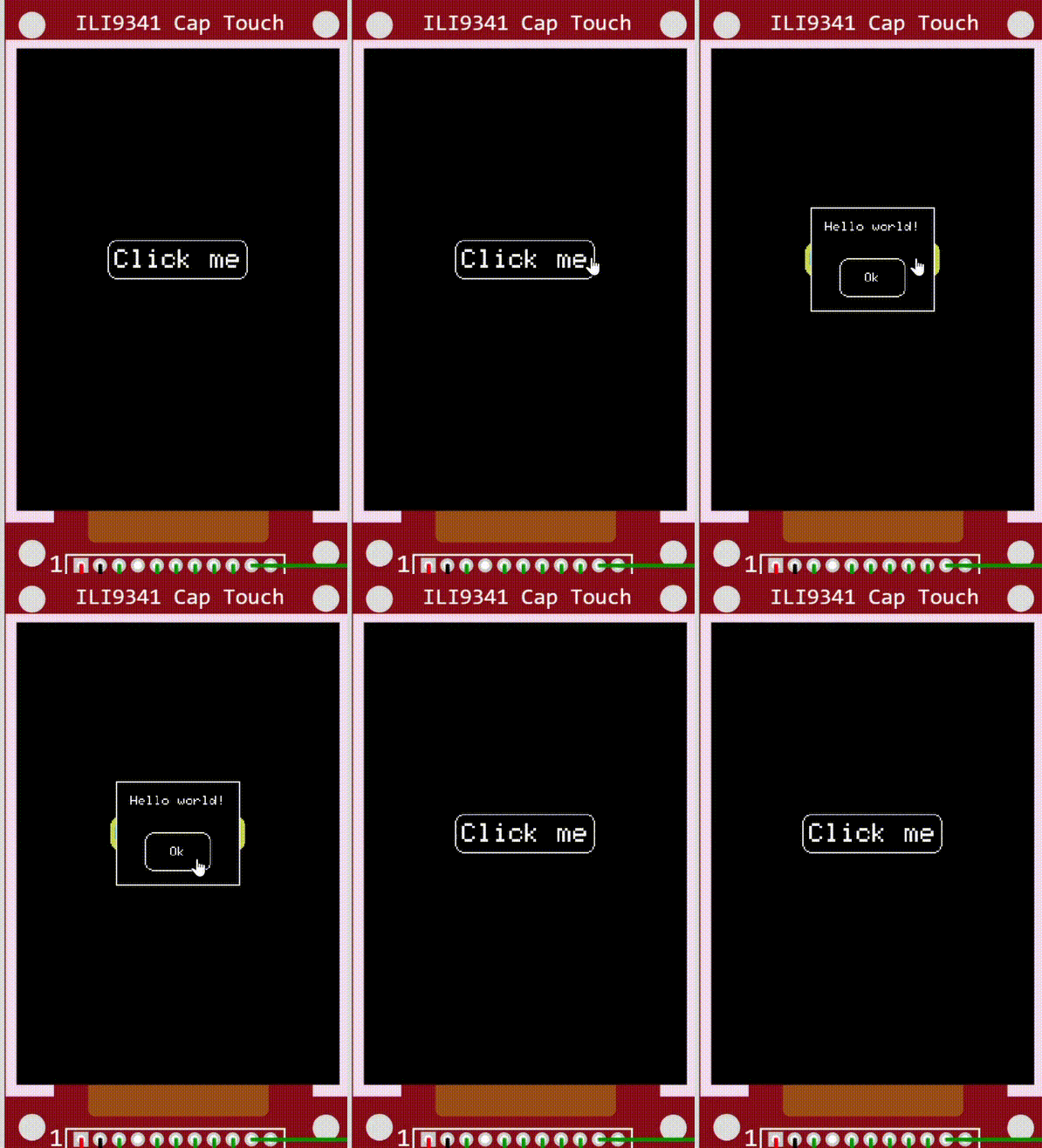
A complete example code showing how to use the library generally.
First we declare the Graphics drivers that will be used to draw on the display. Currently there is only Adafruit_GFX based Graphics but it can be implemented around any other library.
Then we define two screens, one with a ClickMe button and another one with HelloWorld label and an Ok button. Each screen is a Panel with some content.
All memory is preallocated, except for event handlers, they use dynamic memory allocation.

#include "SPI.h"
#include "Adafruit_GFX.h"
#include "Adafruit_ILI9341.h"
#include <Adafruit_FT6206.h>

#include "BAdafruitGraphics.h" // Adafruit_GFX-based graphics implementation
#include "Focuspocus.h" // main header file

// For the Adafruit shield, these are the default.
#define TFT_DC 9
#define TFT_CS 10

// Display and touch drivers
Adafruit_FT6206 ctp = Adafruit_FT6206();
Adafruit_ILI9341 tft = Adafruit_ILI9341(TFT_CS, TFT_DC);

namespace HelloWorld {
  BTextLabel label; // declare a label
  BButton button; // declare a button
  BView* mainContent[] { &label, &button }; // create content array
  BStackPanel main(mainContent); // create panel with content

  // button click handler
  void handleButtonClick(BButton* sender, bool isClicked) {
    if (isClicked) { // if click not cancelled
      // pop the top screen from the stack
      sender->focusManager().pop();
    }
  }

  // initialize screen content
  void init() {
    label.text = "Hello world!";

    button.text = "Ok";
    button.onClick += handleButtonClick;

    main.spacing = 20;
    main.orientation = B::vertical;
    main.horizontalAlignment = B::center;
    main.border = true;
    main.padding(10);
  }
}

// create a namespace for screen content
namespace MainScreen {
  BButton button; // declare a button
  BView* mainContent[] = { &button }; // create the content array
  BStackPanel main(mainContent); // create a panel with content

  // declare an event handler
  void handleButtonClick(BButton* sender, bool isClicked) {
    if (isClicked) { // if the click was not cancelled
      // push a screen onto the stack
      sender->focusManager().push(HelloWorld::main);
    }
  }

  // init screen content
  void init() {
    button.text = "Click me";
    button.fontSize = 2;
    button.onClick += handleButtonClick;

    main.verticalAlignment = B::center;
    main.horizontalAlignment = B::center;
    main.width = -1; // full screen
    main.height = -1; // fullscreen
  }
}

// Adafruit-based graphics
BAdafruitGraphics graphics(tft);
// stack of screens (zero is the space for the HelloWorld popup)
BPanel* stack[] = { &MainScreen::main, 0 };
// color scheme
BTheme theme;

// instantiate focus manager
BFocusManager focusManager(graphics, stack, theme);
// virtual mouse
BMouse mouse(focusManager);

void setup() {
  // init display and touch drivers
  ctp.begin(40);
  tft.begin();

  // init screens
  HelloWorld::init();
  MainScreen::init();
}

void loop(void) {
  // convert touch to virtual mouse events
  if (ctp.touched()) {
    TS_Point pt = ctp.getPoint();
    pt.x = tft.width() - pt.x;
    pt.y = tft.height() - pt.y;
    if (pt.z == 0) mouse.button(false);
    else mouse.move(pt.x, pt.y, true);
  }
  else {
    mouse.button(false);
  }

  // measure/layout/render
  focusManager.loop();
}