I have an ATMEGA328P in a development board and I'm using a USBTinyISP to program it. It works but the LED pin is wrong (pin 13 rather than the required pin 0) and the speed is wrong (out by a factor of 10 or so by the looks of it).
I've not used the new IDE 2.x much and I'm having problems finding the right board. Searching for 328 only shows one result: "Atmel AVR Xplained minis package" which is what I'm using but it obviously isn't the correct one.
I do not understand; are you talking about "Arduino pins"? And you board has the LED connected to pin 0? Or are you talking about the pins of the 328P IC?
Arduino pin 0 (PORTD, bit 0 on the ATmega328P) is used for hardware serial communications, so if you use that for an LED, you won't be able to use UART serial for debugging or a UART serial bootloader. Pin 1 (PORTD, bit 1) is also for UART serial.
MiniCore is not a library - it is a core. Follow the How to Install section in the above link. Select the Boards Manager icon on the left sidebar to select and install MiniCore.
I was just following the instructions on the Github page. It says you can install the zip under "Manual Installation".
Anyway, thanks. Yes, I tried adding the URL to the boards manager and that allowed me to install MiniCore.
However it won't let me upload:
avrdude warning: cannot open USB device: Permission denied
I've tried a couple of different USB drivers using Zadig but nothing seems to work. As soon as I switch back to "Atmel AVR Xplained minis", it uploads no problem.
I then used AVR® Fuse Calculator – The Engbedded Blog to disable the divide-by-8 on the clock. I had to edit the boards.txt file, taking the Arduino Uno as a starting point and changing the fuse settings and CPU speed. It now works as it should.
So problem solved but it seems excessively complicated for an IDE that is supposed to be user-friendly. I'm sure some of the fuses e.g. brownout could be set via the IDE in older versions so why are they not available in version 2?
You will have to hit "Burn bootloader" in order to set the correct fuses and upload the correct bootloader.
If you didn't do that, then the fuses were never set and the fuses on the ATmega328P were still in their factory default settings, which causes the board to run at 1 MHz from the internal oscillator, while the program running on the chip is assuming the clock is 8 MHz (note that 1 MHz / 8 MHz is very close to your "out by a factor of 10 or so" estimate).
I doubt it is necessary since MiniCore should provide what you need out of the box.
Nope. This has never been possible. The correct fuse settings are defined in each board's definition. It would be antithetical to the spirit of Arduino and also not scalable to build a direct fuse configuration system into the IDE UI. The board definitions in advanced flexible platforms like MiniCore do provide something like that via the various "custom board option" menus, but they do this in a friendly manner by presenting a reasonable list of valid settings with human descriptions.
Yes I did that. I'm sure that's what triggered the problem.
There's a clock divder which divdes the internal clock by 8. I disabled it and I've got it running now with the internal clock and the timings are correct.
I agree. In fact I found an old project I did a few years ago which uses MiniCore and I know I didn't have this problem. It was using the v1 IDE (1.8.2. I think).
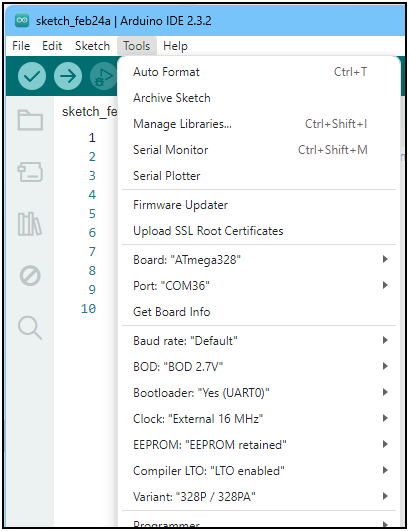
Actually it is present in the V1 IDE. I'm looking at it right now. With the MiniCore ATmega328 selected, there's a 'BOD' option under tools and it shows 2.7V, 4.3V, 1.8V and disabled. It also has an 'EEPROM retained' option. If I can figure out a way to upload images I'll post a screenshot.
This wasn't showing for me in the v2 IDE. After spending a while searching for it, I restarted the v2 IDE and was surpsied to see MiniCore was missing from the 'Additional boards manager URLs'. I added it back and tried to install MiniCore but it was already there. I now see the fuse options as you show above.
So my thinking is that there is some issue with the new IDE. Maybe it had only partly loaded the Minicore or something. When I did a 'Burn Bootloader', it probably picked up some random settings which then bricked my ATmega328 (now thankfully unbricked thanks to Bernhard Nebel's RescueAVR).
I'm inclined to go back to using the original v1 IDE. It's a while since I used either but I don't ever recall having issues with the original IDE. Newer isn't always better, as they say.