Can someone explain why Arduino IDE 2.3.3. (MacOS) consuming 300% CPU? It is a out of the box installation using ESP32 and Arduino boards. The IDE is almost continuously indexing something while you do not touch the IDE. Compilation takes forever.
It drives me crazy. I hope that someone has the answer or tips for a better IDE for development. This is nuts.
I am on 2.3.3, have an M3 Mac and my CPU is 15 - 20% for entire machine. The IDE is typically o but sometimes as high as 2%. There is NO indexing happening at the moment, I am not 100% sure what that is but I assume it involves scanning the folders under Arduino15 to pre-cache some library data. I do leave the IDE open for a long time, I was doing some work yesterday and did not close it, no need to. I have a 100 line sketch with a 100 line hdr file with helper functions. I just tried a verify and it took a few seconds. HOWEVER during the compile I saw the indexing message twice during those few seconds. Do you use any cloud in your sketch folder paths? I use OneDrive but have it set to always keep a copy on disk (actually an SSD) I manually save.
I don;t know if any of that helps, but I am curious and fully expect something in your setup is different than mine and accounts for the diferences.
BTW: there is a big difference in using arduino boards and ESP boards.
What I also not get is that libraries are always compiled and not once and then linked. Which is common in software development. Therefore libraries does not seem to be actually libraries
The gcc environment (under the IDE) which you may use elsewhere certainly tries to not re-compile files if possible. I too at one time thought it was re-compiling unnecessarily but have learned that is not the case.
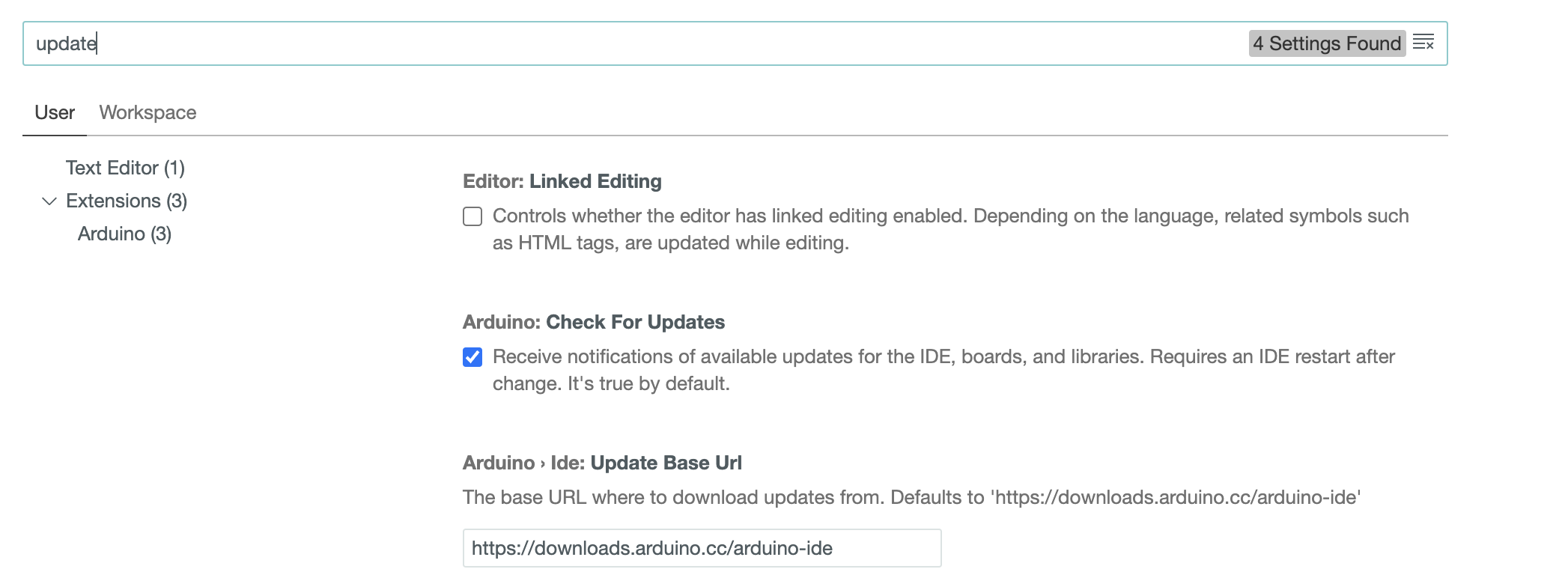
I suspect what is happening is that the 'check for updates' feature (you can turn it off) is 'touching' the files and that causes a re-compile. I KNOW, a DTM last opened logically does not require a re-compile, but I suspect the make facility is coded to be super conservative. I am including screen grabs of the relevant things to click to turn off updates. I leave auto updates on so I am always current and know my compiles take a few seconds to minutes longer.
YMMV
But, there are (on MacOS) several files incl. caches that remains in your FS when you only delete and reinstall the IDE. Done it before and after delete/install the IDE-state was preserved.
I do not want to sound too negative but I do encounter issues. what are the alternatives based on your experiences?
I don't need any alternatives, my IDE is always up to date and I have never encounted a problem that wasn't quickly and simply fixed. However I have over 50 years experience including hardware, micro code, firmware, OS, and apps so I may be unusual. Mostly I just have a can do attitude and NEVER mess with files that are NOT under my user name. Those that fiddle with quasi system files (outside their user name) appear on the forums the most.
Ok, I was misunderstanding. You want to preserve some cache etc. I just spoke yesterday with someone that said you could do a file only? install for Mac as well as Win and Linux. I don't see any 2.x versions older than 2.3.3, where would they be?
Alternatives are Msft CodeVS/PlatformIO, I think Theia which is what Arduino Pro (2.x) was cloned from, and maybe Eclipse. What about sublime?
Remember, the IDE is not doing the compile, that is done by Gnu C++. Here is the relevant part of the verify log
I suspect how it works is the app after installing starts a couple of servers, one of which downloads the auxiliary files it needs. With a back level app, it sees all the files are at least up to date. Since I am sure the Arduino developers are smart enough to develop the code in a backward compatible way, there is no ned to download older files.
Fine for you. I'm also a prof. software engineer in developing avionics systems. So I know what I'm taking about. And Arduino is not in that level nor its IDE. But thats okay since this is not the aim. Arduino or ESP are for fun. Nevertheless, Eclipse or Xcode might be. I'm just interested in experiences that might be an alternative for A IDE.
That said, I'm looking for solutions for a serious problem. My response and your post does not contribute to this goal.
Let's get back to the OP. The reason for 300% busy and a lot of indexing is I think in your question, it is 'new out of the box'. There are literally thousands of files that may need updating, and that requires a web based query. I am not 100% sure of what indexing is, but based on it's appearance I think it also has something to do with managing updates and minimizing re-compiles. What are you seeing when the IDE has a sketch loaded but is not doing a compile or upload, just in editor mode. Also what tool are you using to monitor CPU use.
As I understand it, the library updating involves opening the library.properties file for each library and comparing the version entry to the master somewhere likely on github. That's a lot of internet traffic and waiting in queues and not too much file I/O. You could try turning updates off for a while and see if that helps. Then when you aren't planning on being busy, turn updates back on. As a Mac user, I have a vested interest, I hope I am being constructive, but as an 82yo autistic person I often don't know if I am missing social cues.
I did some work on performance monitoring for a certain computer maker, and yes, >100% is possible IF you are measuring the process. I am more accustomed to measuring the resource, in this case a single CPU and no resource can go above 100% other than rounding and/or other math errors. So you are both correct @rsmls@RonaldG
Indeed; apparently the resource monitor in MacOS uses a different logic than Windows does. Frankly, I find the whole concept of a >100% resource utilization counter-intuitive and a weird choice. But hey...
That's a long time. How long exactly? ESP32 compilation can indeed take annoyingly long. It's one reason why I flirted with PlatformIO (but I'm not too chuffed about that either).
Does the high utilization also happen if you're not compiling anything? So if you start the IDE and then not touch it?
Arduino IDE is Java AFAIK, so you may want to look into possible problems with the JRE (Java Runtime Environment) on your flavor of MacOS. Maybe simply updating JRE to a more recent version helps - or downgrading to an older version.
Are you sure it's indexing? I don't think it is. Indexing in this context is generally something the OS does as part of filesystem maintenance. It's conceivable that some weird interaction between Arduino IDE and the OS keeps them busy as it were.
Look, I'm not aware of how these things work on a Mac, but I assume it's possible like on a PC to explore the process tree and see what the ultimate process/task is that is responsible for this resource utilization.
These things can be frustrating to troubleshoot; I had something similar happen a few months ago when I replaced the SSD on my Windows machine. I cloned the old disk (which suffered hardware failures) to the new one and then I ran into a similar problem you're having - very high CPU utilization out of nowhere. I ended up disabling most services and then putting them back up one by one. I never found a specific cause, but did end up running with a couple less services than I originally did, because I just didn't need them. Maybe a similar approach might work in your case.
I agree. Using 300% of a resource sounds a bit weird.
IDE 1.x is written in Java, IDE 2.x is not.
As I understand indexing, it is the process by which the IDE analyses the sketch to understand how everything is connected together - code, libraries etc. It then allows the hover popups, auto complete, "Go to Definition" etc. and is very resource intensive.