WIFI Clock with dst

I made a WIFI Clock with an ESP32 and 7 segment display TM1637 and this is working fine, till the latest time change. I thought the sketch takes the information from Internet but probably not. Now the clock give a 1 hour later time.

How can I change my sketch so that it takes automatic the time change?

Please help me out!!

Adriaan Schreuder

Post your sketch, here. Wie so...

The ESP32's built-OS handles NTP time synchronization and DST switching automatically once you configure it. DST is controlled by setting the POSIX TZ Variable.

Thanks you very much gfvalvo, for your quick reply.

But I am new with this, how can I configure it.

Greetings Adriaan

Can you give me an example for my sketch.

Here can you see what I made.

#include <WiFi.h>

#include "time.h"

const char* ntpServer1 = "time.google.com";

const char* time_zone = "IST-5:30";

const uint8_t CLK_CYCLE_DELAY = 100;// us

const uint8_t CLK_PIN = 22;

const uint8_t DIO_PIN = 19;

const uint8_t NUM_DIGITS = 4;

const char* ssid = "XXXXXXXXXX";

const char* password = "XXXXXXXXXX";

// LED segment patterns.

const uint8_t NUM_PATTERNS = 10;

const uint8_t PATTERNS[NUM_PATTERNS] = {

0x3F, // 0

0x06, // 1

0x5B, // 2

0x4F, // 3

0x66, // 4

0x60, // 5

0x7D, // 6

0x07, // 7

0x7F, // 8

0x6F, // 9

};

void setDataPin(uint8_t _bit){

digitalWrite(DIO_PIN,_bit);

}

void setClkPint(uint)8_t _bit){

digitalWrite(CLK_PIN,_bit);

}

void sleep(int sleep){

delayMicroseconds(sleep);

}

void start() {

setDataPin(0);

sleep(CLK_CYCLE_DELAY);

setClkPint(0);

sleep(CLK_CYCLE_DELAY);

}

void stop() {

setDataPin(0);

sleep(CLK_CYCLE_DELAY);

setClkPint(1);

sleep(CLK_CYCLE_DELAY);

setDataPin(1);

}

void writeByte(uint8_t _byte){

for(uint8_t i=0;i<8;i++){

setDataPin(_byte >> i & 0x01) ;

sleep(CLK_CYCLE_DELAY);

setClkPint(1);

sleep(CLK_CYCLE_DELAY);

setClkPint(0);

sleep(CLK_CYCLE_DELAY);

}

setClkPint(0);

sleep(CLK_CYCLE_DELAY);

setClkPint(1);

sleep(CLK_CYCLE_DELAY);

setClkPint(0);

sleep(CLK_CYCLE_DELAY);

}

void writeDataCmd(uint8_t cmd){

start();

writeByte(cmd);

stop();

}

void sendByteStream(uint8_t *bytes,uint8_t len) {

writeDataCmd(0x40);

start();

for(uint8_t i=0;i<len;i++){

writeByte(bytes[i]);

}

stop();

}

void updateTime()

{

struct tm timeinfo;

if(!getLocalTime(&timeinfo)){

Serial.println("No time available (yet)");

return;

}

char printBuffer[10];

int strLen = sprintf(printBuffer, "%02d%02d",

timeinfo.tm_hour, timeinfo.tm_min);

uint8_t tokenBuffer[NUM_DIGITS+1] = {0};

tokenBuffer[0]= {0xC0}; // first byte will be the register address

uint8_t showColon = timeinfo.tm_sec % 2;

for(int i=0;i<strLen && i<NUM_DIGITS ;i++){

uint8_t digit = ((uint8_t)printBuffer[i])-48;

tokenBuffer[i+1] = PATTERNS[digit];

if(showColon == 1){

tokenBuffer[i+1] = 0x80 | tokenBuffer[i+1];

  }

}

sendByteStream(tokenBuffer,NUM_DIGITS+1);

sprintf(printBuffer, "%02d:%2d:%02d",

timeinfo.tm_hour, timeinfo.tm_min,timeinfo.tm_sec);

Serial.println(printBuffer);

}

void setup() {

Serial.begin(115200);

configTzTime(time_zone, ntpServer1);

pinMode(CLK_PIN,OUTPUT);

pinMode(DIO_PIN,OUTPUT);

stop();

// swich on the display

uint8_t displayControlCmd[1]={0x8F};//display on with ful brightness

sendByteStream(displayControlCmd,1);

//connect to WiFi

Serial.printf("Connecting to access point");

WiFi.begin(ssid, password);

while (WiFi.status() != WL_CONNECTED) {

delay(500);

Serial.print(".");

}

Serial.println(" CONNECTED");

}

void loop() {

delay(1000);

updateTime();

}
See post#2

Here's a bare bones example. Note how all the real work takes place in the setup() function to configure the WiFi and establish synch with the NTP server. After that, the ESP32 will automatically keep its internal RTC synched with NTP. The ESP32 APIs support standard POSIX time functions as described here. Adjustment for DST will be automatic based on the time zone information you supply when calling the configTzTime() function.

I've also attached a TZ.h file that contains numerous time zone definitions from around the world. Using the macro names is easier than trying to manually configure the TZ variable.

Once setup() is complete, all your code has to do is request the time using the API and format it as desired for display. That happens in the loop() function below.

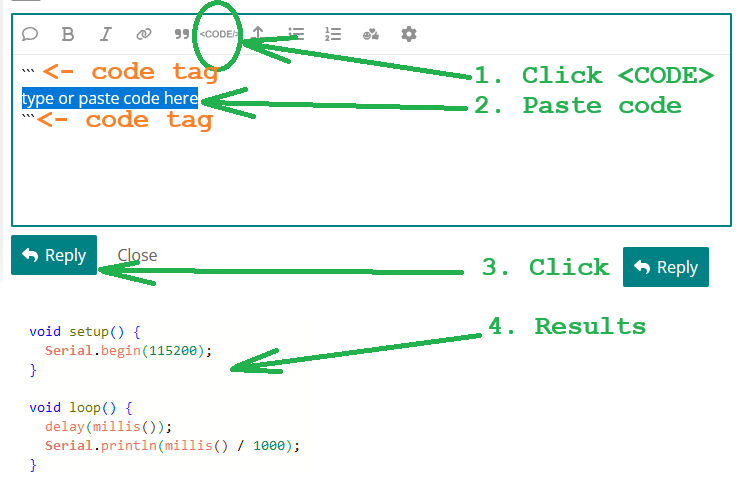
Finally, has already been requested of you twice in this thread ... next time you post your code, please do it properly.

#include "Arduino.h"
#include <WiFi.h>
#include "esp_sntp.h"
#include "TZ.h"

void setup() {
  const char ssid[] {"xxxxxxxx"};
  const char password[] {"yyyyyyyy"};
  const char ntpServer[] {"us.pool.ntp.org"};
  const uint32_t syncInterval {3600UL * 1000};
  tm *timeinfo;
  time_t now;

  Serial.begin(115200);
  delay(2000);

  Serial.printf("Connecting to %s\n", ssid);
  WiFi.disconnect();
  WiFi.begin(ssid, password);

  while (WiFi.status() != WL_CONNECTED) {
    Serial.print(".");
    delay(1000);
  }

  Serial.println();
  Serial.print("Got IP Address: ");
  Serial.println(WiFi.localIP());

  //init sntp and get the time
  sntp_set_sync_mode(SNTP_SYNC_MODE_IMMED);  // Set for immediate synch
  sntp_set_sync_interval(syncInterval);      // Set NTP synch interval
  configTzTime(TZ_America_New_York, ntpServer);
  delay(500);

  // Wait for NTP to sync
  Serial.println("Synching to NTP Time");
  while (true) {
    now = time(nullptr);
    timeinfo = localtime(&now);
    if (timeinfo->tm_year >= (2025 - 1900)) {
      break;
    }
    Serial.print(".");
    delay(2000);
  }

  Serial.println("NTP Synch Established");
  sntp_set_sync_mode(SNTP_SYNC_MODE_SMOOTH);  // Set for smooth NTP synch

}

void loop() {
  time_t now {time(nullptr)};
  tm *timeinfo {localtime(&now)};
  char timeString[100];
  strftime(timeString, 100, "%A, %B %d %Y %H:%M:%S", timeinfo);
  Serial.printf("Local Time: %s\n", timeString);
  delay(1000);
}

TZ.h (22.9 KB)

Please always post code within the "CODE" tags. This is required by forum rules (since plain code is nearly unreadable, lacks indentation, and many sections could be misinterpreted by the forum).

So now open your IDE with your sketch loaded, select "Copy for forum" from the "Edit" menu (or press Ctrl-Shift-C), then get beck here, edit your post #5, remove all the code lines (because they could have been changed by the forum), then paste the code already formatted for the forum. Thanks.