I am still using IDE 2.3.4 on Ubuntu Linux and today I accepted the prompt to upgrade that has been popping up whenever I started 2.3.4 over recent weeks.
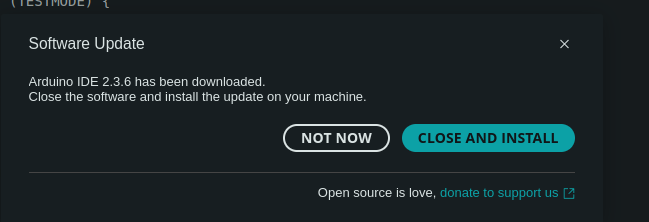
But it didn't work. After I hit the DOWNLOAD button it immediately responded with the CLOSE AND INSTALL dialogue box. I was suspicious - it could not have completed the download that fast, but I clicked on CLOSE AND INSTALL anyway. But nothing happened, i.e. nothing at all.
I repeated this after a compuer restart but no luck. I took a screenshot of the CLOSE AND INSTALL dialogue which has no indication of any progress on the downloading line.
Auto update should work for the App image, apparently not in this case. If you run the IDE from shell you get logging, try that and run the update again. Then post the output here as code.
I could do some diagnosing as you suggest, but I just want to reminded automatically, and later update (at a time of my choosing) with one button click to accept the update, not spending wasted hours just to stay in sync. After reading those links maybe I should swap to using the Flatpak installation technique instead ?
Hi @ninja2. I just tried using Arduino IDE's auto-update capability to upgrade a copy of the 2.3.4 AppImage package to 2.3.6 and it worked perfectly for me. So this definitely isn't a case of the capability being universally broken.
That is suspicious. However, the downloaded file is cached so if Arduino IDE had already downloaded the update file then this behavior would be expected.
The expected result is:
Arduino IDE closes.
There is some time during which nothing appears to be happening (while the update is installed in the background).
The updated version of Arduino IDE starts.
Did you use the auto-update feature to upgrade from that version up to 2.3.4?
The Arduino company distributes two packages of Arduino IDE:
AppImage
ZIP
The auto-update capability is only available when using the AppImage package. If you install Arduino IDE by following that tutorial, you should probably have ended up installing the AppImage package, but there is some ambiguity in how the tutorial is written so it is maybe possible that you could end up installing the ZIP package instead.
If you used the AppImage package, then your Arduino IDE installation folder will only contain a single file, with a .AppImage file extension. If you used the ZIP package then the installation folder will contain multiple files.
What exactly do you do to start Arduino IDE? I ask because Ubuntu's AppArmor security software prevents Arduino IDE from being started normally unless you take some special measures. The community has found multiple different approaches to making AppArmor happy and it might be that some of these are not compatible with the auto-update.
I am using an AppArmor policy (something like what is described here). With that approach, AppArmor should not interfere with the auto-update (since the policy is path-based and the update is performed in place).
Arduino IDE has the capability to work as you hope for it to do. There is something about your system that is breaking that capability. We are here to help you solve the problem, but we don't have access to your system so we only have the information you deign to share here. So you are going to need to make some effort if you want to solve the problem.
There is a good chance that will be an effective workaround.
That package is managed by a 3rd party without any involvement from the Arduino company, so it is not officially supported (though of course support is available via the forum for that package as for all things Arduino).
The Flatpak package does have its own unique problems. I generally advise against using 3rd party packages since there has been a long history of 3rd party Arduino IDE packages in general having significant defects or not being properly maintained. However, I have been quite impressed by the high quality of the maintenance and support from the maintainer of this specific package.
Hi ptillisch,
Thanks for your excellent explanation (as usual ).
Between 2.3.2 and 2.3.4 my Ubuntu install was upgraded 24.04.1 LTS (and now 24.10).
After 24.04.1 LTS I had problems with the IDE starting it took me some effort to resolve. I keep detailed notes for such events, they are shown below for the IDE.
I also attach here a screenshot showing my .arduino15 and .arduinoIDE folders FYI. I'm not sure what relationship is between these and /usr/local/bin as far as IDE operation goes ....
With text editor 'gedit' created new file "99-arduino.rules" (with rules specified per arduino docs above, and copied it into /etc/udev/rules.d/
Set up IDE shortcut in Applcations i.a.w Youtube "Properly Install Arduino IDE in Linux" @ 10:00
Created arduino.desktop using gedit and copied into place:
$ cp arduino.desktop /home/cj/.local/share/applications
$ cp arduino.desktop /home/cj/Desktop (then set permission to execute, and tick "Allow Launching")
ARDUINO IDE (After Ubuntu upgrade to 24.04.1 LTS)
Ubuntu security policy changes prevent existing IDE startup links from working after the upgrade
See "IDE fails to start on Linux due to missing sandboxing" Issue #2429 on GitHub at:
To resolve choose one of following options:
Option 1. add "--no-sandbox" to arduino.desktop, as done in arduino.desktop(b)
This works but defeats purpose of new Ubuntu security policy, not recommended.
Option 2. Create a new AppArmor profile for the Arduino IDE (that allows a non-root user to use the sandboxing in a specific application).
$ mv arduino-ide_2.3.4_Linux_64bit.Appimage ~/Downloads
$ sudo cp arduino-ide_2.3.4_Linux_64bit.Appimage arduino (creates copy with filename "arduino")
$ sudo cp arduino /usr/local/bin
$ rm arduino (from ~/Downloads)
$ cd /usr/local/bin
$ sudo chmod +x arduino
create new text file "usr.local.bin.arduino" in ~/Documents/Ubuntu/Arduino_IDE_Linux
$ gedit usr.local.bin.arduino (add special contents)
$ sudo cp usr.local.bin.arduino /etc/apparmor.d/
reload all AppArmor profiles with:
$ sudo service apparmor reload
$ systemctl daemon-reload
Now clicking arduino.desktop icon starts IDE without bypassing sandboxing
To display Arduino logo in desktop icon,
copied arduino-ide-logo.png (from Surface 1 !) into /usr/local/bin
added following to arduino.desktop: Icon=/usr/local/bin/arduino-ide-logo.png (NB: arduino-icon.ico did not work)
I am not familiar with -no-sandbox... I am using a 2007, 64-bit laptop with Linux Mint 22... running the latest IDE as one appimg blob. I guess I am just lucky.
Ubuntu obviously locked things down in the security department, so the AppImage does no longer work out of the box. Don't know when Mint will follow here.
I have to admit that I am not really a fan of this AppImage thing in the first place, but it is the only variant that has an installation documentation. The TGZ has neither an installer nor a readme or something on how to install that thing.
The appimg that I downloaded is a live blob, no installation, no unpacking (as far as I use it).
Mint is a subset of Ubuntu, but is quite user friendly (no admin/superuser needs). I first stared with Ubuntu in the early 2000s after SuSe, RedHat and Fedora went enterprise, but Ubuntu soon became bloated (because it had EVERYTHING ever needed) and unwieldy. Mint solved all my problems since then. Small, responsive, full office and coding environment. Even plays well with robocode.
That is an alternative approach to the AppArmor policy that @ninja2 and I am using. You can use one or the other, but you definitely don't need both. If you find that you do need both then that means you made a mistake when creating the policy.
The "--no-sandbox" was the solution that worked, and I only found about the AppArmor policy solution way later. I might switch to that because it is more "correct" to use this, but it has no priority.
The log message that is produced when the update fails makes things more clear:
Install on explicit quitAndInstall
Install: isSilent: false, isForceRunAfter: true
Error: Error: EACCES: permission denied, unlink '/usr/local/bin/arduino'
    at Object.unlinkSync (node:fs:1883:3)
    at p.doInstall (/tmp/.mount_arduinj8SzS0/resources/app/lib/backend/electron-main.js:8:89715)
    at p.install (/tmp/.mount_arduinj8SzS0/resources/app/lib/backend/electron-main.js:8:100862)
    at p.quitAndInstall (/tmp/.mount_arduinj8SzS0/resources/app/lib/backend/electron-main.js:8:100136)
    at u.quitAndInstall (/tmp/.mount_arduinj8SzS0/resources/app/lib/backend/electron-main.js:2:59356)
    at u.onRequest (/tmp/.mount_arduinj8SzS0/resources/app/lib/backend/electron-main.js:2:1145083)
    at c.requestHandler (/tmp/.mount_arduinj8SzS0/resources/app/lib/backend/electron-main.js:2:1144902)
    at c.handleRequest (/tmp/.mount_arduinj8SzS0/resources/app/lib/backend/electron-main.js:2:1135969)
    at c.handleMessage (/tmp/.mount_arduinj8SzS0/resources/app/lib/backend/electron-main.js:2:1134220)
    at /tmp/.mount_arduinj8SzS0/resources/app/lib/backend/electron-main.js:2:1133793
Root privileges are required to modify the contents of the /usr/local/bin folder. Arduino IDE does not have those privileges, so it is not able to update the file you stored at that location.
One solution would be to store the Arduino IDE installation in a folder under your normal user account's home folder, then put a symlink to that file in /usr/local/bin. You can do that by closing all Arduino IDE windows and then running the following commands from the terminal:
Then start Arduino IDE again, just as always (you won't need to make any adjustments since a symlink is present in the location where the executable was previously) and try the auto-update again. This time it should work as I described in post #7:
The file at ~/arduino-ide/arduino will now be version 2.3.6 and the /usr/local/bin/arduino symlink will continue to work just as before.
OK, I followed your suggestions @ptillisch and the download and install of 2.3.6 worked, and I can start the IDE by double-clicking on the app image, and all looks normal.
However when I double-click on my (revised) desktop icon it fails with a "Broken Desktop FIle" message "This desktop file has errors, or points to a program without permissions. It cannot be executed."
Here are the commands I issued:
$ cd /usr/local/bin
$ sudo mv arduino ~/arduino_IDE (this is still 2.3.4)
$ sudo ln -s ~/arduino_IDE/arduino /usr/local/bin/arduino
I then started IDE by direct double-click, and accepted 2.3.6 Download and Install)
The desktop icon shows as blank with no name and a red X, and it doesn't start the IDE.
So I tried the commands I used to resolve last time:
$ sudo service apparmor reload
$ systemctl daemon-reload
and restarted my computer, but still no luck
Here are all the relevant file permissions:
$ ls -l ~/arduino_IDE
total 196276
-rwxr-xr-x 1 cj cj 200980456 May  3 06:56 arduino

$ ls -l /usr/local/bin/arduino
lrwxrwxrwx 1 root root 28 May 18 08:56 /usr/local/bin/arduino -> /home/cj/arduino_IDE/arduino

$ ls -l ~/Desktop/arduino.desktop
-rwxrwxr-x 1 cj cj 112 May 19 07:39 /home/cj/Desktop/arduino.desktop
I think the problem is that the ~ shortcut for the user home folder is not expanded when used in a desktop entry. This is a special convenience feature of the Bash shell, and so won't necessarily be usable elsewhere.
Change the path in that line of the .desktop file to the true path of the file on your hard drive.
 ).
).