20X4 LCD w I2C adapter

Product Description

I have ever experienced as much trouble with merging hardware with the Arduino than this silly thing.

The search for a working library(s) has led me on several dead ends. My last attempt resulted in a library that works and I get a display, but it can only handle two lines, not four.

With that being said, I believe my <LiquidCrystal_I2C.h> library may be alright, but the linking <LiquidCrystal.h> may be incorrect. Is that line of thought correct?

My only change was the lcd.begin(16,2) to lcd.begin(20,4).

Regardless, I would sure like to find libraries that work. I would like the left/right scrolling feature to be available as well.

//Libraries 
#include <Wire.h>  
#include <LiquidCrystal_I2C.h>

LiquidCrystal_I2C lcd(0x27, 2, 1, 0, 4, 5, 6, 7, 3, POSITIVE);  // Set the LCD I2C address, if it's not working try 0x27.

void setup(){
  lcd.begin(20,4);   // iInit the LCD for 20 chars 4 lines
  lcd.backlight();   // Turn on the backlight (lcd.noBacklight() to turn it off)
  lcd.setCursor(0,0);
  lcd.print("Window:");
  // lcd.setCursor(16,0); 
  // lcd.print("12:00");
  //  lcd.setCursor(1,1);
  //  lcd.print("Fan:"); 
  //  lcd.setCursor(13,1); 
  // lcd.print("Heat:");
  //  lcd.setCursor(0,2); 
  // lcd.print("Mist:");
  //  lcd.setCursor(13,2); 
  // lcd.print("Pump:");
  //  lcd.setCursor(8,3); 
  // lcd.print("CONN");
}

And for those who are asking, the lines were uncommented at the time of testing.

Have you tried the hd44780 library by Bill Perry (available in the Arduino IDE library manager)?
I have not tried the left/right scroll on a 20x4, but if any library implements that correctly I would expect that library to. Most libraries do not handle the line wrap on 20x4 displays correctly, the hardware likes to wrap line 0 > line 2 > line 1 > line 3, so the library has to adjust for that.

Hi,
I had trouble with that LCD library and a 20x4 LCD, both a long time ago and just this week. So I used this library: LiquidCrystal_I2C_Hangul lcd(0x3F,16,2); //LCD 클래스 초기화 I only had to change the I2C address to 0x27 and the display to 20,4 and it all worked fine!!

  Last Mods: 11/04/2023
  Add ORP12 for Light measurement 07/04/2023
  Add LCD display 20 x 4 Lines 10/04/2023
********************************************/

#include <Arduino.h>
#include <FastIO.h>
//#include <I2C_16Bit.h>
//#include <LiquidCrystal.h>
//#include <LiquidCrystal_I2C.h>
#include <LiquidCrystal_I2C_Hangul.h>
#include <Wire.h>
#include <OneWire.h>
#include <DallasTemperature.h>
#include <SPI.h>
#include <DHT.h>

/*
Connections:
I2C
SDA to Arduino Analog pin 4
SCL to Arduino Analog pin 5
LightPin Analog pin A1
*/
//Declare variables.
int TT, TEMP, light, LightPin = A1, Light, H, chk;
float T1, T2, hum, temp;
//=============================================
LiquidCrystal_I2C_Hangul lcd(0x27, 20, 4);  //LCD

Hope it works for you....

With that being said, I believe my <LiquidCrystal_I2C.h> library may be alright, but the linking <LiquidCrystal.h> may be incorrect. Is that line of thought correct?

@cptadventure
The code you posted is not written for the LiquidCrystal_I2C library.
It is written for fm's newLiquidCrystal library LiquidCrystal_I2C i/o class.
The LiquidCrystal_I2C library and the newLiquidCrystal library both have LiquidCrystal_I2C.h header files which have LiquidCrystal_I2C classes.
They are two different libraries and they work differently.

If your code is compiling, then you have installed fm's newLiquidCrystal library.
If you also have LiquidCrystal_I2C library installed, the IDE can get confused.
If you have both installed, and you want the one from the newLiquidCrystal library you can add an include to ensure it picks fm's newLiquidCrystal library
Add this line
#include <LCD.h>
just above the include for LiquidCrystal_I2C.h to ensure you get the LiquidCrystal_I2.h header file from the newLIquidCrystal library vs the one from the LiquidCrystal_I2C library.

I would sure like to find libraries that work. I would like the left/right scrolling feature to be available as well.

I would suggest using the hd44780 library as it is currently being maintained.
In terms of left/right scrolling, you may be disappointed as to how this really works. IMO, it really isn't usable unless you have small displays.

see below

The left/right shift is handled by the chip set not the library.
When the sketch calls scrollDisplayLeft() or scrollDisplayRight() the library just sends a DisplayShift instruction indicating which direction to shift.
The library doesn't do anything but send the instruction/command.
The code for these API functions is so simple/minimal it is unlikely that any library would screw it up.
Whether it works as the users expects, well that is another matter.

The way the shift is implemented in the hardware is it shifts where characters are pulled from DDRAM and displayed on the display.
There is 80 and ONLY 80 bytes of DDRAM.
The normal starting location is 0, if a shift left is done the starting location bumps by one, If to the right it decrements by one. location rolls around to location 79

IMO, the shifting capability isn't very useful except on small displays.
Like 1 line displays and MAYBE 2x16 if not shifting very much.
Beyond that I think it isn't all that useful since when the display is larger where more of the 80 bytes (or if all 80 bytes) are shown on the display, characters from one line line will move up/down or jump to other lines.
Combine that with the somewhat unexpected 20x4 memory to display mapping the scrolling is a bit strange.
i.e. a right shift will place the character in col 19, of line 0 down at col 0 line 2

On a small display, it appears that the text is moving left or right with spaces coming in because the spaces that shift in are characters that are out of view.
When the display is larger like 20x4 there are not characters that are how of view, the characters just shift around on the display.
This is why I say it isn't very useful unless the display is small.

@catusme
Which library did you mean when you said "that LCD library"?
newLiquidCrystal?

I had trouble with that LCD library and a 20x4 LCD, both a long time ago and just this week. So I used this library: LiquidCrystal_I2C_Hangul

The LiquidCrystal_I2C_Hangul appears to be based on LiquidCrystal_I2C with a couple of new functions added. i.e. if you don't call the new functions, the library should work the same as the LiquidCrystal_I2C library (the one in the IDE library manager)

Both LiquidCrystal_I2C and LIquidCrystal_I2C_Hangul have issues related cursor positioning on certain display geometries since they harded coded the display offsets for the beginning of each row and the actual offsets are not consistent for all geometries.

The hd44780 library will not have this issue.

--- bill

1 Like

Thank you everyone for all your comments.

@bperrybap - looking at that hd44780 library I can see you are the man who has my answers. thank you for sharing your thoughts.

Running "Hello World" from hd44780_I2Cexp gave me no display.

Ran I2CexpDiag and got the following printout...

I will check my solder joints, but I did have a working display before. Is that possible?

@bperrybap

Well Bill I don't know what to tell ya. I've gone and re-soldered all my backpack connections. They looked fine to start with...but now I'm double sure.

Ran the Diags again and got the same error. I even touched up the soldered ends of the backpack pins on the backpack itself to make sure.

I got the screen flashing three times and some random walking blocks on the lcd screen. Then the test ends as the printout shows.


Does it matter? I'm running on a Mega 2560 with an Ethernet shield which works fine.

Strange/Interesting.
The Arduino board being used should not matter.

The diags auto detected the same i2c address (0x27) and the same pin mapping that you configured when using newLiquidCrystal LiquidCrystal_I2C

I'm not sure what the issue is since you said the LCD was previously working.

Does the LCD still work with the other library?
(i'm guessing it doesn't)

From looking at the diag output, bits 1&2 and 4&6 have issues.
Those two pairs are the same bits within a nibble.
Those bit pairs correspond to the connections to LCD pins DB4 and DB5 which are pins 11 and 12 on the LCD module.
What I see is that whenever DB4 or DB5 are both high the value read is correct.
Whenever either one is low, the other will be forced low when it is high.
This seems to indicate a short between these to pins.
Look closely at LCD pins DB4 (pin 11) and DB5 (pin 12)

On that backpack, LCD DB4 and DB5 are wired to PCF8574 P4 and P5 which are pins 9 and 10
If you don't see an issues on LCD pins 11 and 12, may want to check out those PCF8574 pins as well.

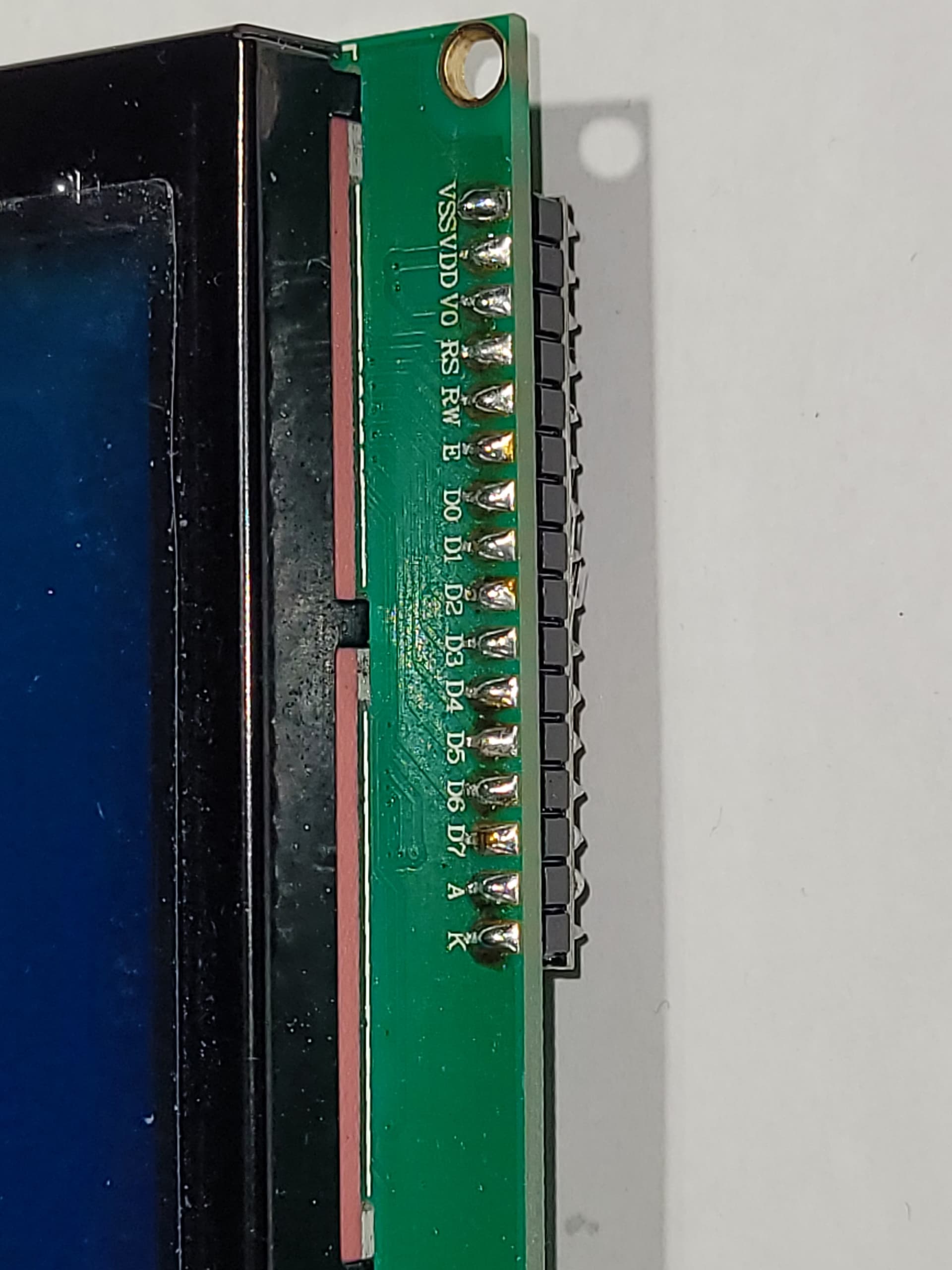
Can you post a post a photo of your LCD backpack?
So we can see it and the 16 solder connections to the LCD module.

--- bill


I don't see any obvious soldering issues.
That said, and it could be an illusion, but it looks backpack header is lifted up a bit off the LCD module. i.e. there appears to be a gap between black plastic on the header and the solder pads on the LCD module. The solder looks odd in that area.

So does it sill work with the other library?

--- bill

That gap you speak of was intentional on my part. I found sitting the backpack any further into the LCD unit would have the two PCB touching each other. I am not comfortable with that.

I will find time later to reload the other library and test again.

Thanks again for all your guidance in this matter.

Hi,
I find this library very reliable and it usually solves my LCD problems:
LiquidCrystal_I2C_Hangul lcd(0x3F,16,2); //LCD 클래스

Just change 16,2 to 20,4 and you may have to change the i2c address I'm sure mine is 0x27.

Mel

Instead of

LiquidCrystal_I2C lcd(0x27, 2, 1, 0, 4, 5, 6, 7, 3, POSITIVE);

put

LiquidCrystal_I2C lcd(0x27, 20, 4);

And wire the I2C adapter like in the image:

I have chosen to give up on this unit. As @bperrybap's diagnostic program showed, pins are shorted together and I am tired of trying to solve this.
The unit itself is a good unit, but I believe this individual board has a factory flaw (short). I am returning the unit and purchasing a second one, with extreme attention shown to any soldering to ensure I am not responsible for any failings.
I will return to this post when the unit arrives and I am confident the LiquidCyrstal_I2C library will work.

1 Like

Before giving this up I would try:

I believe that will solve your problems. Certainly worth a try.

Ron

1 Like

Are you sure the twisted clamp underneath the I2C-module doesn't touch anything?
From the picture of post #10 it is not clear if there is a clear gap.
Not likely, the gap of the pre-soldered "QUAPASS" 2x16 I have is nearly zero.

I had to bend and fold down 2 of those tabs to get the backpacks to not short on my 16x2 displays. The black tabs are ground.

@Ron_Blain
switching constructors also implies that you are suggesting switching libraries since the two constructors are for two different libraries.
See post #4
If you attempt to just switch constructors, and not libraries, the code will no longer compile.
One of the key things to get correct for this type of device is the pin mappings and backlight active state.
LiquidCrystal_I2C is hard coded to one of the half dozen mappings.
When the newLiquidCrystal is initialized with:

LiquidCrystal_I2C lcd(0x27, 2, 1, 0, 4, 5, 6, 7, 3, POSITIVE);

It will be using the same pin mappings and backlight state as the LiquidCrystal_I2C library.
Also, if you look at the hd44780 diagnostic output, it indicated that it probed the device and discovered the same pin mappings and backlight state.
So all 3 libraries are using the same pin configuration.

In many years of working with these LCD devices, and seeing many issues/failures, I've not actually ever seen one yet with an internal RAM issue like this.

Nearly all cases of issues are related to soldering or poor i2c connections/wires.
The other thing that I've seen kill these devices is hooking up the power backwards.

In this case we know that the i2c wiring is ok since the device is being found.
For soldering I have seen these issues:

  • cold solder joints.
    these can be madding since they will look ok but are not actually making connections. They can cause all kinds of weird issues.
    And often change as bumping/touching/flexing the board can cause the symptoms to change.
  • too much solder that bridges pins.
    This creates shorts.
  • fine wire or even a hair that created short.
    Yes in once case a hair bridge two wires on the header pins and created issues.
  • poor soldering of the PCF8574 chip to the backpack PCB.
    I have seen some backpacks that had poor solder connections on the actual PCF8574 chip. This showed up sever times a few years ago. Likely a bad batch that got shipped.
    On those you could see it if you looked very closely at the PCF8574 chip.
    It affected a few of the data pins.

My guess at this point is still a soldering issue.
Particularly since in the very post post @cptadventure said:

My last attempt resulted in a library that works and I get a display, but it can only handle two lines, not four.

When things are intermittent, they are almost always h/w related and not s/w (a library issue).

--- bill

In the interest of keeping this simple I would try a simple LCD code sample.

/* I2C LCD with Arduino example code. More info: https://www.makerguides.com */
// Include the libraries:
// LiquidCrystal_I2C.h: https://github.com/johnrickman/LiquidCrystal_I2C
#include <Wire.h>               // Library for I2C communication
#include <LiquidCrystal_I2C.h>  // Library for LCD
// Wiring: SDA pin is connected to A4 and SCL pin to A5.
// Connect to LCD via I2C, default address 0x27 (A0-A2 not jumpered)
LiquidCrystal_I2C lcd = LiquidCrystal_I2C(0x27, 20, 4);  // Change to (0x27,16,2) for 16x2 LCD.
void setup() {
  // Initiate the LCD:
  lcd.init();
  lcd.backlight();
}
void loop() {
  // Print 'Hello World!' on the first line of the LCD:
  lcd.setCursor(0, 0);  // Set the cursor on the first column and first row.
  lcd.print("Line 1");  // Print the string "Hello World!"
  lcd.setCursor(0, 1);  //Set the cursor on the third column and the second row (counting starts at 0!).
  lcd.print("Line 2");
  lcd.setCursor(0, 2);
  lcd.print("Line 3");
  lcd.setCursor(0, 3);
  lcd.print("Line 4");
}

I am far from a code guru or programmer type. I agree as to intermittent but the thread starter has nothing to lose trying this example code. Just make sure the SDA and SCL lines are correct.

Ron

this is an art indian lib, "all-in-one"

Huh? What do you mean?

The constructor for the lcd object is a constructor for the LiquidCrystal_I2C class that comes with fm's newLiquidCrystal library. It is not a constructor for the LiquidCrystal_I2C class that comes with the LiquidCrystal_I2C library.

---- bill