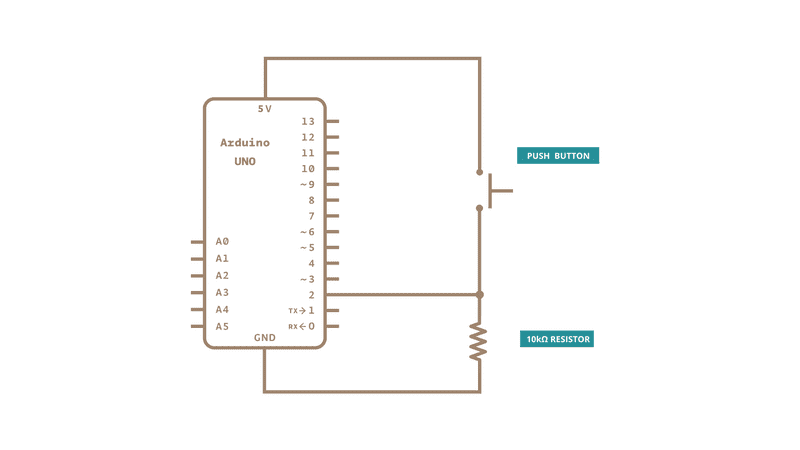
I'm using the Ableton Connection Kit with an diymore Duemilanove Plus board. I want to use binary signal (a button changing the state from HIGH to LOW) and have this play sounds in my Ableton project. My wiring is alright, I get the change from 1 to 0, yet it's not communicating with Ableton. I've mapped the Digital input in the Arduino Device in Ableton, but nothing happens when I push the button. Why is this?
Here is a video of how it should be working: Control Ableton Live with an Arduino Uno - YouTube
I map my Arduino inputs to a parameter, and it goes grey/is disabled as the parameter is controlled by a Max device (as in the video). But when I push my button there is no response...
I hope I managed to provide the necessary information! Thank you so much for the help!
Is that also the code you are using?
I can't see how that is communicating with your computer that runs Ablton.
That takes 11 minutes and has a very low information density.
I noticed that at the beginning he mentioned fermatta have you installed that in your UNO?
Can you tell us what you are doing.
The plan that i know works the best is to get an Arduino, with native USB support like a 'micro' or a 'leonardo' based on an AtMega 32u4, and upload a sketch to make it act as a USB midi device. Then all you need to do is plug it in, and enable the midi-port in ableton (for the purpose you intend to use it for) and it is all straightforward from there.
So did you do that process ? upload the correct sketch etc.
Anyways, it is not a method i would support, simply because it results in a solution that only works in Ableton (if it works at all)
There is a way to also make an UNO with 16u2 for usb, act as a midi-usb device, but the 32u4 make it so much simpler.
Video is not the most popular "documentation". It takes more time than some helpers are ready to use.....
Code is the most important piece together with schematics.
We would always connect the button from the pin to ground, and likely use a pinMode of INPUT_PULLUP instead of providing a pull-up resistor. Assuming the use of a quality pushbutton of course.
Thank you for your help! What I like about this M4L Ableton Device is that it allows me to map various parameters inside my Ableton program to different push buttons. I'm working on a project that is using weaving as a way to close circuits (using a state change detection code) which turns on/off various sounds in Ableton. But it's not working so I'm open for other possible solutions. The Connection Kit seems to be quite unstable still.
The plan that i know works the best is to get an Arduino, with native USB support like a 'micro' or a 'leonardo' based on an AtMega 32u4, and upload a sketch to make it act as a USB midi device. Then all you need to do is plug it in, and enable the midi-port in ableton (for the purpose you intend to use it for) and it is all straightforward from there.
Thank you for this suggestion! I'll try it. Do you have a code you could refer me too?
So did you do that process ? upload the correct sketch etc.
Anyways, it is not a method i would support, simply because it results in a solution that only works in Ableton (if it works at all)
Yeah, I've uploaded the StandardFormata to my board. For this project it's only Ableton I'm working with, but I see your point!
But you can map anything to anything in Ableton anyway. A midi note, CC or anything else you can think of.
Control Surface is a library that will allow you all sorts of things and supports USB-midi on 32u4 based boards.
But something as simple as this might give you some idea.
Thank you! Ok, I don't have access to a 32u4 datasheet board, is there a workaround? All software and instructions I find when googling are old and the software not compatible with my Mac. I'll try to get a Leonardo for the future tho.
The workaround would be to use Hairless on your computer to convert serial data into a MIDI signal that Ableton can connect to. No need to use that Max MSP patch at all.
Thank you this suggestion! Yeah, I've seen this and tried, but I can only find Hairless downloads which are old which gives me problems with compatibility. Do you know of a similar software that is newer and works on MacOS Catalina?