Greetings. I am doing a small project using a graphic LCD display (TM12864L-2) Ver:1.0 5.0V QCPASS202110. So far I have managed to activate the contrast to the screen. I try to search the internet for specific information on the LCD screen but it is very little. I would like if someone would help me with information on how to use this screen with Arduino, its characteristics and what drivers it uses. Thanks for any information you can give me.
I found 906 000 Pages for the 12864. Which one did not work for you?
Can you post a link to the display you have bought?
May be you have also found a datasheet for your display which you can share with us?
It is always wise to post a link to the actual display that you have bought. e.g. Ebay sale page.
Then we know exactly what your item looks like.
You don't need to take photos.
We don't need to guess.
I Googled for your part number. The module appears to have CS1 and CS2 printed on pin#15, #16.
It is probably a KS0108 or compatible controller.
This needs a lot of GPIO pins. e.g. most of a Uno.
U8g2lib supports KS0108 displays.
Search in the IDE Library Manager for KS0108
David.
Thank you very much for answering my question. As you can see, I'm new to this blog and I'm just beginning to interact in the forum. The version of my screen is TM12864L-2.....
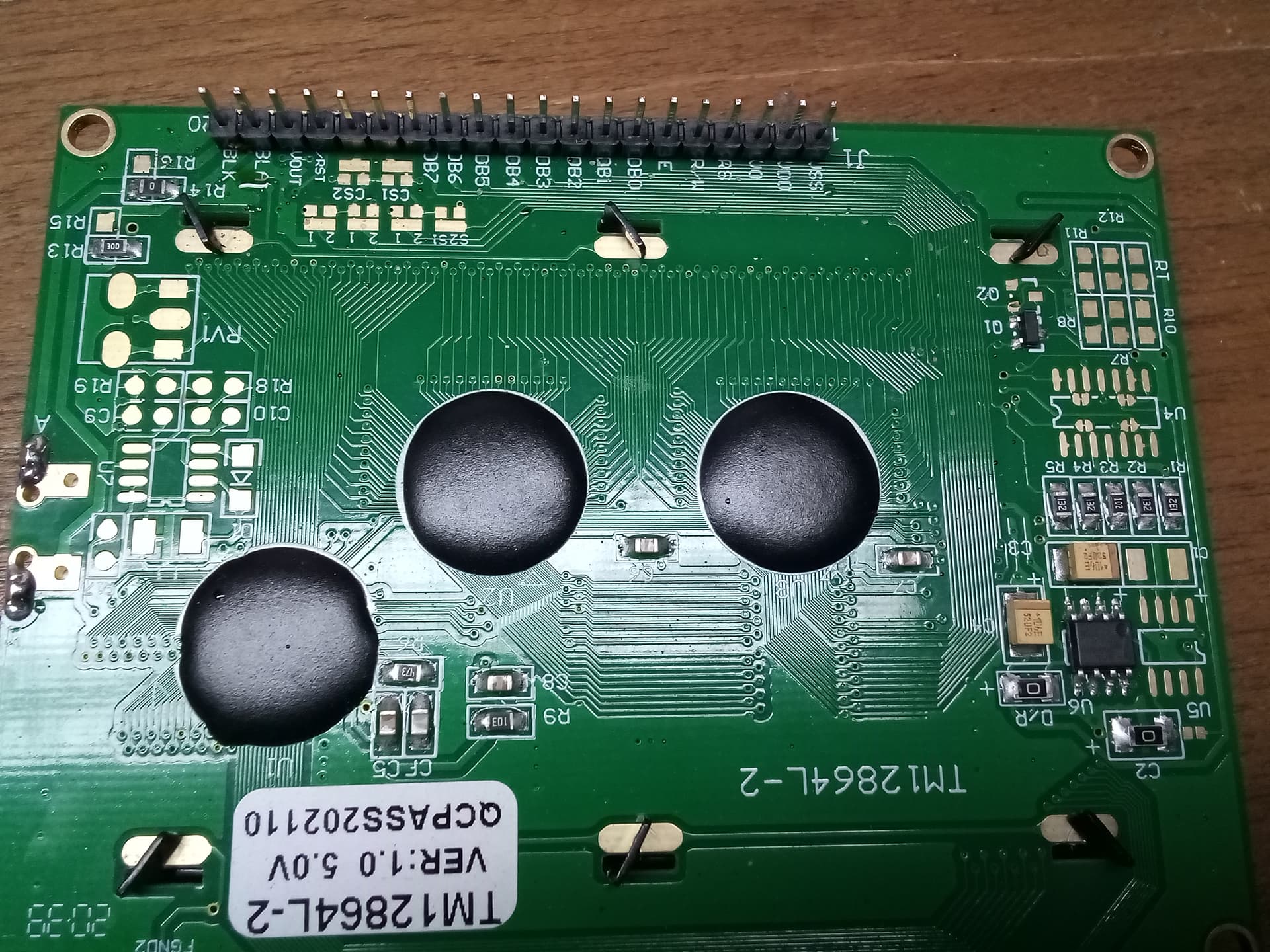

If someone can give me a reference to the exact datasheet of this screen, the libraries that could be used and how to use them, I would be grateful.
This is the constructor used by U8g2 examples.
U8G2_KS0108_128X64_F u8g2(U8G2_R0, 8, 9, 10, 11, 4, 5, 6, 7, /*enable=*/ 18, /*dc=*/ 17, /*cs0=*/ 14, /*cs1=*/ 15, /*cs2=*/ U8X8_PIN_NONE, /* reset=*/ U8X8_PIN_NONE); // Set R/W to low!
This is the wiring that is used by U8g2 examples (for a Uno).
GLCD Name Arduino
1    VSS  GND, pot GND
2    VDD  5V
3    VO   pot slider
4    RS   A3 (17)
5    R/W  GND
6    E    A4 (18)
7    DB0  8
8    DB1  9
9    DB2  10
10   DB3  11
11   DB4  4
12   DB5  5
13   DB6  6
14   DB7  7
15   CS1  A0 (14)
16   CS2  A1 (15)
17   RST  no connection
18   VOUT pot outer
19   BLA  5V
20   BLK  GND
connect a potentiometer to pins 1, 3, 18. Any 10k or 22k pot should be fine.
connect all the signal pins to the Arduino.
rotate the pot to get the best contrast.
install U8g2lib via IDE Library Manager.
run all the U8g2 examples. (with this constructor)
David.
I want to thank the community and all those people who helped clarify my doubts. Finally I managed to connect the graphic LCD screen with a MEGA 2560 board.
I comment my experience....
In a first instance it was not possible to get information from the datasheet of the graphic screen (TM12864L-2 Ver:1.0).
Then I put the exact information of said screen....

I had some problems with the contrast in the end I managed to adjust the contrast with the following configuration.....

Finally make the following wiring between the Atmega 2560 and the graphic LCD screen TM12864L-2.
Use the U8glib library, in the development of the examples that the library includes, locate the appropriate constructor for the LCD screen that I have.
There are various configurations for the display pins. We must locate which one is appropriate.

I hope this information can be of use to anyone.
Your J1, J2, J3 connections are correct in your second image. The RV1 connections are wrong in the third image.
I am pleased that you have it working with U8glib. Note that U8glib is no longer maintained by the author.
You should use U8g2lib instead.
The constructor and wiring in #5 will be fine for the MEGA2560. Just use the digital numbers instead of the Uno Analog numbers. e.g. connect RS to D17 and not A3.
David.