Hello,
I've built my first Arduino project, which is clock with LCD display (I2C converter) and RTC1302 module. Here is the scheme I followed:
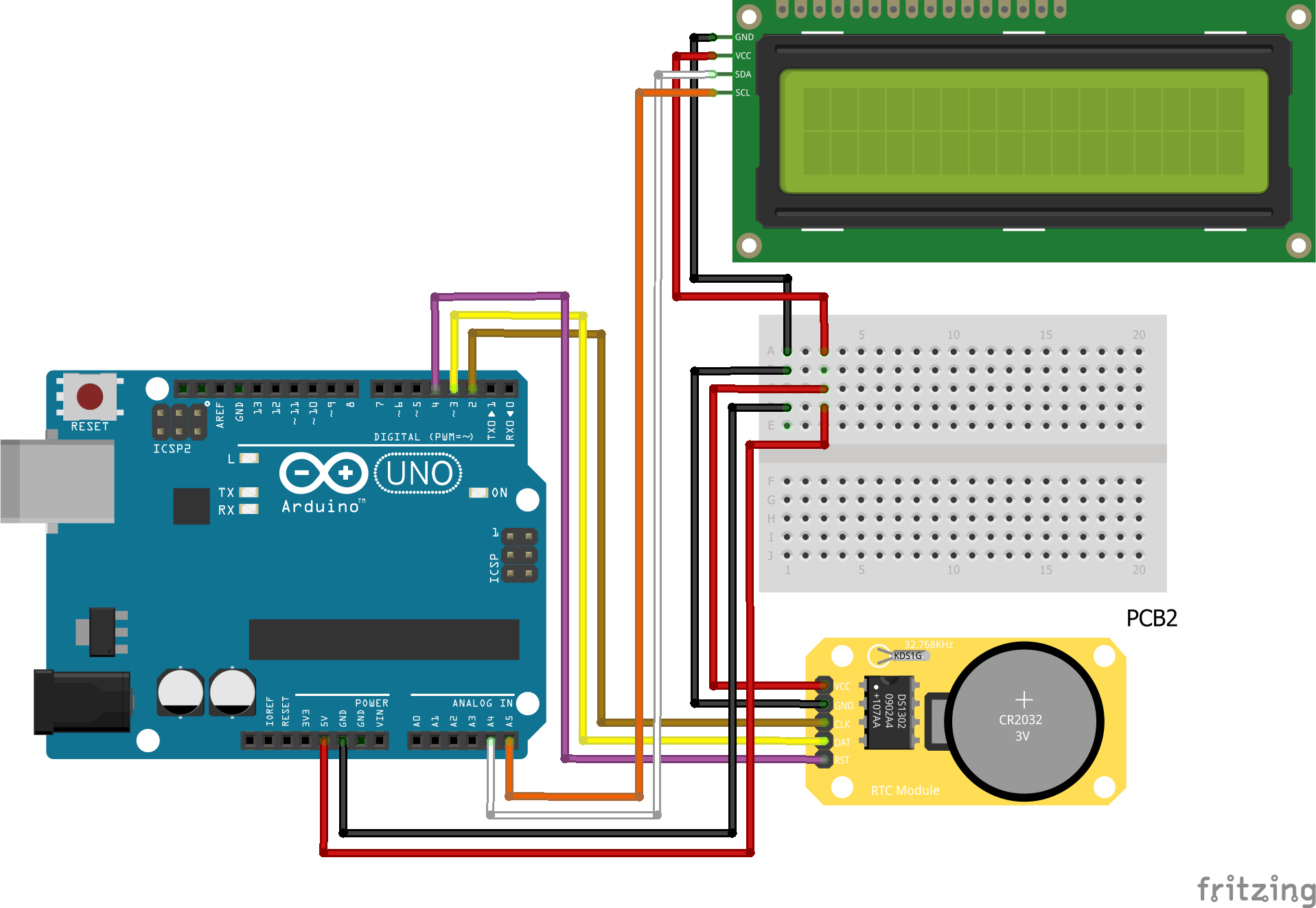
I would like to add some audio component, which would make the ticking or beeping sound (hopefully, not too annoying...). I wanted to ask for an advice which components work the best and also where should to add it to my project. Also, if and which transistors would be necessary (that part for a beginner like me is a mystery for now...).
I've considered:
Buzzer (although the simplest, I am wondering if it is possible to make the sound pleasant)
Speaker and DFPlayer with card reader
Grove speaker from Seeeduino (although I'm not sure, I think it requires a shield, so that would be really hard to add to existing parts)
The next part is coding. I was wondering how to sync the beep with the clock, and how to make it silent at a time.
Here is the code I'm using (there are some modifications to the standard clock code)
#include "virtuabotixRTC.h"//Library used
#include <LiquidCrystal_I2C.h>

LiquidCrystal_I2C lcd(0x27, 16, 2);
virtuabotixRTC myRTC(2, 3, 4); //The order here is DAT,CLK,RST. You can change this depending on the wiring

char timeChar [8]; //number of digits for the format
uint8_t prevSeconds = 0; //

void setup()
{

  Serial.begin(9600);

  lcd.init();
  lcd.backlight();

  // Set the current date, and time in the following format:
  // seconds, minutes, hours, day of the week, day of the month, month, year
  //myRTC.setDS1302Time(30, 21, 00, 5, 07, 01, 2021); //Here you write your actual time/date as shown above
  //but remember to "comment/remove" this function once you're done
  //The setup is done only one time and the module will continue counting it automatically
}
void loop()
{

  myRTC.updateTime();

  if(myRTC.seconds != prevSeconds)  // Only update display if seconds have changed
  {
    prevSeconds = myRTC.seconds;

    // Start printing elements as individuals

    if(myRTC.seconds %10)
    {
      sprintf(timeChar, "%02d:%02d:%02d",myRTC.hours, myRTC.minutes, myRTC.seconds);
      if(myRTC.seconds == 9 || myRTC.seconds == 19 || myRTC.seconds == 29 || myRTC.seconds == 39 || myRTC.seconds == 49 || myRTC.seconds == 59)
      {
        // timeChar[0] = 'Z';
        // timeChar[4] = 'X';
        timeChar[0] = random("32, 128");
        timeChar[4] = random("32, 128");
      }
    }
    else
    {
      sprintf(timeChar, "D0:0M:%02d", myRTC.seconds);
    }

    lcd.print(timeChar);
  }
Thanks in advance and best regards,
Lena


