Ambient data from Ruuvi>ESP32>google sheet - http connection issue

Hi everyone :slight_smile:

I am new here and I am starting this topic because I am being stuck with my (seemingly) straight-forward project: I want to track ambient data from two Ruuvi tags in my greenhouse.
Therefore I am trying to program an ESP32-WROOM-32U to receive the Ruuvi HEX string and forward it via my home-WiFi to a google sheet.
In the Google Apps script I have the logic to decode the Ruuvi hex strings and add them as a new row.
Everything works in principal and I do receive data in the google sheet, BUT:

  • after the ESP is running successfully a while, I get the http error code -1 , which then repeats for minutes or even hours. Then it works couple of minutes, then stops working again for good.
  • after restarting the ESP32, it again works for some time, but then stops as described above
  • I am logging WiFi strength and it seems reasonable between -50 and -65, so not too bad.
  • When it is working, I keep getting the http error code 302, not sure if that has to say anything...

So, does anyone have an idea what is causing the connection to "break" after some time of working normally?

I am totally new to programming, but this is my code so far (with help of google and microsoft copilot) :

#include <BLEDevice.h>
#include <BLEUtils.h>
#include <BLEScan.h>
#include <BLEAdvertisedDevice.h>
#include <BLEAddress.h>
#include <WiFi.h>
#include <HTTPClient.h>
#include <esp_task_wdt.h>
#include <time.h>

#define WDT_TIMEOUT 3600000  // = 1 hour - Timeout in milliseconds

const char* MAC_inside_sensor = "xx:B9:9A:E5:54:xx";
const char* MAC_outside_sensor = "xx:6A:CC:E0:7E:xx";

HTTPClient http; // Declare HTTPClient object globally

const char* ssid = "FRITZxxxxxxx2";
const char* password = "451xxxxxxxxxx710";

unsigned long previousMillis = 0;
const long interval = 30000; // 30 seconds in milliseconds

esp_task_wdt_config_t wdt_config = {
    .timeout_ms = WDT_TIMEOUT,
    .idle_core_mask = (1 << 2) - 1,
    .trigger_panic = true,
};

int scanTime = 25; // BLE scan time in seconds
BLEScan* pBLEScan;

String googleURL = "https://script.google.com/macros/s/AKfycbxyxxxxxxxxxxxxxxiMlTAh1oXXEdZ--WXXa24PnMa/exec?";
String HEX_inside_sensor = "";
String HEX_outside_sensor = "";

bool insideSensorFound = false;
bool outsideSensorFound = false;

void connectToWiFi() {
    WiFi.disconnect();
    delay(1000);
    WiFi.begin(ssid, password);
    unsigned long startAttemptTime = millis();

    while (WiFi.status() != WL_CONNECTED && millis() - startAttemptTime < 10000) {
        delay(1000);
        Serial.println("Connecting to WiFi...");
        logWiFiStrength(); // Log the WiFi signal strength during connection attempts
    }

    if (WiFi.status() == WL_CONNECTED) {
        Serial.println("Connected to WiFi");
        logWiFiStrength(); // Log the WiFi signal strength after connection
    } else {
        Serial.println("Failed to connect to WiFi");
    }
}

class MyAdvertisedDeviceCallbacks : public BLEAdvertisedDeviceCallbacks {
    void onResult(BLEAdvertisedDevice advertisedDevice) {
        String macAddress = advertisedDevice.getAddress().toString().c_str();
        macAddress.toUpperCase();
        macAddress.trim();
        Serial.print("MAC Address: "); Serial.println(macAddress);
        if (macAddress == MAC_inside_sensor) {
            Serial.print("Inside sensor detected - ");
            String raw_data = String(BLEUtils::buildHexData(nullptr, (uint8_t*)advertisedDevice.getManufacturerData().c_str(), advertisedDevice.getManufacturerData().length()));
            raw_data.toUpperCase();
            HEX_inside_sensor = raw_data;
            Serial.print("Raw data: "); Serial.println(HEX_inside_sensor);
            insideSensorFound = true;
        } else if (macAddress == MAC_outside_sensor) {
            Serial.print("Outside sensor detected - ");
            String raw_data = String(BLEUtils::buildHexData(nullptr, (uint8_t*)advertisedDevice.getManufacturerData().c_str(), advertisedDevice.getManufacturerData().length()));
            raw_data.toUpperCase();
            HEX_outside_sensor = raw_data;
            Serial.print("Raw data: "); Serial.println(HEX_outside_sensor);
            outsideSensorFound = true;
        }
        // Stop the scan if both sensors are found
        if (insideSensorFound && outsideSensorFound) {
            pBLEScan->stop();
        }
    }
};

void setupBLE() {
    BLEDevice::init("");
    pBLEScan = BLEDevice::getScan();
    pBLEScan->setAdvertisedDeviceCallbacks(new MyAdvertisedDeviceCallbacks());
    pBLEScan->setActiveScan(true);
    pBLEScan->setInterval(100);
    pBLEScan->setWindow(99);
}

void logWiFiStrength() {
    long rssi = WiFi.RSSI();
    Serial.print("WiFi Signal Strength (RSSI): ");
    Serial.print(rssi);
    Serial.println(" dBm");
}

void setup() {
    Serial.begin(115200);

    WiFi.setSleep(false);

    esp_task_wdt_deinit();
    esp_task_wdt_init(&wdt_config);
    esp_task_wdt_add(NULL);

    delay(4000);
    connectToWiFi();
    setupBLE();

    configTime(0, 0, "pool.ntp.org", "time.nist.gov");
    Serial.println("NTP initialized");

    http.setTimeout(20000); // Set timeout to 20 seconds
}

void loop() {
    unsigned long currentMillis = millis();
    if (currentMillis - previousMillis >= interval) {
        previousMillis = currentMillis;

        insideSensorFound = false;
        outsideSensorFound = false;
        HEX_inside_sensor = "";
        HEX_outside_sensor = "";

        BLEScanResults* foundDevices = pBLEScan->start(scanTime, false);
        pBLEScan->clearResults();

        if (!HEX_inside_sensor.isEmpty() && !HEX_outside_sensor.isEmpty()) {
            String googleURL_with_parameters = googleURL + "&HEXin=" + HEX_inside_sensor + "&HEXout=" + HEX_outside_sensor;
            Serial.println("URL: " + googleURL_with_parameters);

            if (WiFi.status() == WL_CONNECTED) {
                http.begin(googleURL_with_parameters);
                int httpResponseCode = http.GET();
                if (httpResponseCode > 0) {
                    String response = http.getString();
                    Serial.println(httpResponseCode);
                    Serial.println(response);
                } else {
                    Serial.print("Error on HTTP request: ");
                    Serial.println(httpResponseCode);
                    if (httpResponseCode == -1) {
                        Serial.println("Failed to connect to server. Re-initializing WiFi...");
                        connectToWiFi();
                    }
                }
                http.end();
            } else {
                Serial.println("Error in WiFi connection. Re-initializing WiFi...");
                connectToWiFi();
            }
        } else {
            Serial.println("No BLE values received");
        }
    }
    esp_task_wdt_reset();
}

Any tips, hints, ANYTHING is appreciated, as I do not know what else to look at...
thanks!

one thing I forgot to mention and I really cannot understand right now:
The

Serial.print("Error on HTTP request: ");
Serial.println(httpResponseCode);

gives me (after the first successful tries) always once
Error on HTTP request: -11

and then

Error on HTTP request: -1

I found here what the codes mean:

I found it via this arduino - What does an HTTP response code of -5 or -2 mean? - Stack Overflow but the answer is currently way above my knowledge...
So if someone could help me understand on how to apply this to my code would be great :slight_smile:

to continue my monologue, I found out that the issue has to do with memory leakage - apparently the SSL-stuf for the https-connection is using too much memory, if I understand the debug correctly:

21:17:53.265 -> [711103][D][HTTPClient.cpp:574] sendRequest(): request type: 'GET' redirCount: 0
21:17:53.265 -> 
21:17:53.265 -> [711111][E][NetworkClient.cpp:319] setSocketOption(): fail on 0, errno: 9, "Bad file number"
21:17:53.265 -> [711120][D][NetworkManager.cpp:123] hostByName(): DNS found IPv4 172.217.19.78
21:17:53.265 -> [711127][V][ssl_client.cpp:68] start_ssl_client(): Free internal heap before TLS 63568
21:17:53.302 -> [711135][V][ssl_client.cpp:75] start_ssl_client(): Starting socket (domain 2)
21:17:53.333 -> [711183][V][ssl_client.cpp:166] start_ssl_client(): Seeding the random number generator
21:17:53.333 -> [711193][V][ssl_client.cpp:174] start_ssl_client(): Setting up the SSL/TLS structure...
21:17:53.366 -> [711201][D][ssl_client.cpp:192] start_ssl_client(): WARNING: Skipping SSL Verification. INSECURE!
21:17:53.366 -> [711210][V][ssl_client.cpp:288] start_ssl_client(): Setting hostname for TLS session...
21:17:53.366 -> [711218][E][ssl_client.cpp:36] _handle_error(): [start_ssl_client():298]: **(-32512) SSL - Memory allocation failed**
21:17:53.366 -> [711228][I][NetworkClientSecure.cpp:153] connect(): Actual TLS start postponed.
21:17:53.398 -> [711235][E][NetworkClientSecure.cpp:159] connect(): start_ssl_client: connect failed: -32512
21:17:53.398 -> [711244][V][ssl_client.cpp:360] stop_ssl_socket(): Cleaning SSL connection.
21:17:53.398 -> [711253][D][HTTPClient.cpp:1105] connect(): failed connect to script.google.com:443
21:17:53.398 -> [711261][W][HTTPClient.cpp:1421] returnError(): **error(-1): connection refused**
21:17:53.430 -> [711268][E][NetworkClient.cpp:319] setSocketOption(): **fail on 0, errno: 9, "Bad file number"**
21:17:53.430 -> Error on HTTP request: -1
21:17:53.430 -> Failed to connect to server. Re-initializing WiFi...
21:17:53.430 -> [711285][V][STA.cpp:214] _onStaEvent(): STA Disconnected: SSID: FRITZ!Box 7312, BSSID: 34:31:c4:76:f9:76, Reason: 8
21:17:53.470 -> [711296][V][NetworkEvents.cpp:119] checkForEvent(): Network Event: 14 - STA_DISCONNECTED
21:17:53.470 -> [711304][V][STA.cpp:110] _onStaArduinoEvent(): Arduino STA Event: 14 - STA_DISCONNECTED
21:17:53.470 -> [711312][W][STA.cpp:135] _onStaArduinoEvent(): Reason: 8 - ASSOC_LEAVE
21:17:54.509 -> [712371][V][STA.cpp:204] _onStaEvent(): STA Connected: SSID: FRITZ!Box 7312, BSSID: 34:31:c4:76:f9:76, Channel: 1, Auth: WPA_WPA2_PSK
21:17:54.541 -> [712383][V][NetworkEvents.cpp:119] checkForEvent(): Network Event: 13 - STA_CONNECTED
21:17:54.541 -> [712391][V][STA.cpp:110] _onStaArduinoEvent(): Arduino STA Event: 13 - STA_CONNECTED
21:17:54.541 -> [712397][V][NetworkInterface.cpp:78] _onIpEvent(): sta Got Same IP: 192.168.0.230 MASK: 255.255.255.0 GW: 192.168.0.1
21:17:54.573 -> [712409][V][NetworkEvents.cpp:119] checkForEvent(): Network Event: 16 - STA_GOT_IP
21:17:54.573 -> [712417][V][STA.cpp:110] _onStaArduinoEvent(): Arduino STA Event: 16 - STA_GOT_IP
21:17:54.573 -> [712424][V][STA.cpp:169] _onStaArduinoEvent(): STA IP: 192.168.0.230, MASK: 255.255.255.0, GW: 192.168.0.1
21:17:55.514 -> Connecting to WiFi...
21:17:55.514 -> WiFi Signal Strength (RSSI): -58 dBm

I am still wondering why an apparently easy task is so troublesome :slight_smile: to implement...

Your code is not so pretty...
I'm surprised that it works without initializing an HTTP client
HTTPClient http;

Anyway I suggest you to take a http client library example code and make it work to send some simple line to google sheets. When you have that working reliably, add your sensor string and then rest of your elements.

Hi! and thanks for your honest feedback.
A lot of the code got added with the copilot, it was much less complicated when I started with the script, then added more and more stuff to fix the problems. But I guess: more code means more problems, so you are probably right by going back and starting with a much simpler script and adding functionality back step by step.
However, the httpClient http; is in there right at the top after the #define and const char* :slight_smile:

regards
Jochen

well, this minimal code runs reliably:

#include <WiFi.h>
#include <HTTPClient.h> 

HTTPClient http; // Declare HTTPClient object globally

const char* ssid = "CDFxxx04";
const char* password = "lexxxin1";

String googleURL = "https://script.google.com/macros/s/AKfycbxyaRqvZ4pBmhZN0_tjK20gtTYCxxxoXXEdZ--WXXa24PnMa/exec?";
String HEX_inside_sensor = "7FFFFFFEFFFE7FFF7FFF7FFFFFDEFEFFFE";
String HEX_outside_sensor = "12FC5394C37C0004FFFC040CAC364200CD";

void connectToWiFi() {
    WiFi.disconnect();
    delay(1000);
    WiFi.begin(ssid, password);

    while (WiFi.status() != WL_CONNECTED) { // && millis() - startAttemptTime < 10000) {
        delay(1000);
        Serial.println("Connecting to WiFi...");
    }
    if (WiFi.status() == WL_CONNECTED) {
        Serial.println("Connected to WiFi");
    } else {
        Serial.println("Failed to connect to WiFi");
    }
}

void setup() {
    Serial.begin(115200);
    // setupBLE();
    delay(4000); //before setting up WiFi
    connectToWiFi();
    Serial.println("NTP initialized");
    http.setTimeout(20000); // Set timeout to 20 seconds
}

void loop() {
            String googleURL_with_parameters = googleURL + "&HEXin=" + HEX_inside_sensor + "&HEXout=" + HEX_outside_sensor;
            Serial.println("URL: " + googleURL_with_parameters);
            if (WiFi.status() == WL_CONNECTED) {

                http.begin(googleURL_with_parameters);
                int httpResponseCode = http.GET();
                if (httpResponseCode > 0) {
                    String response = http.getString();
                    Serial.println(httpResponseCode);
                    Serial.println(response);
                } else {
                    Serial.print("Error on HTTP request: ");
                    Serial.println(httpResponseCode);
                }
                http.end();
            } else {
                Serial.println("Error in WiFi connection. Re-initializing WiFi...");
                connectToWiFi();
            }
            delay(10000);
        }

now trying to add BLE back in

Nice, having working setup for the wifi part takes a lot of odds out.

putting back BLE in and I am having the same trouble.
I was expecting this tbh..

I wonder if these settings might have to do with my issue:


I already learned that it will not run at all if I do not use "huge APP", but I am wondering if I need to tinker with other settings as well.
For example the impact on selecting "Core 1" and "Core 0" for events and arduino.
Copilot told me that it is better to spread the functionality on both cores, but I am absolutely clueless if that makes sense or not. I found some threads here, but the discussion is way over my head right now...

The functionality on both cores should be automatic.
You could again try your BLE code without wifi to be sure it works reliably.
If yes, try to troubleshoot wifi+BLE problem.
You could try lower scan interval for example. Or to stop bluetooth before get request with btStop();
You could also use some function (Esp32 has plenty)to keep on eye (serialprint) free heap memory.

Not quite. Since it works for "a while" it's more likely heap fragmentation, which you can read about elsewhere. As suggested, you can use built-in functions to watch the heap, as you repeatedly try a TLS/SSL connection

#include <WiFi.h>
#include <WiFiClientSecure.h>
#include "arduino_secrets.h"

WiFiClientSecure wifi;

void setup() {
  Serial.begin(115200);

  WiFi.begin(SECRET_SSID, SECRET_PASS);
  for (int i = 0; WiFi.status() != WL_CONNECTED; i++) {
    Serial.print(i % 10 ? "." : "\n.");
    delay(100);
  }
  Serial.println();
  Serial.println(WiFi.localIP());

  wifi.setInsecure();  // should only be used for testing
}

uint32_t relevant_memory_info() {
  constexpr uint32_t caps = MALLOC_CAP_DEFAULT;
  uint32_t low = heap_caps_get_minimum_free_size(caps);
  Serial.printf("total free: %lu, low water mark: %lu, largest block: %lu\n",
    heap_caps_get_free_size(caps),
    low,
    heap_caps_get_largest_free_block(caps));
  return low;
}

void loop() {
  static uint32_t last_low = -1;
  static int stable_low = 0;
  uint32_t low = relevant_memory_info();
  if (low < last_low) {
    last_low = low;
    stable_low = 0;
  } else if (++stable_low >= 10) {
    Serial.println("done");
    for (;;) {}
  }
  wifi.connect("script.google.com", 443);
  delay(750);
  wifi.stop();
}

This waits for the heap "low water mark" to stabilize. The numbers will vary a bit depending on what's happening with the WiFi and Google (in this case), but with the board I have handy, I got

.......
192.168.1.15
total free: 206868, low water mark: 202032, largest block: 110580
total free: 205560, low water mark: 148148, largest block: 110580
total free: 205528, low water mark: 147076, largest block: 110580
total free: 205316, low water mark: 146588, largest block: 110580
total free: 205092, low water mark: 146588, largest block: 110580
total free: 204856, low water mark: 146588, largest block: 110580
total free: 204640, low water mark: 144612, largest block: 110580
total free: 204408, low water mark: 144612, largest block: 110580
total free: 204192, low water mark: 144612, largest block: 110580
total free: 203764, low water mark: 144612, largest block: 110580
total free: 203756, low water mark: 144612, largest block: 110580
total free: 203532, low water mark: 144612, largest block: 110580
total free: 203104, low water mark: 142424, largest block: 110580
total free: 202880, low water mark: 142424, largest block: 110580
total free: 202648, low water mark: 142424, largest block: 110580
total free: 202628, low water mark: 141280, largest block: 110580
total free: 202404, low water mark: 141280, largest block: 110580
total free: 202396, low water mark: 141280, largest block: 110580
total free: 202400, low water mark: 141280, largest block: 110580
total free: 202408, low water mark: 141280, largest block: 110580
total free: 202200, low water mark: 141280, largest block: 110580
total free: 202208, low water mark: 141280, largest block: 110580
done
  • making the connection causes a permanent loss of 4K
  • the first connection takes 54K, reducing the low water mark: the lowest amount of free memory up to that point. It takes 54, and then frees 50 of that when done.
  • every connection might take 54K -- you can't tell from this. It could take somewhere in between.
  • the largest block is not permanently affected. The heap allocator might prefer using the small blocks first; and/or any memory actually used is freed completely.

The end result here is that even if you have 202K free, the largest block is 110K, so you can't for example allocate 150K. If you set Core Debug Level to Verbose as you had before

total free: 206512, low water mark: 201676, largest block: 110580
[  2170][D][NetworkManager.cpp:83] hostByName(): Clearing DNS cache
[  2235][D][NetworkManager.cpp:123] hostByName(): DNS found IPv4 142.251.116.139
[  2242][V][ssl_client.cpp:68] start_ssl_client(): Free internal heap before TLS 259348

There's more "free internal heap". That's because the function used checks for a different set of memory capabilities ("caps"). Before, it failed after reporting

which does seem on the low side. And if the memory is fragmented, the largest available block will be even smaller. One can also see

[  3289][V][ssl_client.cpp:354] ssl_starttls_handshake(): Free internal heap after TLS 209216

that a TLS/SSL connection does take about 50K.

So you can call that relevant_memory_info() in various places to see where the problem is. A likely culprit is using String.

Will not Upload or will not run? That setting should only affect the former. At the bottom of the Output when you Verify/compile/build it'll say something like

Sketch uses 1029873 bytes (78%) of program storage space. Maximum is 1310720 bytes.
Global variables use 45388 bytes (13%) of dynamic memory, leaving 282292 bytes for local variables. Maximum is 327680 bytes.

The first "Maximum" is from the Partition Scheme. The second line is the memory discussed above.

ok, "BLE only" now also working reliably:

#include <BLEDevice.h>
#include <BLEUtils.h>
#include <BLEScan.h>
#include <BLEAdvertisedDevice.h>
#include <BLEAddress.h>

const char* MAC_inside_sensor = "E8:B9:9A:E5:54:BE";
const char* MAC_outside_sensor = "CE:6A:CC:E0:7E:1E";
String HEX_inside_sensor = "";
String HEX_outside_sensor = "";

int scanTime = 20;  //In seconds
BLEScan *pBLEScan;

class MyAdvertisedDeviceCallbacks : public BLEAdvertisedDeviceCallbacks {
  void onResult(BLEAdvertisedDevice advertisedDevice) {

  String macAddress = advertisedDevice.getAddress().toString().c_str();
  macAddress.toUpperCase();
  macAddress.trim();
  Serial.println(macAddress);
    if (MAC_inside_sensor == macAddress){
        HEX_inside_sensor = String(BLEUtils::buildHexData(nullptr, (uint8_t*)advertisedDevice.getManufacturerData().c_str(), advertisedDevice.getManufacturerData().length()));
        Serial.print("found inside sensor: ");
        Serial.println(HEX_inside_sensor);
    }
    if (MAC_outside_sensor == macAddress){
        HEX_outside_sensor = String(BLEUtils::buildHexData(nullptr, (uint8_t*)advertisedDevice.getManufacturerData().c_str(), advertisedDevice.getManufacturerData().length()));
        Serial.print("found outside sensor: ");
        Serial.println(HEX_outside_sensor);
    }
    if (HEX_inside_sensor != "" && HEX_outside_sensor != ""){
      Serial.println("found both Ruuvis");
      pBLEScan->stop();
    }
  }
};

void setup() {
  Serial.begin(115200);
  Serial.println("Scanning...");

  BLEDevice::init("");
  pBLEScan = BLEDevice::getScan();  //create new scan
  pBLEScan->setAdvertisedDeviceCallbacks(new MyAdvertisedDeviceCallbacks());
  pBLEScan->setActiveScan(true);  //active scan uses more power, but get results faster
  pBLEScan->setInterval(100);
  pBLEScan->setWindow(99);  // less or equal setInterval value
}

void loop() {
  // put your main code here, to run repeatedly:
  BLEScanResults *foundDevices = pBLEScan->start(scanTime, false);
  Serial.println("Scan done!");
  pBLEScan->clearResults();  // delete results fromBLEScan buffer to release memory
  HEX_inside_sensor = "";
  HEX_outside_sensor= "";
  delay(2000);
}

Now bringing both parts together, while I try to understand the second reply, thanks both!

ok, I think I understand a bit more what the problem is, thank you for the insight!
Here the values when I run the code:

total free: 199700, low water mark: 196284, largest block: 110580
total free: 198380, low water mark: 140792, largest block: 110580
total free: 198156, low water mark: 140556, largest block: 110580
total free: 197920, low water mark: 140332, largest block: 110580
total free: 197708, low water mark: 140112, largest block: 110580
total free: 197484, low water mark: 139892, largest block: 110580
total free: 197248, low water mark: 139540, largest block: 110580
total free: 197016, low water mark: 139444, largest block: 110580
total free: 196796, low water mark: 139208, largest block: 110580

Even lower with my ESP32.
To your question: It won't upload, if I recall correctly.
I will have closer look about what the output at end of compile says, now that I understand it better.

a likely culprit is using string

But what else? I could try to reduce a bit, I was not aware that a "few letters" take up so much space.

Please allow me that question, as this is the first time working with ESP32 and programming hardware in general: Am I really expecting too much from the ESP32 when I want a "simple" BLE + WiFi functionality that just works without having to deal with "memory allocation" and "heaps" and "caps" and all of that? The fancy tutorials one can find everywhere never mention that and I wonder what is so special with my code/what I want to achieve...?

Thanks
Jochen

I think you are at the moment. For arduino framework there is basically documentation next to nothing. It should be doable, unfortunately I never played with arduino code, but I can confirm that it's working on Esphome (with arduino framework). But you have to accept that Esp has only one radio, if you code it to do 100% of time BLE, wifi fails.

ok, understand. Then I will try to get BLE and WiFi running alternatively and not simultaneously,

btw. here comparison between the 3 - "combined" still crashes after a while, though have not checked verbose debug yet, will do tomorrow.

WiFi only:
Sketch uses 1073009 bytes (34%) of program storage space. Maximum is 3145728 bytes.
Global variables use 47332 bytes (14%) of dynamic memory, leaving 280348 bytes for local variables. Maximum is 327680 bytes.

BLE only:
Sketch uses 1155941 bytes (36%) of program storage space. Maximum is 3145728 bytes.
Global variables use 38880 bytes (11%) of dynamic memory, leaving 288800 bytes for local variables. Maximum is 327680 bytes.

combined:
Sketch uses 1849737 bytes (58%) of program storage space. Maximum is 3145728 bytes.
Global variables use 61092 bytes (18%) of dynamic memory, leaving 266588 bytes for local variables. Maximum is 327680 bytes.

I am trying to change the strings to char, just to see the difference in memory usage and to learn it, but this is also new territory for me...

Both look fine.
I suggested in post#9 to print the free heap memory on serial monitor while you run your code (in loop).

Both look fine.
I suggested in post#9 to print the free heap memory on serial monitor while you run your code (in loop).
Some years ago it was done with ESP.getFreeHeap(); but nowadays there are multiple functions...

Hi, back again.
First I was pondering about the "string is the culprit" thing and thought, maybe using char is saving me some memory, but it seems as this is not doing much? I was trying it twice, not sure what I tweaked between the tests, but it doesn't seem to make much of a difference:

combined:
Sketch uses 1849737 bytes (58%) of program storage space. Maximum is 3145728 bytes.
Global variables use 61092 bytes (18%) of dynamic memory, leaving 266588 bytes for local variables. Maximum is 327680 bytes.

Sketch uses 1841381 bytes (58%) of program storage space. Maximum is 3145728 bytes.
Global variables use 61092 bytes (18%) of dynamic memory, leaving 266588 bytes for local variables. Maximum is 327680 bytes.

combined with char instead of String:
Sketch uses 1849457 bytes (58%) of program storage space. Maximum is 3145728 bytes.
Global variables use 61500 bytes (18%) of dynamic memory, leaving 266180 bytes for local variables. Maximum is 327680 bytes.

Sketch uses 1841001 bytes (58%) of program storage space. Maximum is 3145728 bytes.
Global variables use 61244 bytes (18%) of dynamic memory, leaving 266436 bytes for local variables. Maximum is 327680 bytes.

So I did let go of the char code as I find it more complicated to work with...
Still would be interesting to know if I understood totally wrong what you meant with that statement or not.

Next I was putting in

Serial.println("heap memory: " + String(esp_get_free_heap_size()) + " bytes");

all over the place before and after all critical steps with the following code:

#include <BLEDevice.h>
#include <BLEUtils.h>
#include <BLEScan.h>
#include <BLEAdvertisedDevice.h>
#include <BLEAddress.h>
#include <HTTPClient.h> 
#include <WiFi.h>
//////////WIFI////////////////////////////////////////
const char* ssid = "FRxxx2";
const char* password = "451xxx10";
//////////BLE/////////////////////////////////////////
BLEScan *pBLEScan;
const char* MAC_inside_sensor = "E8:B9:9A:E5:54:BE";
const char* MAC_outside_sensor = "CE:6A:CC:E0:7E:1E";
String HEX_inside_sensor = "";
String HEX_outside_sensor = "";
int scanTime = 20;  //In seconds
//////////HTTP////////////////////////////////////////
HTTPClient http; // Declare HTTPClient object globally
String googleURL = "https://script.google.com/macros/s/AKfycbxyaRqvZ4pBxxxK20gtTYCu9Qeawl3ttegynmiMlTAh1oXXEdZ--WXXa24PnMa/exec?";

class MyAdvertisedDeviceCallbacks : public BLEAdvertisedDeviceCallbacks {
  void onResult(BLEAdvertisedDevice advertisedDevice) {
  String macAddress = advertisedDevice.getAddress().toString().c_str();
  macAddress.toUpperCase();
  macAddress.trim();
  //Serial.println(macAddress);
    if (MAC_inside_sensor == macAddress){
        HEX_inside_sensor = String(BLEUtils::buildHexData(nullptr, (uint8_t*)advertisedDevice.getManufacturerData().c_str(), advertisedDevice.getManufacturerData().length()));
        HEX_inside_sensor.toUpperCase();
        HEX_inside_sensor.trim();
        //Serial.print("found inside sensor: ");
        //Serial.println(HEX_inside_sensor);
    }
    if (MAC_outside_sensor == macAddress){
        HEX_outside_sensor = String(BLEUtils::buildHexData(nullptr, (uint8_t*)advertisedDevice.getManufacturerData().c_str(), advertisedDevice.getManufacturerData().length()));
        HEX_outside_sensor.toUpperCase();
        HEX_outside_sensor.trim();
        //Serial.print("found outside sensor: ");
        //Serial.println(HEX_outside_sensor);
    }
    if (HEX_inside_sensor != "" && HEX_outside_sensor != ""){
      //Serial.println("found both Ruuvis");
      pBLEScan->stop();
    }
  }
};

void connectToWiFi() {
    WiFi.disconnect();
    delay(1000);
    WiFi.begin(ssid, password);
    while (WiFi.status() != WL_CONNECTED) {
      delay(1000);
      //Serial.println("Connecting to WiFi...");
    }
    if (WiFi.status() == WL_CONNECTED) {
      //Serial.println("Connected to WiFi");
    } else {
      //Serial.println("Failed to connect to WiFi");
    }
}

void setup() {
  Serial.begin(115200);
  Serial.println("SETUP Initial heap memory: " + String(esp_get_free_heap_size()) + " bytes");
  //Serial.println("Scanning...");

  delay(4000); //before setting up WiFi
  connectToWiFi();
  http.setTimeout(20000); // Set timeout to 20 seconds
  Serial.println("SETUP After WiFi Connect: heap memory: " + String(esp_get_free_heap_size()) + " bytes");
  
  BLEDevice::init("");
  pBLEScan = BLEDevice::getScan();  //create new scan
  pBLEScan->setAdvertisedDeviceCallbacks(new MyAdvertisedDeviceCallbacks());
  pBLEScan->setActiveScan(true);  //active scan uses more power, but get results faster
  pBLEScan->setInterval(100);
  pBLEScan->setWindow(99);  // less or equal setInterval value
  Serial.println("SETUP After BLE Setup: heap memory: " + String(esp_get_free_heap_size()) + " bytes");
}

void loop() {
  Serial.println("LOOP Before BLE Scan: heap memory: " + String(esp_get_free_heap_size()) + " bytes");
  BLEScanResults *foundDevices = pBLEScan->start(scanTime, false);
  //Serial.println("Scan done!");
  pBLEScan->clearResults();  // delete results fromBLEScan buffer to release memory
  Serial.println("LOOP After BLE Scan: heap memory: " + String(esp_get_free_heap_size()) + " bytes");
  String googleURL_with_parameters = googleURL + "&HEXin=" + HEX_inside_sensor + "&HEXout=" + HEX_outside_sensor;
    //Serial.println("URL: " + googleURL_with_parameters);
    if (WiFi.status() == WL_CONNECTED) {
      Serial.println("LOOP Before http.begin: heap memory: " + String(esp_get_free_heap_size()) + " bytes");
      http.begin(googleURL_with_parameters);
      int httpResponseCode = http.GET();
      if (httpResponseCode > 0) {
        String response = http.getString();
        Serial.println(httpResponseCode);
        //Serial.println(response);
      } else {
        //Serial.print("Error on HTTP request: ");
        //Serial.println(httpResponseCode);
      }
      http.end();
      Serial.println("LOOP After http.end: heap memory: " + String(esp_get_free_heap_size()) + " bytes");
    } else {
      //Serial.println("Error in WiFi connection. Re-initializing WiFi...");
      connectToWiFi();
    }
  HEX_inside_sensor = "";
  HEX_outside_sensor= "";
  Serial.println("LOOP end of loop: heap memory: " + String(esp_get_free_heap_size()) + " bytes");
}

I deactivated all other Serial.println statements (besides the http response), so it is easier to follow what happens with the heap. And here is the result:

10:13:07.179 -> SETUP After WiFi Connect: heap memory: 149540 bytes
10:13:07.776 -> SETUP After BLE Setup: heap memory: 64100 bytes
10:13:07.823 -> LOOP Before BLE Scan: heap memory: 64100 bytes
10:13:23.087 -> LOOP After BLE Scan: heap memory: 63432 bytes
10:13:23.128 -> LOOP Before http.begin: heap memory: 63176 bytes
10:13:26.095 -> 302
10:13:26.095 -> LOOP After http.end: heap memory: 9708 bytes
10:13:26.133 -> LOOP end of loop: heap memory: 9724 bytes
10:13:26.133 -> LOOP Before BLE Scan: heap memory: 9964 bytes
10:13:44.503 -> LOOP After BLE Scan: heap memory: 9820 bytes
10:13:44.548 -> LOOP Before http.begin: heap memory: 9564 bytes
10:13:45.871 -> 302
10:13:45.871 -> LOOP After http.end: heap memory: 9156 bytes
10:13:45.871 -> LOOP end of loop: heap memory: 9172 bytes
10:13:45.871 -> LOOP Before BLE Scan: heap memory: 9412 bytes
10:13:54.383 -> LOOP After BLE Scan: heap memory: 9688 bytes
10:13:54.427 -> LOOP Before http.begin: heap memory: 9432 bytes
10:13:55.933 -> 302
10:13:55.933 -> LOOP After http.end: heap memory: 9420 bytes
10:13:55.933 -> LOOP end of loop: heap memory: 9424 bytes
10:13:55.933 -> LOOP Before BLE Scan: heap memory: 9676 bytes
10:14:04.348 -> LOOP After BLE Scan: heap memory: 9544 bytes
10:14:04.348 -> LOOP Before http.begin: heap memory: 9288 bytes
10:14:06.030 -> 302
10:14:06.073 -> LOOP After http.end: heap memory: 9276 bytes
10:14:06.073 -> LOOP end of loop: heap memory: 9292 bytes
10:14:06.073 -> LOOP Before BLE Scan: heap memory: 9532 bytes
10:14:14.228 -> LOOP After BLE Scan: heap memory: 9384 bytes
10:14:14.228 -> LOOP Before http.begin: heap memory: 9128 bytes
10:14:16.503 -> 302
10:14:16.503 -> LOOP After http.end: heap memory: 9132 bytes
10:14:16.503 -> LOOP end of loop: heap memory: 9136 bytes
10:14:16.503 -> LOOP Before BLE Scan: heap memory: 9388 bytes
10:14:24.116 -> LOOP After BLE Scan: heap memory: 9240 bytes
10:14:24.116 -> LOOP Before http.begin: heap memory: 8984 bytes
10:14:30.589 -> E (94919) task_wdt: Task watchdog got triggered. The following tasks/users did not reset the watchdog in time:
10:14:30.589 -> E (94919) task_wdt:  - IDLE0 (CPU 0)
10:14:30.589 -> E (94919) task_wdt: Tasks currently running:
10:14:30.621 -> E (94919) task_wdt: CPU 0: loopTask
10:14:30.621 -> E (94919) task_wdt: CPU 1: IDLE1
10:14:30.621 -> E (94919) task_wdt: Aborting.
10:14:30.621 -> E (94919) task_wdt: Print CPU 0 (current core) backtrace
10:14:30.621 -> 
10:14:30.621 -> 
10:14:30.621 -> 
10:14:30.621 -> 
10:14:30.621 -> Backtrace: 0x4010793d:0x3ffce8c0 0x400f2167:0x3ffce8e0 0x400f368d:0x3ffce920 0x400f373a:0x3ffce980 0x400f0765:0x3ffce9a0 0x4000bdbb:0x3ffce9c0 0x400017ea:0x3ffce9e0 0x401a6d19:0x3ffcea00 0x401a0b0d:0x3ffcea20 0x401a13c1:0x3ffcea40 0x401a1b7a:0x3ffceab0 0x400de762:0x3ffcead0 0x400dd6e3:0x3ffceaf0 0x400dd606:0x3ffceb20 0x40218662:0x3ffceb60 0x4021843d:0x3ffceb90 0x400d86c0:0x3ffcebb0 0x400d8d66:0x3ffcebe0 0x400d8e6a:0x3ffcec20 0x400d3582:0x3ffcec70 0x400e3d00:0x3ffcecd0 0x4009950a:0x3ffcecf0
10:14:30.653 -> 
10:14:30.653 -> 
10:14:30.654 -> 
10:14:30.654 -> 
10:14:30.654 -> ELF file SHA256: ec881f38934c52af
10:14:30.695 -> 
10:14:30.733 -> Rebooting...
10:14:30.772 -> ets Jul 29 2019 12:21:46
10:14:30.772 -> 
10:14:30.772 -> rst:0xc (SW_CPU_RESET),boot:0x13 (SPI_FAST_FLASH_BOOT)
10:14:30.772 -> configsip: 0, SPIWP:0xee
10:14:30.772 -> clk_drv:0x00,q_drv:0x00,d_drv:0x00,cs0_drv:0x00,hd_drv:0x00,wp_drv:0x00
10:14:30.772 -> mode:DIO, clock div:1
10:14:30.772 -> load:0x3fff0030,len:4832
10:14:30.772 -> load:0x40078000,len:16460
10:14:30.772 -> load:0x40080400,len:4
10:14:30.772 -> load:0x40080404,len:3504
10:14:30.772 -> entry 0x400805cc
10:14:31.354 -> E (588) quad_psram: PSRAM ID read error: 0xffffffff, PSRAM chip not found or not supported
10:14:31.354 -> [    32][E][esp32-hal-psram.c:90] psramAddToHeap(): PSRAM not initialized!
10:14:31.394 -> SETUP Initial heap memory: 197504 bytes
10:14:37.495 -> SETUP After WiFi Connect: heap memory: 149412 bytes
10:14:38.086 -> SETUP After BLE Setup: heap memory: 64024 bytes
10:14:38.086 -> LOOP Before BLE Scan: heap memory: 64024 bytes
10:14:43.936 -> LOOP After BLE Scan: heap memory: 63592 bytes ---- here it restarts over again.

Later I also get the following loop where the watchdog is not triggered, but I am getting the memory allocation error:

10:21:22.172 -> LOOP After http.end: heap memory: 8404 bytes
10:21:22.172 -> LOOP end of loop: heap memory: 8432 bytes
10:21:22.172 -> LOOP Before BLE Scan: heap memory: 8660 bytes
10:21:38.098 -> LOOP After BLE Scan: heap memory: 8516 bytes
10:21:38.157 -> LOOP Before http.begin: heap memory: 8260 bytes
10:21:40.978 -> 302
10:21:40.978 -> LOOP After http.end: heap memory: 8248 bytes
10:21:40.978 -> LOOP end of loop: heap memory: 8276 bytes
10:21:40.978 -> LOOP Before BLE Scan: heap memory: 8504 bytes
10:21:49.614 -> LOOP After BLE Scan: heap memory: 8360 bytes
10:21:49.614 -> LOOP Before http.begin: heap memory: 8104 bytes
10:21:51.444 -> 302
10:21:51.444 -> LOOP After http.end: heap memory: 8116 bytes
10:21:51.444 -> LOOP end of loop: heap memory: 8144 bytes
10:21:51.444 -> LOOP Before BLE Scan: heap memory: 8372 bytes
10:22:07.838 -> LOOP After BLE Scan: heap memory: 8228 bytes
10:22:07.838 -> LOOP Before http.begin: heap memory: 7972 bytes
10:22:27.810 -> [189005][E][NetworkClient.cpp:319] setSocketOption(): fail on 0, errno: 9, "Bad file number"
10:22:27.857 -> LOOP After http.end: heap memory: 57176 bytes
10:22:27.857 -> LOOP end of loop: heap memory: 57192 bytes
10:22:27.857 -> LOOP Before BLE Scan: heap memory: 57432 bytes
10:22:37.542 -> LOOP After BLE Scan: heap memory: 57700 bytes
10:22:37.542 -> LOOP Before http.begin: heap memory: 57444 bytes
10:22:37.542 -> [198693][E][NetworkClient.cpp:319] setSocketOption(): fail on 0, errno: 9, "Bad file number"
10:22:37.622 -> [198789][E][ssl_client.cpp:36] _handle_error(): [start_ssl_client():298]: (-32512) SSL - Memory allocation failed
10:22:37.715 -> [198799][E][NetworkClientSecure.cpp:159] connect(): start_ssl_client: connect failed: -32512
10:22:37.715 -> [198809][E][NetworkClient.cpp:319] setSocketOption(): fail on 0, errno: 9, "Bad file number"
10:22:37.715 -> [198818][E][NetworkClient.cpp:319] setSocketOption(): fail on 0, errno: 9, "Bad file number"
10:22:37.715 -> LOOP After http.end: heap memory: 57004 bytes
10:22:37.715 -> LOOP end of loop: heap memory: 57020 bytes
10:22:37.716 -> LOOP Before BLE Scan: heap memory: 57260 bytes
10:22:47.382 -> LOOP After BLE Scan: heap memory: 57268 bytes
10:22:47.456 -> LOOP Before http.begin: heap memory: 57012 bytes
10:22:47.456 -> [208579][E][NetworkClient.cpp:319] setSocketOption(): fail on 0, errno: 9, "Bad file number"
10:22:47.460 -> [208656][E][ssl_client.cpp:36] _handle_error(): [start_ssl_client():298]: (-32512) SSL - Memory allocation failed
10:22:47.493 -> [208666][E][NetworkClientSecure.cpp:159] connect(): start_ssl_client: connect failed: -32512
10:22:47.493 -> [208676][E][NetworkClient.cpp:319] setSocketOption(): fail on 0, errno: 9, "Bad file number"
10:22:47.493 -> [208684][E][NetworkClient.cpp:319] setSocketOption(): fail on 0, errno: 9, "Bad file number"
10:22:47.530 -> LOOP After http.end: heap memory: 56628 bytes
10:22:47.530 -> LOOP end of loop: heap memory: 56644 bytes
10:22:47.530 -> LOOP Before BLE Scan: heap memory: 56884 bytes
10:23:07.163 -> LOOP After BLE Scan: heap memory: 56896 bytes
10:23:07.219 -> LOOP Before http.begin: heap memory: 56640 bytes
10:23:07.219 -> [228360][E][NetworkClient.cpp:319] setSocketOption(): fail on 0, errno: 9, "Bad file number"
10:23:07.230 -> [228426][E][ssl_client.cpp:36] _handle_error(): [start_ssl_client():298]: (-32512) SSL - Memory allocation failed
10:23:07.262 -> [228436][E][NetworkClientSecure.cpp:159] connect(): start_ssl_client: connect failed: -32512
10:23:07.262 -> [228446][E][NetworkClient.cpp:319] setSocketOption(): fail on 0, errno: 9, "Bad file number"
10:23:07.262 -> [228454][E][NetworkClient.cpp:319] setSocketOption(): fail on 0, errno: 9, "Bad file number"

Before the first error it has only 7972 bytes of free heap:

[189005][E][NetworkClient.cpp:319] setSocketOption(): fail on 0, errno: 9, "Bad file number"

Then the heap is suddenly much higher and the error repeats:

[198693][E][NetworkClient.cpp:319] setSocketOption(): fail on 0, errno: 9, "Bad file number"
10:22:37.622 -> [198789][E][ssl_client.cpp:36] _handle_error(): [start_ssl_client():298]: (-32512) SSL - Memory allocation failed
10:22:37.715 -> [198799][E][NetworkClientSecure.cpp:159] connect(): start_ssl_client: connect failed: -32512
10:22:37.715 -> [198809][E][NetworkClient.cpp:319] setSocketOption(): fail on 0, errno: 9, "Bad file number"
10:22:37.715 -> [198818][E][NetworkClient.cpp:319] setSocketOption(): fail on 0, errno: 9, "Bad file number"

what is going on here?

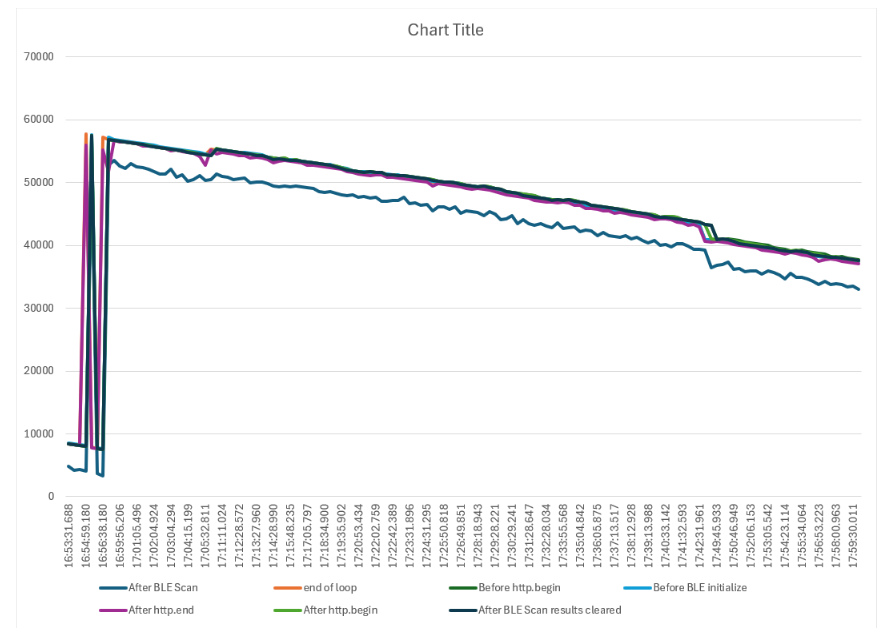
OK, I am trying to analyze more what the memory is doing and I can't get my head around it... that's why I made that chart.
At first the heap, before I start with http.begin, is decreasing with every loop slightly, once it comes below around 7800-8000, http stops working.
It can recover a few times in the next loops, but eventually the memory is too low and http stops working completely.
This is where free heap suddenly rises back to 58k or something, but http does not come back and heap gets smaller every loop. Where does the memory go?

here the code ofc:

#include <BLEDevice.h>
#include <BLEUtils.h>
#include <BLEScan.h>
#include <BLEAdvertisedDevice.h>
#include <BLEAddress.h>
#include <HTTPClient.h> 
#include <WiFi.h>
#include "secrets.h"

BLEScan *pBLEScan;
String HEX_inside_sensor = "";
String HEX_outside_sensor = "";
int BLEscanTime = 20;  //In seconds

HTTPClient http; 

String googleURL_with_parameters = "";
String response = "";

class MyAdvertisedDeviceCallbacks : public BLEAdvertisedDeviceCallbacks {
  void onResult(BLEAdvertisedDevice advertisedDevice) {
  String macAddress = advertisedDevice.getAddress().toString().c_str();
  macAddress.toUpperCase();
  macAddress.trim();
  //Serial.println(macAddress);
    if (MAC_inside_sensor == macAddress){
        HEX_inside_sensor = String(BLEUtils::buildHexData(nullptr, (uint8_t*)advertisedDevice.getManufacturerData().c_str(), advertisedDevice.getManufacturerData().length()));
        HEX_inside_sensor.toUpperCase();
        HEX_inside_sensor.trim();
        //Serial.print("found inside sensor: ");
        //Serial.println(HEX_inside_sensor);
    }
    if (MAC_outside_sensor == macAddress){
        HEX_outside_sensor = String(BLEUtils::buildHexData(nullptr, (uint8_t*)advertisedDevice.getManufacturerData().c_str(), advertisedDevice.getManufacturerData().length()));
        HEX_outside_sensor.toUpperCase();
        HEX_outside_sensor.trim();
        //Serial.print("found outside sensor: ");
        //Serial.println(HEX_outside_sensor);
    }
    if (HEX_inside_sensor != "" && HEX_outside_sensor != ""){
      //Serial.println("found both Ruuvis");
      pBLEScan->stop();
    }
  }
};

void connectToWiFi() {
    WiFi.disconnect();
    delay(1000);
    WiFi.begin(ssid, password);
    while (WiFi.status() != WL_CONNECTED) {
      delay(1000);
      //Serial.println("Connecting to WiFi...");
    }
    // if (WiFi.status() == WL_CONNECTED) {
    //   //Serial.println("Connected to WiFi");
    // } else {
    //   //Serial.println("Failed to connect to WiFi");
    // }
}

void initializeBLE(){
  BLEDevice::init("");
  pBLEScan = BLEDevice::getScan();  //create new scan
  pBLEScan->setAdvertisedDeviceCallbacks(new MyAdvertisedDeviceCallbacks());
  pBLEScan->setActiveScan(true);  //active scan uses more power, but get results faster
  pBLEScan->setInterval(100);
  pBLEScan->setWindow(99);  // less or equal setInterval value
  // Serial.println("BLE initialized");
}

void setup() {
  Serial.begin(115200);
  Serial.println("SETUP Initial heap memory: " + String(esp_get_free_heap_size()) + " bytes");
  //reserve memory for variable size Strings
  response.reserve(4);
  HEX_inside_sensor.reserve(64);
  HEX_outside_sensor.reserve(64);
  googleURL_with_parameters.reserve(256);

  //initialize BLE and WiFi connections
  Serial.println("SETUP after string reserve/before BLE heap memory: " + String(esp_get_free_heap_size()) + " bytes");
  initializeBLE();
  delay(4000); //before setting up WiFi
  Serial.println("SETUP after BLE/before WiFi heap memory: " + String(esp_get_free_heap_size()) + " bytes");
  connectToWiFi();
  http.setTimeout(20000); // Set timeout to 20 seconds
  Serial.println("SETUP Done heap memory: " + String(esp_get_free_heap_size()) + " bytes");
}

void loop() {
  Serial.println("LOOP Before BLE initialize: heap memory: " + String(esp_get_free_heap_size()) + " bytes");
  BLEScanResults *foundDevices = pBLEScan->start(BLEscanTime, false);
  //Serial.println("Scan done!");
  Serial.println("LOOP After BLE Scan: heap memory: " + String(esp_get_free_heap_size()) + " bytes");
  pBLEScan->clearResults();  // delete results fromBLEScan buffer to release memory
  Serial.println("LOOP After BLE Scan results cleared: heap memory: " + String(esp_get_free_heap_size()) + " bytes");
  delay(5000);
    
  googleURL_with_parameters = googleURL + "&HEXin=" + HEX_inside_sensor + "&HEXout=" + HEX_outside_sensor;
    //Serial.println("URL: " + googleURL_with_parameters);
    if (WiFi.status() == WL_CONNECTED) {
      Serial.println("LOOP Before http.begin: heap memory: " + String(esp_get_free_heap_size()) + " bytes");
      http.begin(googleURL_with_parameters);
      Serial.println("LOOP After http.begin: heap memory: " + String(esp_get_free_heap_size()) + " bytes");
      int httpResponseCode = http.GET();
      if (httpResponseCode > 0) {
        response = http.getString();
        Serial.println(httpResponseCode);
        //Serial.println(response);
      } else {
        //Serial.print("Error on HTTP request: ");
        //Serial.println(httpResponseCode);
      }
      http.end();
      Serial.println("LOOP After http.end: heap memory: " + String(esp_get_free_heap_size()) + " bytes");
    } else {
      //Serial.println("Error in WiFi connection. Re-initializing WiFi...");
      connectToWiFi();
    }
  HEX_inside_sensor = "";
  HEX_outside_sensor= "";
  delay(5000);
  Serial.println("LOOP end of loop: heap memory: " + String(esp_get_free_heap_size()) + " bytes");
}