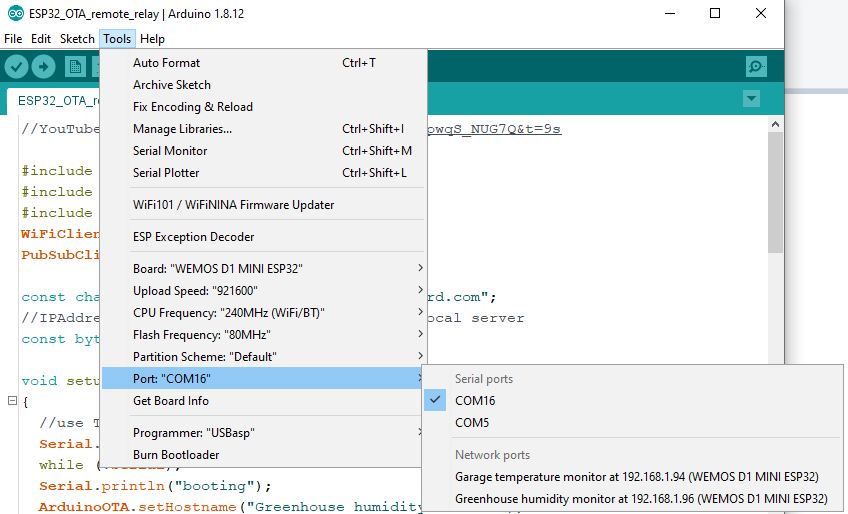
I'm starting to collect a small family of ESP32 boards monitoring different sensors. Each sensor has its own ESP32 and I'm successfully able to Update a Sketch Over The Air (OTA).
Management of these should be easier than keeping a paper chart. Where in the Arduino Environment does the "Host Name" (?) get set to "Esp32 Dev Module"? I would like to assign each device a unique name so I don't inadvertently FLASH the wrong one.
const char* hname = "ESP32RMETZ1";

void setup () {
  WiFi.disconnect(); // just in case
  WiFi.setHostname(hname); // call before begin
  WiFi.mode(WIFI_STA);
  WiFi.begin(ssid, password);
...
You might have the old name in the cache of the router so do clean the dhcp cache or renew lease or reboot the router if you don’t see it. It’s important to set the hostname before calling begin
None of that has anything to do with the name that appears in the PORTS menu though. Yes, I can get my router to report the name with the IP address. That wasn't the question.
The Arduino IDE Menu echoes the Board Type from Boards Manager's choices. Why does it stick that in next to the IP address and how to change it? Sorry if I was unclear.
Here is my entire Setup();
// Initialize I/O Matrix, Serial Class
void setup() {
  pinMode(ENABLE, OUTPUT);                 // ENA/PWM to Motor
  digitalWrite(ENABLE,_ON);                 // do FIRST so motor doesn't spike
  Serial.begin(115200);
  Serial.println("Booting");
  ScanI2C();
  display.begin(SSD1306_SWITCHCAPVCC, 0x3C);  // Address 0x3C for 128x64
  PCF8574.begin();                            // start the IO expander object
  PCF8574.pinMode(CAT_PRESENT, INPUT);        // IR Cat Present Sensor
  PCF8574.pinMode(AT_HOME, INPUT);            // Returned prox
  PCF8574.pinMode(FWD, OUTPUT);               // Motor EXTEND
  PCF8574.pinMode(REV, OUTPUT);               // Motor RETURN
  pinMode(PCFIO_INT, INPUT_PULLUP);           // IO chip IRQ pin
  pinMode(CPU_HOME, INPUT_PULLUP);            //
  WiFi.disconnect();
  delay(2000);
  WiFi.setHostname(hname); // call before begin
  WiFi.mode(WIFI_STA);
  WiFi.begin(ssid, password);                         //connect to WiFi
  Serial.print("Connecting to WiFi Network: ");
  Serial.println(ssid);
  while (WiFi.status() != WL_CONNECTED) {
      delay(1000);
      Serial.print("**");
  }
  Serial.println(" ");
  Serial.print("CONNECTED to ");
  Serial.print(ssid);
  Serial.print(" using Local IP address: ");
  Serial.println(WiFi.localIP());
  TelnetStream.begin();
  TelnetStream.print  ("Booting ** Version ");
  TelnetStream.println(ver);
  TelnetStream.println(WiFi.localIP());
  beginOTA();
  Serial.println("Done with Setup");
  digitalWrite(ENABLE,_OFF);
  digitalWrite(FWD,_OFF);                  // 00 = BRAKE
  digitalWrite(REV,_OFF);
  PState = PWRUP;
  display.clearDisplay();
  display.setTextSize(2); // Draw 2X-scale text
  display.setTextColor(SSD1306_WHITE);
  display.display();      // Show initial text
}//------------------------------------------------------------------------
But it does this only if you did not initialize the String yourself (testing if it’s length is non nul) as this is in begin you need to call the ArduinoOTAClass’ setHostname method before calling begin.
Thanks, I did see that but I had things out of order when I tried it. Obvious to me now, you have to set the Host Name before you begin OTA.
Now that I understand it, I'll try to set the Host Name based on Mac Address. That way, I won't have to maintain a different copy of the program if the boards are the same.