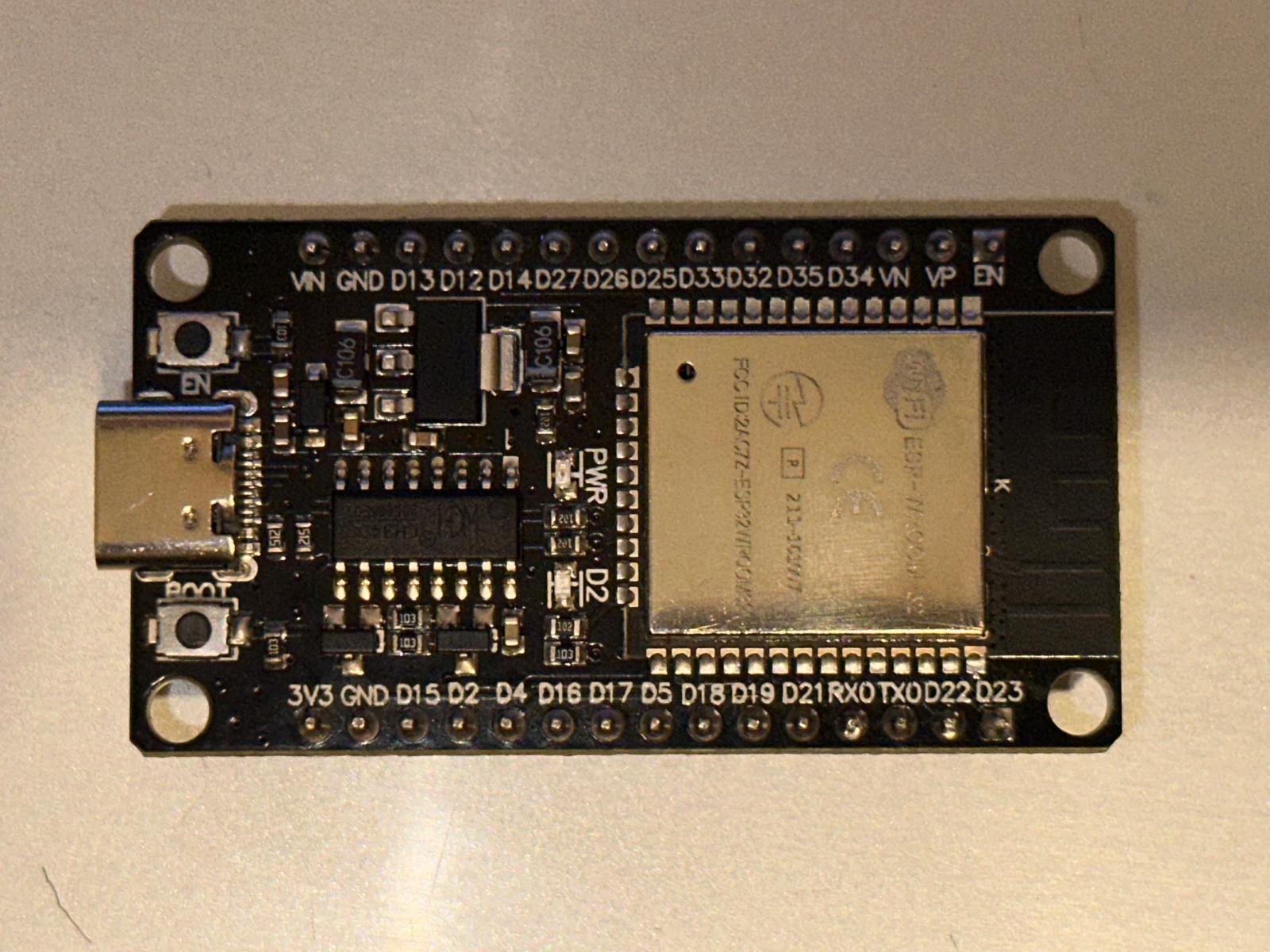
Arducam Mega stuck at calling myCAM.begin()

Hi, beginner here...
I've been trying to make an Arducam Mega 5MP work with an ESP-Wroom32 board for the past 5 hours now, and I just can't figure out what seems to be the problem with the code/hardware. I'm trying to save pictures to an SD card every 5 seconds, but even a simplified code that checks if the camera has initialized succesfully fails to run, as it always stops at a myCAM.begin() method

Wiring:
Arducam Pins --- ESP Pins

VCC --- VIN

GND --- GND

SCK --- GPIO 18

MISO --- GPIO 19

MOSI --- GPIO 23

CS --- GPIO 15

#include <SPI.h>
    #include <Arducam_Mega.h>
    
    #define CS_PIN 15
    #define SCK_PIN 18
    #define MOSI_PIN 23
    #define MISO_PIN 19
    
    Arducam_Mega myCAM(CS_PIN);
    
    void setup() {
        Serial.begin(115200);
        delay(1000);
        Serial.println("Starting minimal test...");
    
        SPI.begin(SCK_PIN, MISO_PIN, MOSI_PIN, CS_PIN);
        SPI.setFrequency(4000000);
        Serial.println("SPI initialized.");
    
        Serial.println("Calling myCAM.begin()...");
        if (myCAM.begin() != CAM_ERR_SUCCESS) {
            Serial.println("Camera initialization failed!");
            while (1);
        }
        Serial.println("Camera initialized successfully!");
    }
    
    void loop() {
        
    }

This is what the output on the serial monitor always looks like, it doesn't go further:

Starting minimal test...
    SPI initialized.
    Calling myCAM.begin()...

Here's what the begin() method looks like in the Arducam_Mega.h file:

CamStatus begin(void);
    
    //**********************************************
    //!
    //! @brief Start a snapshot with specified resolution and pixel format
    //!
    //! @param mode Resolution of the camera module
    //! @param pixel_format Output image pixel format,which supports JPEG, RGB,
    //! YUV
    //!
    //! @return Return operation status
    //!
    //! @note The mode parameter must be the resolution which the current camera
    //! supported
    //**********************************************

Respectively, the Arducam_Mega.cpp file:

CamStatus Arducam_Mega::begin(void)
    {
        return ::begin(&cameraInfo);
    }

Any tips, anything I should try out? Thank you!

Well if you connect VCC to VIN (Voltage IN) of course nothing's gonna happen. Take your time to read the datasheets and especially what voltage the ESP works with and wire it up accordingly.

I'm powering the ESP through a USB cable. From what I've read, I can provide 5V through the VIN pin for other components ("If you're powering the board via USB, VIN will be 5V"). There are no other pins outside VN, VP, EN, GND and GPIO on the board, so I don't see how else I could power the camera using the ESP.

I have also powered an SD card reader with the VIN pin before and it worked without any issues

That's ret****d. Not you, but to label the pins that way.

Anyway, if you would change to another power pin, which one would you pick?

Well the only two power pins on the ESP-Wroom32 are VIN and 3V3. As far as I know, 3V3 only outputs 3.3V, but the camera needs 5V to operate, so my only option is VIN. Would there be another?

https://lastminuteengineers.com/esp32-pinout-reference/

This is what I was getting at, about reading the datasheets.

Usually when something runs at a certain voltage, that's the voltage you wanna interface it with too.

The ESP is 3.3 V, the camera if I got it right is 3.3 - 5 V.

You got a link to the cameras datasheet?

My board say 5V. There are many different versions of an ESP32 development board and many say Wroom32.

Can you show a picture of the one you have

My board

That is a strapping pin, DO NOT USE.
Try 13 or 12

1 Like

It's one of the DOITs. So Vin can also be an output
Did you see my comment about pin 15

Does it have a USB-C connector?

Yes, I just wired CS to 13 and it still does the same thing. The user above suggested trying it on 3.3V because the ESP also uses 3.3V logic, and the camera's documentation says the camera can operate on either 3.3V or 5V. So I also switched the power input to 3.3V, but it still seems to be stuck at myCAM.begin()

It also has a USB-C connector, yes.

You're right, it can operate on 3.3V too, my bad. The problem still stands though...

I forgot to change CS_PIN to 13 in the code. It works now, by changing the power source from 5V to 3.3V, and by changing the CS to pin 13 from 15.

Thank you!

Great!

And.. even if the ESP can take 5 V on the gpio pins, I'd run everything on 3.3 V just for good measures.

Happy making!

It was the CS pin that was the problem

Reopening this because I've found another issue relating to this...

I've been trying to write a program that takes pictures every 5 seconds and saves them onto an SD card. When running the program, the camera seems to be stuck at the exact same point: running the myCamera.begin() method.

Wiring looks like this:
Arducam Pins --- ESP-WROOM32 pins
VCC --- 3V3
GND --- GND
SCK --- GPIO18
MISO --- GPIO19
MOSI --- GPIO 23
CS --- 13

SD reader pins --- ESP-WROOM32 pins
VCC --- 5V
GND --- GND
SCK --- GPIO18
MISO --- GPIO19
MOSI --- GPIO 23
CS --- 12

#include <Arducam_Mega.h>
#include <SD.h>
#include <SPI.h>

// Camera setup
#define CAM_CS_PIN 13
Arducam_Mega myCamera(CAM_CS_PIN);
CAM_IMAGE_MODE imageMode = CAM_IMAGE_MODE_QVGA;
CAM_IMAGE_PIX_FMT imageFormat = CAM_IMAGE_PIX_FMT_JPG;

// SD card setup
#define SD_CS_PIN 5 // SD Card Chip Select (CS) pin

// Timer setup
unsigned long lastCaptureTime = 0;
const unsigned long captureInterval = 5000; // 5 seconds

SPIClass spi(VSPI);

void testSPI() {
  spi.beginTransaction(SPISettings(8000000, MSBFIRST, SPI_MODE0));
  
  
  digitalWrite(CAM_CS_PIN, LOW);
  uint8_t response = spi.transfer(0x00); // sending dummy byte for camera
  digitalWrite(CAM_CS_PIN, HIGH);
  Serial.print("Cam test response: 0x");
  Serial.println(response, HEX);
  
  digitalWrite(SD_CS_PIN, LOW);
  response = spi.transfer(0xFF);  // sending dummy byte for SD card
  digitalWrite(SD_CS_PIN, HIGH);
  
  // Print response for SD card
  Serial.print("SD card test response: 0x");
  Serial.println(response, HEX);
}

void setup() {
  Serial.begin(115200);
  while (!Serial) delay(10);

  Serial.println("Initializing SPI...");
  spi.begin(18, 19, 23, SD_CS_PIN); // SCK, MISO, MOSI, CS for SD card
  Serial.println("SPI initialized");

  testSPI();

  Serial.println("Initializing camera...");
  if (myCamera.begin() != CAM_ERR_SUCCESS) {
    Serial.println("Camera initialization failed.");
    while (1);
  }
  Serial.println("Camera initialized successfully.");

  
  if (!SD.begin(SD_CS_PIN, spi)) {
    Serial.println("SD card initialization failed.");
    while (1);
  }
  Serial.println("SD card initialized successfully.");
}

void loop() {
  unsigned long currentTime = millis();

  if (currentTime - lastCaptureTime >= captureInterval) {
    lastCaptureTime = currentTime;
    captureAndSaveImage();
  }
}

void captureAndSaveImage() {
  Serial.println("Capturing image...");

  if (myCamera.takePicture(imageMode, imageFormat) != CAM_ERR_SUCCESS) {
    Serial.println("Failed to capture image.");
    return;
  }

  uint32_t imageSize = myCamera.getTotalLength();
  if (imageSize == 0) {
    Serial.println("Captured image has no data.");
    return;
  }

  char filename[15];
  static int fileIndex = 0;
  snprintf(filename, sizeof(filename), "/IMG_%04d.jpg", fileIndex++);
  Serial.print("Saving image to ");
  Serial.println(filename);

  File file = SD.open(filename, FILE_WRITE);
  if (!file) {
    Serial.println("Failed to create file.");
    return;
  }

  uint8_t buffer[255]; // Maximum length for readBuff is 255
  while (imageSize > 0) {
    uint8_t readLength = (imageSize > sizeof(buffer)) ? sizeof(buffer) : imageSize;
    myCamera.readBuff(buffer, readLength); // read data into buffer
    file.write(buffer, readLength);       // write buffer to SD card
    imageSize -= readLength;              // reduce remaining size
  }
  file.close();
  Serial.println("Image saved successfully.");
}

The serial monitor after running this looks like this:

Initializing SPI...
SPI initialized
Cam test response: 0x0
SD card test response: 0xFF
Initializing camera...

Running the separate program mentioned in the original post (with CAM_CS_PIN changed to 13), i have noticed when trying to connect individual pins of the SD card reader that the camera can't initialize when the SD reader's MISO is connected to the ESP's GPIO 19.

I tried using different SPI buses for the 2 components, however it still wouldn't work. I might have done something wrong though...

SD card module?

The library doesn't take care of addressing the Cam? (CS pin)

Yeah, a micro sd card reader module

I don't exactly get what you mean by that, but in the segment you've highlighted I just wanted to test if the SPI communication is working properly between the camera and the ESP