Hello
I have a project which in, I have a 4 channel relay and 16x2 lcd.
My problem is when I start my arduino, every thing is working fine but suddenly the lcd shows a weird characters and after 1 or 2 seconds everything clears and I should to restart my arduino to work again.
I've tested it with simple "hello world" program and it lasted for more than 2000 seconds without any problem. But whenever I upload my own project to arduino, the problem starts again.
I think it should because of 4channel relay but I'm not sure.
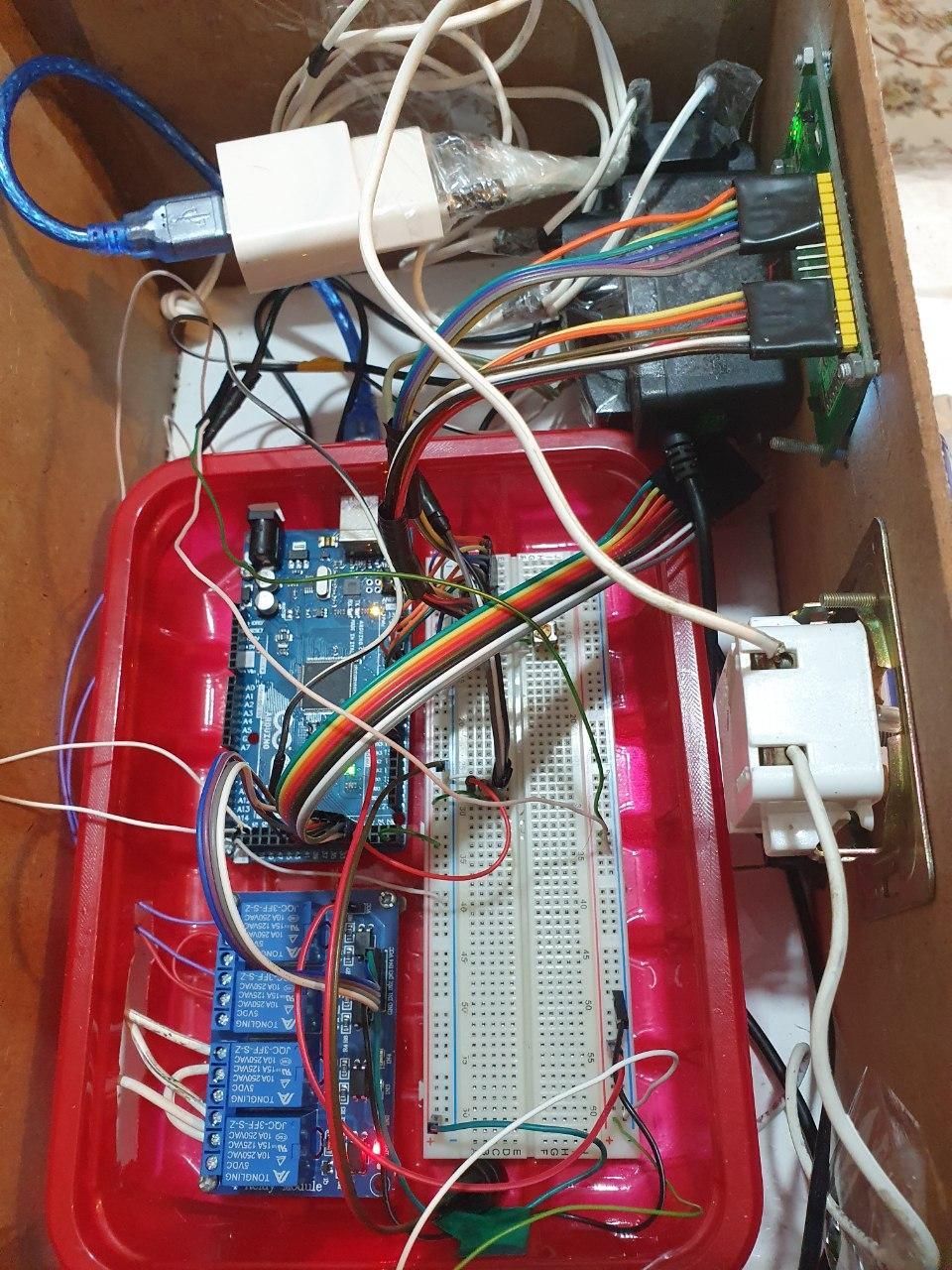
I will also upload my circuit below.
EDIT:
I have removed the connection between two grounds and it lasted for about 15 minutes and then it crashed again.(a little more than before).
I also have a little problem. I want to use my external power supply also for servo motor. If I remove the connection between arduino power and my external power , servo motor which is on external power won't work any more.
There should NOT be a ground connection between Arduino and relay board
if you power the relay board with a separate 5volt supply connected to JD-VCC (jumper removed).
If you do have a shared ground, then you don't have opto isolation.
Supply problems (relay module) poor wiring and switching inductive loads all can cause lock-ups.
What kind of "lamps" are you switching.
Do you also have the problem if the "lamps" are disconnected.
Leo..
Wawa:
There should NOT be a ground connection between Arduino and relay board
if you power the relay board with a separate 5volt supply connected to JD-VCC (jumper removed).
If you do have a shared ground, then you don't have opto isolation.
Supply problems (relay module) poor wiring and switching inductive loads all can cause lock-ups.
What kind of "lamps" are you switching.
Do you also have the problem if the "lamps" are disconnected.
Leo..
Thanks for your reply
I'm using relay to turn on/off two 220V lamp.
I've removed the ground connection between Arduino and relay board and i think its now working.
I'll test it in a hour and if it was ok, I change topic to [solved]
Wawa:
There should NOT be a ground connection between Arduino and relay board
if you power the relay board with a separate 5volt supply connected to JD-VCC (jumper removed).
If you do have a shared ground, then you don't have opto isolation.
Supply problems (relay module) poor wiring and switching inductive loads all can cause lock-ups.
What kind of "lamps" are you switching.
Do you also have the problem if the "lamps" are disconnected.
Leo..
I have removed the connection between two grounds and it lasted for about 15 minutes and then it crashed again.(a little more than before).
I also have a little problem. I want to use my external power supply also for servo motor. If I remove the connection between arduino power and my external power , servo motor which is on external power won't work any more.
The use of String (capital S) can cause memory fragmentation and as a result unpredictable problems at run-time; this is specifically the case when one uses concatenation as you do. You're better of using so-called c-strings (nul-terminated character arrays).
For your code, I doubt it will pose an issue but when more Strings are used and you do lots of concatenations, it will become an issue.
To play it safe, you can get rid of String in setup and in loop by just directly printing; no need for character arrays either.
In setup():
  lcd.setCursor(0, 1);
  for (int i = 0; i < 16; i++) {
    lcd.print("-");
    Serial.println("-");
    delay(125);
  }
sterretje:
The use of String (capital S) can cause memory fragmentation and as a result unpredictable problems at run-time; this is specifically the case when one uses concatenation as you do. You're better of using so-called c-strings (nul-terminated character arrays).
For your code, I doubt it will pose an issue but when more Strings are used and you do lots of concatenations, it will become an issue.
To play it safe, you can get rid of String in setup and in loop by just directly printing; no need for character arrays either.
In setup():
lcd.setCursor(0, 1);
for (int i = 0; i < 16; i++) {
lcd.print("-");
Serial.println("-");
delay(125);
}
Thank you
I will fix them but I don't think it solve my problem.
My lcd crashes only when the relay changes.
When I don't use relay controlling code (I mean only show temperature), lcd is working fine.
Wawa:
You didn't answer the questions from post#1 yet.
Leo..
I'm using two 15W 220V Incandescent lamp. I also use a dimmer to control the light.
When I disconnect lamps from relay, I don't have the problem anymore. (why?)
I also find a trick but I'm not sure about it.
I can use "lcd.begin()" every two second and whenever the lcd crashed, it will fixed next time.
axone:
I'm using two 15W 220V Incandescent lamp. I also use a dimmer to control the light.
When I disconnect lamps from relay, I don't have the problem anymore. (why?)
I also find a trick but I'm not sure about it.
I can use "lcd.begin()" every two second and whenever the lcd crashed, it will fixed next time.
Wawa:
You didn't answer the questions from post#1 yet.
Leo..
Time to remove the dimmer, and try with just the light bulb.
Dimmers can produce lots of interference, and should have extra parts (snubbers/inductors) to kill that.
Cheap dimmers might not have those extra parts.
Leo..
Wawa:
Time to remove the dimmer, and try with just the light bulb.
Dimmers can produce lots of interference, and should have extra parts (snubbers/inductors) to kill that.
Cheap dimmers might not have those extra parts.
Leo..
I've removed the dimmer and the problem still exist.
It's driving me crazy...
axone:
When I disconnect lamps from relay, I don't have the problem anymore.
axone:
I've removed the dimmer and the problem still exist.
15watt is low for an incandescent bulb. Are you sure they are incandescent.
Not CFL or LED, which might need a snubber circuit across the relay contacts.
Did you separate mains wiring from Arduino wiring.
How is the Arduino powered.
Could you upload a picture of the setup.
axone:
It's driving me crazy...
Sorry, can't help with that. Maybe ask your psychiatrist.
Leo..
Wawa:
15watt is low for an incandescent bulb. Are you sure they are incandescent.
Not CFL or LED, which might need a snubber circuit across the relay contacts.
Did you separate mains wiring from Arduino wiring.
How is the Arduino powered.
Could you upload a picture of the setup.
Sorry, can't help with that. Maybe ask your psychiatrist.
Leo..
Yes I'm sure both lamps are incandescent 220V 15W. They are small.
What do you mean by separating wires?
Arduino is powered with my 1000mA 5V usb charger from my cellphone.
and yes I will attach a picture of the setup bellow.