Hi y'all,
let me get right into the topic.
Right now i try to use the Arduino Genuino Micro to work with LabVIEW.
Things work perfectly when i use a terminal or console.
The Programm works like this. If i send a 'f' char i get 'ok' as an answer. If i send a '?' i get the output 'A100'.
char receivedChar;
boolean newData = false;


void setup() {
  Serial.begin(9600);
  Serial.println("Arduino is ready!");

}

void loop() {
  recvOneChar();
  if(receivedChar == 'f' && newData == true)
  {
    Serial.println("ok");
  }
  if(receivedChar == '?' && newData == true)
  {
    Serial.println("A100");
  }
}

void recvOneChar()
{
  if (Serial.available() > 0)
  {
    receivedChar = Serial.read();
    newData = true;
  }
  else{
  newData = false;
  }
}
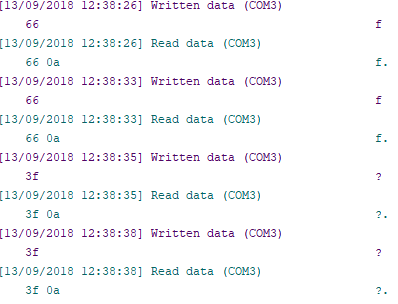
Now to the strange thing, when i work with a terminal program like "Serial Input Monitor" or "H-Term" the device responses as it should. You can see it in the picture with the text "Terminal".
Now it gets iexciting, when i send the same strings with LabVIEW, i get different responses. It look like lag.
The first message is always correct. When i try an other character it responses with the wrong responses. See the picture with the text "LabVIEW". The problem is, this only happens in LabVIEW and nowhere else.
Any ideas?