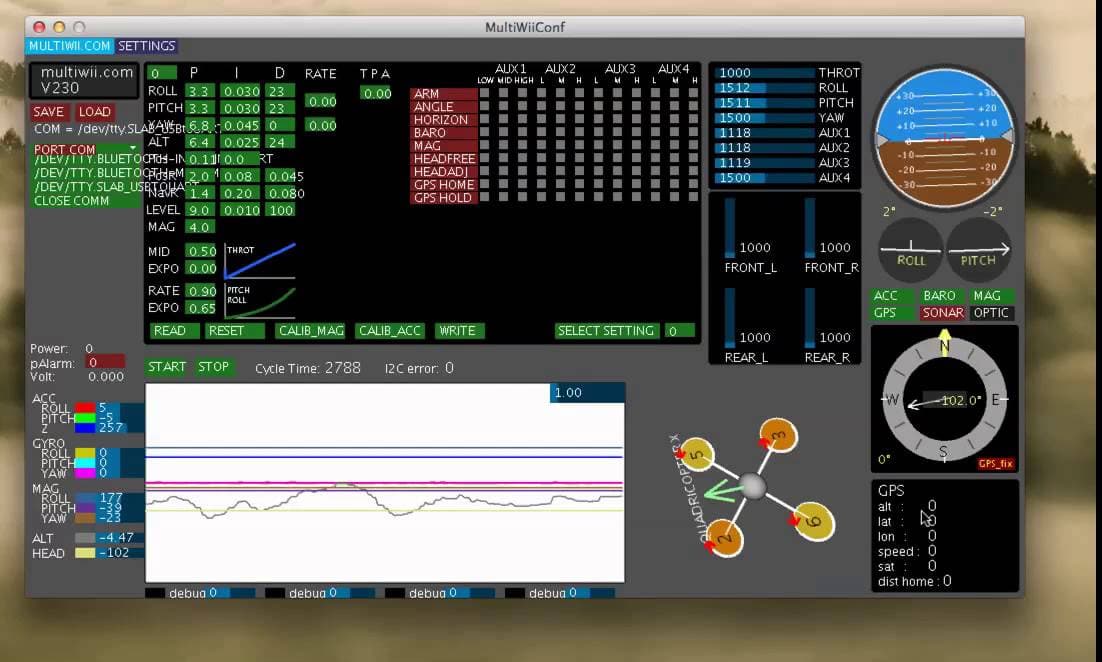
I am making an arduino uno based flight controller. We have successfully calibrated acc, mag and esc but when we are about to arm the drone, the drone does not arm. IF anyone would contact me to assist in my project( its my first arduino project) i would be forever in your debt.
I am using multiwii software for the arduino code while programming for a quad copter X.
I also have some queries for the multiwii gui. I searched for the documentation but cannot get some of the data. For example, in the left side of the interface, there are two small graphs for blue color for throtle and green for pitch. I am also using a fly sky receiver(fs-IA6B) and transmitter. They are successfully connected and i can see the the inputs on the right side of my gui interface(the 5 blue level bars). But in the two small graphs only the blue one changes but the green one for pitch remains still(is it supposed to be still).
Also i connected esc signal pin for M1 to D13, M2 to D3, M3 to D10, and M4 to D9. Before arming, i put the drone on a flat surface, made sure i tweak the value of throttle to 2000 and tried the arming process of pull down throttle and swiping to right, the motors didnt spin. Any help would be appreciated
You are using some the #define statements incorrectly as they should be followed by a value to be replace when the first parameter is found.
So the following are bad examples of the use of a define statement.
About min throttle, I am using simonk esc and in the comment section it says
//#define MINTHROTTLE 1064 //for special esc like simonk
Something like this line. Should I use this value or the one in the above code i.e.1150
I will try again putting the values after define.
In multiwii 2.4 config, I cannot find this line #define MPU6050_LPF_42HZ.
I am using MPU6050 HC I TG/MPU
For instance, in the config file you choose the type of multicopter, minimum throttle for motors, i2c speed, internal pullup resistors (if needed), controller board with at least gyroscope, remove the // in front of the #define and you have the simplest configuration to fly in Acro mode. No need do change any other line: