"I am Slightly confused, would it be possible to use these for a wireless streaming of data to a laptop out on the field? "
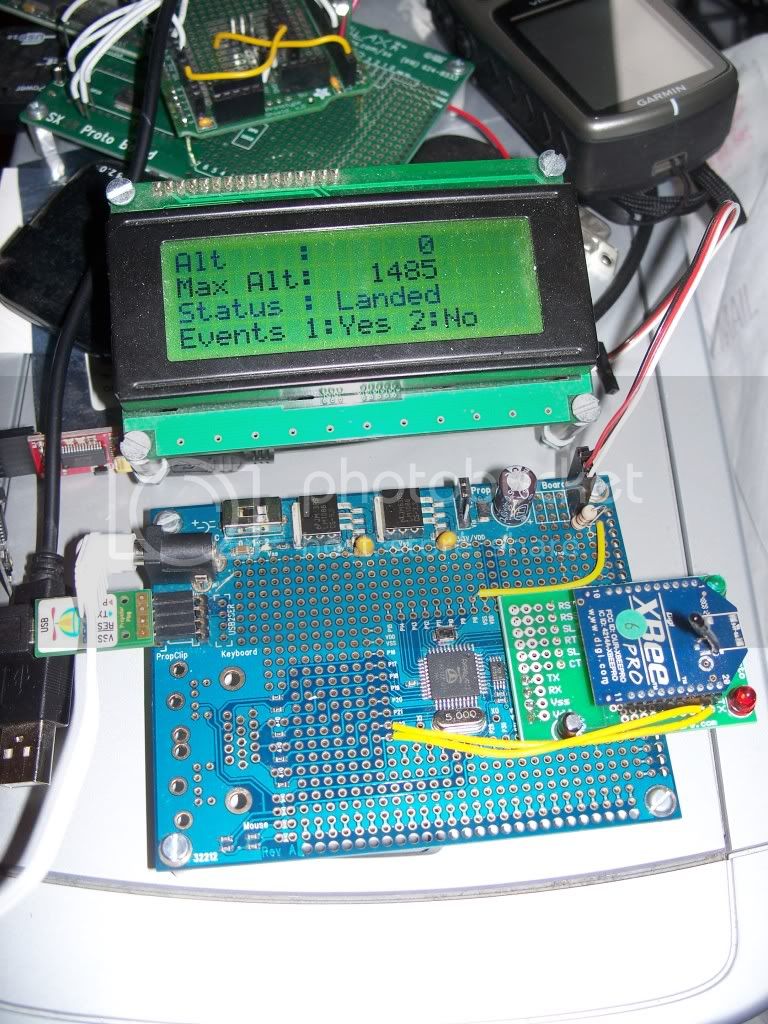
Yes. I'll be flying something similar a little later today, weather permitting. I've flown a homemade XBee-based telemetry system successfully 7 times, sending altitude data taken from a Perfectflite MAWD altimeter, sent directly to an XBee (no intervening microprocessor), and to a receiving station on the ground.
The GPS half of your project could do the same thing. An XBee will automatically transmit whatever serial data are sent to its DIN pin. GPS units typically send out NMEA strings as serial data, at 4800 baud (8N1), so if you change the interface rate of your XBee to 4800 and make sure you're using the appropriate data level, you can transmit GPS data without even needing the Arduino. I've built and ground-tested a board that does exactly that. If I haven't forgotten any parts, it'll fly later today (in a 4" diameter rocket on some kind of I motor).
If you were to use a GPS that had 3.3V output, all you'd need for this would be power to the XBee and GPS, and a single wire from the GPS output to the XBee DIN pin, and you're set. If the GPS is 5V you'll need level-shifting, and dual power supplies (as you see in the project that you linked to).
The ADXL 345 will be a bit more complicated, as will putting both sensors through the same XBee at once. It would be possible to connect the ADXL's analog output to one of the XBee I/O pins, set it all up for analog line-passing, and set up a system for reading the analog voltages on the ground side, to again avoid having to fly the Arduino. I'm not certain that you could do that and also have the GPS data sent out from the same XBee, though.
The alternative is to have the Arduino read the data from both the GPS and the ADXL 345, and then send them out in a certain format through its serial port to a level shifter to the XBee DIN pin (again, unless you're using a 3.3V Arduino, in which case you just need a single wire to the XBee).
On the receiving end, if all you want is a file with the data, connect an XBee through a USB board to your laptop, send the data to a terminal program, and turn on the "capture" function before you fly. Alternatively, you could set up PLX_DAQ software and send the data directly to an Excel file, for on-the-fly graphings of the acceleration. I did that with the altitude data. It's pretty cool, though it requires a few extra steps.
I'm using regular 2.4 GHz XBee Pro modules, rather than the higher-range 900 MHz ones. I've flown to about 3200 feet with my system, without any loss of data at all, even right up to landing. Of course the 900 MHz modules will give you more range (at greater expense), and otherwise should set up exactly as the 2.4 GHz ones do.
The versions I've flown so far were just wires plugged into the appropriate places. Today's devices are mounted on pc boards that I designed myself, and had BatchPCB produce. I didn't use SMT parts, but there'd be obvious advantages to doing so (smaller size, more resistance to shocks from the ejection charges). If I get ambitious and find the time, I'll make SMT versions.
I just took a look at the GPS you're using. It's a bit unusual, in that it uses 9600 Baud, so you shouldn't need to change the comm speed of the XBee (which defaults to 9600). It also has some extra capabilities that you might be able to use, but that I can't help you with. Here's a page that looks very helpful, though: