Arduino BT module error 507

Hi,

I'm newbie in Arduino and want to learn using BT module with Arduino. I'm using Nano, I connected the BT module through voltage divider to Nano and want to make the LED turn on and off, when sending '0' or '1' according to this tutorial: Arduino and HC-05 Bluetooth Module Tutorial | Android Smartphone & Laptop Control - YouTube

My code:

int ledpin= 7;
int data = 0;

void setup() {
  pinMode(ledpin, OUTPUT);
  digitalWrite(ledpin, HIGH);
  Serial.begin(38400);
  Serial.print("Zaciatok programu");
}

void loop() 
{
  delay(500);
  Serial.print("data before serial available=  ");
    Serial.println(data);
    
  if (Serial.available() > 0)
  {
    data = Serial.read();
    
    Serial.print("data after serial read=  ");
    Serial.println(data);
  }
    if (data == '0')
    {
      digitalWrite(ledpin, LOW);
      
      Serial.print("data if O=  ");
      Serial.println(data);
      Serial.println("LED OFF");
      data = 0;
      
    }
    else if  (data == '1')
    {
   digitalWrite(ledpin, HIGH);

    Serial.print("data if I=  ");
   Serial.println(data);
    Serial.println("LED OFF");
   data = 0;
    }
}

Those serialprints are just for debugging.

I'm struggling for a really long time now with this and am frustrated, since it should have been super easy. I spent many and many hours and days trying to figure this out, it probably means it's off my capabilities and I won't be able to deal with arduino stuff, but I don't want to give up.

Problem nr. 1: error 507

I am able to pair the BT module with android phone, but can't connect it to any app designed for serial communication but one: Serial Bluetooth Terminal All other apps give me error 507 unable to connect is the device turned on?

Problem nr 2.: weird values in serial monitor

As I was able to connect to that only one app (led on BT module was on constantly, not blinking) I was glad and tried to send 0 and 1 through the app from my phone.
However the LED on pin 7 did nothing, it stayed on, but I was getting weird values of 'data'. See screenshot.
I tried different baud rates as well.
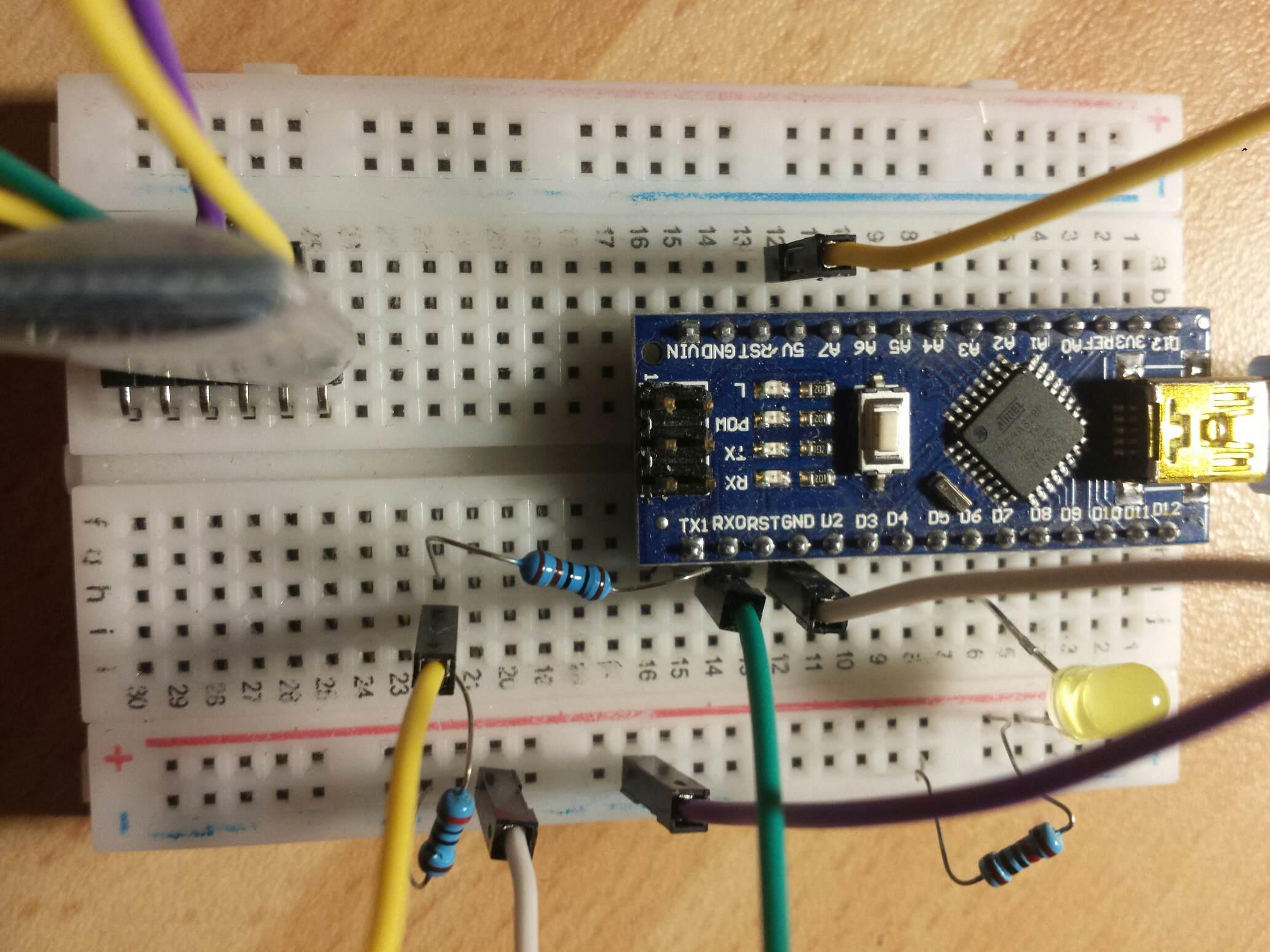
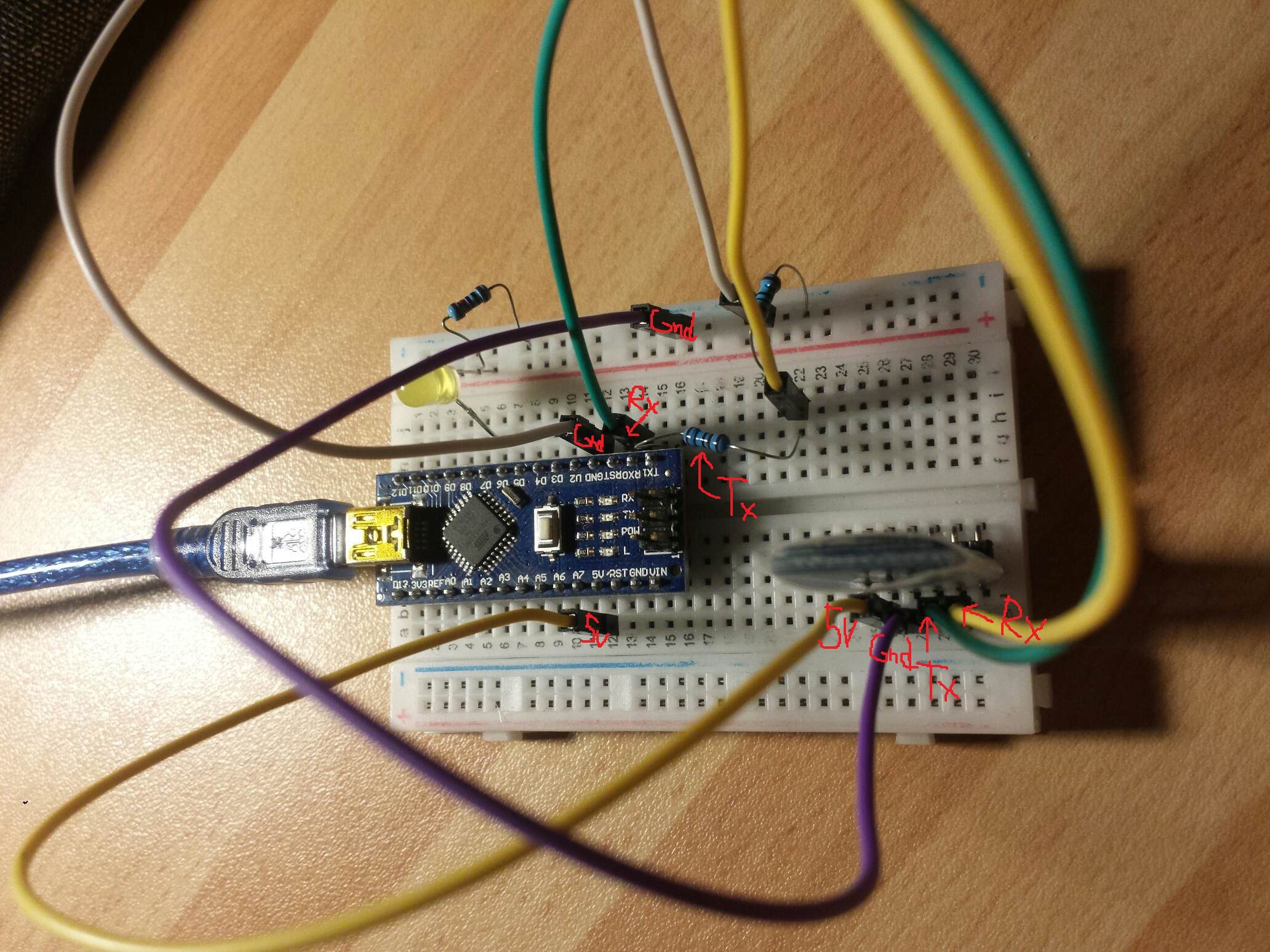
I am uploading also the wiring, but I am almost sure I have it right, was checking it million times already, but who knows it might be wrong. Not sure if it will be visible fine on photo so added some notes in the photo.

Please help me to solve this, I feel I tried everything, I tried also AT commands, but no response in Serial monitor.

Thank you for all the advices and help, I appreciate your time.

lampasik:
I'm using Nano, I connected the BT module through voltage divider to Nano

You should not use a voltage divider to supply an active circuit. Active circuits can and will change the current consumed continuously in a "random" way. This will break the voltage divider ratio and therefore the voltage will fluctuate, creating all kinds of issues. Especially digital radios will create "large" current spikes because they send data for short amounts of time.

It would be useful if you can specify what Bluetooth module you use and if you could add a link to the datasheet. This will allow us to look things up instead of searching for a datasheet that you already have.

It seems your module is a serial cable replacement. If you really would like to learn about BLE it will be much better to get a true BLE product like the Arduino Nano 33 BLE or Arduino Nano 33 IoT. The ArduinoBLE library will allow you to use the GATT which is the way BLE has been designed to be used. If I am not mistaken, this is hidden from you by the module you are using.

It is normal, and good, practice to use a voltage divider as you have done. If there were any problems with that, everybody would know about it. I assume the values are 1k/2k.

The Bluetooth device appears to be an HC-06, but I can only tell that because of my long years of experience, and it appears to be wired the right way round.

If its LED is flashing, it is turned on, and waiting to be connected. No comment on "error 507".

There is only one baud rate you can use, and that is the rate at which Bluetooth has been set. You can assume it is 9600 because I bet you have not changed it. There should be no need for any AT commands.

You are using hardware serial for Bluetooth. That is quite OK, and I guess you already know that it must be disconnected when you upload a programme. Using hardware serial means that you can test things with the serial monitor. Check that monitor and Bluetooth are same rate 9600. Do all this with Bluetooth disconnected. Get rid of all the statements that you will not be using with the phone.
Once you have proven it, disconnect monitor and connect Bluetooth, i.e. you simply swap one serial device for the other, no change to code.

Nick_Pyner:
It is normal, and good, practice to use a voltage divider as you have done. If there were any problems with that, everybody would know about it. I assume the values are 1k/2k.

Just to clarify, it is OK to divide a voltage by a voltage divider for a signal into an input pin. But it is not OK in the supply of an active circuit. It was not clear from the photos where it was used.

Nick_Pyner:
You are using hardware serial for Bluetooth. ... Using hardware serial means that you can test things with the serial monitor.

That's a good tip and confirms the module is an easy replacement for a serial cable but hides the Bluetooth capabilities.

1. HC06 type BT comes with 4-pin; HC05 type BT comes with 6-pin. Your picture shows a 6-pin BT; so, I assume that you are using HC05 type BT.

2. The RX-pin of HC05-BT is not 5V tolerant; so, using a voltage divider to get down the bias level at about 3.4V at the RX-pin is a sound judgement.

3. Because the hardware UART Port of NANO is permanently engaged with Serial Monitor/IDE/PC for sketch debugging/downloading, it is recommended to use a software UART Port (SURT) to communicate with BT.

4. Rebuild your connection diagram between NANO and BT as per following diagram (Fig-1):
hc5-1nano.png
Figure-1:

5. Turn on BT Terminal of your phone and pair it with BT of NANO. When paired, the red LED of BT will blink once a while; else, it will be continuously blinking. Select the command settings of BT terminal at ASCII Mode.

6. Upload the following sketch in NANO.

#include <SoftwareSerial.h>
SoftwareSerial SUART(2, 3); // SRX = D2, STX=D3
int ledpin = 13;  //I am using built-in L of NANO
int data = 0;

void setup()
{
  pinMode(ledpin, OUTPUT);
  digitalWrite(ledpin, LOW);  //L is OFF
  Serial.begin(9600);
  SUART.begin(9600);
  Serial.print("Zaciatok programu");
}

void loop()
{
  byte n = SUART.available();
  if (n != 0)
  {
    char x = SUART.read();
    if (x == '1')
    {
      digitalWrite(ledpin, HIGH);  //L is ON
      SUART.println("L is ON.");
    }
    if (x == '0')
    {
      digitalWrite(ledpin, LOW);    //L is OFF
      SUART.println("L is OFF.");
    }
  }
}

7. Send 1 from phone; check that L is ON in NANO and this message has appeared on the BT terminal of phone: L is ON.

8. Send 0 from phone; check that L is OFF in NANO and this message has appeared on the BT terminal of phone: L is OFF.

hc5-1nano.png

Klaus_K:
That's a good tip and confirms the module is an easy replacement for a serial cable but hides the Bluetooth capabilities.

There is nothing to hide. Being an easy replacement for a serial cable is the only capability this Bluetooth has.

I identified the module as HC-06 because of the sleeve. I have never known of an HC-05 with a sleeve, but did not realise it had six pins. I think the other guy might be right about it being HC-05, but my comments still apply.

Nick_Pyner:
There is nothing to hide.

I meant this from an educational point of view. If someone would like to learn how Bluetooth LE protocol works, these modules are probably not the right product. I think the new Arduino Nano 33 IoT and BLE are a better choice for learning about BLE.

This is completely irrelevant. There is nothing to suggest the OP wants to learn anything about Bluetooth LE protocols, and quite a lot to suggest he doesn't, not the least being that he is holding an HC-05 in his hand, along with a plain-vanilla Nano - both of which may be entirely suitable for his intended purpose. Further, they may be more suitable than a BLE device.

You are at least partly right though, in that, if one wants to learn about Bluetooth LE protocols, these modules are most definitely not the right product - nothing "probably" about it.

Klaus_K:
You should not use a voltage divider to supply an active circuit. Active circuits can and will change the current consumed continuously in a "random" way. This will break the voltage divider ratio and therefore the voltage will fluctuate, creating all kinds of issues. Especially digital radios will create "large" current spikes because they send data for short amounts of time.

It would be useful if you can specify what Bluetooth module you use and if you could add a link to the datasheet. This will allow us to look things up instead of searching for a datasheet that you already have.

It seems your module is a serial cable replacement. If you really would like to learn about BLE it will be much better to get a true BLE product like the Arduino Nano 33 BLE or Arduino Nano 33 IoT. The ArduinoBLE library will allow you to use the GATT which is the way BLE has been designed to be used. If I am not mistaken, this is hidden from you by the module you are using.

Thanks for answer and I'm sorry for later reply, I had to make a small pause from this project.

Anyways I'm using AT 09 BLE MODULE
The AT-09 is a module that contains a BLE chip (a CC2540/CC2541). This module is also very similar to the HM-10 module and is also compatible with it. I'm adding a data sheet to reply below.
I'm using voltage divider, not for the input voltage, but only to decrease logic voltage from Nano to BT module.

I don't understand what you mean by saying it is serial cable replacement. Can you explain please?

I'm using AT 09 BLE MODULE
The AT-09 is a module that contains a BLE chip (a CC2540/CC2541). This module is also very similar to the HM-10 module and is also compatible with it. I'm adding a data sheet.

I still didn't figure this out, but I guess I need to learn more in depth about Bluetooth protocols so I will try to google some info. I admit, I don't really understand what you mean when you say this BT module is a serial cable replacement. I am using a serial cable when uploading program - while doing that, I unplug Tx and Rx pins. I have the cable connected in the PC all the time, because it is also a power supply for the nano and nano supplies voltage to BT module.

I will try the steps that GolamMostafa suggested and also the ones from Nick_Pyner but at first I believe I need to know more about it, since now I don't really understand what you mean by swapping the BT module with cable and doesn't understand the software serial communication.

I will report to you as soon as I find out sth. new, which hopefully will be soon.

Thank you for your help and advices. :slight_smile:

HM-10.pdf (327 KB)

lampasik:
I'm using voltage divider, not for the input voltage, but only to decrease logic voltage from Nano to BT module.

This is right and proper. You only need it between Arduino Tx and Bluetooth Rx.

I don't understand what you mean by saying it is serial cable replacement. Can you explain please?

Serial implies communication with wires. In the immortal words of some guru on this forum, bluetooth is "serial without wires". What this means is that, if you use hardware serial, and as I recall you already are, you simply disconnect the wired device ( e.g. serial monitor) and connect Bluetooth. No change of code required. Keep in mind that Arduino merely talks to the serial port, and neither knows nor cares what is connected to it.

So now, at last, we know the vital bit about what is really going on. It is possible that the real problem is that you are trying to use a BLE module like an HC-05. I understand this is not a good idea. The code you post looks like that for an HC-05 and may be as kosher as you will ever get. The trouble is that the standard Bluetooth terminal apps will not work with BLE - hence the error 507, which I know nothing about, but is apparently generated by Android. It would appear that you have found the single exception, which I guess is some sort of triumph.

I think that, essentially, you are using the wrong module. BLE for this purpose is not only a bad idea, but more trouble than it is worth. Now I'm not familiar with the terminal you refer to, and I don't know why, or if, you need to use another, or if this is just an intellectual exercise. You might check out the Martyn Currey website. I think he is regularly updating on the HM-10.

lampasik:
I don't understand what you mean by saying it is serial cable replacement. Can you explain please?

Have a look at the following page, if you like to know more about BLE.

As you can see BLE uses a structure called the GATT that holds and describes data, so that other applications can find the data they are interested in and use them. This is very flexible and allows products to work together e.g. a heart rate monitor from one company with your phone from someone else.

On the other side Serial (UARTs, called COM ports on PC) is very simple. You push one byte in on one end and the byte comes out on the other side. You must create a protocol for both sides to know what the bytes mean for each application. There is no one standard for that, there are some like NMEA 0183 but they are not universal.

Some modules like the HC05 have used the Bluetooth protocol for the "through the air transmission" part and create a virtual serial cable. You put one byte in on one side and one byte comes out on the other, without a cable.

As Nick said the application does not need to know nor cares that it talks to a Bluetooth module.

I am using the voltage divider as you say: between Arduino Tx and Bluetooth Rx.

What this means is that, if you use hardware serial, and as I recall you already are, you simply disconnect the wired device ( e.g. serial monitor) and connect Bluetooth. No change of code required.

So what I should do is to connect Nano to a battery to get rid of serial communication with PC (disconnecting from serial monitor) so that only serial communication happens with BT module? Did I get it right?

It is possible that the real problem is that you are trying to use a BLE module like an HC-05

Well now I understand more and it can be, that I am just using the module wrong and should learn how to use HM-10 module. I used codes from videos and tutorials for different modules, among them also HC-05.

I think that, essentially, you are using the wrong module. BLE for this purpose is not only a bad idea, but more trouble than it is worth.

  • I don´t understand why the module is wrong. How can one know what module to use for the intended purpose. I just need to transmit some data through air to control Nano remotely.

Now I'm not familiar with the terminal you refer to, and I don't know why, or if, you need to use another, or if this is just an intellectual exercise.

  • Terminal that I refer to - do you mean the app that I used?

  • Yes this should have been just an excercise for me to learn to control simple LED, later I´d like to control servo´s and motors with phone + BT module + arduino or with 2 modules + arduino.

You might check out the Martyn Currey website. I think he is regularly updating on the HM-10.

  • I will definitely check that website.

Thank you :slight_smile:

Have a look at the following page, if you like to know more about BLE.

GATT | Introduction to Bluetooth Low Energy | Adafruit Learning System

As you can see BLE uses a structure called the GATT that holds and describes data, so that other applications can find the data they are interested in and use them. This is very flexible and allows products to work together e.g. a heart rate monitor from one company with your phone from someone else.

On the other side Serial (UARTs, called COM ports on PC) is very simple. You push one byte in on one end and the byte comes out on the other side. You must create a protocol for both sides to know what the bytes mean for each application. There is no one standard for that, there are some like NMEA 0183 but they are not universal.

Some modules like the HC05 have used the Bluetooth protocol for the "through the air transmission" part and create a virtual serial cable. You put one byte in on one side and one byte comes out on the other, without a cable.

As Nick said the application does not need to know nor cares that it talks to a Bluetooth module.

Thank you for the explanation how it works. I will check the website you suggest. :slight_smile: Hopefully after that I will be able to use the BT module properly to transmit and receive the data with arduino.

lampasik:
So what I should do is to connect Nano to a battery to get rid of serial communication with PC (disconnecting from serial monitor) so that only serial communication happens with BT module? Did I get it right?

There is no need to connect Nano to a battery in order to use Bluetooth on hardware serial, you just can't use the monitor. You don't actually have to have the monitor off either, you can't send date from it but you can see what is going on.

Well now I understand more and it can be, that I am just using the module wrong and should learn how to use HM-10 module.

Since that is the module you have in your hand, yes. It is quite different from an HC-05.

I don´t understand why the module is wrong. How can one know what module to use for the intended purpose. I just need to transmit some data through air to control Nano remotely.

The HC-05 is a plain-vanilla SPP module and well suited to your purpose. It may be better suited for it than an HM-10. This does not necessarily mean that an HM-10 will not work and when I said it is more trouble than it is worth, I said that as one with an HC-05 in my hand. I have HM-10s as well but I have never used them.

Terminal that I refer to - do you mean the app that I used?

Yes. Maybe you struck it lucky and got the only one that worked, maybe they all work. I couldn't get any to work. I know they all work with HC-05, hence my comment.

Yes this should have been just an excercise for me to learn to control simple LED, later I´d like to control servo´s and motors with phone + BT module + arduino or with 2 modules + arduino.

I imagine Martyn has HM-10<>HM-10 information. This is just a matter of configuration of one Bluetooth into a master, but stay away from all references to HC-05.

Hi, just to update on this, I wasn't able to resolve the problem using the AT 09 BLE module for this purpose, but I bought an HC 05 / HC 06 module and the bluetooth communication with an android app and Nano is working as I wanted. So I am using different module for this purpose as I was adviced. Thank you. :slight_smile:

OK, that's good to hear. In the light of this thread, I would point out that, while I still think BLE devices for this sort of thing are not worth the trouble, I was wrong to be as dismissive as I sounded, and have learned a bit since. I have been surprised to find that the HM-10 BLE device can be used as a virtual data cable, just like an HC-05. However it must be used with a BLE-compatible app at the Android end. There are not many around, and the only one that I have had actual experience with is that by Kai Morich.

I raise this because

  1. your original problem may have been down to simply using the wrong Android app, and what you did at the Arduino end was all correct.

  2. There may well be nothing wrong with your BLE device, and your money may not be entirely wasted!

  3. You may actually be glad of your BLE because there are a lot of dodgy HC-05s about these days. Indeed, this is the reason why I have been looking more closely at the HM-10.

For all that, I don't think an HM-10 actually offers any advantage over the HC-05 - except for item 3 above.......