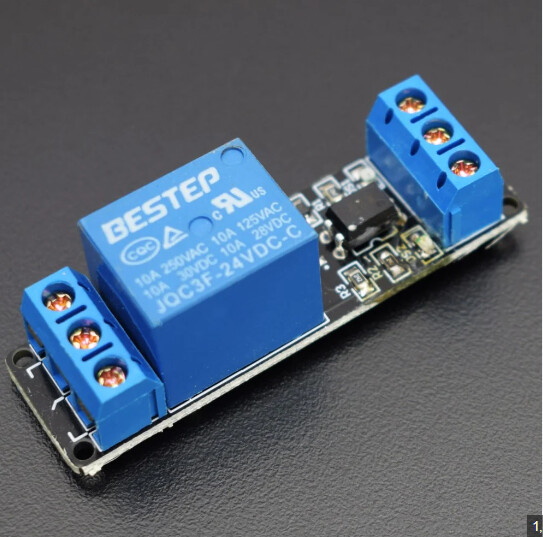
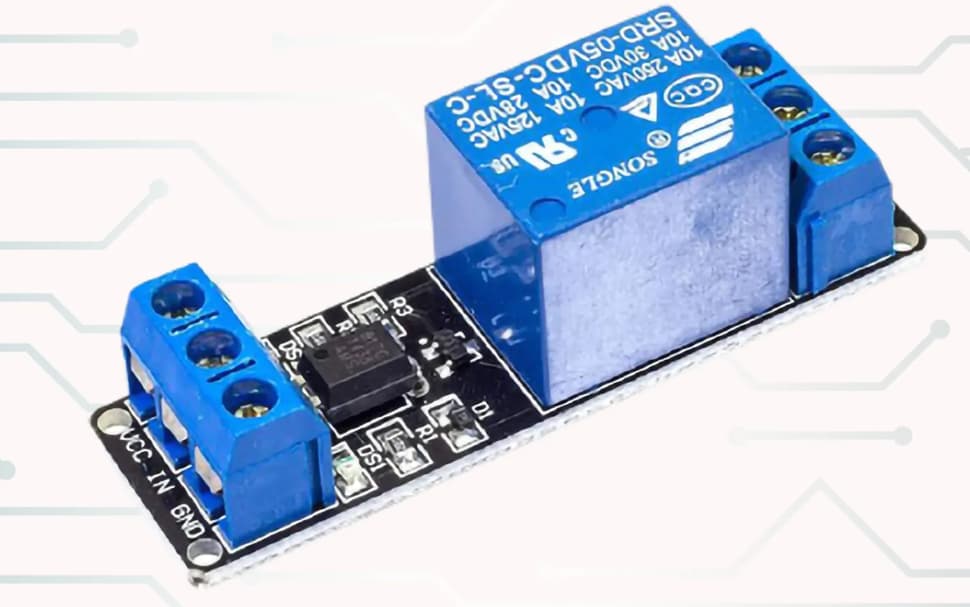
good evening everyone...I need help with my new project which is an arduino coin counter using arduino uno, coin hopper, i2c 16x2, 3 buttons for add, subtract and start/push button, relay module, my problem is when the coin counter is booted, the coin hopper starts automatically, I use a non inverted relay module, then the coin hopper doesn't want to stop even when it has reached the coin limit that was set and when I want to pause the coin hopper from counting then I resume again the arduino dies and it reboots again,,I hope you can help me what is wrong with my code,, this is the code I am using
#include <Wire.h>
#include <LiquidCrystal_I2C.h>

// Pin Definitions
#define ADD_BUTTON 2
#define SUBTRACT_BUTTON 3
#define START_BUTTON 4
#define RELAY_PIN 5
#define COIN_SENSOR_PIN 7

// LCD Address, columns, and rows
LiquidCrystal_I2C lcd(0x27, 16, 2);

// Variables
int coinCount = 0;
int coinLimit = 0;  // Start with 0 coin limit
bool isCounting = false;
bool isPaused = false;
bool buttonState = HIGH;  // Current state of the button
bool lastButtonState = HIGH;  // Previous state of the button
int totalCoins = 0;  // Total coins counted in the current session
bool limitReached = false;  // Tracks if the limit has been reached

void setup() {
  // Initialize Serial for debugging
  Serial.begin(9600);

  // Initialize LCD
  lcd.init();
  lcd.backlight();

  // Initialize pins
  pinMode(ADD_BUTTON, INPUT_PULLUP);
  pinMode(SUBTRACT_BUTTON, INPUT_PULLUP);
  pinMode(START_BUTTON, INPUT_PULLUP);
  pinMode(RELAY_PIN, OUTPUT);
  pinMode(COIN_SENSOR_PIN, INPUT_PULLUP);

  // Initial states
  digitalWrite(RELAY_PIN, LOW);

  // Display bootscreen
  showBootScreen();

  // Display initial state
  updateDisplay();

  // Debug: Display initial message
  Serial.println("System Initialized");
}

void loop() {
  // Check for Add Button Press
  if (digitalRead(ADD_BUTTON) == LOW && !limitReached) {
    coinLimit++;
    updateDisplay();
    Serial.println("Add Button Pressed - Coin Limit Increased");
    delay(200); // Debounce delay
  }

  // Check for Subtract Button Press
  if (digitalRead(SUBTRACT_BUTTON) == LOW && !limitReached) {
    if (coinLimit > 0) coinLimit--;  // Prevent negative limits
    updateDisplay();
    Serial.println("Subtract Button Pressed - Coin Limit Decreased");
    delay(200); // Debounce delay
  }

  // Check for Start/Pause Button Press
  buttonState = digitalRead(START_BUTTON);
  if (buttonState == LOW && lastButtonState == HIGH) {
    if (!isCounting && limitReached) {
      resetCounting();  // Reset count and start a new session after limit reached
      totalCoins = 0;   // Reset total coins for a new session
      startCounting();  // Start counting again
      Serial.println("Start Button Pressed - Counting Started After Limit Reached");
    } else if (!isCounting && !limitReached) {
      startCounting();  // Start counting if not already counting
      Serial.println("Start Button Pressed - Counting Started");
    } else if (isCounting && !isPaused) {
      pauseCounting();  // Pause counting if currently counting
      Serial.println("Start Button Pressed - Counting Paused");
    } else if (isCounting && isPaused) {
      resumeCounting(); // Resume counting if paused
      Serial.println("Start Button Pressed - Counting Resumed");
    }
    delay(200); // Debounce delay
  }
  lastButtonState = buttonState;  // Update last button state

  // Check coin sensor during counting
  if (isCounting && !isPaused && digitalRead(COIN_SENSOR_PIN) == LOW) {
    coinCount++;
    totalCoins++; // Increment total coins counted in the current session
    updateDisplay();
    Serial.print("Coin Inserted - Count: ");
    Serial.println(coinCount);
    delay(200); // Debounce delay to prevent multiple counts for one coin

    // Stop counting if limit is reached
    if (coinCount >= coinLimit) {
      stopCounting();
      Serial.println("Coin Limit Reached - Counting Stopped");
    }
  }
}

void startCounting() {
  // Start counting
  digitalWrite(RELAY_PIN, HIGH);  // Activate relay
  isCounting = true;
  isPaused = false;
  limitReached = false;  // Reset limit reached status
  updateDisplay();  // Update the display
}

void pauseCounting() {
  // Pause counting
  digitalWrite(RELAY_PIN, LOW);  // Deactivate relay
  isPaused = true;
  lcd.setCursor(0, 0);
  lcd.print("Paused         ");  // Show "Paused" on the display
}

void resumeCounting() {
  // Resume counting
  digitalWrite(RELAY_PIN, HIGH);  // Activate relay
  isPaused = false;
  updateDisplay();  // Continue showing normal display
}

void stopCounting() {
  // Stop counting when limit is reached
  lcd.clear();
  lcd.setCursor(0, 0);
  lcd.print("Limit Reached!");
  lcd.setCursor(0, 1);
  lcd.print("Total Coins: ");
  lcd.print(totalCoins);  // Display the total coins for the session

  digitalWrite(RELAY_PIN, LOW);  // Deactivate relay
  isCounting = false;
  limitReached = true;  // Set the limit reached flag
}

void resetCounting() {
  coinCount = 0;  // Reset coin count after stopping
  updateDisplay();  // Update to normal display
}

void updateDisplay() {
  // Normal display
  lcd.clear();
  lcd.setCursor(0, 0);
  lcd.print("Coin Limit: ");
  lcd.print(coinLimit);
  lcd.setCursor(0, 1);
  lcd.print("Count: ");
  lcd.print(coinCount);
}

void showBootScreen() {
  // Show bootscreen with the name of the coin counter
  lcd.clear();
  lcd.setCursor(0, 0);
  lcd.print("  Coin Counter ");
  lcd.setCursor(0, 1);
  lcd.print("    Welcome!   ");
  delay(5000);  // Display bootscreen for 3 seconds

  // Clear the screen after bootscreen
  lcd.clear();
}