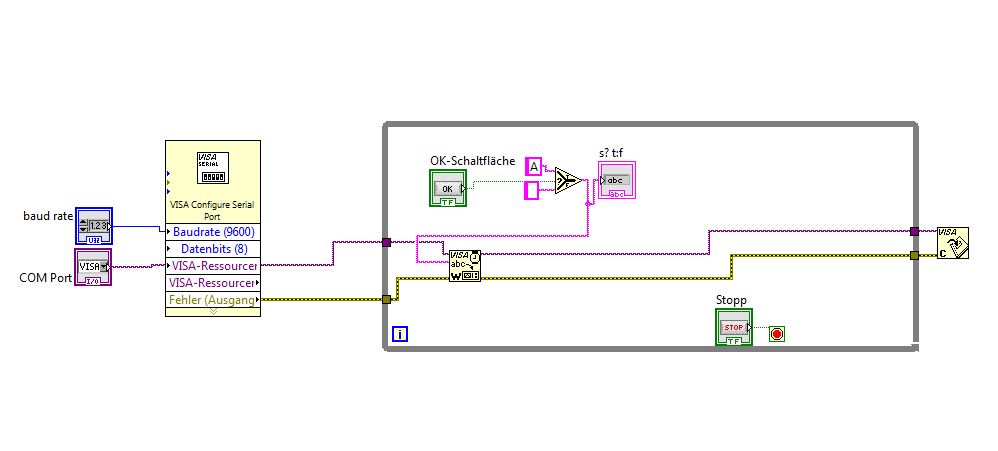
I want to click a Button in my Labview Programm and the Arduino have to put out a specific C code which I wrote.
So I wrote an Code, which put out a signal on a Digital output pin.... my task is, that the signal should change if I click the button in my Program
Did anyone do such a project ?
I want to realize it with the Visa tool...
So maybe send a specific signal by clicking the button and in my c code there are 2 if cases which different types e.g. clicking button 1 sends a A and clicking button 2 sends a B ...so in the if case I can write if A .... and if B ....
and the Arduino have to put out a specific C code which I wrote.
This does not make sense. The Arduino can EXECUTE some C code AFTER it has been compiled and linked and uploaded as part of a sketch. It can NOT output code, other than as a stream of text, but then it isn't code. It's just text.
Did anyone do such a project ?
Lots of people.
What is important is what YOU have tried and what the results were.
PaulS:
This does not make sense. The Arduino can EXECUTE some C code AFTER it has been compiled and linked and uploaded as part of a sketch. It can NOT output code, other than as a stream of text, but then it isn't code. It's just text.
Lots of people.
What is important is what YOU have tried and what the results were.
ye, sorry for this articulation
so I try to explain again
...I wrote an c-Code and uploaded the sketch to the arduino.... The sketch results, that I get an signal on pin 6 and pin 7 with 1 MHz...on Pin 6 it looks like 1010 and on pin 7 it looks like 1100
Now I want, that this both signals I get only from Pin 6 by clicking a button in Labview....
Clicking Button 1 the output signal is 1010
and clicking button 2 the output signal is 1100
No. I don't understand what "on Pin 6 it looks like 1010" means. Pin 6 is a digital pin. It will read either HIGH (1) or LOW (0) at any given point in time.
Now I want, that this both signals I get only from Pin 6 by clicking a button in Labview....
Are you trying to get input from pin 6 into LabView? Or, are you trying to make the Arduino do something when LabView tells it to?
No. I don't understand what "on Pin 6 it looks like 1010" means. Pin 6 is a digital pin. It will read either HIGH (1) or LOW (0) at any given point in time.
The Pins are set as Output....and they send me a High/Low Signal e.g. 1010 means I get a signal like
|¯||¯|_
and yes I trying to make the Arduino do something when LabView tells it to do
By clicking a Button on Labview the output signal should change e.g. to 1100 -> |¯¯|__|¯¯|
I already wrote a program with this different output signals, but every signal on a different pin on the arduino..
Now I want to switch the signals on just 1 pin by clicking a button in LabView
I already wrote a program with this different output signals, but every signal on a different pin on the arduino..
Which you still haven't posted.
The ONLY means of communication between LabView and the Arduino is the serial port. So, forget about LabView for now. Modify the Arduino sketch to output data on one pin based on what character is read from the serial port. Send that character from the Serial Monitor application.
When that works, the Arduino won't even know that the app on the other end has changed from the Serial Monitor app to LabView.
I doubt seriously that you want a while loop there, but that is the general idea. Make sure that you check that there is data to be read before you try to read.
What is a Pio and why are you defining a pointer to point to an int?
And can u send me an example how can I realize in LabView to send an 'A' oder 'B' by press the Button ?
Even if I knew anything about LabView, and this was the appropriate forum, no I couldn't. I don't even understand what "to send an 'A' oder 'B'" means. Nor do I know what Button you are referring to.