Arduino IDE 2.2.1:

Arduino IDE 1.8.13:
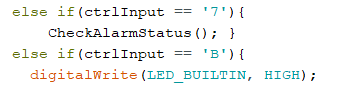
Same code for Arduino Uno doesnt work when I compile and upload it with IDE 2.2.1. Uno receives serial data but dont recoqnize it. IDE 1.8.13 works fine.
setup: win10
Please post a complete sketch that illustrates your problem, using code tags when you do
Are the 2 IDEs configured the same way ? ie, if the Serial input is coming from the Serial monitor are the baud rates and Line ending set to the same values in both ?
I hope you don't go to the mechanic saying just "the engine makes a noise" asking what it could be, but without allowing him to open the bonnet and see the engine, right?... ;-)
What do you mean with "don't recognize it"? How does the Serial Monitor settings, and how you initialized the Serial?
I've found that I now have lots of trouble trying to upload a sketch to a Pro-Mini board using the latest version of the IDE. I never had this problem with the older versions (1.xx). It will work sometimes, but then starts giving me the following error message every time I try to upload:
"avrdude: ser_open(): can't open device \.\COM2 : The system cannot find the file specified." (it could be any COM #)
This happened regardless of the sketch I was trying to upload (and yes, I had selected the appropriate board and com port). I Googled this problem and found many others getting the same error message. I tried everything that was suggested, but nothing worked. Some of those things include:
- Restarting the Windows 11 PC (many times - what a huge waste of time)
- Restarting the IDE
- Trying a different USB port
- Trying different Pro-Mini boards
- Trying different USB cables
- trying different Sparkfun FTD USB-Serial converter boards
- Changing COM ports
- Blah-Blah-Blah
Finally, after submitting a post about this problem yesterday, it was suggested I download IDE version 1.8.19 (I know, not Ver 1.8.13 - as in the title of this thread, but very close I suspect) and try that. Sure enough, using the older version of the IDE, I've now uploaded many times to the same Pro-Mini board, using the same converter and the same USB cable with NO problem.
This was such a relief, because I was basically at a stand-still with my projects, since the Pro-Mini (3.3V) board is a favorite of mine, given it's small size, low cost and the ability to run from 2xAAA or even a 3V coin cell for projects that are really compact and don't need to be powered for very long.
I strongly recommend using the older version of the IDE to anyone experiencing similar problems.
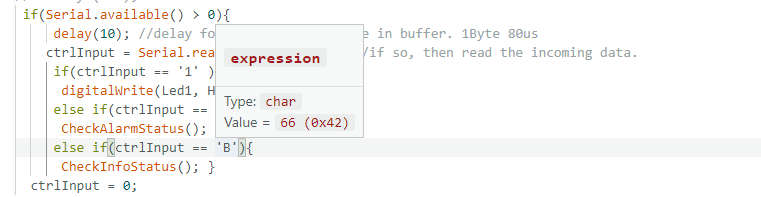
The point in my original post was that IDE 2.2.1 somehow do not "color" those numbers as blue (I dont know what the heck it means but I guess its related to issue) like IDE 1.8.13 is doing.
Arduino Uno with new IDE doesnt receive/handle/regoqnize data properly when I write serial data from my app to Arduino.
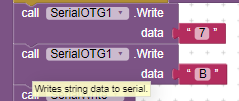
Same serial initialization and same code in both cases:
Serial.begin(115200);
I cant update Arduino IDE to version 2.2.1 or newer - I have to stay in 1.8.13
When I move cursor over B (IDE 2.2.1) it shows like this
Hi @stonexet
The syntax highlighting is purely decorative. As you noticed, there are some differences between how code is colored in Arduino IDE 2.x when compared to 1.x. There is no technical significance to this and it has absolutely nothing to do with the serial data handling problem you experienced.
People here were ready to provide assistance but you didn't make the effort to provide sufficient information or to respond to the requests for information.
Many thousands of people are working with serial data in Arduino IDE 2.x every day without any problems. It is likely you can also if you make some effort at it.
The IDE 2.* is a completely different application, created with a different framework, there are many changes both internal or external so don't judge things based on their aspect/color. Then, the issue you're talking about is still missing some more information, starting from what exactly you mean with:
What "properly" means? You send a character and Arduino receives another one?
Please post here your full Arduino sketch (the one you're using with IDE 2.2.1), together with a portion of your PC application code where you manage such serial communication, and describe a working example (e.g. "the application sends the character 'A' while Arduino does...").
But remember, for both codes don't send them as pictures: paste the code and enclose it with "code" tag (e.g. click the "<CODE/>" button you find on the editor's toolbar, then paste the text code inside the marks).
Guys, you can try installing the CH340 driver, if you're using the standard Arduino boards. You can check which drivers are required by checking the number (faintly) written on a small rectangular-shaped microchip on your Arduino board.
I was facing the same issue a few weeks ago, I installed and updated my drivers, and everything seemed okay.
Nope. CH340 are used on "compatible" (aka "chinese") arduinos, with original boards you don't need them.