Arduino IDE 2.3.2 Baud rate stuck

Hi,

I am using the new 2.3.2 IDE with an esp32 board,
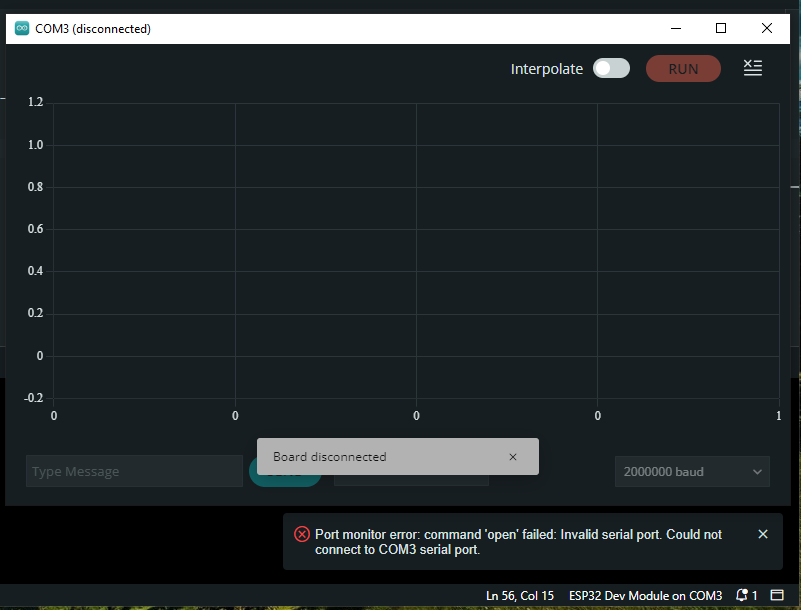
while trying to open the serial monitor or serial plotter the esp32 disconnects and the baud rate is stuck at 2000000 baud and it can't be changed (the code baud rate is 115200)

while using older IDE (for example 1.8) everything works fine, meaning that I can change the baud rate and read the serial data without any disconnection
I tried to reinstall the IDE and the esp32 library

any recommendation on how to change the default baud rate?

Hi @palal2 ,

Welcome to the forum..

wow, that's a fast rate!!
you can't simply click that little down arrow next to baud and choose a slower rate??

good luck.. ~q

well, if it was so simple, wasn't it?

on the serial monitor, I can open the dropdown list and choose other baud rates, but is always stuck on 2000000, on the serial plotter it grayed out

maybe its that invalid serial port error i didn't notice till now..
port can't be opened..

does it show in the device manager??

~q

I will try to explain the issue more clearly:

  1. If I connect the esp32 the device is connected (without disconnecting)

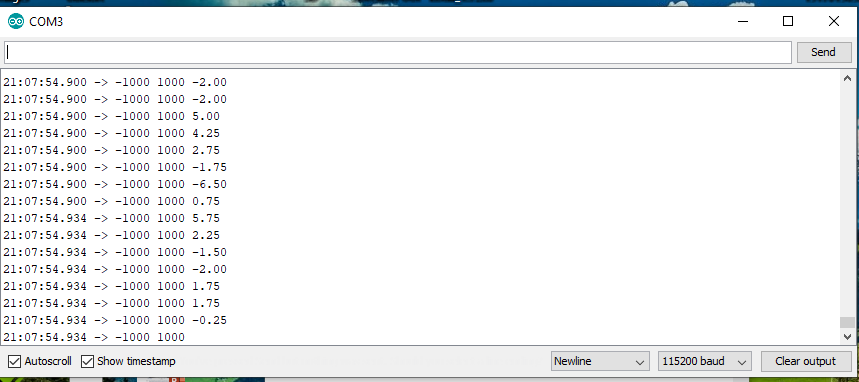
  2. Working on older IDE (for example as 1.8.12) the serial monitor works fine:

  3. If I open the serial monitor or the serial plotter on IDE 2.3.2 (not in parallel to the 11.8), the device disconnects the the baud rate is stuck on 2000000, and I can not change it

Please tell us which USB to serial bridge chip your Arduino board has. This is a black chip near the USB socket.

The chip will usually be identified by writing on the top. This might say something like "WCH CH340G" or "SILABS CP2102".

Examples:

WCH CH340

CH340

📷

SparkFun - CC BY-SA 4.0 (cropped)

Silicon Labs CP2102

CP2102

📷

SparkFun - CC BY-SA 4.0 (cropped)


If it isn't clear, alternatively you can provide the link to where you bought the board from and we'll see if we can determine the chip from the product listing.

The USB to serial is CP2102

I managed to solve the issue by deleting and reinstalling the CP210x driver from the device manager
image

the weird thing is that on older IDE ver there was no issue at all

1 Like

This topic was automatically closed 180 days after the last reply. New replies are no longer allowed.