I am new to arduino IOT cloud.
my device is ESP32 Devkit v1
I associated the device, by selecting "DOIT ESP32 DEVKIT V1" and downloaded the device id and secret key.
But when trying to configure network, its greyed out
Hi @sim_tcr. For some reason the network credentials configuration button is only enabled after you add at least one Arduino Cloud IoT Variable to the Thing.
Please give that a try. If you still have problems after adding Variables to the Thing, just let us know and we'll investigate further.
#include "thingProperties.h"

void setup() {
  // Initialize serial and wait for port to open:
  Serial.begin(9600);
  // This delay gives the chance to wait for a Serial Monitor without blocking if none is found
  delay(1500);

  // Defined in thingProperties.h
  initProperties();

  // Connect to Arduino IoT Cloud
  ArduinoCloud.begin(ArduinoIoTPreferredConnection);

  /*
     The following function allows you to obtain more information
     related to the state of network and IoT Cloud connection and errors
     the higher number the more granular information you’ll get.
     The default is 0 (only errors).
     Maximum is 4
 */
  setDebugMessageLevel(2);
  ArduinoCloud.printDebugInfo();
}

void loop() {
  ArduinoCloud.update();
  // Your code here


}

/*
  Since Relay is READ_WRITE variable, onRelayChange() is
  executed every time a new value is received from IoT Cloud.
*/
void onRelayChange()  {
  // Add your code here to act upon Relay change
}
above is the sketch generated by IOT Cloud.
When I compile it, I get error,
In file included from C:\Users\sim_t\Desktop\iot-cloud\iot-cloud.ino:16:
C:\Users\sim_t\Desktop\iot-cloud\thingProperties.h:25:2: error: #error "No device is currently associated to this Thing, hence the Connection Handler code could not be generated"
   25 | #error "No device is currently associated to this Thing, hence the Connection Handler code could not be generated"
      |  ^~~~~
exit status 1

Compilation error: #error "No device is currently associated to this Thing, hence the Connection Handler code could not be generated"
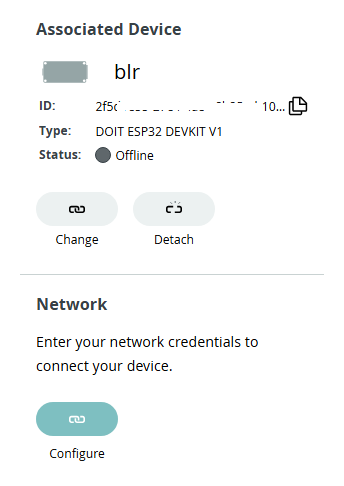
Select the "Setup" tab at the top of the page and verify that the "blr" Device is still shown under the "Associated Device" section of the "Setup" page, as it was at the time you took the screenshot you shared:
If the Device is no longer associated with the Thing, associate it once again.
If it is still associated, try the following procedure:
Click the "Detach" button under the "Associated Device" section of the "Setup" page.
The association between the "blr" Device and the Thing will be removed.
Click the "Select Device" button under the "Associated Device" section of the "Setup" page.
The "Associate device" dialog will open.
Select the "blr" Device from the list of Devices in the dialog.
The dialog will close and the "blr" Device will be associated with the Thing once again.
Click the "Configure" button under the "Network" section of the "Setup" page.
The "Configure network" dialog will open.
Enter the credentials of your Wi-Fi access point in the dialog.
Click the "SAVE" button in the dialog.
The dialog will close.
Select the "Sketch" tab at the top of the Thing page.
Now try compiling or uploading the Thing sketch once again. Hopefully it will be successful this time.
Got it. I got the device online and Network tab enabled now.
I was doing the Mistake of taking the sketch contents to my local computer and trying to flash with Arduino IDE, where as I should have flashed it directly from Web console.
Also I was not updating,
const char SSID[]               = "xxx";    // Network SSID (name)
const char PASS[]               = "x";    // Network password (use for WPA, or use as key for WEP)
const char DEVICE_KEY[]  = "xx";    // Secret device password
Thanks for taking the time to post an update with your findings! I'm glad it is working now.
You can use Arduino IDE with Arduino Cloud IoT Thing sketches. However, you do need to set up the Device and Thing with the Arduino Cloud service before the Thing sketch will work. Once you have done that, you are free to use Arduino IDE and Arduino Cloud Editor to develop, compile, and upload the Thing sketch.
If you want to use Arduino IDE, you might find its feature that provides integration with your Arduino Cloud sketchbook to be useful:
The most convenient way to set up Devices and Things is via the Arduino Cloud website, but if you prefer to do it via a local tool, or otherwise find working with a command line tool to be preferrable then you can use the Arduino Cloud CLI tool: